![How to Find Your Website's Lead Conversion Leaks with ChatGPT [including 8 prompts to use]](https://cdn.prod.website-files.com/687998866aa498f98160dbb6/6a86366654f54f6e36601151_your-website-leaking-leads.png)
The Problem Most Businesses Never Audit
Traffic goes up. Leads stay flat. You've tried new headlines, changed the button colour, maybe swapped the hero image. Nothing moves the needle. Here's what usually isn't happening: a proper audit of the full path a visitor takes from landing on your homepage to becoming a lead.
The average website converts 2 to 3 percent of its visitors. The top performers convert 8 to 15 percent. The gap between those two numbers is often not better traffic or smarter ads. It's fewer leaks in the conversion path. A leak is any point where a motivated visitor quietly exits without taking the action you need them to take.
Leaks hide in obvious places: a form with no clear next step, a contact page stripped of any reason to trust you, a service page that doesn't match what the homepage promised. They also hide in less obvious ones: a visitor arriving at 9 PM with a genuine need and nowhere to turn, or a buyer who just came from an AI search tool mid-conversation and landed on a static brochure page with a contact form at the bottom and a phonenumber in the menu bar.
Most businesses have never audited for these problems systematically. They've looked at individual pages. They haven't looked at the path. This guide changes that. Eight prompts, one conversation thread with an AI, your own screenshots.
Why Listen to Us?
Weply has in 2025 alone generated over 250,000 qualified leads on behalf of 2,400+ customers across the Nordics and Europe. We've been doing this since 2013, across industries ranging from dental chains to insurance companies to fast-growing scaleups, to telco enterprises and so on.
We know what breaks conversion paths because we watch them break in real time.
Our chat consultants, backed by AI, handle the questions visitors can't get answered on a website. They capture the leads that forms lose. Across our customer base, adding managed chat produces an average 12% lift in lead conversion, and one in three chat conversations becomes a qualified lead. That data is the foundation for everything you're about to audit.
Why Use AI for This, and What You'll Need
A conversion specialist can audit your website for between EUR 3,000 and 8,000. They'll spend four to six weeks on it and deliver a PDF. The audit will be thorough, and for complex e-commerce operations, it's probably worth every cent. For most service businesses, you can surface minimum 80% of the same findings in 30 minutes using an AI. Here's why it works: AI evaluates your pages the way a first-time visitor does, without the curse of knowledge. You've looked at your homepage so many times you no longer see it. AI reads it cold. It also audits paths as sequences, which means it catches the friction that lives between pages, not just on them.
One honest caveat: this works well for service and product businesses with a clear conversion path. If you're running a complex multi-product e-commerce operation, a full specialist audit will find things this process won't. For everyone else, 30 minutes is enough to find what's bleeding leads.
What you'll need:
- ChatGPT Plus, Team, or Claude Pro (the free tier works, with limitations on image uploads)
- A browser
- A full-page screenshot tool (GoFullPage for Chrome, Firefox's built-in screenshot function, or use mulitple screenshot directly from Claude)
- 30 minutes
- Optional: GA4 access for one advanced prompt
Before You Start: Four Preparation Steps
Step 1: Map your conversion path. For most businesses this is Homepage, Service/Product Page, Pricing Page, Contact Page. If you're unsure which pages matter most, open GA4, go to Explore, and check the path exploration report. Three to five pages is enough to work with.
Step 2: Take full-page screenshots of each page in sequence. Full-page, not just the top fold. You need the AI to see the whole page.
Step 3: Screenshot your lead form and your confirmation page. The confirmation page matters because it tells you, and the AI, what promise you make to someone after they submit.
Step 4: Open a new conversation in ChatGPT or Claude, upload all screenshots together, and add this context:
You are a senior conversion rate optimisation specialist with experience auditing business websites. These are screenshots of my website pages in the order a visitor would see them. My business is [type of business]. My goal is to generate [desired action: enquiries / consultations / quote requests]. I'll be asking you to audit specific aspects of these pages.
Set this context once at the start. Every prompt that follows builds on it.
The Prompt Library
Eight prompts. Run them in sequence in the same conversation thread. Each builds on what came before.
Prompt 1: The First-Impression Test (copy this exact prompt)
# First-Impression Audit
## Context
Visitors decide within 5 to 10 seconds whether to stay or leave.
This audit evaluates what's communicated before any scrolling.
## Your task
Look at the first screenshot only (homepage or landing page).
Based exclusively on what's visible above the fold, answer:
1. Clarity — What does this company do?
2. Audience — Who is it for?
3. Action — What should I do next?
4. Trust — Why should I believe them?
## Output format
| Question | Answered? (Y/N) | What's missing or unclear |
|----------|:---:|---------------------------|
| What do they do? | | |
| Who is it for? | | |
| What should I do next? | | |
| Why trust them? | | |
Above-fold score: X/10
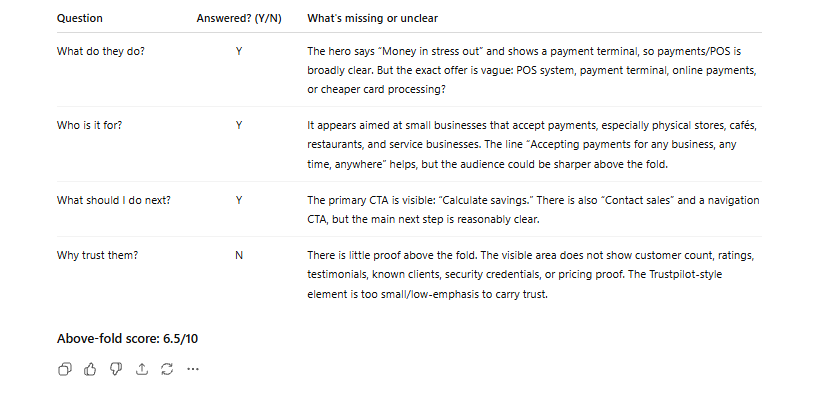
What this reveals: The failure we see most often across service websites is in row three of that table: "What should I do next?" Businesses build strong hero sections explaining what they do, then offer no visible next step. No CTA above the fold. No invitation to start a conversation. The visitor who wants to engage has to scroll, navigate, and figure the path out alone. Every step of effort they have to put in is a point where you can lose them. The good news is this is the quickest fix in the whole audit. A clear, visible CTA above the fold costs nothing to add and almost always moves conversion numbers.
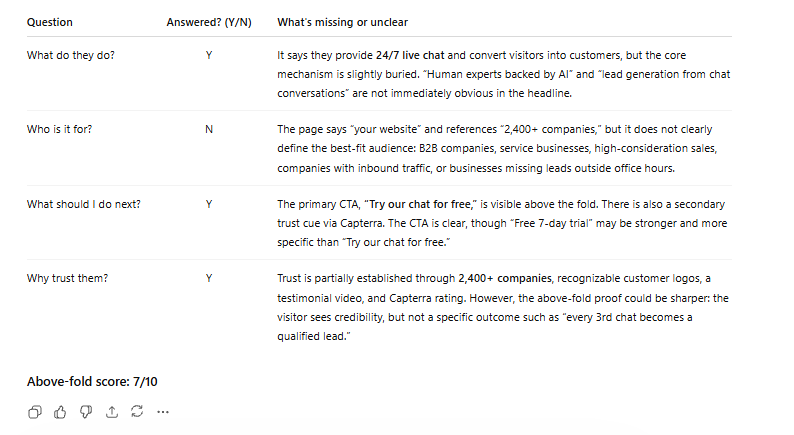
Now what we did was to run the full series of prompts on one of the most succesful current scaleups in Europe and one of the best at digital marketing, Flatpay.
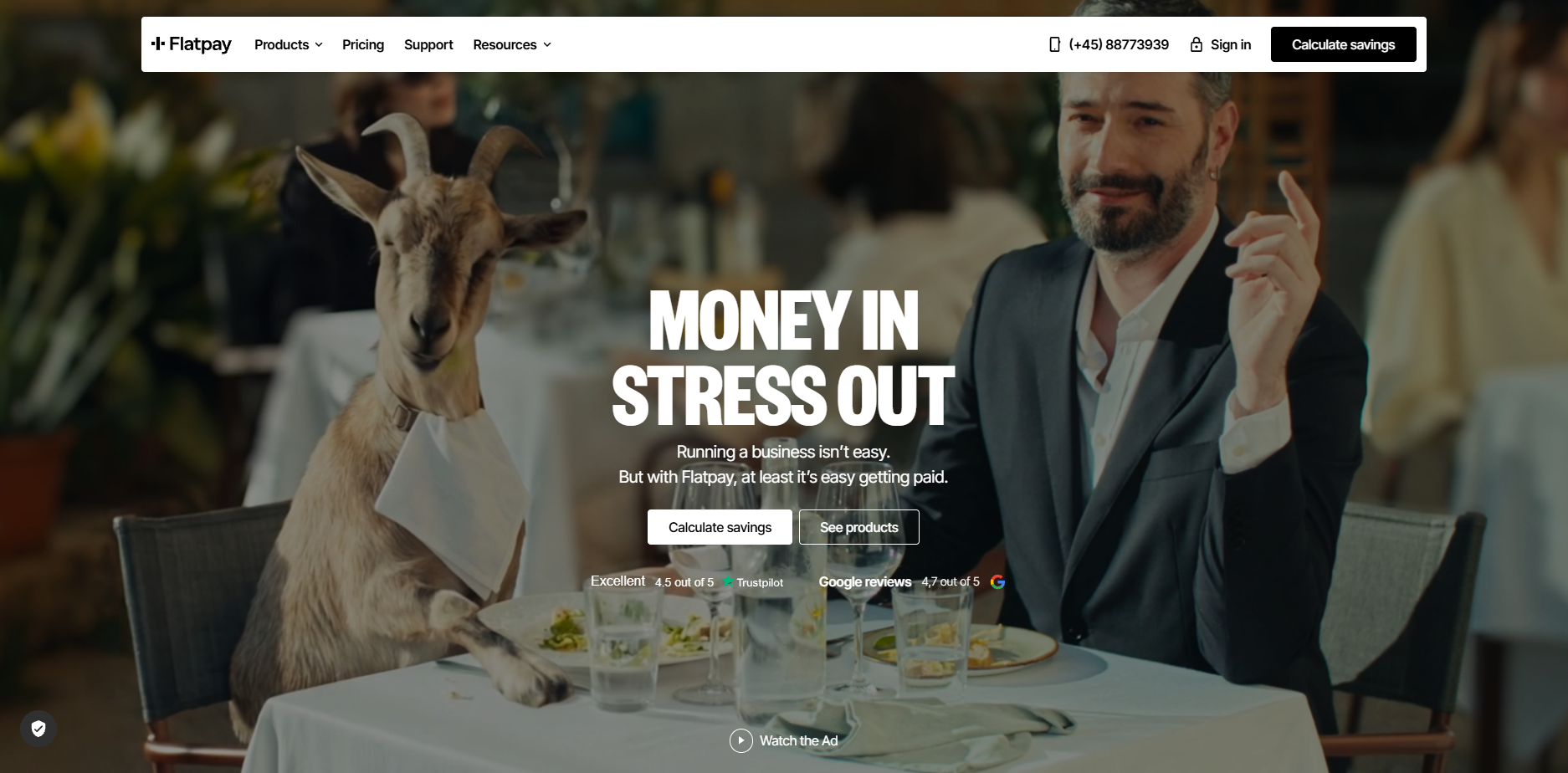
This is the result from the first prompt:
Prompt 2: The Conversion Path Coherence Audit
# Conversion Path Coherence Audit
## Context
These pages form a sequence that visitors move through.
The biggest conversion leaks often live between pages, not on them.
## Your task
Evaluate all screenshots as a connected journey:
1. Message consistency — Do promises made on one page carry through to the next, or do they shift?
2. CTA consistency — Is the call-to-action language stable across pages, or does it change confusingly?
3. Orientation — Are there pages where a visitor might feel lost or unsure what to do next?
4. Distractions — What elements pull visitors away from the conversion goal (unrelated links, social buttons, irrelevant navigation)?
## Output format
Score each transition between pages:
| Transition | Coherence (1-10) | Key issue |
|-----------|:---:|-----------|
| Page 1 to Page 2 | | |
| Page 2 to Page 3 | | |
| (continue as needed) | | |
Overall path score: X/10
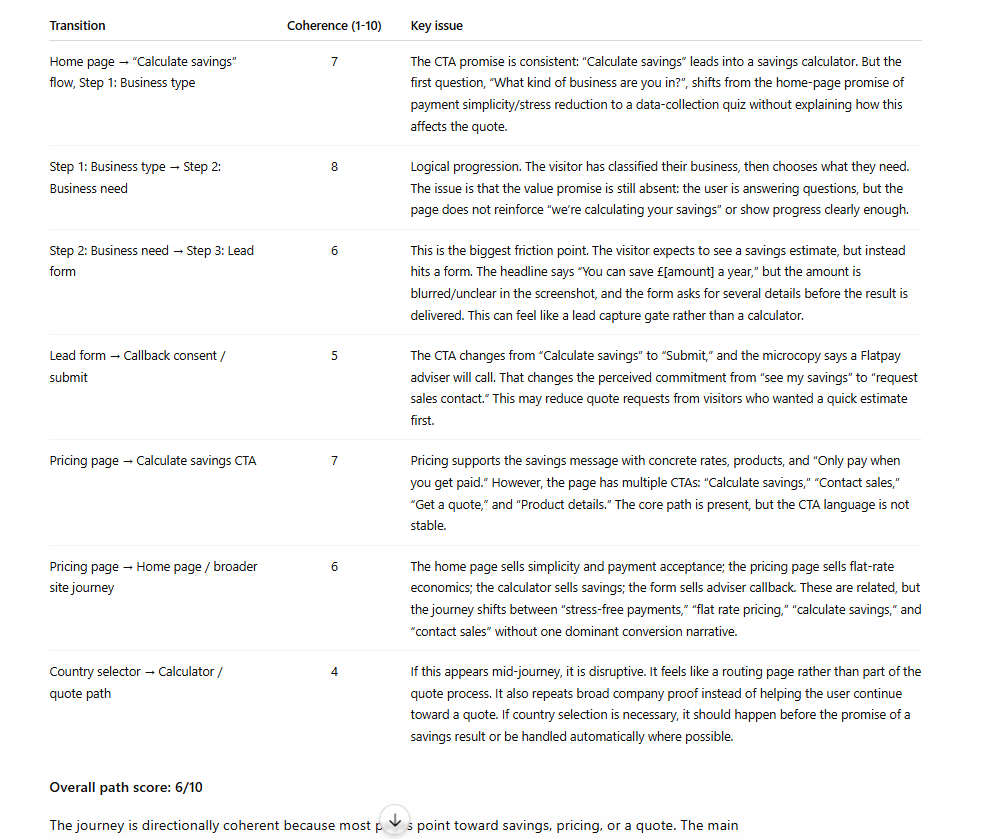
What this reveals: Messaging fragmentation is the most common path-level problem, and it's also the least visible to the people who built the site. The homepage says "Get a free consultation." The service page says "Contact us for pricing." The contact page says "Send us a message." Three different implied offers. Three moments of micro-doubt. Each transition chips away at the visitor's confidence that they're in the right place. The path should feel like one continuous conversation.
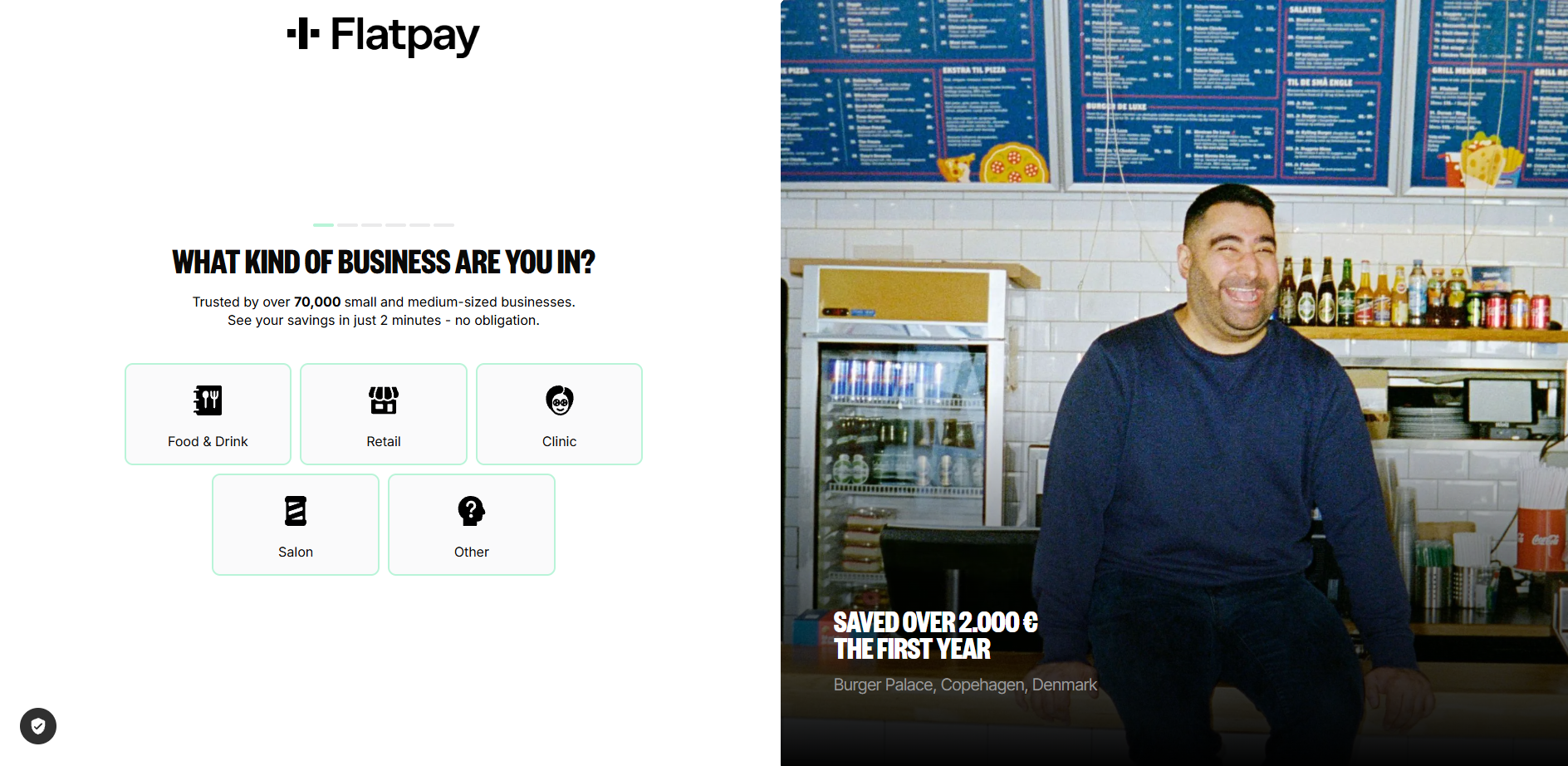
Flatpay uses a multi-step CTA journey for "calculate savings" or "get a quote", which most serves as a teaser as well as pre-qualifier for leads and Flatpay.
Flatpay results from prompt 2:
Prompt 3: The Trust Signal Inventory
# Trust Signal Inventory
## Your task
Across all pages, catalogue every trust signal present:
customer logos, testimonials, reviews, case studies, certifications, team photos, years in business, guarantees, privacy assurances, awards, association memberships.
Then evaluate:
1. Which pages have strong trust signals?
2. Which pages have weak or no trust signals?
3. Is there a trust gap specifically on the conversion page (contact or pricing page)?
4. What trust signals would you add, and where?
## Output format
| Page | Trust signals present | Trust signals missing | Gap severity |
|------|----------------------|----------------------|:---:|
| Homepage | | | |
| Service page | | | |
| Contact page | | | |
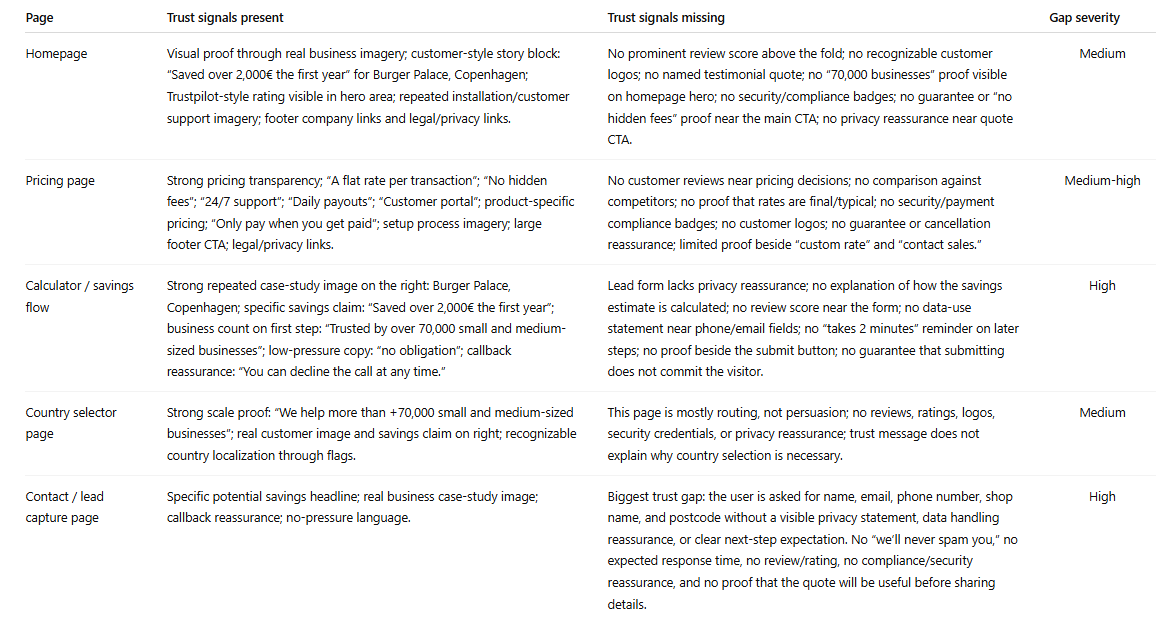
What this reveals: Trust signals cluster on homepages, where they're least needed, and disappear on contact pages, where they matter most. The moment a visitor is about to hand over their phone number is precisely when they need reassurance. They're asking: will someone actually reply to this? Have you done this for businesses like mine? Our chat data shows the most common questions visitors ask right before converting are trust questions: "How quickly will someone respond?" "Do you work with companies in my industry?" A single line on the contact page, "We typically respond within two hours," does more conversion work than most hero sections. Adding it takes five minutes.
Flatpay results from prompt 3:
Prompt 4: The Dead Form Diagnosis
# Lead Capture Form Diagnosis
## Context
This is your final conversion point. A motivated visitor is about to become a lead, or quietly close the tab.
## Your task
Evaluate the contact or lead form as a slightly hesitant potential customer who is ready to enquire:
1. Field count: How many fields? Which feel unnecessary for a first interaction?
2. Expectation setting: Does the page explain what happens after submission? Who responds? How soon?
3. Alternatives: Is there any option besides this form (phone, chat, booking link, WhatsApp)?
4. Urgency: Is there a reason to submit now, or could I come back to it later with no consequence?
5. Friction score: Rate 1 (effortless) to 10 (not worth the effort).
## Output format
| Criteria | Rating | Specific issue |
|----------|:---:|----------------|
| Field necessity | /10 | |
| Expectation clarity | /10 | |
| Alternative channels | /10 | |
| Urgency/motivation | /10 | |
| Overall friction | /10 | |
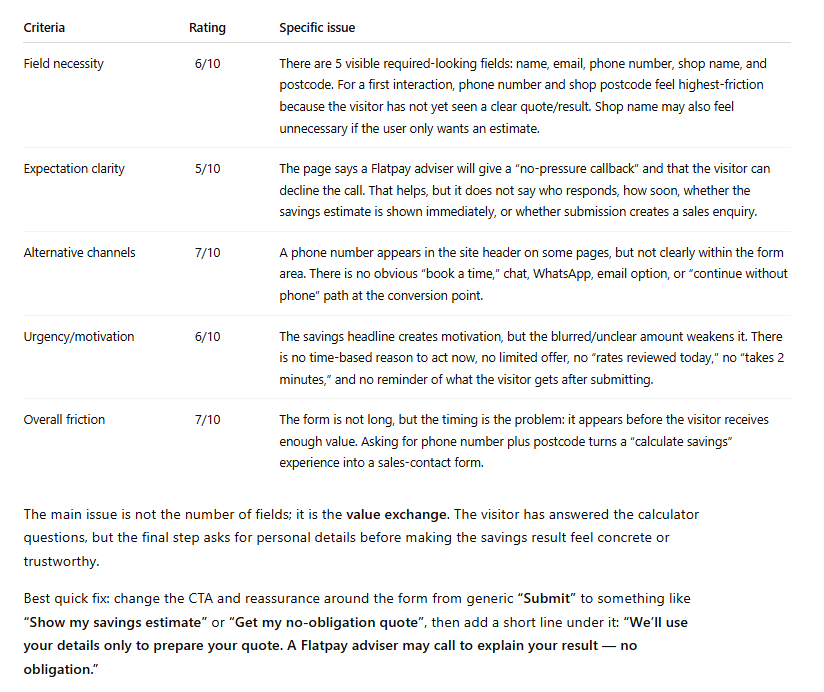
What this reveals: Forms are where conversions go to die, and the problem usually isn't the fields themselves. It's the silence around them. No indication of what happens after you submit. No alternative for the person who has a quick question but isn't ready to commit to a form submission. No urgency. Just a form floating on a page, asking for information and offering nothing in return. Our data shows that between 35 and 50 percent of chat conversations start because a visitor saw the form and decided they wanted to talk to a person instead. The form didn't convert them. A conversation did.
Flatpay Results:
Prompt 5: The AI Search Visitor Test
# AI Search Visitor Experience Audit
## Context
A growing share of visitors now arrive from AI search tools (ChatGPT, Perplexity, Google AI Overviews, Claude). These visitors have been in a conversational research flow: asking questions, refining needs, receiving personalised guidance. They land here mid-dialogue, having just been told this website looks like a good match for their needs.
## Your task
Evaluate these pages as an AI-referred visitor who was just told: "[Company] looks like a good option for your needs."
1. Conversation continuity. Can this visitor continue their dialogue, or does the experience break from conversation to static content? What engagement options exist?
2. Information redundancy. How much of this repeats what the AI tool likely already told them? What is genuinely new here?
3. Specificity gap. The visitor has a refined need. Does the site address specific use cases, or only general claims?
4. Next-step friction How many clicks stand between landing here and having a real conversation about their specific situation?
## Output format
| Criteria | Score (1-10) | Key finding |
|----------|:---:|-------------|
| Conversation continuity | | |
| Information redundancy | | |
| Specificity gap | | |
| Next-step friction | | |
Verdict: Is this website ready for the AI search era?
Single most impactful change:
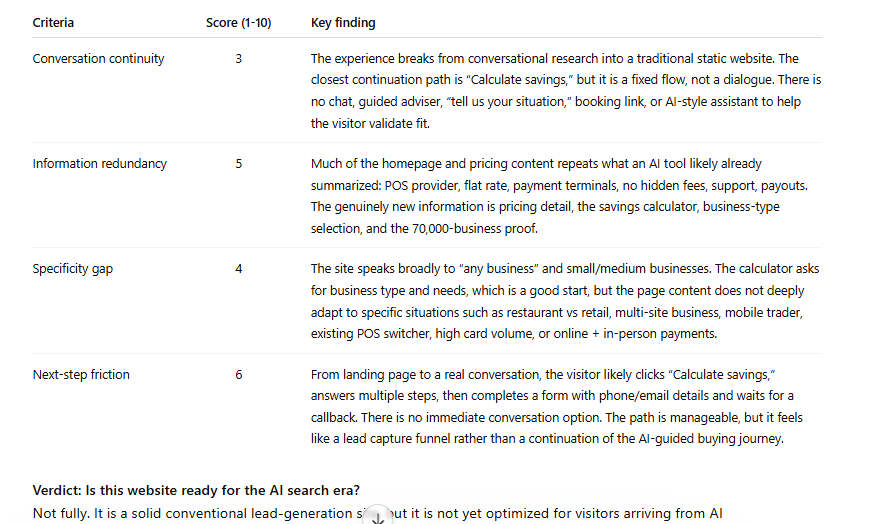
What this reveals: An AI-referred visitor has been in an active dialogue. They arrive expecting to continue it. Instead they hit a static page and a form. It's like being mid-conversation with someone, then being walked to a colleague's office where that colleague hands you a clipboard. The AI will almost always point to real-time conversational engagement as the single most impactful change.
Results from Flatpay analysis:
Prompt 6: The After-Hours Visitor Test
# After-Hours Visitor Simulation
## Scenario
It is 9 PM on a Wednesday. A potential customer lands on this website from a search. They're interested but have a specific question about the service.
## Your task
1. Is there any way for this visitor to get an answer now?
2. If they submit the form, when can they realistically expect a response?
3. What is the most likely outcome: conversion, or leaing to check a competitor?
4. What would need to change for the 9 PM visitor to become a lead?
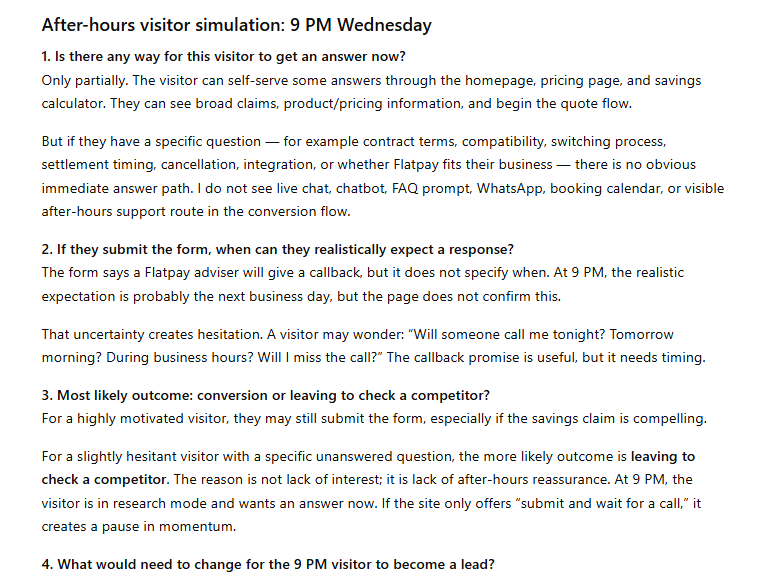
What this reveals: Between 35 and 50 percent of high-intent traffic arrives outside business hours. The visitor at 9 PM with an urgent question, a pest control problem, an insurance query, a question about a dental procedure, is often your most motivated visitor. They're ready to act. Your website offers them a form that won't be read until tomorrow morning. By then, they've found a competitor who responded immediately. The after-hours visitor rarely shows up in your analytics as a lost lead. They show up as a lead that was never there.
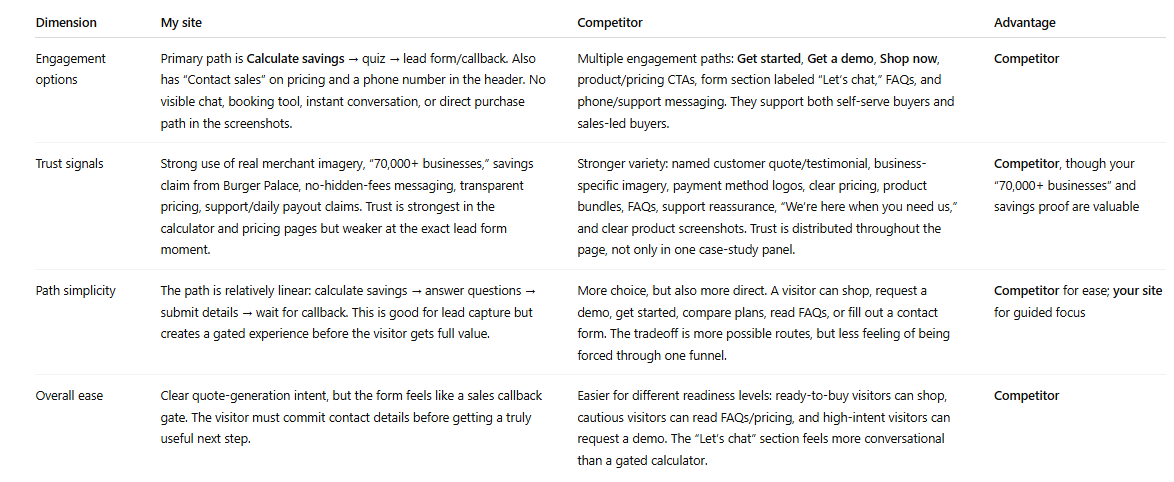
Prompt 7: The Competitor Comparison
# Competitive Conversion Comparison
## Context
I'm now uploading screenshots from a competitor's website.
## Your task
Compare their conversion path to mine across four dimensions:
1. Engagement methods — Do they offer anything we don't? (chat, callback, WhatsApp, instant quote, booking tool)
2. Trust signals — Stronger, weaker, or different in type?
3. Path simplicity — Fewer or more steps to conversion?
4. If you were a potential customer comparing both, which makes it easier to take the next step? Why?
## Output format
| Dimension | My site | Competitor | Advantage |
|-----------|---------|------------|-----------|
| Engagement options | | | |
| Trust signals | | | |
| Path simplicity | | | |
| Overall ease | | | |
What this reveals: This is the prompt that makes abstract findings feel urgent. When the AI tells you "your competitor has live chat and a 60-second quote promise, you have a contact form," the gap stops being theory. It's a specific competitive disadvantage, described in plain language, sitting in a table. Running this against one or two competitors takes ten minutes. The output is more persuasive than any conversion audit report, because it shows exactly what a visitor experiences when they compare options, and most of the time, they are comparing options.
For this competitor comparison we used SumUp.
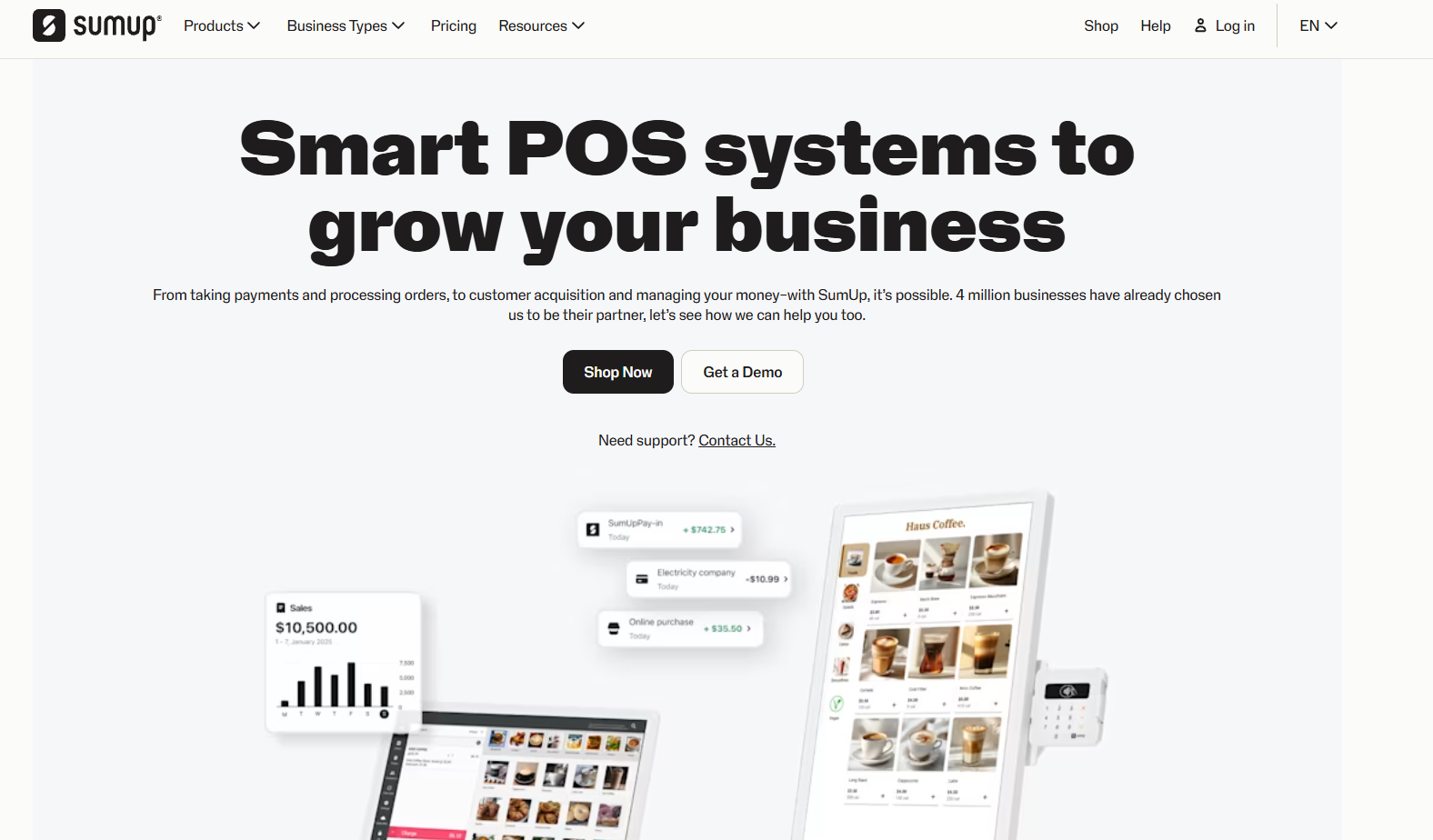
Response from ChatGPT on this prompt for comparison:
Prompt 8: The Priority Fix List
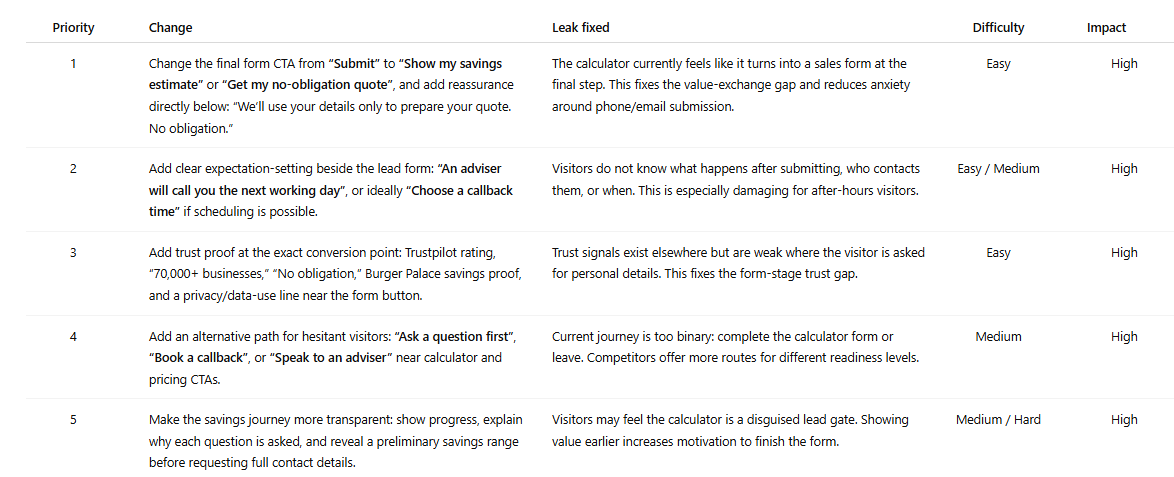
# Prioritised Conversion Fix List
## Your task
Based on everything analysed across all pages, give me the 5 most impactful changes to increase leads from this website.
For each recommendation:
1. The specific change
2. Which leak it fixes
3. Difficulty (easy / medium / hard)
4. Potential impact (low / medium / high)
## Output format
| Priority | Change | Leak fixed | Difficulty | Impact |
|:---:|-------|-----------|:---:|:---:|
| 1 | | | | |
| 2 | | | | |
| 3 | | | | |
| 4 | | | | |
| 5 | | | | |
Put highest-impact, lowest-difficulty changes first.
What this reveals: This is the prompt that turns the audit into a to-do list.
Flatpay priority fix list:
What to Do With Your Results
Most audits produce one of three finding patterns. Here's how to act on each.
Messaging and CTA inconsistencies. These are quick wins. Align the headline, the button text, and the implied offer across every page in the path so the visitor feels like they're moving through one coherent conversation. This costs nothing and can be done in an afternoon. It's also the change most businesses deprioritise because it doesn't feel significant enough. It is.
Trust gaps on conversion pages. Add one or two trust signals directly to your contact page this week. A response-time commitment. A relevant testimonial. A count of businesses you've helped. Visitors about to submit a form need reassurance at that precise moment. Putting it on the homepage instead is like putting the "safe to drink" sign on the bottle rather than the glass.
No real-time engagement option. This is the structural finding that shows up in almost every audit and sits at the top of almost every priority list. You have a few honest options:
Managing chat yourself during business hours works for some businesses and isn't sustainable for most. An AI chatbot handles FAQ deflection and support reasonably well. It struggles with the nuanced, pre-purchase questions that are actually standing between a visitor and a conversion. It fails at custom lead qualification questions and collecting customer lead information.
Managed live chat with human agents available around the clock, including evenings and weekends, is what Weply provides. It's the approach behind more than 250,000 qualified leads generated across our customer base in 2025. If the after-hours prompt produced an uncomfortable answer, it's worth a look.
Read our guide to the best chat solutions for business in 2026 here or dive deep on why a chat solution is needed to match visitor expectations coming from AI search.
What This Process Replaces
The standard alternative is hiring a CRO agency. Budget: EUR 3,000 to 8,000. Timeline: four to six weeks. Deliverable: a PDF. The report is usually good. The process is slow, expensive, and produces findings that are already weeks old when they reach you. The process in this guide takes 30 minutes and produces an action plan from your own pages, in your own conversation thread, reviewable immediately. Run it quarterly. Run it after every redesign. Run it whenever traffic goes up and leads don't.
Try Weply for free for 7 days. Get qualifed leads, customer support and insights into the conversations that your webiste visitors have.
.png)