

Everything worth knowing about turning web traffic into qualified leads
Practical strategy, insights and data from the team handling it every day across companies in Europe.
![How to Find Your Website's Lead Conversion Leaks with ChatGPT [including 8 prompts to use]](https://cdn.prod.website-files.com/687998866aa498f98160dbb6/6a86366654f54f6e36601151_your-website-leaking-leads.png)
How to Find Your Website's Lead Conversion Leaks with ChatGPT [including 8 prompts to use]
The Problem Most Businesses Never Audit
Traffic goes up. Leads stay flat. You've tried new headlines, changed the button colour, maybe swapped the hero image. Nothing moves the needle. Here's what usually isn't happening: a proper audit of the full path a visitor takes from landing on your homepage to becoming a lead.
The average website converts 2 to 3 percent of its visitors. The top performers convert 8 to 15 percent. The gap between those two numbers is often not better traffic or smarter ads. It's fewer leaks in the conversion path. A leak is any point where a motivated visitor quietly exits without taking the action you need them to take.
Leaks hide in obvious places: a form with no clear next step, a contact page stripped of any reason to trust you, a service page that doesn't match what the homepage promised. They also hide in less obvious ones: a visitor arriving at 9 PM with a genuine need and nowhere to turn, or a buyer who just came from an AI search tool mid-conversation and landed on a static brochure page with a contact form at the bottom and a phonenumber in the menu bar.
Most businesses have never audited for these problems systematically. They've looked at individual pages. They haven't looked at the path. This guide changes that. Eight prompts, one conversation thread with an AI, your own screenshots.
Why Listen to Us?
Weply has in 2025 alone generated over 250,000 qualified leads on behalf of 2,400+ customers across the Nordics and Europe. We've been doing this since 2013, across industries ranging from dental chains to insurance companies to fast-growing scaleups, to telco enterprises and so on.
We know what breaks conversion paths because we watch them break in real time.
Our chat consultants, backed by AI, handle the questions visitors can't get answered on a website. They capture the leads that forms lose. Across our customer base, adding managed chat produces an average 12% lift in lead conversion, and one in three chat conversations becomes a qualified lead. That data is the foundation for everything you're about to audit.
Why Use AI for This, and What You'll Need
A conversion specialist can audit your website for between EUR 3,000 and 8,000. They'll spend four to six weeks on it and deliver a PDF. The audit will be thorough, and for complex e-commerce operations, it's probably worth every cent. For most service businesses, you can surface minimum 80% of the same findings in 30 minutes using an AI. Here's why it works: AI evaluates your pages the way a first-time visitor does, without the curse of knowledge. You've looked at your homepage so many times you no longer see it. AI reads it cold. It also audits paths as sequences, which means it catches the friction that lives between pages, not just on them.
One honest caveat: this works well for service and product businesses with a clear conversion path. If you're running a complex multi-product e-commerce operation, a full specialist audit will find things this process won't. For everyone else, 30 minutes is enough to find what's bleeding leads.
What you'll need:
- ChatGPT Plus, Team, or Claude Pro (the free tier works, with limitations on image uploads)
- A browser
- A full-page screenshot tool (GoFullPage for Chrome, Firefox's built-in screenshot function, or use mulitple screenshot directly from Claude)
- 30 minutes
- Optional: GA4 access for one advanced prompt
Before You Start: Four Preparation Steps
Step 1: Map your conversion path. For most businesses this is Homepage, Service/Product Page, Pricing Page, Contact Page. If you're unsure which pages matter most, open GA4, go to Explore, and check the path exploration report. Three to five pages is enough to work with.
Step 2: Take full-page screenshots of each page in sequence. Full-page, not just the top fold. You need the AI to see the whole page.
Step 3: Screenshot your lead form and your confirmation page. The confirmation page matters because it tells you, and the AI, what promise you make to someone after they submit.
Step 4: Open a new conversation in ChatGPT or Claude, upload all screenshots together, and add this context:
You are a senior conversion rate optimisation specialist with experience auditing business websites. These are screenshots of my website pages in the order a visitor would see them. My business is [type of business]. My goal is to generate [desired action: enquiries / consultations / quote requests]. I'll be asking you to audit specific aspects of these pages.
Set this context once at the start. Every prompt that follows builds on it.
The Prompt Library
Eight prompts. Run them in sequence in the same conversation thread. Each builds on what came before.
Prompt 1: The First-Impression Test (copy this exact prompt)
# First-Impression Audit
## Context
Visitors decide within 5 to 10 seconds whether to stay or leave.
This audit evaluates what's communicated before any scrolling.
## Your task
Look at the first screenshot only (homepage or landing page).
Based exclusively on what's visible above the fold, answer:
1. Clarity — What does this company do?
2. Audience — Who is it for?
3. Action — What should I do next?
4. Trust — Why should I believe them?
## Output format
| Question | Answered? (Y/N) | What's missing or unclear |
|----------|:---:|---------------------------|
| What do they do? | | |
| Who is it for? | | |
| What should I do next? | | |
| Why trust them? | | |
Above-fold score: X/10
What this reveals: The failure we see most often across service websites is in row three of that table: "What should I do next?" Businesses build strong hero sections explaining what they do, then offer no visible next step. No CTA above the fold. No invitation to start a conversation. The visitor who wants to engage has to scroll, navigate, and figure the path out alone. Every step of effort they have to put in is a point where you can lose them. The good news is this is the quickest fix in the whole audit. A clear, visible CTA above the fold costs nothing to add and almost always moves conversion numbers.
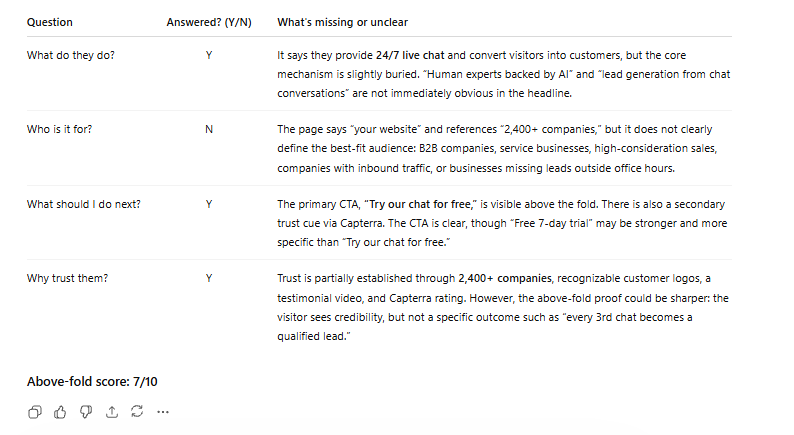
Now what we did was to run the full series of prompts on one of the most succesful current scaleups in Europe and one of the best at digital marketing, Flatpay.
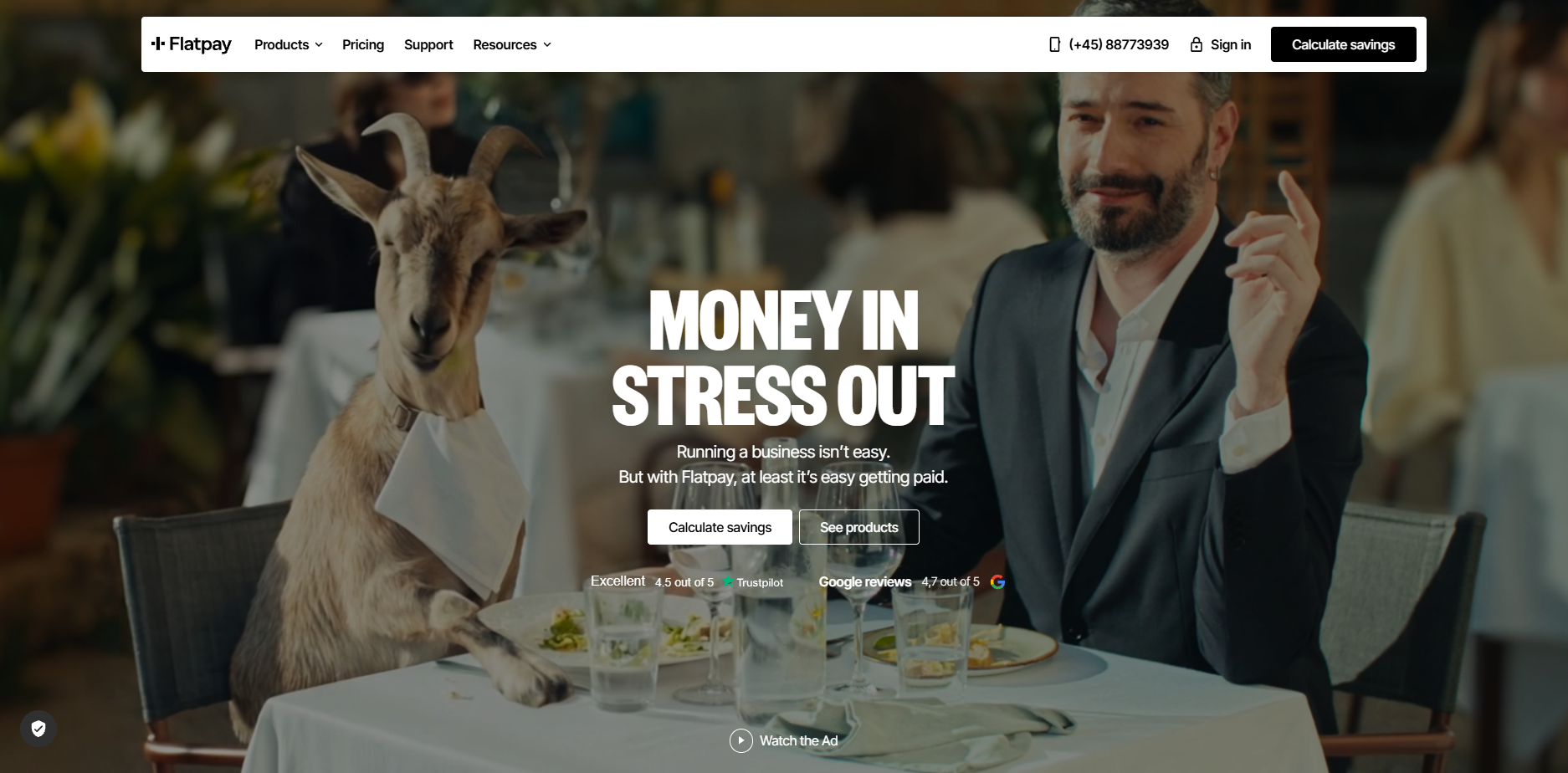
This is the result from the first prompt:
Prompt 2: The Conversion Path Coherence Audit
# Conversion Path Coherence Audit
## Context
These pages form a sequence that visitors move through.
The biggest conversion leaks often live between pages, not on them.
## Your task
Evaluate all screenshots as a connected journey:
1. Message consistency — Do promises made on one page carry through to the next, or do they shift?
2. CTA consistency — Is the call-to-action language stable across pages, or does it change confusingly?
3. Orientation — Are there pages where a visitor might feel lost or unsure what to do next?
4. Distractions — What elements pull visitors away from the conversion goal (unrelated links, social buttons, irrelevant navigation)?
## Output format
Score each transition between pages:
| Transition | Coherence (1-10) | Key issue |
|-----------|:---:|-----------|
| Page 1 to Page 2 | | |
| Page 2 to Page 3 | | |
| (continue as needed) | | |
Overall path score: X/10
What this reveals: Messaging fragmentation is the most common path-level problem, and it's also the least visible to the people who built the site. The homepage says "Get a free consultation." The service page says "Contact us for pricing." The contact page says "Send us a message." Three different implied offers. Three moments of micro-doubt. Each transition chips away at the visitor's confidence that they're in the right place. The path should feel like one continuous conversation.
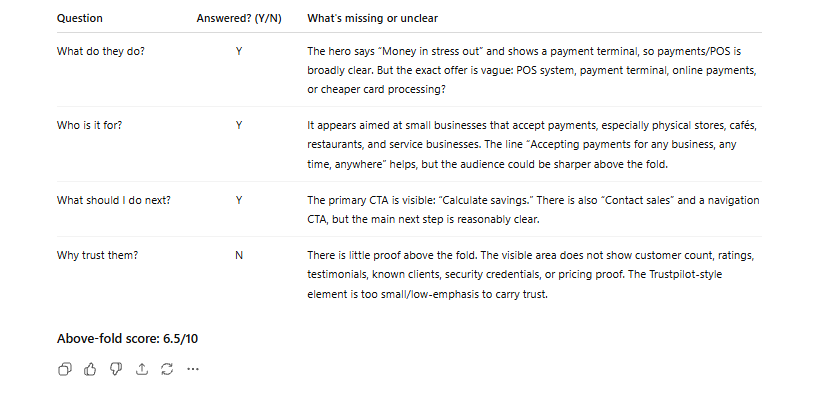
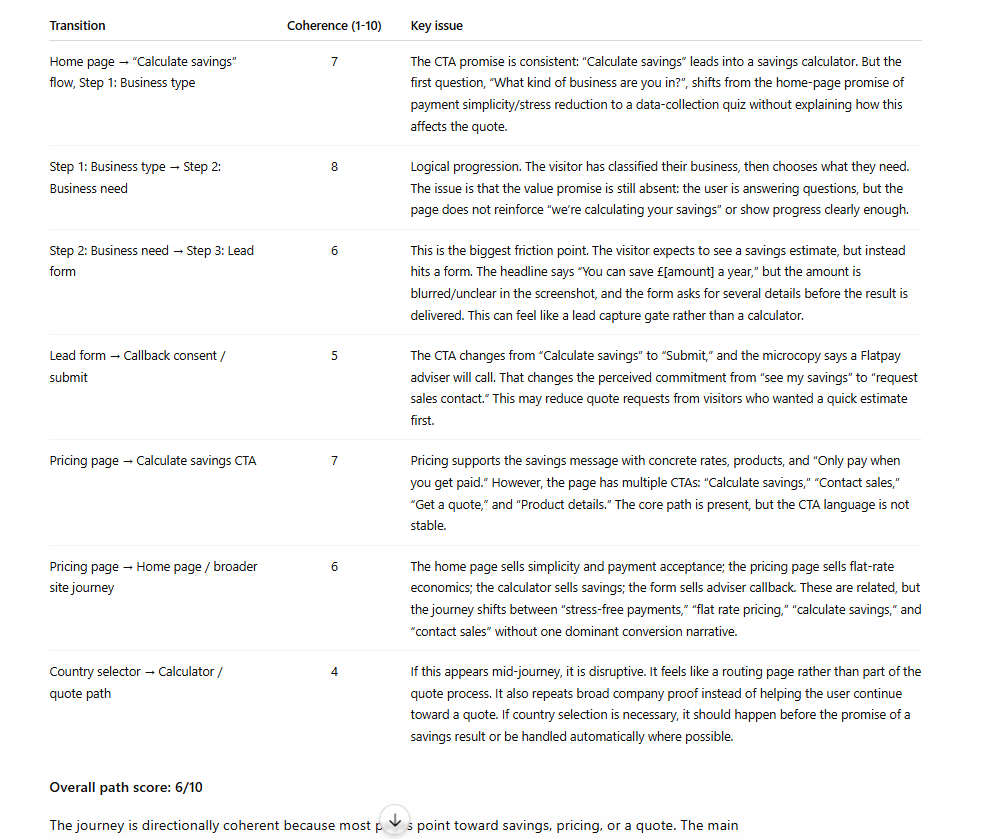
Flatpay uses a multi-step CTA journey for "calculate savings" or "get a quote", which most serves as a teaser as well as pre-qualifier for leads and Flatpay.
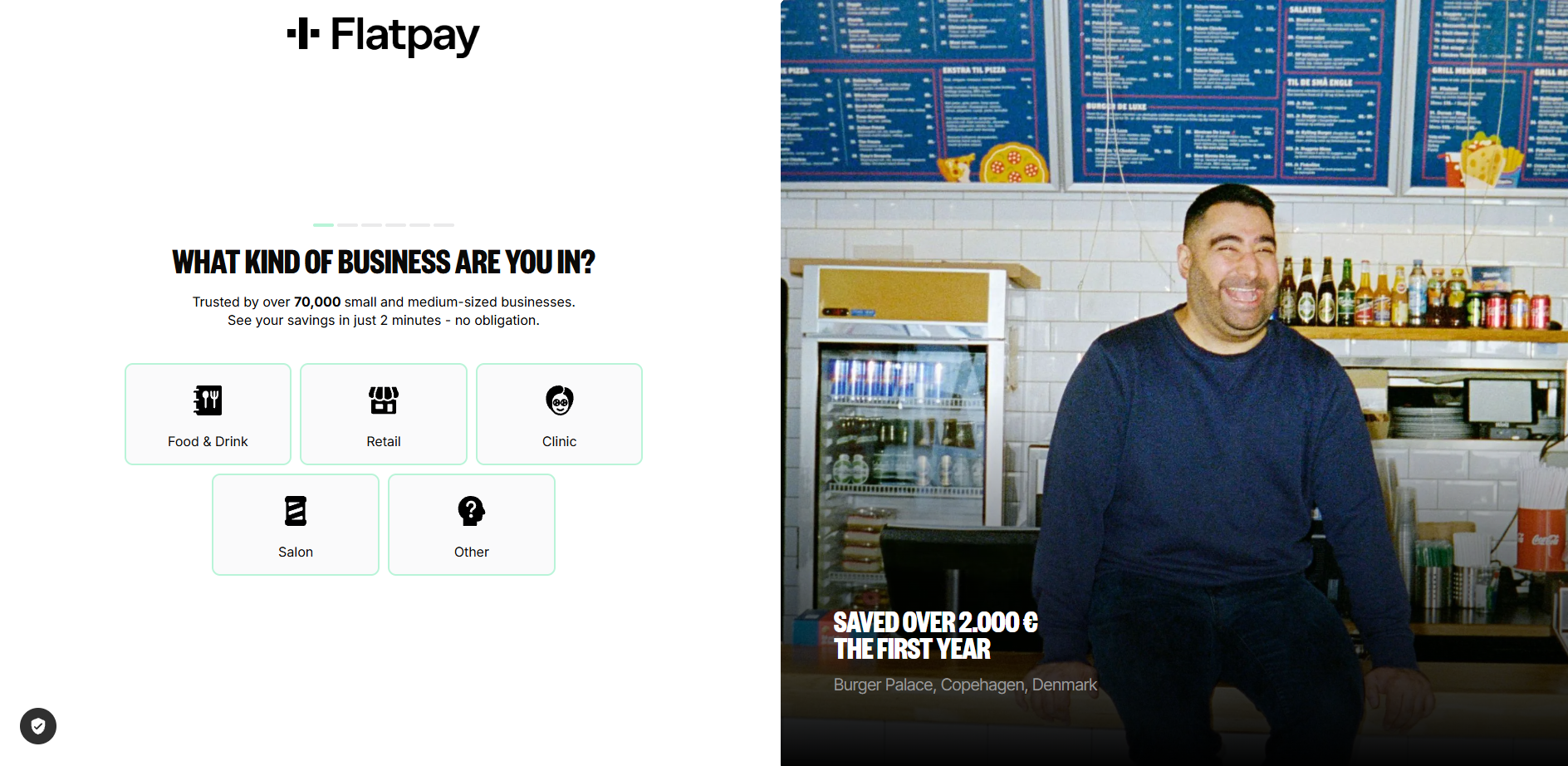
Flatpay results from prompt 2:
Prompt 3: The Trust Signal Inventory
# Trust Signal Inventory
## Your task
Across all pages, catalogue every trust signal present:
customer logos, testimonials, reviews, case studies, certifications, team photos, years in business, guarantees, privacy assurances, awards, association memberships.
Then evaluate:
1. Which pages have strong trust signals?
2. Which pages have weak or no trust signals?
3. Is there a trust gap specifically on the conversion page (contact or pricing page)?
4. What trust signals would you add, and where?
## Output format
| Page | Trust signals present | Trust signals missing | Gap severity |
|------|----------------------|----------------------|:---:|
| Homepage | | | |
| Service page | | | |
| Contact page | | | |
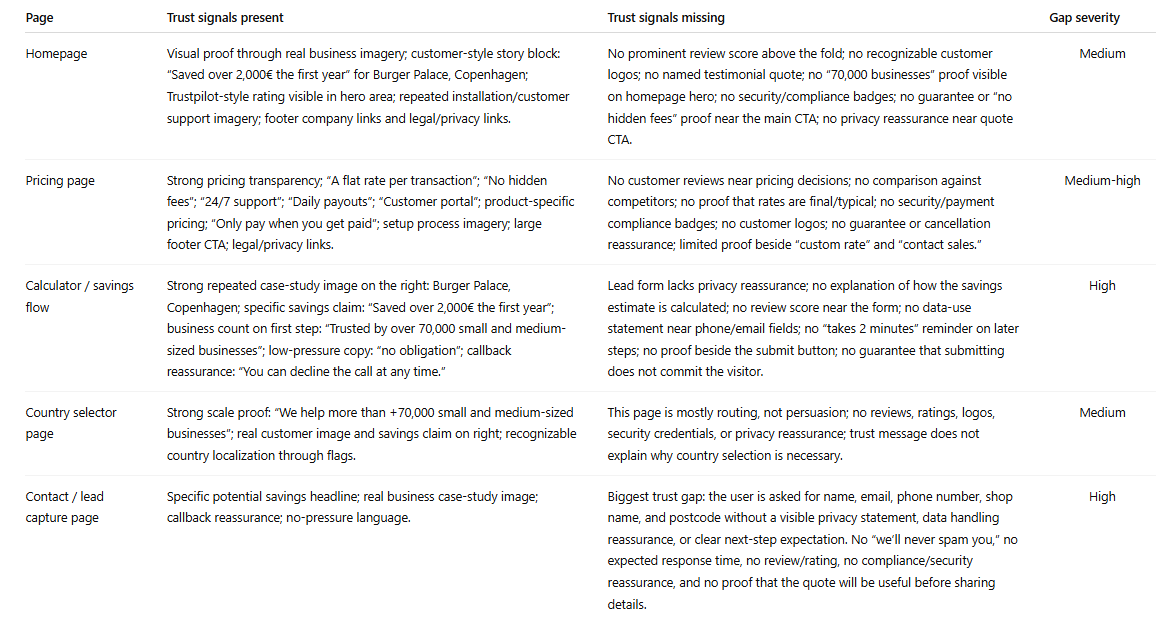
What this reveals: Trust signals cluster on homepages, where they're least needed, and disappear on contact pages, where they matter most. The moment a visitor is about to hand over their phone number is precisely when they need reassurance. They're asking: will someone actually reply to this? Have you done this for businesses like mine? Our chat data shows the most common questions visitors ask right before converting are trust questions: "How quickly will someone respond?" "Do you work with companies in my industry?" A single line on the contact page, "We typically respond within two hours," does more conversion work than most hero sections. Adding it takes five minutes.
Flatpay results from prompt 3:
Prompt 4: The Dead Form Diagnosis
# Lead Capture Form Diagnosis
## Context
This is your final conversion point. A motivated visitor is about to become a lead, or quietly close the tab.
## Your task
Evaluate the contact or lead form as a slightly hesitant potential customer who is ready to enquire:
1. Field count: How many fields? Which feel unnecessary for a first interaction?
2. Expectation setting: Does the page explain what happens after submission? Who responds? How soon?
3. Alternatives: Is there any option besides this form (phone, chat, booking link, WhatsApp)?
4. Urgency: Is there a reason to submit now, or could I come back to it later with no consequence?
5. Friction score: Rate 1 (effortless) to 10 (not worth the effort).
## Output format
| Criteria | Rating | Specific issue |
|----------|:---:|----------------|
| Field necessity | /10 | |
| Expectation clarity | /10 | |
| Alternative channels | /10 | |
| Urgency/motivation | /10 | |
| Overall friction | /10 | |
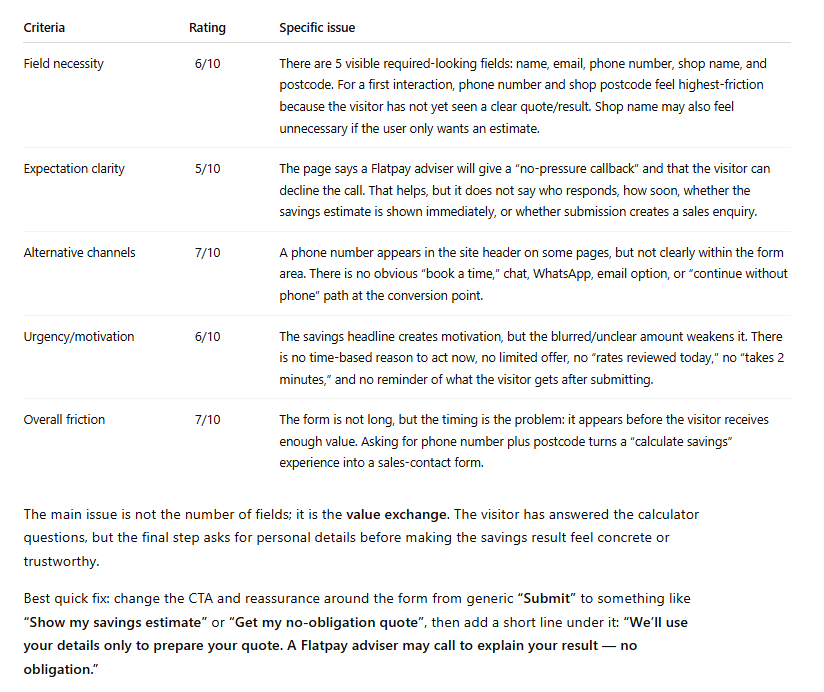
What this reveals: Forms are where conversions go to die, and the problem usually isn't the fields themselves. It's the silence around them. No indication of what happens after you submit. No alternative for the person who has a quick question but isn't ready to commit to a form submission. No urgency. Just a form floating on a page, asking for information and offering nothing in return. Our data shows that between 35 and 50 percent of chat conversations start because a visitor saw the form and decided they wanted to talk to a person instead. The form didn't convert them. A conversation did.
Flatpay Results:
Prompt 5: The AI Search Visitor Test
# AI Search Visitor Experience Audit
## Context
A growing share of visitors now arrive from AI search tools (ChatGPT, Perplexity, Google AI Overviews, Claude). These visitors have been in a conversational research flow: asking questions, refining needs, receiving personalised guidance. They land here mid-dialogue, having just been told this website looks like a good match for their needs.
## Your task
Evaluate these pages as an AI-referred visitor who was just told: "[Company] looks like a good option for your needs."
1. Conversation continuity. Can this visitor continue their dialogue, or does the experience break from conversation to static content? What engagement options exist?
2. Information redundancy. How much of this repeats what the AI tool likely already told them? What is genuinely new here?
3. Specificity gap. The visitor has a refined need. Does the site address specific use cases, or only general claims?
4. Next-step friction How many clicks stand between landing here and having a real conversation about their specific situation?
## Output format
| Criteria | Score (1-10) | Key finding |
|----------|:---:|-------------|
| Conversation continuity | | |
| Information redundancy | | |
| Specificity gap | | |
| Next-step friction | | |
Verdict: Is this website ready for the AI search era?
Single most impactful change:
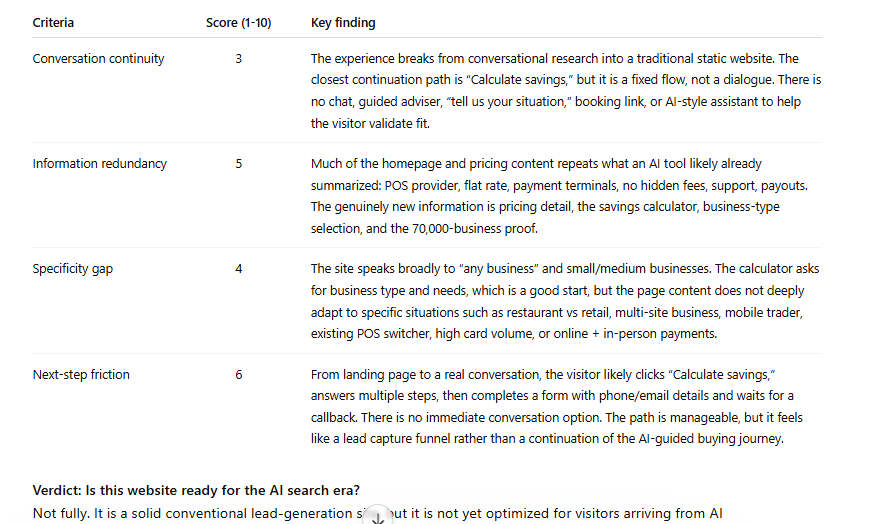
What this reveals: An AI-referred visitor has been in an active dialogue. They arrive expecting to continue it. Instead they hit a static page and a form. It's like being mid-conversation with someone, then being walked to a colleague's office where that colleague hands you a clipboard. The AI will almost always point to real-time conversational engagement as the single most impactful change.
Results from Flatpay analysis:
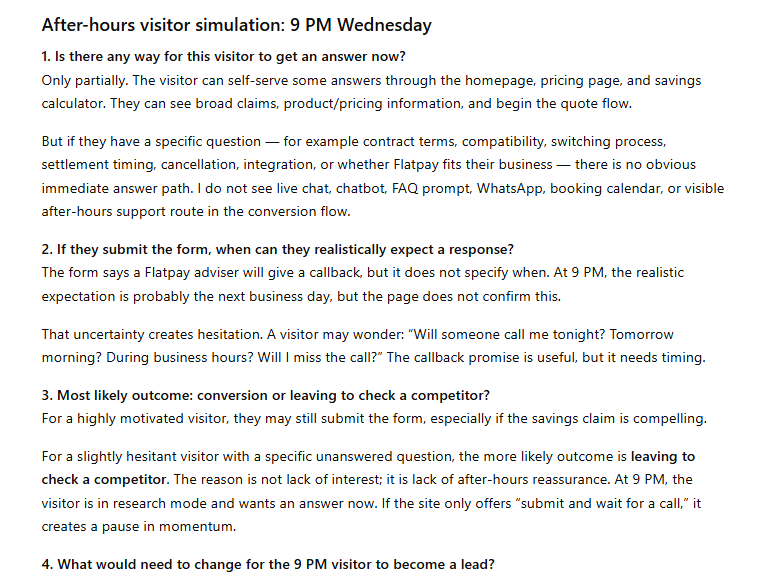
Prompt 6: The After-Hours Visitor Test
# After-Hours Visitor Simulation
## Scenario
It is 9 PM on a Wednesday. A potential customer lands on this website from a search. They're interested but have a specific question about the service.
## Your task
1. Is there any way for this visitor to get an answer now?
2. If they submit the form, when can they realistically expect a response?
3. What is the most likely outcome: conversion, or leaing to check a competitor?
4. What would need to change for the 9 PM visitor to become a lead?
What this reveals: Between 35 and 50 percent of high-intent traffic arrives outside business hours. The visitor at 9 PM with an urgent question, a pest control problem, an insurance query, a question about a dental procedure, is often your most motivated visitor. They're ready to act. Your website offers them a form that won't be read until tomorrow morning. By then, they've found a competitor who responded immediately. The after-hours visitor rarely shows up in your analytics as a lost lead. They show up as a lead that was never there.
Prompt 7: The Competitor Comparison
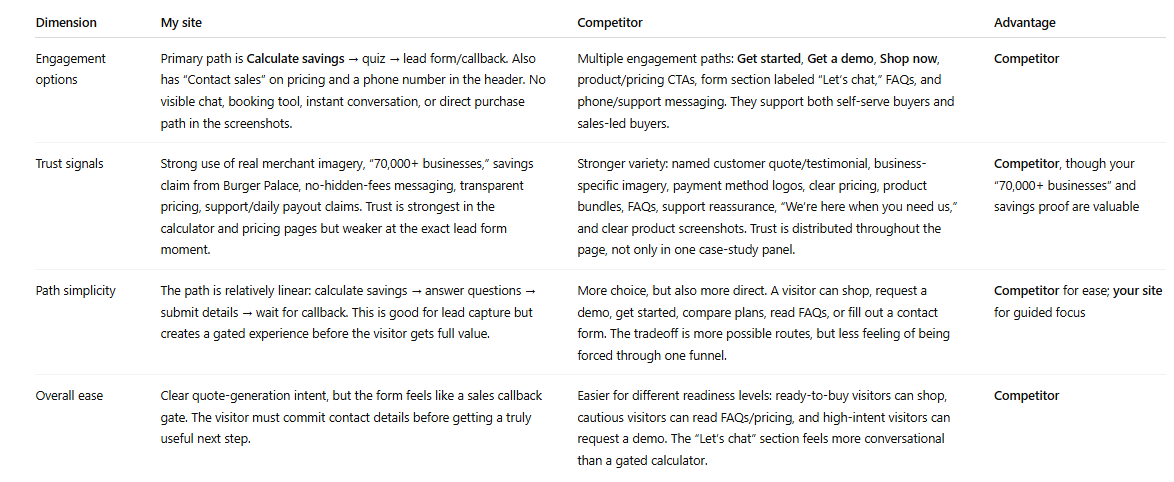
# Competitive Conversion Comparison
## Context
I'm now uploading screenshots from a competitor's website.
## Your task
Compare their conversion path to mine across four dimensions:
1. Engagement methods — Do they offer anything we don't? (chat, callback, WhatsApp, instant quote, booking tool)
2. Trust signals — Stronger, weaker, or different in type?
3. Path simplicity — Fewer or more steps to conversion?
4. If you were a potential customer comparing both, which makes it easier to take the next step? Why?
## Output format
| Dimension | My site | Competitor | Advantage |
|-----------|---------|------------|-----------|
| Engagement options | | | |
| Trust signals | | | |
| Path simplicity | | | |
| Overall ease | | | |
What this reveals: This is the prompt that makes abstract findings feel urgent. When the AI tells you "your competitor has live chat and a 60-second quote promise, you have a contact form," the gap stops being theory. It's a specific competitive disadvantage, described in plain language, sitting in a table. Running this against one or two competitors takes ten minutes. The output is more persuasive than any conversion audit report, because it shows exactly what a visitor experiences when they compare options, and most of the time, they are comparing options.
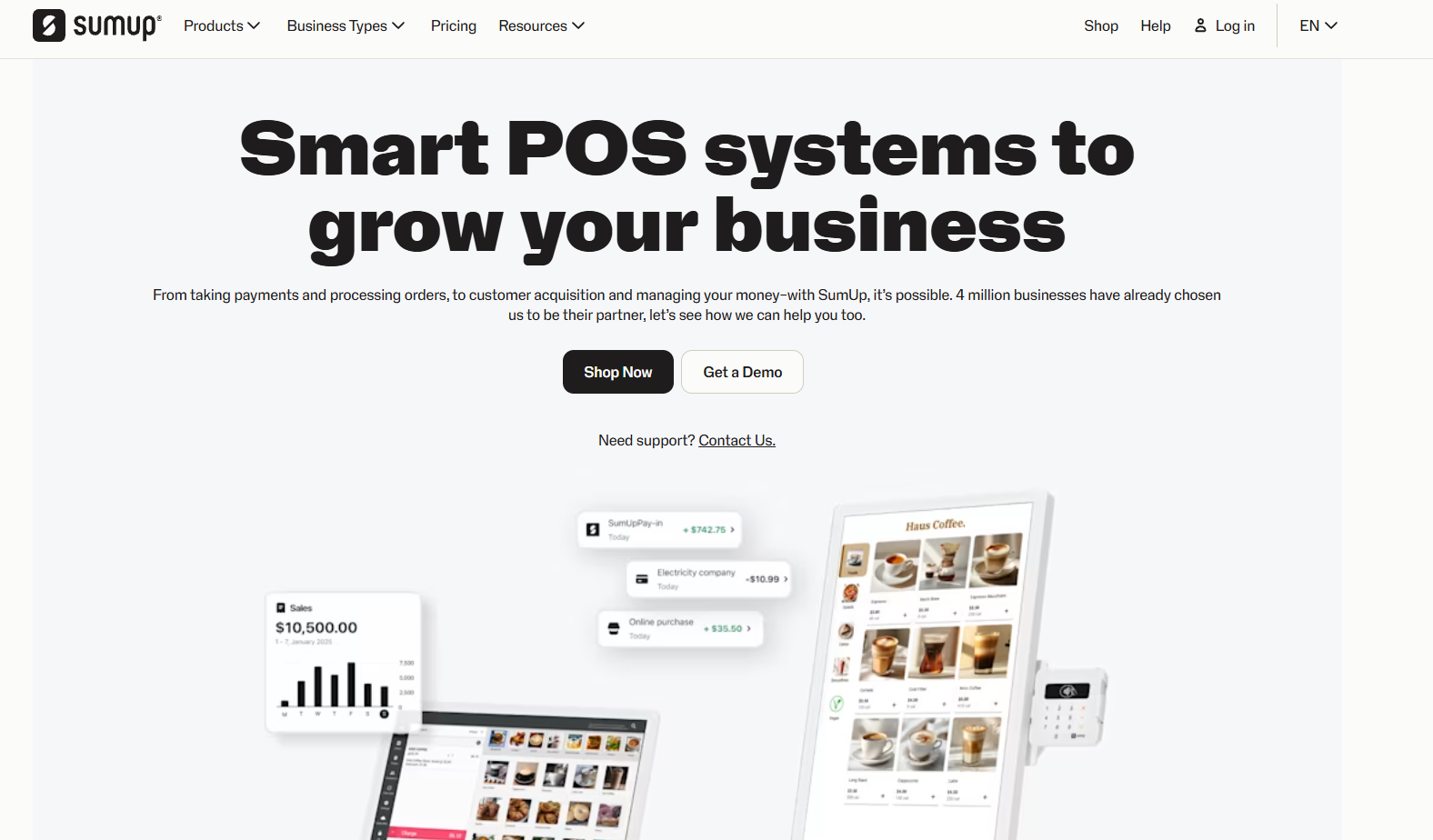
For this competitor comparison we used SumUp.
Response from ChatGPT on this prompt for comparison:
Prompt 8: The Priority Fix List
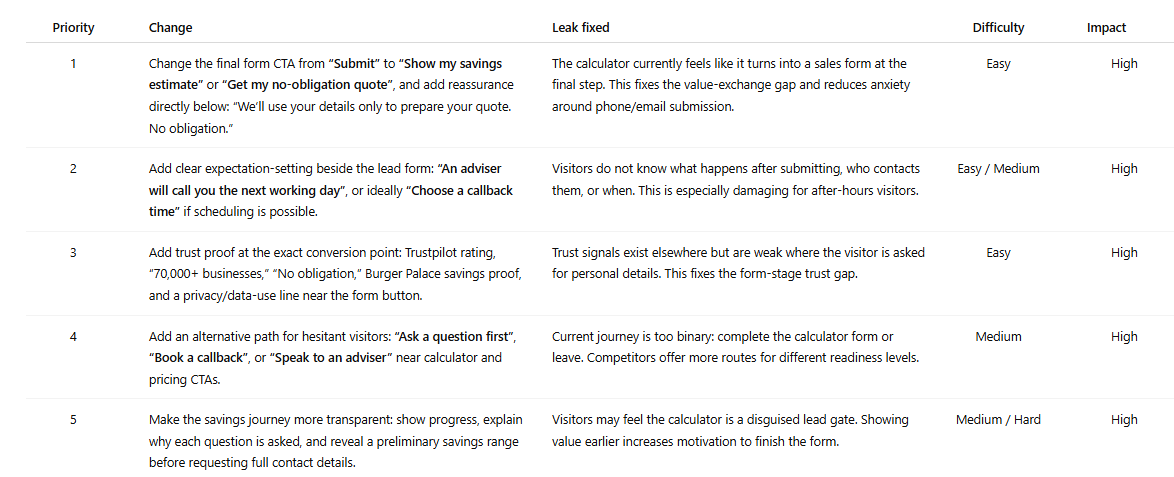
# Prioritised Conversion Fix List
## Your task
Based on everything analysed across all pages, give me the 5 most impactful changes to increase leads from this website.
For each recommendation:
1. The specific change
2. Which leak it fixes
3. Difficulty (easy / medium / hard)
4. Potential impact (low / medium / high)
## Output format
| Priority | Change | Leak fixed | Difficulty | Impact |
|:---:|-------|-----------|:---:|:---:|
| 1 | | | | |
| 2 | | | | |
| 3 | | | | |
| 4 | | | | |
| 5 | | | | |
Put highest-impact, lowest-difficulty changes first.
What this reveals: This is the prompt that turns the audit into a to-do list.
Flatpay priority fix list:
What to Do With Your Results
Most audits produce one of three finding patterns. Here's how to act on each.
Messaging and CTA inconsistencies. These are quick wins. Align the headline, the button text, and the implied offer across every page in the path so the visitor feels like they're moving through one coherent conversation. This costs nothing and can be done in an afternoon. It's also the change most businesses deprioritise because it doesn't feel significant enough. It is.
Trust gaps on conversion pages. Add one or two trust signals directly to your contact page this week. A response-time commitment. A relevant testimonial. A count of businesses you've helped. Visitors about to submit a form need reassurance at that precise moment. Putting it on the homepage instead is like putting the "safe to drink" sign on the bottle rather than the glass.
No real-time engagement option. This is the structural finding that shows up in almost every audit and sits at the top of almost every priority list. You have a few honest options:
Managing chat yourself during business hours works for some businesses and isn't sustainable for most. An AI chatbot handles FAQ deflection and support reasonably well. It struggles with the nuanced, pre-purchase questions that are actually standing between a visitor and a conversion. It fails at custom lead qualification questions and collecting customer lead information.
Managed live chat with human agents available around the clock, including evenings and weekends, is what Weply provides. It's the approach behind more than 250,000 qualified leads generated across our customer base in 2025. If the after-hours prompt produced an uncomfortable answer, it's worth a look.
Read our guide to the best chat solutions for business in 2026 here or dive deep on why a chat solution is needed to match visitor expectations coming from AI search.
What This Process Replaces
The standard alternative is hiring a CRO agency. Budget: EUR 3,000 to 8,000. Timeline: four to six weeks. Deliverable: a PDF. The report is usually good. The process is slow, expensive, and produces findings that are already weeks old when they reach you. The process in this guide takes 30 minutes and produces an action plan from your own pages, in your own conversation thread, reviewable immediately. Run it quarterly. Run it after every redesign. Run it whenever traffic goes up and leads don't.
Try Weply for free for 7 days. Get qualifed leads, customer support and insights into the conversations that your webiste visitors have.
The Real Cost of a Slow Lead Response
The Real Cost of a Slow Lead Response: What Happens Minute by Minute
Accoridng to a 2026 study the average B2B company takes 47 hours to respond to a new lead. The window where most buyers are still actively comparing options closes at five minutes. That gap is not a minor inefficiency. It is the single largest unmeasured revenue leak in European inbound lead generation, and it widens every quarter as buyer expectations harden. This article is the minute-by-minute account of what the gap costs you, and what to do about it.
What happens at each interval
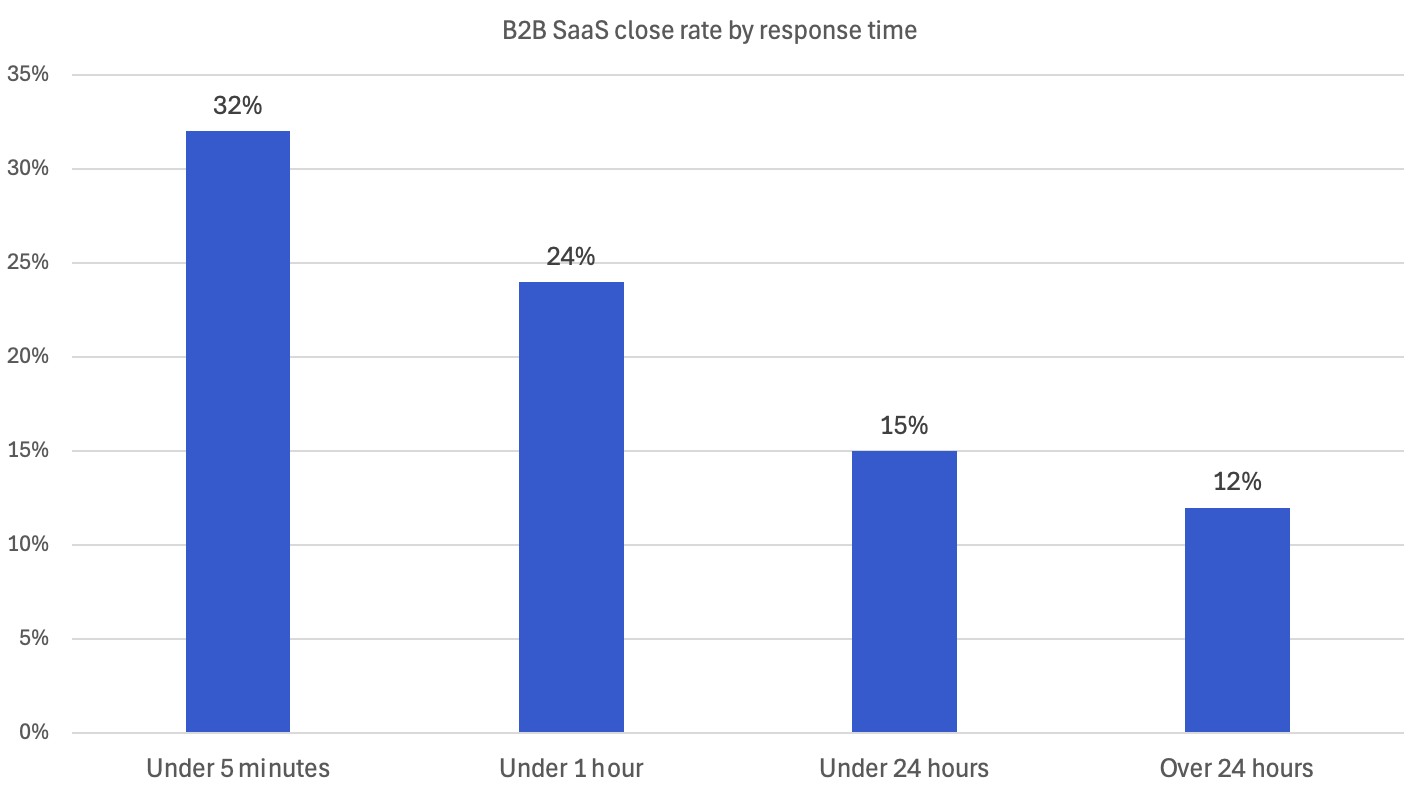
The decay curve below is built from four sources: the original Oldroyd/MIT research published in Harvard Business Review 2011, Velocify's follow-up data, Optifai's 2026 benchmark study of 939 B2B SaaS companies, and Hennessey Digital's 2025 study of 1,333 law firm websites. The exact multipliers vary by source and sales motion. The shape of the curve does not.
1 minute. Peak intent. The visitor is still on the page with three competitor tabs open. Velocify's research found a 391% conversion uplift for one-minute responses compared with delays of two minutes or more.
5 minutes. The benchmark every credible study converges on. Optifai's 2026 data, drawn from 939 B2B companies, shows a 32% close rate for leads contacted within 5 minutes, which is 2.6× higher than leads contacted after 24 hours. Looking at contact rates rather than close rates, the original Oldroyd research found firms 100× more likely to reach the lead at 5 minutes than at 30 minutes.
10 minutes. Engagement falls off a cliff. Strolid's analysis of 2.3 million automotive leads found that buyer engagement drops from roughly 80% at 5 minutes to 45% at 10 minutes (Strolid, 2024). Each additional minute of delay in the first five minutes reduces conversion probability by approximately 10%.
30 minutes. You are now 21× less likely to qualify the lead than a competitor who got there in 5. In Strolid's automotive data, just 15% of leads are still in active shopping mode at this point.
1 hour. The original Harvard Business Review finding still holds in the more recent data: firms contacting leads within an hour are 7× more likely to qualify them than those waiting one hour longer, and 60× more likely than those waiting 24+ hours.
4 hours. Most competitors have already had a conversation. The lead may still answer your call. But they are no longer comparing options. They are in a sales process you started too late.
24 hours. Optifai's data shows close rates settle around 12%. Less than half the rate of a 5-minute response. Drift's Lead Response Report found 55% of companies actually take five days or more to respond at all.
48+ hours. Salvage mode. Salesforce data shows that only 27% of leads ever get contacted at all. The remaining 73% are wasted marketing spend, sitting in a CRM that nobody takes action upon.
Why the problem is getting worse, not better
A decade of CRM tools, marketing automation, and AI-assisted sales should have closed the response gap. It hasn't. The B2B average is still 47 hours. Hatch's 2024 analysis of 132,188 home services campaigns found 88% of users take longer than 5 minutes to reply, and the most common response time was a full day.
Three things are pulling the average in the wrong direction.
Buyer expectations have flipped. 80% of Millennials expect an immediate response from a company they contact. 64% of Gen Z want the same. The customer base is becoming less tolerant of delay every quarter. The infrastructure most businesses are still running was built for a tolerance window that no longer exists.
Lead volume is shifting outside business hours. AI-referred traffic, mobile inquiries, and after-hours research all push more inquiries into the 5 PM–9 AM window. A homeowner requesting three pest control quotes on a Sunday evening is not the exception. They are the median.
Multi-vendor shopping is the default. A buyer requesting a quote almost never requests just one. Insurance leads from some sources are often sold to between three and eight carriers simultaneously, with the first to respond winning the conversation. 78% of customers buy from the first business that responds. Not the best. Not the cheapest. The first.
The compound effect: rising expectations, more after-hours volume, and simultaneous-vendor shopping have created a window that closes faster than most internal processes can react. A 30-minute response in 2015 was acceptable. In 2026, it could have the same effect on your pipeline as no response at all.
The after-hours gap
This is where most of the leakage happens, and where most businesses haven't looked.
Across Weply's European chat operations, roughly half of all visitor conversations happen outside standard office hours: evenings, nights, and weekends. That is not surprising once you look at the calendar. 5 PM–9 AM weekdays plus weekends is around 64% of the week. What is surprising is how few businesses are set up to respond during that window.
The pattern is consistent across the public data. Housecall Pro found that 41% of home services jobs are booked after hours, when most teams are unavailable to respond. Neil Patel's analysis of LeadChat client data put after-hours leads at 50–60% of total volume. GreetNow's 2026 benchmark report found companies with 24/7 response capability convert at 2.5× the rate of 9-5 operations, and that after-hours leads receiving same-night response have an 85% contact rate, compared with 35% for next-morning response.
Translate the numbers into the buyer's actual experience. Someone fills in your form at 21:14 on a Tuesday. Your CRM stamps it and waits. At 09:00 Wednesday, your team sees it and responds. By then, the buyer has had twelve hours to receive replies from three competitors who do answer at night. The deal isn't lost because your product is worse. It's lost because the conversation happened without you.
The after-hours gap is the single largest unaddressed revenue leak in European inbound lead generation. It is also the easiest to measure. Pull the timestamps on every web form, chat, or call request from the last 90 days. Plot them by hour. The shape you'll see is not 9-5.
Industry response time dynamics are not the same
Not every industry decays at the same rate. The shape of the curve holds across all of them. The slope varies.
Insurance
Insurance leads are often sold to between three and eight carriers simultaneously. The first response wins the conversation. Yet only 37% of insurance reps reply within the first hour, and 24% take more than 24 hours. For an industry where the entire premium structure depends on capturing intent at the point of decision, that is a structural problem. SalesWings's analysis of insurance lead behaviour found that the golden window is the first five minutes, after which connect rates "decay as intent drops and competitors step in".
Automotive
Strolid analysed 2.3 million automotive leads across 847 dealerships between 2022 and 2024. Buyer engagement at five minutes was 80%. At ten, 45%. At thirty, 15%. Yet only 13% of dealership sales teams respond within five minutes to a web form or chat lead. Automotive is one of the clearest cases of an industry where the data is well-known and ignored.
Trades and home services
Hatch's 2024 study of 132,188 home services campaigns found 88% of responses take longer than five minutes; only 3% respond in under a minute. 41% of home services jobs are booked after hours. A homeowner whose drain backs up at 19:00 is contacting three plumbers. The one who answers first wins. This is the vertical where the decay curve is steepest and the after-hours skew is most pronounced.
Legal
Hennessey Digital's 2025 study of 1,333 US law firms found the median response time is 13 minutes, markedly faster than five years ago, but 26% of firms still don't respond at all, and only 25% respond within five minutes. Legal leads are higher-consideration than insurance or trades, but the window is still measured in minutes, not days.
B2B equipment and SaaS
The longest consideration cycle, but not exempt from the rule. SaaS averages 11.4 hours response time, and 72% of B2B buyers cite a vendor's response time as the most important attribute of a winning vendor. The consumer-grade expectations Millennial buyers bring with them from their personal lives also applies in the business world.
Two examples of what the cost actually looks like
A decay curve and a benchmark spreadsheet don't move budgets. Concrete numbers do. Two illustrative examples, with the maths visible below:
Example A: A Danish insurance brokerage
Inputs. 200 inbound leads per month from the website, hereof 50 pre-qualified by experts in the live chat. Average commission per converted policy: €350. Current response time: 45 minutes during business hours; next-morning for after-hours leads, which represent roughly half of total volume.
What the data says. At a sub-5-minute response, the close rate would land near 32% on the Optifai curve. At a 45-minute response, closer to 24%. That is an 8-percentage-point gap. On 200 leads per month, the brokerage is converting 48 policies instead of an achievable 64.
The maths. 16 lost policies × €350 = €5,600 per month, or €67,200 per year, on the response-time delta alone. That number ignores the 100 after-hours leads receiving no response until the next morning, where GreetNow's contact-rate gap of 85% vs 35% implies a further loss in the range of 30 to 50 policies per year.
Example B: A Dutch pest control company
Inputs. 50 leads per month, average job value €280. Current response: 4 hours during business hours, no response after-hours (roughly 45% of inbound).
What the data says. The 27 after-hours leads receiving no response have an 85% drop in contact rate by next morning. Of the 23 business-hours leads, the 4-hour response is converting roughly half what a 5-minute response would.
The maths. Best-case lost revenue across both buckets sits between €3,000 and €4,500 per month, or roughly €42,000 per year.
The exact numbers will vary by business. The shape of the loss does not.
What to do about it
Three tiers, in increasing investment. Pick the one your data justifies.
Free, this week
Audit your inbound timestamps. Pull every form submission, chat, and call request from the last 30 days. Plot them by hour and day of week. Mark the percentage that arrived outside your team's working hours. Until you have that number, every other decision is guesswork.
Set up an immediate auto-acknowledgement on every web form. A real, useful response within 60 seconds confirming receipt, setting expectations on when a human will reply, and offering an alternative channel like chat for urgent enquiries. This buys you goodwill and time.
Moderate investment
Live chat with human agents during business hours. The data on chat is consistent: one reply in a chat increases conversion probability by 50%, and a second reply doubles it. After-hours, a human agent also does the smart lead qualification; name, contact, intent, urgency, and captures the lead in the conversation rather than letting it sit in an inbox and informs the lead when they can expect to be contacted.
Full coverage
24/7 human-staffed chat with AI support. This is what Weply does for European businesses. Not an AI support bot answering alone. A human-supervised conversational layer with lead conversion experts that handles the conversions 24/7, 365 days a year. Why waste all those marketing initiatives and money in generating traffic with buying intent, when no expert is there to pick it up? Because that is what you do, when you neglect putting conversion experts on your website.
Frequently Asked Questions
What is a good lead response time?Under 5 minutes for any qualified inbound lead with active intent: quote requests, demo bookings, contact form submissions. Top-performing teams hit under 60 seconds. The industry average across B2B is 47 hours, which means even a 1-hour response puts you ahead of the field. The right target for your business depends on the competitive intensity of your vertical.
Does live chat really improve response time? Yes. Both the response itself and the conversion rate. Chat-based qualification removes the asynchronous gap between form submission and human reply. Companies running 24/7 chat convert at roughly 2.5× the rate of those running 9-5 operations.
Is the 5-minute rule actually based on real data?Yes, with caveats. The original research is Dr. James Oldroyd's 2007 study using InsideSales.com data, published in Harvard Business Review in 2011. It analysed 2,241 US companies and roughly 100,000 leads, looking at phone-based outbound responses. The shape of the curve has been replicated in every subsequent study; the precise multipliers vary by motion (chat vs phone vs SMS) and industry. Modern benchmarks like Optifai 2026 and Hennessey 2025 confirm the directional finding.
What if my business doesn't operate after hours? Roughly half of European inbound lead volume arrives outside standard office hours. The question isn't whether your business operates at night. It's whether your competitor's response system does. The economics rarely justify staffing a full sales team after hours, but they almost always justify some form of automated qualification with human handoff and expectation setting in real-time with the high-intent visitor.
How quickly should I respond to after-hours leads? If you can respond same-night, within a few hours, even via outsourced qualification, your contact rate will be roughly 85%, compared with 35% if you wait until the next morning. The cost of a "respond in the morning" policy is roughly half of every after-hours lead lost to a faster competitor.
Does response time matter more for B2C or B2B? Both, differently. B2C buyers have higher decay velocity and shorter consideration cycles. B2B leads have more tolerance for delay measured in minutes, but the deal value is usually higher, so the cost per lost lead is greater. 72% of B2B buyers say a vendor's response time is the most important attribute of a winning vendor.
The bottom line
Two sales teams with identical leads, identical products, and identical prices will produce wildly different revenue results based solely on response speed. The data on this has been consistent for fifteen years and continues to consolidate as buyer expectations harden.
The businesses that win are the ones that first and foremost capture and qualify the leads as the enter the website and that measure the after-hours skew in their own inbound data, calculate the cost of the response delta honestly, and decide what level of coverage the maths supports.
The numbers have been here for a decade. The question is whether you act on them before the competitor next door does.
.png)
What you need to know about CRO
Are you driving a lot of traffic to your website, but missing conversions? There could be several reasons why your users aren't getting all the way to their final destination.
In this article, we'll go over what conversion optimization means and how you can work with the strategy on your website.
What does CRO mean?
CRO is an abbreviation for Conversion Rate Optimization. Conversion rate optimization aims to increase the number of conversions on your website, which means that a greater number of visitors meet your specific goals. This could be a purchase, membership, contact, or newsletter sign-up.
You can calculate the conversion rate by dividing the number of goals achieved by the number of visitors. Let's give an easy example.
You have sold 100 items and had 1000 visitors in the given period, this means you have a conversion rate of 10%.
By optimising the conversion rate of your website, you have the opportunity to increase your sales, reach your goals, and produce more value from of your visitors.
What is a conversion?
Depending on your industry and business, conversions can look different. Here are some examples of conversion points:
- Buy
- Downloadable whitepaper or guide
- Contact form
- Register for webinars
- Gives contact information
A conversion means that the visitor actively chooses to receive information from your brand, complete a purchase or contact you. Depending on whether you sell products or services, there are several conversion options to choose from.
A common conversion point for almost all industries is the collection of contact details, which can be used by the sales department or for newsletters, for example.
Why work with conversion optimization?
Today, marketers spend 85% of their budget on driving traffic to their website, with no plan on how to convert that traffic from visitors to actual customers.
Statistics also show that 27% have a purchase intent when they visit a website, yet only 1-4% of visitors act. Now that's a problem. To raise the numbers, conversion optimization plays a key role.
Conversion optimization increases the number of quality leads
There are several strategies to optimize the conversion rate of your website. Now it's time to figure out what works for your business.
1. Optimize the structure
Look at the structure of your website and see if there is anything you can improve in the menu, the choice of headings or CTAs, for example. Base your website on your visitors' intentions. Is it easy for them to navigate, find information and take advantage of your offers?
If not, make the process easier for them by ensuring that the menu highlights the most important elements of your business. Examples include product categories, services, news, and contact. You should highlight at least one conversion point in the menu, which could be purchase, downloadable content, or contact for example.
The same strategy applies to the landing page, which visitors are sent in the first place. Include the most important parts of your business through concise descriptions and interesting headlines. Work actively with CTAs and internal links that easily take visitors to the next step, with a focus on conversion.
You can also review your design. You can highlight key elements by using more prominent colors, fonts, and shapes.
- Do your CTAs stand out from the crowd?
- Are your conversion points clear and easy enough to find, compared to the rest of your content?
2. Optimize downloadable content
What kind of downloadable content are you using today? Are there PDFs or forms exposed on your website? Analyze how the content is presented and whether there are opportunities to improve the download process.
If the content takes a long time to download or is of poor quality, you risk losing potential customers before they have even had a chance to read it.
The same applies if you do not present the content in a sufficiently interesting way. Be clear about why recipients should engage with the content, what they can expect and how it will benefit them.
3. Increase trust
Trust is one of the most important factors influencing visitors' purchase intentions, according to most studies.
The visual impression, quality of content, certifications, credentials, knowledge, and navigation all influence how visitors will perceive your brand and company.
Here it is important to create an overall impression that is professional, informative, and in line with your brand profile. Is there any element you have neglected or neglected to date?
For example, are you missing references, customer cases, or proof of your expertise in the form of certifications and awards? Or could you create more articles, interviews, or press releases that demonstrate your knowledge in the industry?
There's plenty of content to work with that will help you build deeper trust with your visitors.
4. Live chat
Live chat allows you to engage with users at any time of day. At Weply, we offer a service in the form of lead-generating chat consultants 24/7. It's a way for you to improve customer service, build deeper relationships, and collect data from potential customers in a natural context.
No matter what question the customer has, the consultants can guide them right. Right in the chat. Livechat can generate more leads and build customer relationships over time.
5. Listen to users
One of the most important parts of conversion optimization is listening to users. Collect feedback through forms, chat features, or newsletters.
- Do they think something is missing from your website?
- Is the information they want available?
- Or could you improve your offerings?
Consumers appreciate feeling important. Show that their opinions matter to you and your brand moving forward.
It's important to A/B test
It's easy to fall into old ways of doing things and to fall behind the competition. Instead, we recommend finding out what actually works on your site. Develop data-driven hypotheses, run A/B tests and analyze your stats after the fact.
A/B tests show specifically what generates results and what doesn't, as different versions are tested over the same period of time. This can include headlines, formats, color choices, and placements. But also alternative opening phrases in a live chat. The possibilities are many and data-driven optimization will play a big part in your conversion optimization.
Conversion optimization allows you to guide your visitors the right way on the website. Depending on your needs and circumstances, there are different strategies you can apply to achieve your goals. Dare to test yourself and evaluate afterwards.
If you are curious about implementing lead generation and personalized interactions in your strategy, contact us for more information!