Strategy, data and guidance on driving the right traffic, converting it, and making the most of every lead. From a team doing it every day across 2500+ BtB and BtC companies.
August 26, 2026
|
9
min
How to Find Your Website's Lead Conversion Leaks with ChatGPT [including 8 prompts to use]
Quick Summary
Most businesses spend serious money driving traffic to their website and almost nothing auditing whether that website actually converts visitors into leads. This guide gives you 8 copy-paste prompts and a clear process. Run them against your own webpages using ChatGPT or Claude. No tools to buy, no agency to hire. By the end, you'll have a prioritised list of exactly where your website is losing leads and what to fix first.
The Problem Most Businesses Never Audit
Traffic goes up. Leads stay flat. You've tried new headlines, changed the button colour, maybe swapped the hero image. Nothing moves the needle. Here's what usually isn't happening: a proper audit of the full path a visitor takes from landing on your homepage to becoming a lead.
The average website converts 2 to 3 percent of its visitors. The top performers convert 8 to 15 percent. The gap between those two numbers is often not better traffic or smarter ads. It's fewer leaks in the conversion path. A leak is any point where a motivated visitor quietly exits without taking the action you need them to take.
Leaks hide in obvious places: a form with no clear next step, a contact page stripped of any reason to trust you, a service page that doesn't match what the homepage promised. They also hide in less obvious ones: a visitor arriving at 9 PM with a genuine need and nowhere to turn, or a buyer who just came from an AI search tool mid-conversation and landed on a static brochure page with a contact form at the bottom and a phonenumber in the menu bar.
Most businesses have never audited for these problems systematically. They've looked at individual pages. They haven't looked at the path. This guide changes that. Eight prompts, one conversation thread with an AI, your own screenshots.
Why Listen to Us?
Weply has in 2025 alone generated over 250,000 qualified leads on behalf of 2,400+ customers across the Nordics and Europe. We've been doing this since 2013, across industries ranging from dental chains to insurance companies to fast-growing scaleups, to telco enterprises and so on.
We know what breaks conversion paths because we watch them break in real time.
Our chat consultants, backed by AI, handle the questions visitors can't get answered on a website. They capture the leads that forms lose. Across our customer base, adding managed chat produces an average 12% lift in lead conversion, and one in three chat conversations becomes a qualified lead. That data is the foundation for everything you're about to audit.
Why Use AI for This, and What You'll Need
A conversion specialist can audit your website for between EUR 3,000 and 8,000. They'll spend four to six weeks on it and deliver a PDF. The audit will be thorough, and for complex e-commerce operations, it's probably worth every cent. For most service businesses, you can surface minimum 80% of the same findings in 30 minutes using an AI. Here's why it works: AI evaluates your pages the way a first-time visitor does, without the curse of knowledge. You've looked at your homepage so many times you no longer see it. AI reads it cold. It also audits paths as sequences, which means it catches the friction that lives between pages, not just on them.
One honest caveat: this works well for service and product businesses with a clear conversion path. If you're running a complex multi-product e-commerce operation, a full specialist audit will find things this process won't. For everyone else, 30 minutes is enough to find what's bleeding leads.
What you'll need:
ChatGPT Plus, Team, or Claude Pro (the free tier works, with limitations on image uploads)
A browser
A full-page screenshot tool (GoFullPage for Chrome, Firefox's built-in screenshot function, or use mulitple screenshot directly from Claude)
30 minutes
Optional: GA4 access for one advanced prompt
Before You Start: Four Preparation Steps
Step 1: Map your conversion path. For most businesses this is Homepage, Service/Product Page, Pricing Page, Contact Page. If you're unsure which pages matter most, open GA4, go to Explore, and check the path exploration report. Three to five pages is enough to work with. Step 2: Take full-page screenshots of each page in sequence. Full-page, not just the top fold. You need the AI to see the whole page. Step 3: Screenshot your lead form and your confirmation page. The confirmation page matters because it tells you, and the AI, what promise you make to someone after they submit. Step 4: Open a new conversation in ChatGPT or Claude, upload all screenshots together, and add this context: You are a senior conversion rate optimisation specialist with experience auditing business websites. These are screenshots of my website pages in the order a visitor would see them. My business is [type of business]. My goal is to generate [desired action: enquiries / consultations / quote requests]. I'll be asking you to audit specific aspects of these pages.
Set this context once at the start. Every prompt that follows builds on it.
The Prompt Library
Eight prompts. Run them in sequence in the same conversation thread. Each builds on what came before.
Prompt 1: The First-Impression Test (copy this exact prompt) # First-Impression Audit ## Context Visitors decide within 5 to 10 seconds whether to stay or leave. This audit evaluates what's communicated before any scrolling. ## Your task Look at the first screenshot only (homepage or landing page). Based exclusively on what's visible above the fold, answer:
1. Clarity — What does this company do? 2. Audience — Who is it for? 3. Action — What should I do next? 4. Trust — Why should I believe them?
## Output format | Question | Answered? (Y/N) | What's missing or unclear | |----------|:---:|---------------------------| | What do they do? | | | | Who is it for? | | | | What should I do next? | | | | Why trust them? | | | Above-fold score: X/10
What this reveals: The failure we see most often across service websites is in row three of that table: "What should I do next?" Businesses build strong hero sections explaining what they do, then offer no visible next step. No CTA above the fold. No invitation to start a conversation. The visitor who wants to engage has to scroll, navigate, and figure the path out alone. Every step of effort they have to put in is a point where you can lose them. The good news is this is the quickest fix in the whole audit. A clear, visible CTA above the fold costs nothing to add and almost always moves conversion numbers.
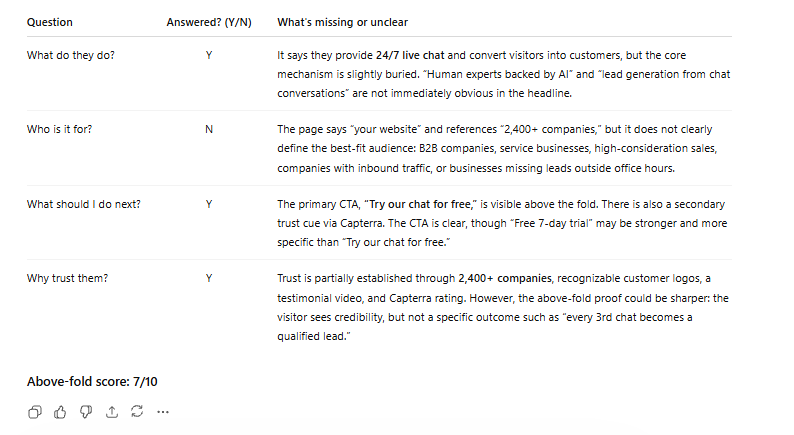
Example from running the prompt on Weply's homepage
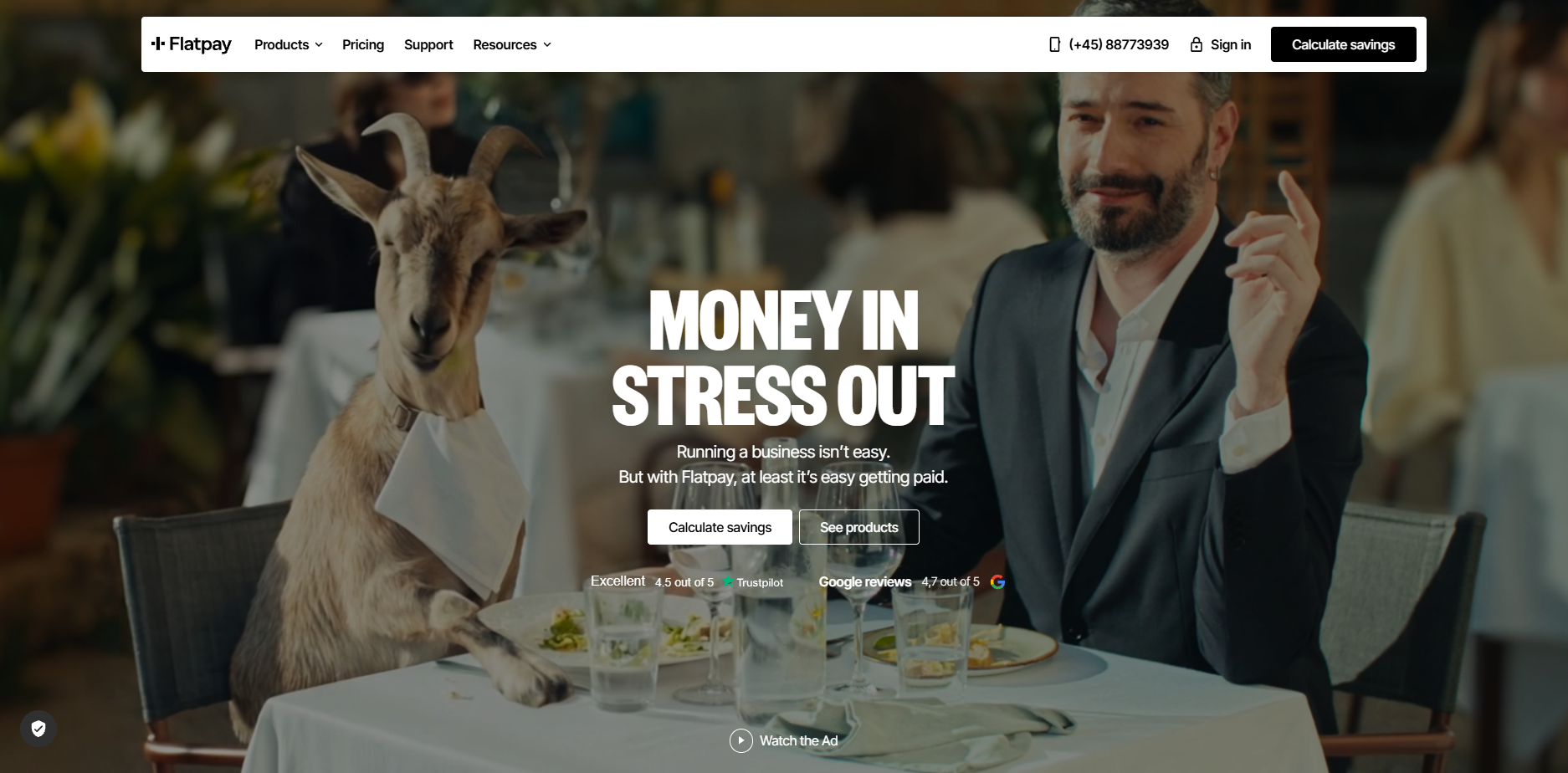
Now what we did was to run the full series of prompts on one of the most succesful current scaleups in Europe and one of the best at digital marketing, Flatpay.
This is the result from the first prompt:
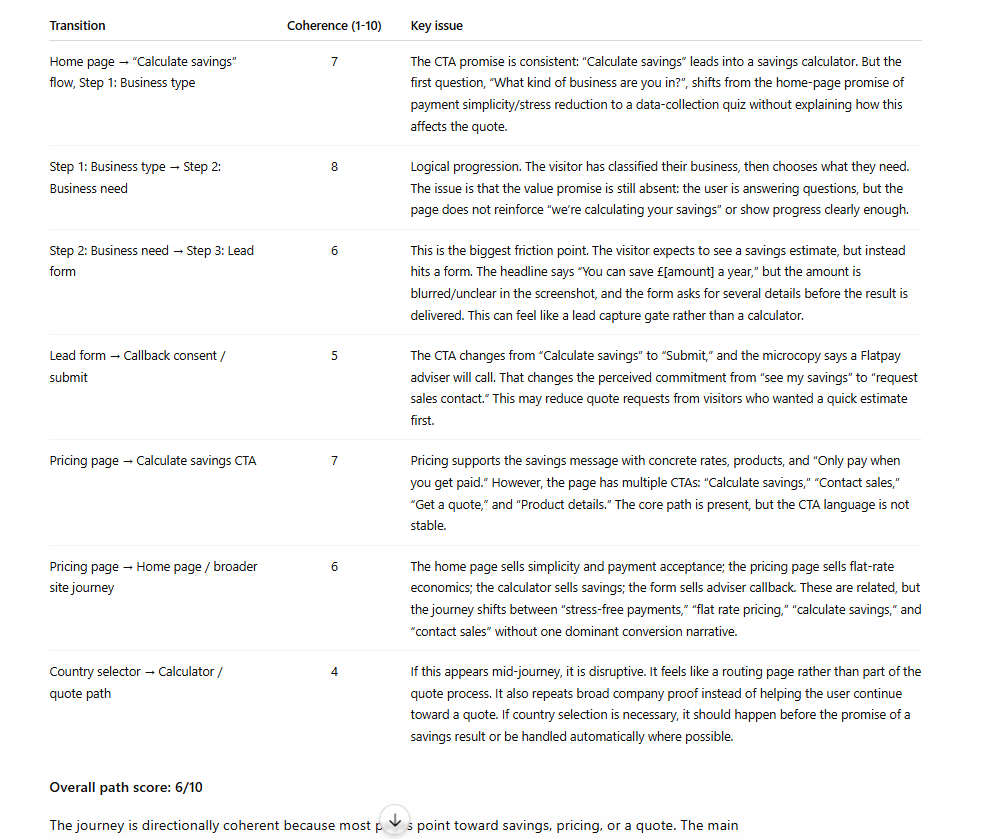
Prompt 2: The Conversion Path Coherence Audit # Conversion Path Coherence Audit ## Context These pages form a sequence that visitors move through. The biggest conversion leaks often live between pages, not on them. ## Your task Evaluate all screenshots as a connected journey:
1. Message consistency — Do promises made on one page carry through to the next, or do they shift? 2. CTA consistency — Is the call-to-action language stable across pages, or does it change confusingly? 3. Orientation — Are there pages where a visitor might feel lost or unsure what to do next? 4. Distractions — What elements pull visitors away from the conversion goal (unrelated links, social buttons, irrelevant navigation)?
## Output format Score each transition between pages: | Transition | Coherence (1-10) | Key issue | |-----------|:---:|-----------| | Page 1 to Page 2 | | | | Page 2 to Page 3 | | | | (continue as needed) | | |
Overall path score: X/10
What this reveals: Messaging fragmentation is the most common path-level problem, and it's also the least visible to the people who built the site. The homepage says "Get a free consultation." The service page says "Contact us for pricing." The contact page says "Send us a message." Three different implied offers. Three moments of micro-doubt. Each transition chips away at the visitor's confidence that they're in the right place. The path should feel like one continuous conversation.
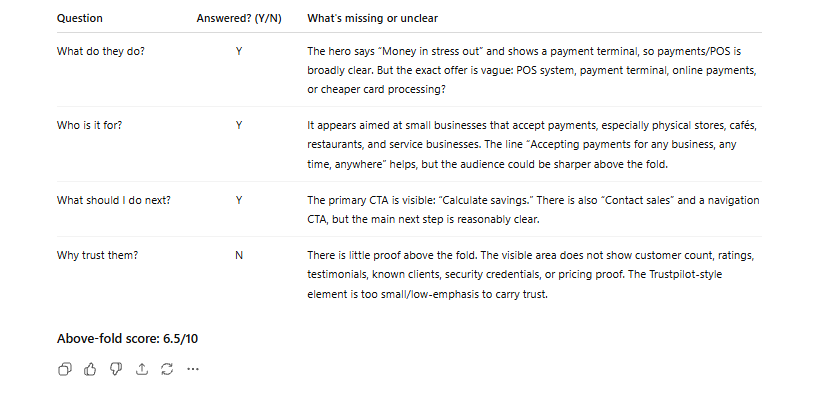
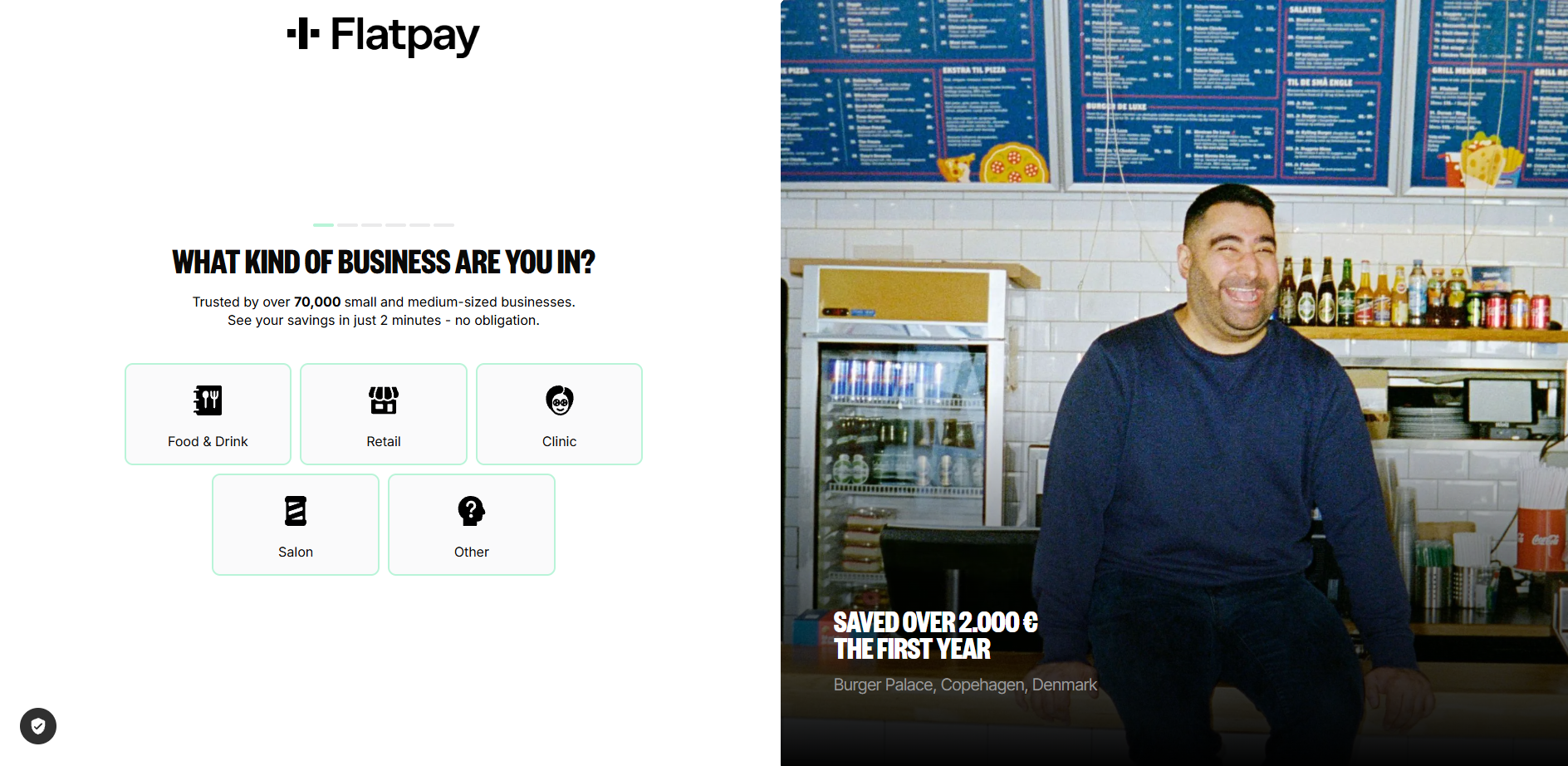
Flatpay uses a multi-step CTA journey for "calculate savings" or "get a quote", which most serves as a teaser as well as pre-qualifier for leads and Flatpay.
Flatpay results from prompt 2:
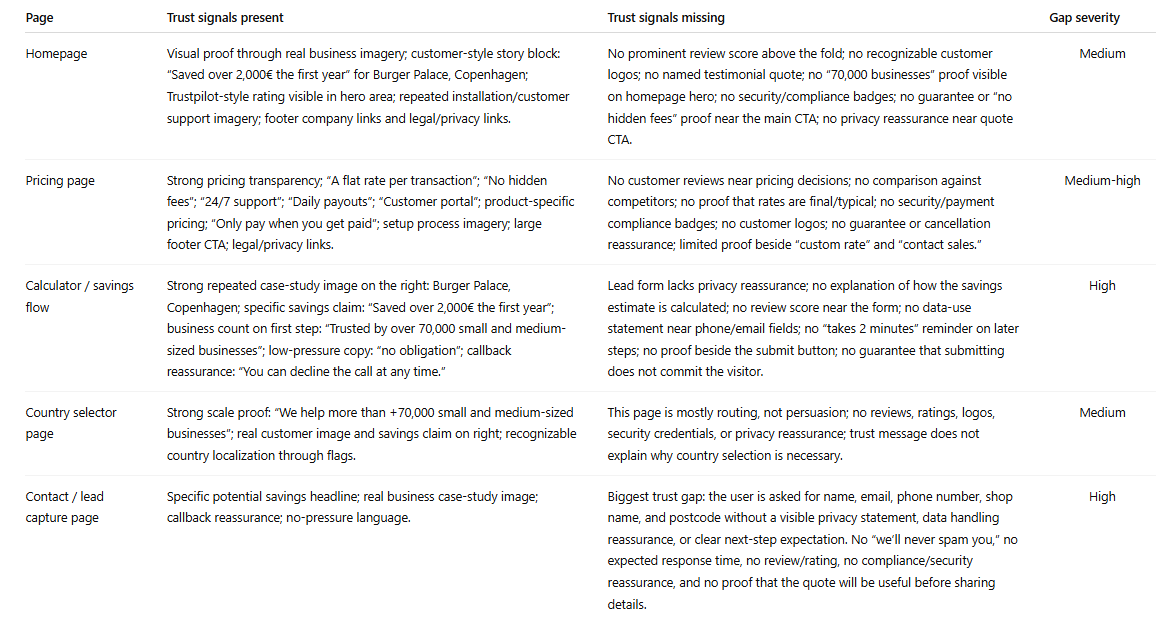
Prompt 3: The Trust Signal Inventory # Trust Signal Inventory ## Your task Across all pages, catalogue every trust signal present: customer logos, testimonials, reviews, case studies, certifications, team photos, years in business, guarantees, privacy assurances, awards, association memberships. Then evaluate:
1. Which pages have strong trust signals? 2. Which pages have weak or no trust signals? 3. Is there a trust gap specifically on the conversion page (contact or pricing page)? 4. What trust signals would you add, and where?
What this reveals: Trust signals cluster on homepages, where they're least needed, and disappear on contact pages, where they matter most. The moment a visitor is about to hand over their phone number is precisely when they need reassurance. They're asking: will someone actually reply to this? Have you done this for businesses like mine? Our chat data shows the most common questions visitors ask right before converting are trust questions: "How quickly will someone respond?" "Do you work with companies in my industry?" A single line on the contact page, "We typically respond within two hours," does more conversion work than most hero sections. Adding it takes five minutes. Flatpay results from prompt 3:
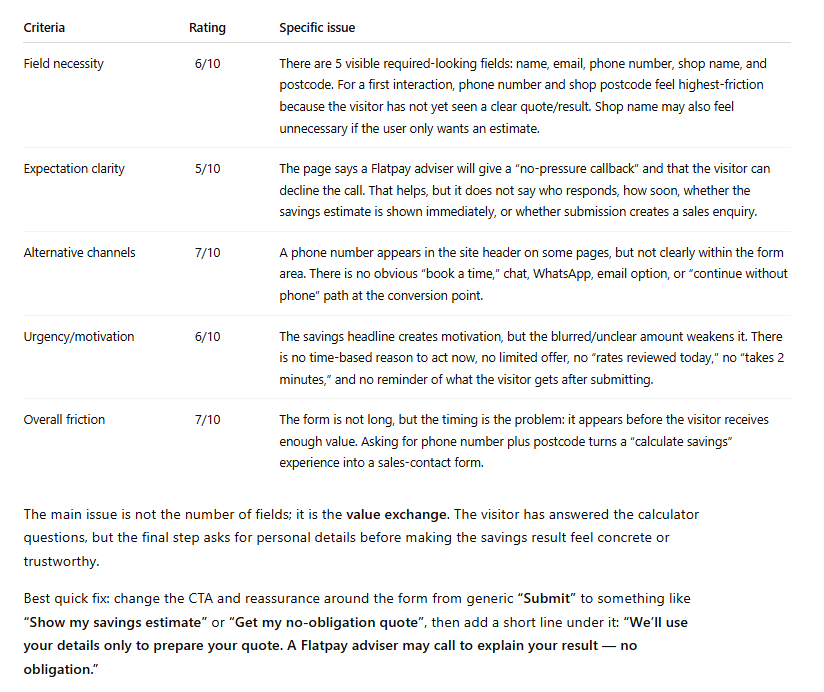
Prompt 4: The Dead Form Diagnosis # Lead Capture Form Diagnosis ## Context This is your final conversion point. A motivated visitor is about to become a lead, or quietly close the tab. ## Your task Evaluate the contact or lead form as a slightly hesitant potential customer who is ready to enquire:
1. Field count: How many fields? Which feel unnecessary for a first interaction? 2. Expectation setting: Does the page explain what happens after submission? Who responds? How soon? 3. Alternatives: Is there any option besides this form (phone, chat, booking link, WhatsApp)? 4. Urgency: Is there a reason to submit now, or could I come back to it later with no consequence? 5. Friction score: Rate 1 (effortless) to 10 (not worth the effort).
What this reveals: Forms are where conversions go to die, and the problem usually isn't the fields themselves. It's the silence around them. No indication of what happens after you submit. No alternative for the person who has a quick question but isn't ready to commit to a form submission. No urgency. Just a form floating on a page, asking for information and offering nothing in return. Our data shows that between 35 and 50 percent of chat conversations start because a visitor saw the form and decided they wanted to talk to a person instead. The form didn't convert them. A conversation did. Flatpay Results:
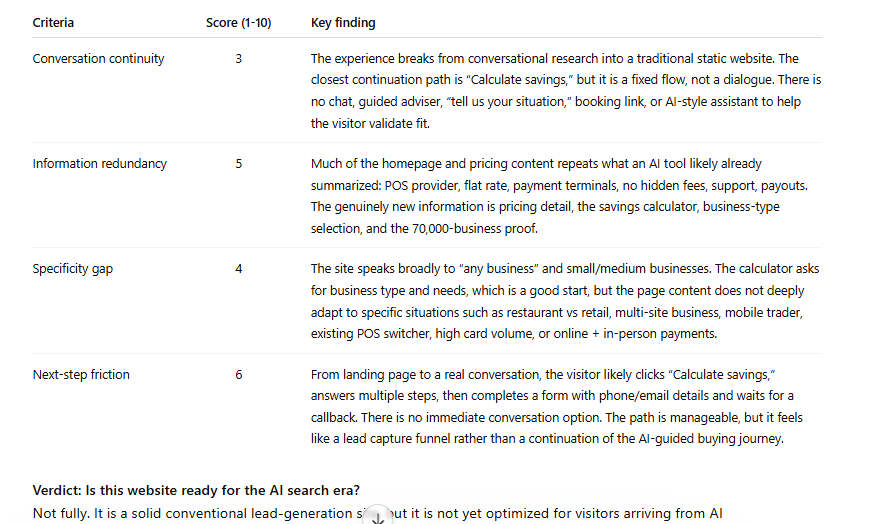
Prompt 5: The AI Search Visitor Test # AI Search Visitor Experience Audit ## Context A growing share of visitors now arrive from AI search tools (ChatGPT, Perplexity, Google AI Overviews, Claude). These visitors have been in a conversational research flow: asking questions, refining needs, receiving personalised guidance. They land here mid-dialogue, having just been told this website looks like a good match for their needs. ## Your task Evaluate these pages as an AI-referred visitor who was just told: "[Company] looks like a good option for your needs."
1. Conversation continuity. Can this visitor continue their dialogue, or does the experience break from conversation to static content? What engagement options exist? 2. Information redundancy. How much of this repeats what the AI tool likely already told them? What is genuinely new here? 3. Specificity gap. The visitor has a refined need. Does the site address specific use cases, or only general claims? 4. Next-step friction How many clicks stand between landing here and having a real conversation about their specific situation?
## Output format | Criteria | Score (1-10) | Key finding | |----------|:---:|-------------| | Conversation continuity | | | | Information redundancy | | | | Specificity gap | | | | Next-step friction | | | Verdict: Is this website ready for the AI search era? Single most impactful change:
What this reveals: An AI-referred visitor has been in an active dialogue. They arrive expecting to continue it. Instead they hit a static page and a form. It's like being mid-conversation with someone, then being walked to a colleague's office where that colleague hands you a clipboard. The AI will almost always point to real-time conversational engagement as the single most impactful change. Results from Flatpay analysis:
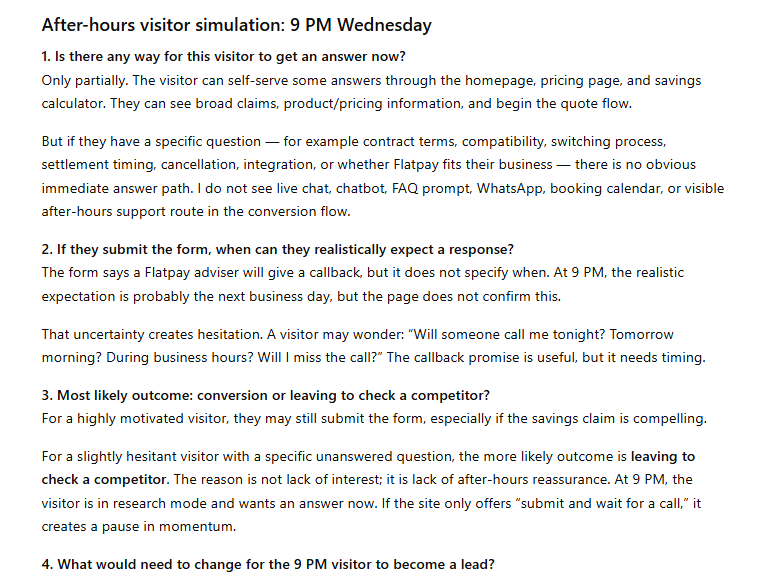
Prompt 6: The After-Hours Visitor Test # After-Hours Visitor Simulation ## Scenario It is 9 PM on a Wednesday. A potential customer lands on this website from a search. They're interested but have a specific question about the service. ## Your task
1. Is there any way for this visitor to get an answer now? 2. If they submit the form, when can they realistically expect a response? 3. What is the most likely outcome: conversion, or leaing to check a competitor? 4. What would need to change for the 9 PM visitor to become a lead?
What this reveals: Between 35 and 50 percent of high-intent traffic arrives outside business hours. The visitor at 9 PM with an urgent question, a pest control problem, an insurance query, a question about a dental procedure, is often your most motivated visitor. They're ready to act. Your website offers them a form that won't be read until tomorrow morning. By then, they've found a competitor who responded immediately. The after-hours visitor rarely shows up in your analytics as a lost lead. They show up as a lead that was never there.
Example from Flatpay conversion analysis. Prompt 6 answer form.
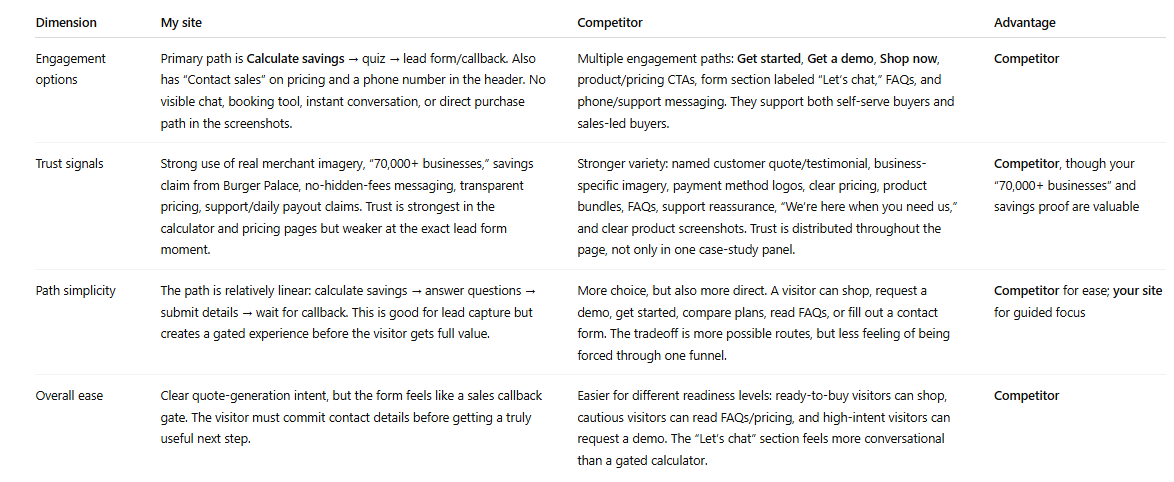
Prompt 7: The Competitor Comparison # Competitive Conversion Comparison ## Context I'm now uploading screenshots from a competitor's website. ## Your task Compare their conversion path to mine across four dimensions:
1. Engagement methods — Do they offer anything we don't? (chat, callback, WhatsApp, instant quote, booking tool) 2. Trust signals — Stronger, weaker, or different in type? 3. Path simplicity — Fewer or more steps to conversion? 4. If you were a potential customer comparing both, which makes it easier to take the next step? Why?
What this reveals: This is the prompt that makes abstract findings feel urgent. When the AI tells you "your competitor has live chat and a 60-second quote promise, you have a contact form," the gap stops being theory. It's a specific competitive disadvantage, described in plain language, sitting in a table. Running this against one or two competitors takes ten minutes. The output is more persuasive than any conversion audit report, because it shows exactly what a visitor experiences when they compare options, and most of the time, they are comparing options.
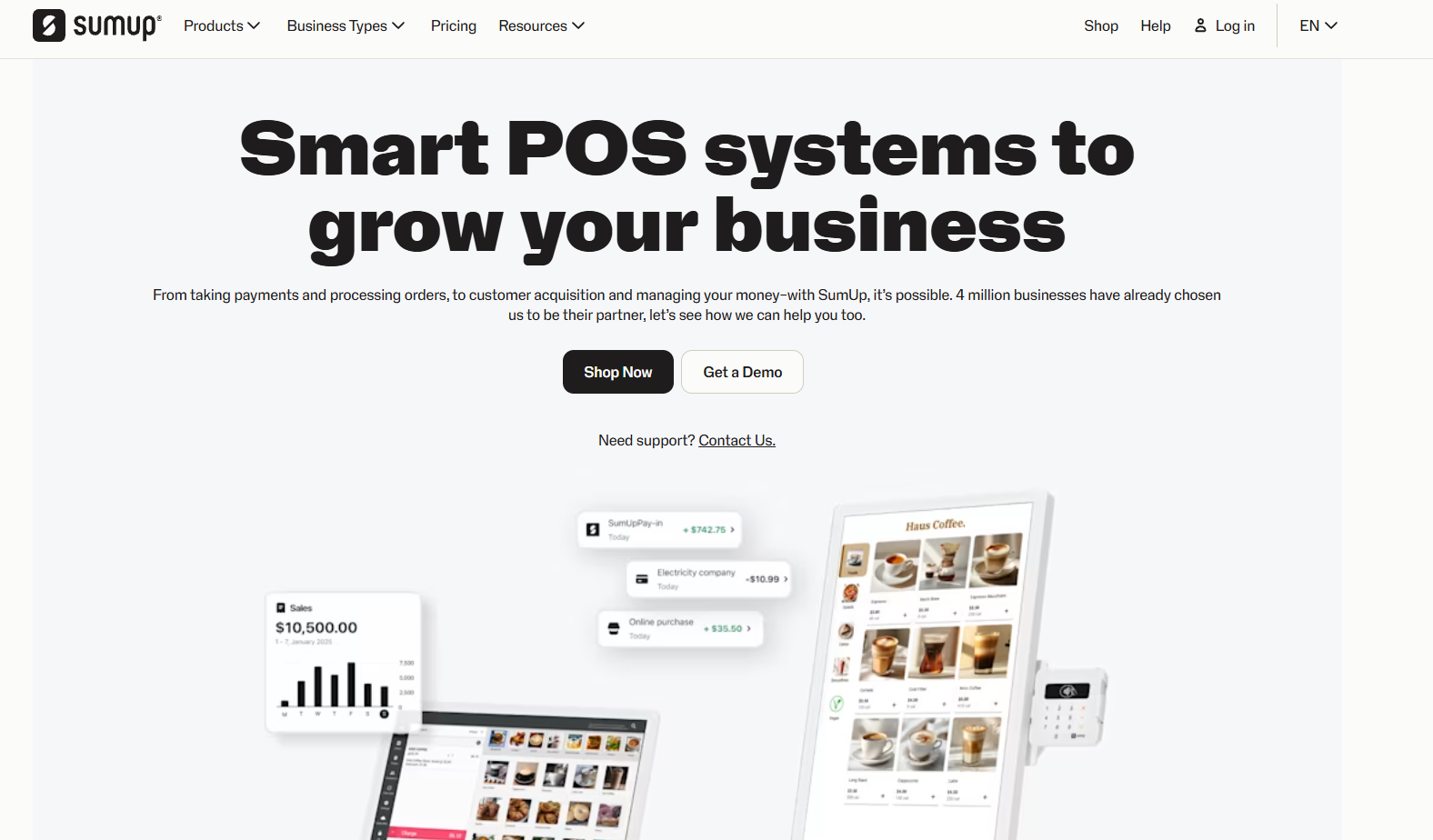
For this competitor comparison we used SumUp.
Response from ChatGPT on this prompt for comparison:
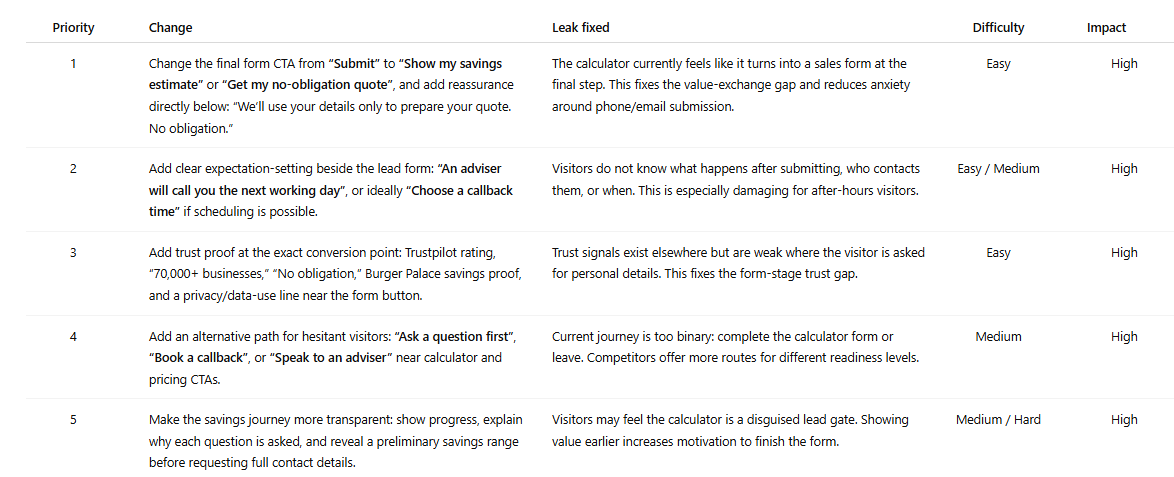
Prompt 8: The Priority Fix List # Prioritised Conversion Fix List ## Your task Based on everything analysed across all pages, give me the 5 most impactful changes to increase leads from this website.
For each recommendation:
1. The specific change 2. Which leak it fixes 3. Difficulty (easy / medium / hard) 4. Potential impact (low / medium / high)
What this reveals: This is the prompt that turns the audit into a to-do list. Flatpay priority fix list:
What to Do With Your Results
Most audits produce one of three finding patterns. Here's how to act on each.
Messaging and CTA inconsistencies. These are quick wins. Align the headline, the button text, and the implied offer across every page in the path so the visitor feels like they're moving through one coherent conversation. This costs nothing and can be done in an afternoon. It's also the change most businesses deprioritise because it doesn't feel significant enough. It is. Trust gaps on conversion pages. Add one or two trust signals directly to your contact page this week. A response-time commitment. A relevant testimonial. A count of businesses you've helped. Visitors about to submit a form need reassurance at that precise moment. Putting it on the homepage instead is like putting the "safe to drink" sign on the bottle rather than the glass. No real-time engagement option. This is the structural finding that shows up in almost every audit and sits at the top of almost every priority list. You have a few honest options: Managing chat yourself during business hours works for some businesses and isn't sustainable for most. An AI chatbot handles FAQ deflection and support reasonably well. It struggles with the nuanced, pre-purchase questions that are actually standing between a visitor and a conversion. It fails at custom lead qualification questions and collecting customer lead information. Managed live chat with human agents available around the clock, including evenings and weekends, is what Weply provides. It's the approach behind more than 250,000 qualified leads generated across our customer base in 2025. If the after-hours prompt produced an uncomfortable answer, it's worth a look.
The standard alternative is hiring a CRO agency. Budget: EUR 3,000 to 8,000. Timeline: four to six weeks. Deliverable: a PDF. The report is usually good. The process is slow, expensive, and produces findings that are already weeks old when they reach you. The process in this guide takes 30 minutes and produces an action plan from your own pages, in your own conversation thread, reviewable immediately. Run it quarterly. Run it after every redesign. Run it whenever traffic goes up and leads don't.
Try Weply for free for 7 days. Get qualifed leads, customer support and insights into the conversations that your webiste visitors have.
Read more
Articles
AI Hub
|
August 26, 2026
|
9
min
10 Best Chat Solutions for Customer Support and Lead Generation in 2026
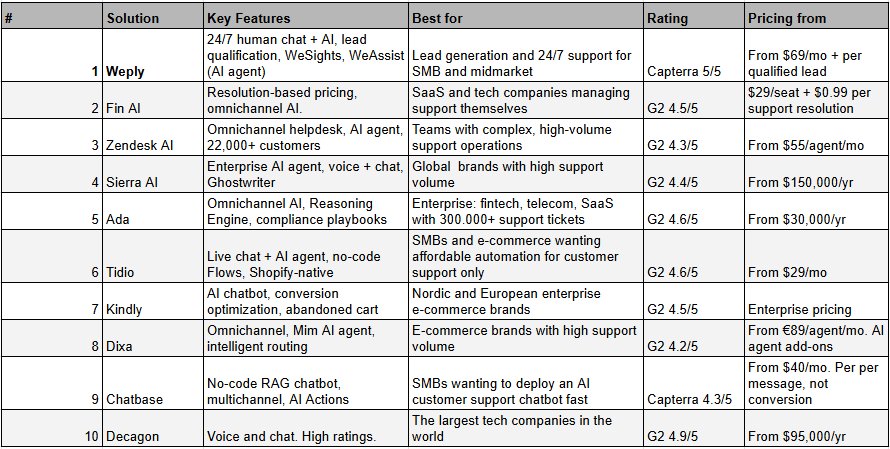
The right chat solution can turn your website traffic into paying customers and lift your customer support from reactive to proactive, or strengthen your lead generation and help grow your business. In the age of AI search having a chat solutions has become even more important. In this guide, we've reviewed the 10 best chat solutions available in 2026, including Weply, Intercom Fin, and Zendesk AI. We've looked at features, pricing, reviewsite ratings, and customer cases, so you don't have to. Here are our three top picks:
Looking for the best chat solution for your business?
Customers expect answers now. 63% of consumers prefer live chat over email or phone, and 46% of all leads are generated outside of normal business hours. With an ever-growing selection of solutions and increasing demands around GDPR compliance, data residency, and 24/7 availability, choosing the right chat solution has never been more important. The right solution helps you:
Convert anonymous visitors into named and qualified leads.
Give customers immediate help, 24/7.
Free up tiem for your team for other, more high-value interactions.
Comply with GDPR and data handling requirements within the EU.
Integrate with your existing CRM, helpdesk or e-com platform.
Why trust Weply?
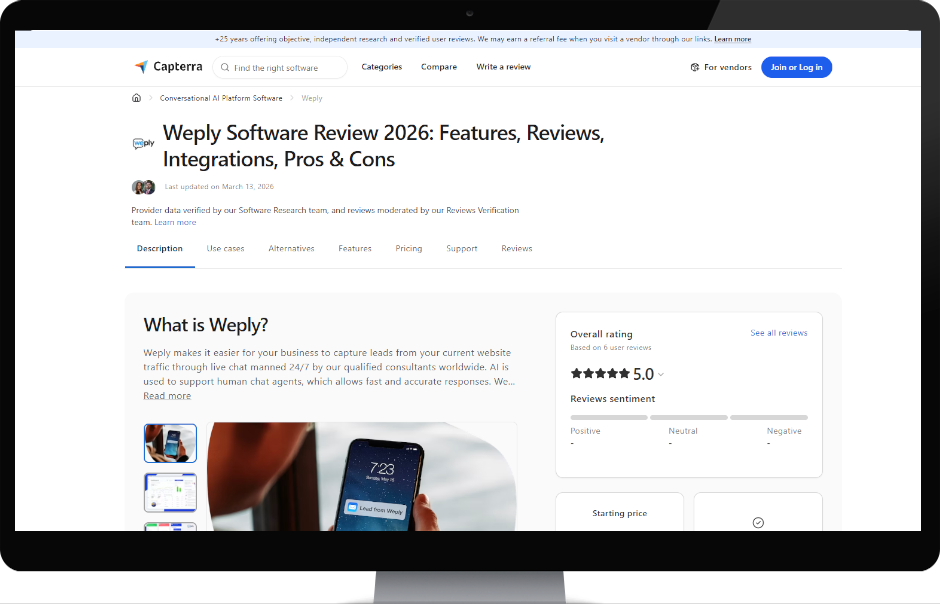
We built Weply because we saw how businesses across Europe were losing potential customers on their websites, either because they had no chat at all, it was only availbale during operating hours, or because they put an AI support chat in front of high intent traffic and think it can convert it to qualified leads. Our platform combines trained chat consultants with AI and we generated over 250,000 qualified leads for more than 2,400 customers in 2025. We know this market inside out, from SMBs to enterprise. That gives us a unique position to evaluate which chat solutions actually deliver on the European and US markets. Finding the right solution is always about understanding your own needs first. Here's how some of our customers rate us:
Now, let's take a look at the 10 best chat solutions for 2026.
Now let's dive into each solution.
1. Weply
Weply is a Nordic 24/7 live chat solution that combines trained human chat consultants, lead conversion experts, with AI technology to generate and pre-qualify leads directly on your website. Founded in 2013 and headquartered in Copenhagen, Denmark, Weply has generated over 250,000 qualified leads for more than 2,400 customers in 2025, making it the largest Nordic operator in hybrid human-AI chat. Weply recently launched WeAssist, a support AI agent that chat consultants can activate for incoming support queries. What sets Weply apart from pure AI solutions is that your customers always interact with a real human being, backed by AI. That means meaningfully higher conversion rates and fewer missed interactions compared to fully automated chatbots. All support responses are also quality-checked by a human in real time, minimising the risk of AI hallucinations and ensuring answers are delivered with human empathy and nuance.
Key Features
24/7 Human Live Chat + AI (WeAssist): Trained chat consultants are available around the clock, complemented by WeAssist AI for standard support queries. You never miss a relevant customer interaction.
Sales-qualified leads delivered to your inbox: Weply pre-qualifies visitors based on your criteria and delivers warm leads, with name, phone number, and relevant context, directly to your CRM or inbox.
AI Co-pilot for internal chat agents: some customer run internal customer support agents using Weply outside normal opening hours or if overloaded, and those agents have access to AI WeAsssist co-pilot.
WeSights our analytics platform: Gives you insight into chat volume, chat context, campaign data, and conversion patterns, so you can continuously optimise your digital marketing, web, and lead strategy.
Dedicated Customer Success Manager: Every customer gets a dedicated CSM who helps with setup, optimisation, and ongoing strategy.
GDPR-compliant and EU-hosted: Data is processed in accordance with GDPR, with servers in the EU and full compliance with the ISO and EU AI Act.
Pricing
Pricing consists of a small monthly subscription starting from $69/mo, covering up to 100 monthly support chats with the WeAssist AI agent included. Beyond that, you pay only for success, a fixed price per qualified lead Weply generates, based on your unique lead qualification criteria. Weply offers a fully free 7-day trial, where all generated leads and answered support queries are free.
Pros
Human touch for your potential and existing customers 24/7, 365 days a year. Customers always talk to a real person, not just a bot.
Experts in lead conversion. If you're already spending money and time driving potential customers to your website, Weply is the only specialist. Typically converts minimum 50–80% more chat visitors into qualified leads than AI chatbots.
WeAssist is included in the subscription price, meaning you get an AI support chatbot verified in real time by humans. At a significantly lower cost than the alternatives.
Plug-and-play setup with CRM integrations, live quickly.
GDPR, AI Act, ISO. Verified with over 2,400 paying customers across the Nordics and Europe.
You get AI where AI is strong (support, but verified by humans) and humans where they're best (qualified lead generation).
Free 7-day trial, no credit card required, no commitment.
Cons
WeSights, the unique chat analytics tool, is an add-on.
Available as chat only, not yet on voice, email, or social channels.
Not ideal for public institutions where all traffic is support-related, or for chat behind a login wall as inside a SaaS support tool.
Rating
Capterra: 5/5. Trustpilot 4.4/5. Businesses consistently highlight that Weply delivers significantly more leads and better lead quality than AI chatbots, alongside 24/7 availability, easy setup, and a very high level of customer service.
2. Intercom Fin
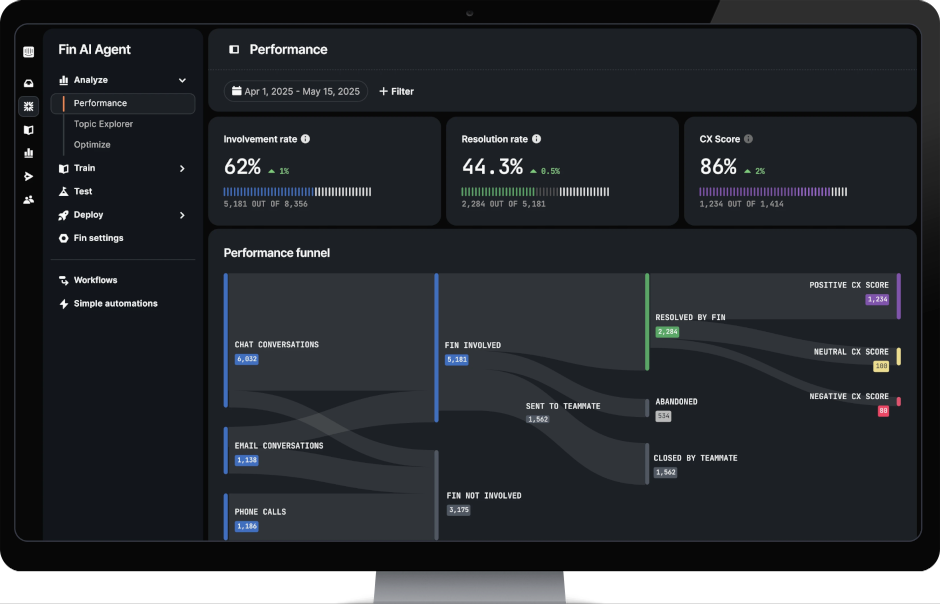
Intercom Fin is Intercom's AI agent, launched in 2023 and now one of the most widely deployed AI support platforms globally. Fin states it resolves an average of 60% of all queries automatically and supports all major channels: email, live chat, WhatsApp, Messenger, SMS, and voice.
Key Features
Outcome-based AI agent: Fin receives queries, responds using your knowledge base, and escalates to your support team when needed.
Omnichannel out-of-the-box: Fin works across email, live chat, WhatsApp, Messenger, SMS, and voice from a single platform.
Fin Copilot (agent assist): AI assistant for human agents in the inbox, generates reply suggestions, summarises case history, and retrieves knowledge in real time. $35/user/mo add-on.
AI-driven simulations and performance insights: Test Fin's performance against historical tickets before going live, and receive ongoing improvement recommendations.
Integrations: 450+ integrations including Shopify, Salesforce, Zendesk, and HubSpot.
Pricing
Fin AI Agent: $0.99 per resolution (min. 50 resolutions/mo = $49.50). Copilot is $35/user/mo as an add-on.
Example: 1,000 Fin resolutions/mo = $990 on top of seat costs. For 10 agents on the Advanced plan ($85/seat), the monthly total is approximately $1,840.
Pros
Outcome-based model is fair: you pay only for success.
Works standalone alongside Zendesk, Intercom and Salesforce.
Strong for SaaS and B2B support teams that manage their own helpdesk.
Cons
Pricing scales aggressively at high volumes: 1,000 resolutions/mo = $990 in AI costs alone.
Requires internal setup and optimisation. No dedicated CSM on lower plans.
Not suited for active lead generation, only customer support.
Fin Copilot is a paid add-on.
Some G2 reviewers report that what Intercom counts as a "resolution" doesn't always match real-world outcomes.
Rating
G2: 4.5/5. Users praise the modern interface and automation rate. Most criticism: pricing scales unpredictably, and advanced features require expensive plans.
3. Zendesk AI
Zendesk is still the world's most widely used customer service platform, with 22,000+ support teams globally and a well-established enterprise presence. Zendesk's AI capabilities including AI agents (chatbots), Copilot for human agents, and intelligent triage, are layered on top of its core omnichannel helpdesk and have been significantly expanded since 2024. Zendesk is used by teams ranging from fast-growing SaaS companies to large enterprise organisations across every industry. Zendesk's core strength is organisational scale: it handles email, live chat, voice, WhatsApp, Instagram, Facebook Messenger, X, and web forms in a single agent workspace, and routes tickets intelligently across large agent pools.
Key Features
AI agents and intelligent triage: Built-in AI agents handle common queries using your help centre content and can take basic actions.
Omnichannel unified workspace: Email, live chat, phone, WhatsApp, social media, and web forms in a single agent view. Routing ensures tickets reach the right agent based on skills, language, and current load.
Zendesk AI Copilot: Agent-side AI that suggests replies, surfaces relevant knowledge articles, and summarises long ticket threads in real time.
Knowledge base and help centre: AI-powered content suggestions for help centre articles, and a self-service portal that deflects tickets before they reach your support team.
Analytics and reporting: Pre-built dashboards and, on higher tiers, Explore for custom reports tracking response time, resolution rate, CSAT, and agent performance.
Pricing
Suite Team: $55/agent/mo (annual). Basic multichannel ticketing, help centre, AI agents with limited resolutions.
Suite Professional: $115/agent/mo (annual). Skills-based routing, community forums, HIPAA compliance, custom analytics.
Suite Enterprise: From $169/agent/mo (annual, negotiated). Custom agent roles, sandbox, advanced data protection.
Advanced AI add-on: ~$50/agent/mo extra. Required for Copilot, advanced triage, and generative AI features.
AI Agent resolutions: $1.50 per automated resolution (committed volume) or $2.00 pay-as-you-go.
For a 20-agent team on Suite Professional with Advanced AI, total annual cost approaches $40,000 before implementation.
Pros
The most established customer support platform globally. Deep integration ecosystem and proven enterprise track record.
Strong at scale: skills-based routing, SLAs, and omnichannel work well for 15+ agent teams.
Cons
Advanced AI features require a separate $50/agent/mo add-on.
Own support quality criticised consistently on G2: slow response times and link-heavy replies.
Some G2 reviewers describe being oversold during the buying process, real-world AI performance fell short of what was promised.
Per-agent pricing model means costs scale directly with headcount, with no outcome-based option on core plans. Expensive option.
Rating
G2: 4.3/5 (6,800+ reviews). Satisfaction correlates strongly with team size: large, multi-channel support teams tend to find the cost justified; smaller teams often feel they're paying for features they don't use.
4. Sierra.ai
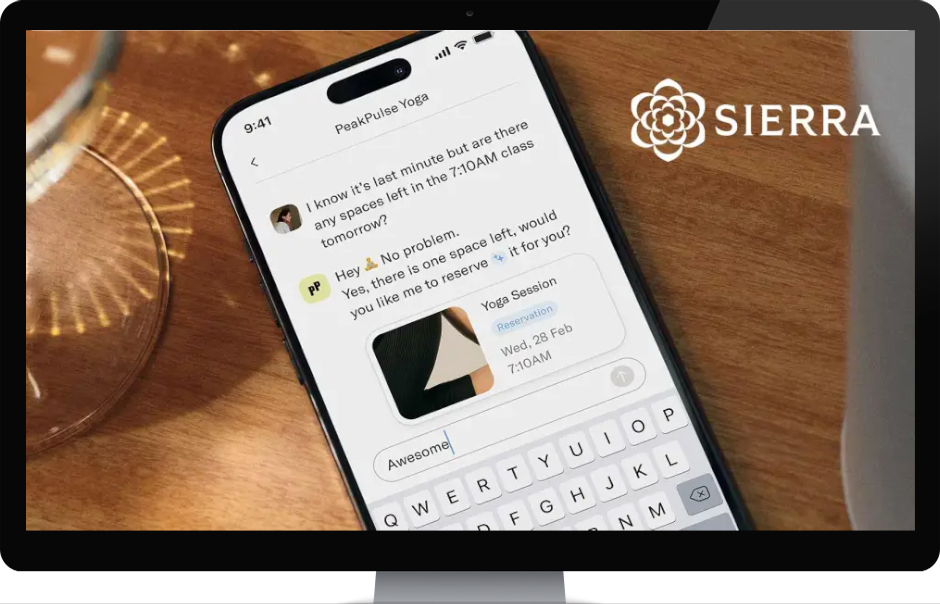
Sierra.ai is an American enterprise AI company founded in 2023 by Bret Taylor (former co-CEO of Salesforce and current chairman of OpenAI's board) and Clay Bavor. Sierra has raised $950 million to date and is one of the most discussed AI companies globally. Sierra's customers include Sonos, SiriusXM, Weight Watchers, ADT, and Casper. The platform is built for large consumer brands with high inbound support volume across chat and voice.
Key Features
Empathetic AI agents: Sierra's agents are designed to mirror your brand's voice and tone precisely, handling complex interactions like returns, subscription changes, and account management autonomously.
Agent Studio + Agent SDK: No-code workflow builder for CX teams (Agent Studio) and a developer-focused SDK for custom integrations.
Ghostwriter: Automatically generates production-ready AI agents from SOPs, call transcripts, audio recordings, and whiteboard photos. Also runs an automatic improvement loop based on live interactions.
Multi-model "Constellation" architecture: Uses multiple AI models in parallel for accuracy-checking, reducing hallucination, but can introduce latency (700ms+) in voice environments.
Voice + chat across channels: Sierra's agents support web chat, mobile apps, and voice.
Pricing
Sierra publishes no pricing and has no pricing page. All contracts are enterprise agreements. Third-party estimates:
Annual contracts from $150,000+.
Implementation and onboarding fees: $50,000–$200,000.
Outcome-based model: payment per successful resolution (rate confidential, but with minimum commitment volumes).
Pros
One of the world's leading chat and voice agents for support.
Pricing makes it exclusive to the largest enterprises. SMBs and mid-market are entirely excluded.
Long and technically complex implementation.
Support only. No real lead generation capability.
Rating
G2: 4.4/5. Users praise the intuitive interface and empathetic AI interactions. Most common criticism: high price with unclear ROI, steep learning curve during onboarding.
5. Ada
Ada is an enterprise AI customer service platform founded in Toronto in 2016 by Mike Murchison and David Hariri. Ada has raised $200M+ and serves 350+ enterprise customers including Monday.com, Pinterest, Verizon, and YETI. The platform is built for high-volume, omnichannel AI deflection in industries including financial services, e-commerce, telecommunications, and SaaS. Ada's 2026 platform centres on its "Reasoning AI" which are agents that understand intent, follow compliance-sensitive playbooks, and execute multi-step workflows across chat, email, voice, SMS, and WhatsApp from a single platform.
Key Features
Reasoning AI engine: Ada's agents understand customer intent and follow structured playbooks, including compliance-sensitive flows for regulated industries, rather than simple script logic. Claims to resolve 80%+ of inquiries automatically.
Omnichannel coverage: Chat, email, voice, SMS, WhatsApp, and social messaging managed from a single platform. Handoff integrations with Zendesk, Salesforce, Freshworks, Genesys, Dixa, Gorgias, and more.
Coaching and feedback loops: Platform managers can provide precise, surgical guidance to the AI agent through a coaching interface, and verify outcomes through test scenarios before going live.
SOP-based playbooks: Ada can follow complex, multi-step workflows, including triggering refunds, extensions, or system updates, based on standard operating procedures. Well-suited to regulated industries.
Enterprise security: SOC 2 Type II, HIPAA, GDPR, and PCI compliant. Zero Data Retention option with all LLM providers.
Pricing
Ada does not publish pricing. Estimates from third-party sources:
Starting from ~$30,000/year.
Pricing model: typically $1–$3.50 per AI resolution, based on resolved conversations.
Pros
Strong omnichannel coverage across 10+ channels from a single platform.
Coaching interface gives platform managers strong control over AI behaviour.
Cons
Implementation timeline is measured in months.
Only for large global enterprises.
Pricing scales aggressively at high volume.
Rating
G2: 4.6/5. Platform administrators rate Ada highly for ease of use and coaching capability. Negative sentiment on Trustpilot: 1.8/5.
6. Tidio + Lyro
Tidio is a live chat and AI support platform primarily serving small businesses and e-commerce stores. Founded in Poland in 2013 and used by 300,000+ businesses globally, Tidio combines live chat, ticketing, a no-code chatbot builder and Lyro, its conversational AI agent, in a single platform. Tidio is particularly popular with Shopify merchants and SMBs that want to start with live chat and gradually layer in automation without switching tools.
Key Features
Lyro AI agent: Conversational AI that answers common customer questions based on your support content. Handles handoff to human agents when needed.
No-code Flows builder: Drag-and-drop chatbot builder for creating automated conversation paths: product recommendations, lead capture, FAQ automation, and more .
Live chat with live typing preview: Agents can see what customers are typing before they hit send, allowing faster, more prepared responses.
Multichannel inbox: Manages website chat, email, Instagram, Messenger, and WhatsApp in a single unified inbox.
Pricing
Starter: From $29/mo (annual). Includes live chat, ticketing, basic automation.
Growth: From $59/mo (annual). Includes Lyro AI conversations and advanced Flows.
Lyro AI add-on: Can be purchased separately from $39/mo for additional AI conversation quotas.
Pros
Among the most affordable live chat + AI combinations on the market for SMBs.
Conversation-based pricing is more predictable than per-seat models for smaller teams.
Very fast to set up. Live in minutes. Strong Shopify native integration.
Cons
Data processing: primarily EU-based, but some data is also transferred to the US.
Not well-suited for complex enterprise workflows, SLA management, or large multi-team operations.
Very limited lead generation capability. Can only be used for customer support.
Rating
G2: 4.6/5. Users consistently highlight ease of setup and Shopify integration. Most criticism relates to some agreesive prices increases.
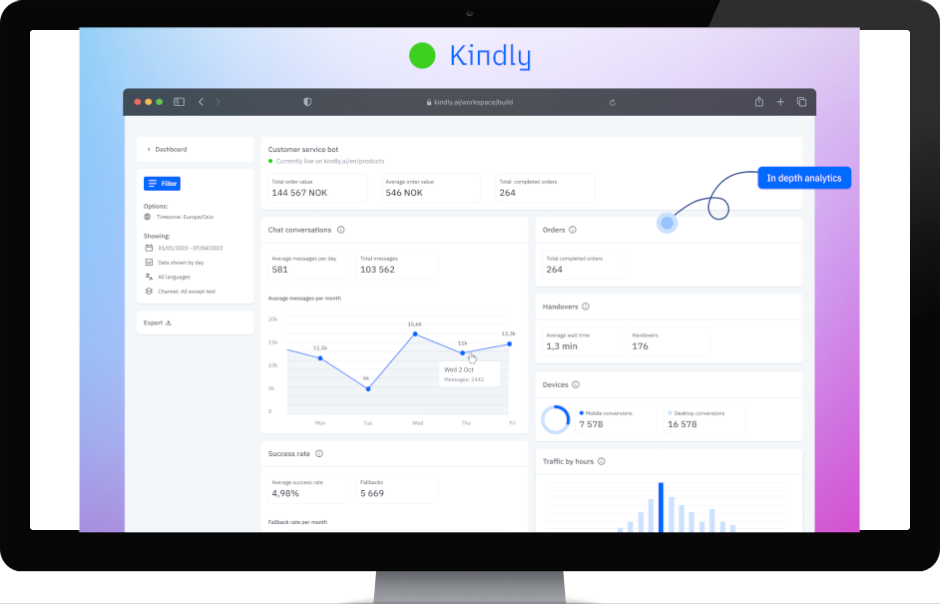
7. Kindly
Kindly is a Nordic AI chatbot platform founded in Oslo in 2016 and one of Europe's leading conversational AI providers for enterprise e-commerce and customer service.
Key Features
Generative AI chatbot with multilingual training: Train the chatbot in one language and it understands queries in 100+ languages automatically. Nordic language expertise is a core competency.
Conversion optimisation and abandoned cart: Kindly's platform can increase conversion rates by up to 12% and automates abandoned cart messages.
Visual product carousel in chatbot: Enables product search and displays products directly within the chat interface based on selections made in the chatbot.
Simple customisation without coding: No code required to match the chatbot to your brand identity, tone, and layout.
Support automation: Automates up to 80% of customer inquiries according to themselves.
Pricing
Kindly does not publish pricing. All agreements are reached via direct contact. Enterprise prices.
Pros
Deep Nordic and European market presence with proven language expertise.
Unique combination of AI chatbot, conversion optimisation, and support automation in one platform.
No public pricing. Expensive and only for enterprises.
Primary focus on e-commerce. Not tailored for public sector or regulated industries.
Only for customer support. Not suited for active lead generation.
Rating
G2: 4.9/5. Users highlight easy implementation, Nordic language expertise, and high automation rates.
8. Dixa
Dixa is a Danish-founded customer experience platform aimed at e-commerce brands that want to consolidate all customer communication in one system. Dixa is used by 850–1,000+ brands across 42 countries, including Rapha, Hobbii, Mejuri, and Miinto. In 2025, Dixa launched Mim, an agentic AI agent.
Key Features
Mim AI Agent: Dixa's AI agent handles end-to-end customer interactions, including order lookup in Shopify and Magento, refunds, and self-service, with intelligent escalation to interrnal human agents.
E-commerce focused: Built exclusively for e-commerce companies, with features and integrations tailored to these specific workflows.
Omnichannel native: Phone, email, live chat, WhatsApp, Instagram, Facebook Messenger, and SMS in a single Team Hub.
Intelligent routing and Flow Builder: Drag-and-drop routing engine that assigns interactions to the right agent based on skills, language, and workload.
Shopify + Magento + WooCommerce integrations: Deep e-commerce integrations mean agents see order history directly within the conversation window.
Pricing
Growth: From €89/agent/mo. All channels included.
Ultimate: From €139/agent/mo. Adds various AI features.
Prime: From €179/agent/mo. Enterprise functionality including SSO.
Mim AI agent is an additional cost on all plans.
Pros
All channels included as standard.
Danish-founded with strong Nordic support and understanding of European data requirements.
Mim AI Agent is one of the market's most mature agentic AI solutions for e-commerce.
Cons
Built specifically for e-commerce brands. Limited or no relevance for other verticals.
Mim AI agent access costs extra on top of the base subscription.
AI copilot is also an add-on.
Rating
G2: 4.2/5. Users praise the user-friendly interface and customer support, but criticise long contracts and minimum seat requirements.
9. Chatbase
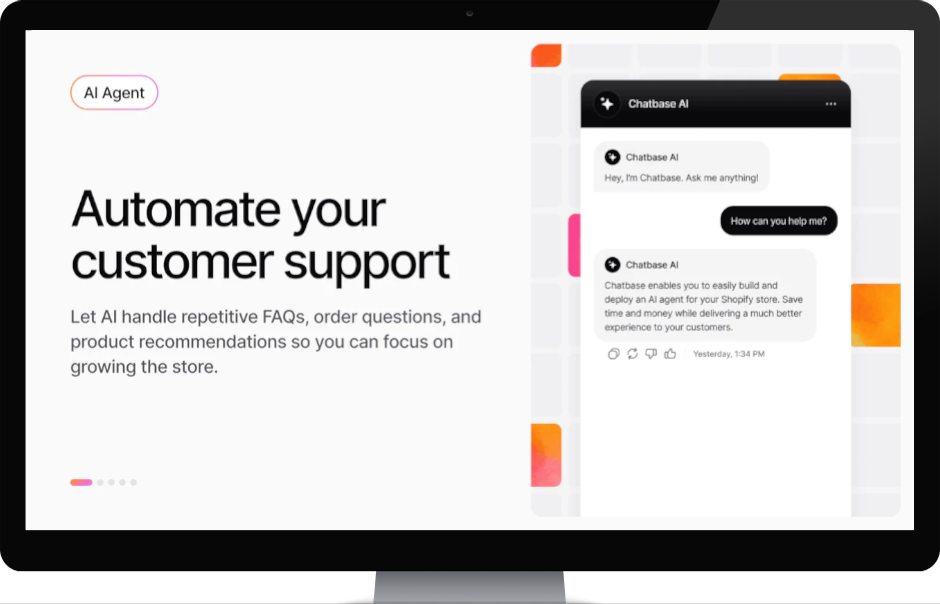
Chatbase is a no-code AI chatbot builder used by over 10,000 businesses globally. Chatbase lets you train an AI chatbot on your website, PDF documents, Notion pages, and internal knowledge sources, and deploy it on websites, Shopify, email, WhatsApp, Instagram, Facebook, and Slack. It is designed for SMBs and teams that want AI support without programming or developer resources.
Key Features
RAG-based knowledge training: Upload PDFs, link to URLs, or Notion pages. Chatbase automatically builds a knowledge foundation and uses it to answer queries accurately with source references.
Multichannel deployment: Deploy your chatbot on your website with a script tag, or connect to Shopify, WhatsApp, Instagram, Facebook Messenger, and Slack via native integrations.
AI Actions: The chatbot can take real actions via API as booking meetings in Calendly, updating subscriptions in Stripe, and so on.
Flexible AI model selection: Choose between economy LLM models (GPT-4o Mini, Claude Haiku) and premium models (Claude Sonnet) depending on quality and cost requirements.
Pricing
Prices start from $40/mo. You pay additional credits when your usage exceeds the amount included in your plan.
Note: Chatbase uses "messages" rather than "chat conversations" as its consumption metric. A single conversation can contain many messages, which can be difficult to control and therefore forecast costs. In theory one single chat can eat your entire budget.
Pros
Fastest time-to-live of any solution in this guide.
Multichannel deployment without any coding.
Flexible model selection (GPT-4o, Claude Haiku/Sonnet/Opus).
Cons
The free plan deletes the chatbot after 14 days of inactivity. Unreliable for production use.
Limited workflow logic. Not suited for complex escalation flows or multi-step automation.
Output quality depends heavily on which AI models you choose. The best models can make the solution expensive very quickly.
Priced per message, not per conversation. Many add-ons may be required.
Good for customer support. Not in the same league as Weply for active lead generation.
Data is processed in the US. Not EU compliant for most EU-based companies.
Rating
Capterra 4.3/5. Users praise easy setup and quick deployment. Most common criticism: pricing climbs quickly on higher plans and workflow capabilities are limited compared to alternatives.
10. Decagon
Decagon is an American enterprise AI customer service platform founded in 2023. Decagon has raised $481M across five rounds, reaching a $4.5B valuation in January 2026, and was named to the Forbes AI 50 list. Its customer list includes 100+ enterprise customers to date. Decagon's core concept is that AI agents should work like employees, not tools.
Key Features
Agent Operating Procedures (AOPs): Define agent workflows in natural language. A non-technical support manager can write instructions like "If a customer asks for a refund over $100, verify their purchase date and escalate to billing", and the AI follows that logic precisely, with full audit trails.
Decagon Voice 2.0: Inbound and outbound voice with sub-second latency, customisable tone and speed, interruption handling, and branded caller IDs.
Cross-channel memory: If a customer starts in chat and later calls, the voice agent already knows what was discussed. No information repeated, no disconnected experiences across channels.
Continuous self-learning: Decagon agents learn from new tickets and human replies, updating their own knowledge without manual retraining.
Enterprise security and version control: SOC 2 compliant, data residency options, strict guardrails for sensitive operations (identity verification, refunds).
Pricing
Esitamted annual platform fee: ~$50,000/year, regardless of usage volume.
Per-conversation fee: ~$0.99/conversation on top of the platform fee.
Effective starting cost: ~$95,000/year total. Median enterprise spend is estimated at ~$400,000/year at scale.
No public pricing page. All contracts are enterprise agreements with custom volume terms.
Pros
Voice 2.0 with sub-second latency and outbound capabilities is a genuine differentiator vs Sierra and Ada.
AOPs make complex workflow logic accessible to non-technical teams without sacrificing precision.
Very strong customer references for SaaS and tech enterprises globally.
Cons
Pricing makes it inaccessible for all but the largest tech enterprises.
Choosing the right chat solution for your business
The best chat solution depends on your company's size, industry, and primary purpose, whether that's lead generation, customer support, or both.
Do you need lead generation, because some of the traffic you drive to your website is genuinely purchase-ready? Then Weply is the only solution on this list that specialises in it, offering 24/7 human-led lead qualification backed by AI.
Are you a SaaS or tech company running your own helpdesk? Intercom Fin is a strong choice, with its outcome-based pricing and solid resolution rates.
Is your business an international enterprise with high support volume? Sierra.ai or Decagon are the natural candidates.
Are you an e-commerce brand wanting quick, affordable AI support? Tidio + Lyro is the best entry-level option.
Most visitors to a live chat prefer talking to a human. If you want to satisfy both potential and existing customers on that dimension, Weply is the only solution offering a hybrid between real human experts and a controlled AI agent, for both lead generation and support.
Whatever you choose, the most important thing is to start. Try Weply free for 7 days, no credit card, no commitment, and see what it means for your conversion rate and customer support this week.
FAQ: Chat Solutions for Support and Lead Generation
What is the best chat solution for lead generation?
Weply is the only chat solution in this guide specifically built for lead generation. The platform combines trained human chat consultants with AI agents and is available 24/7, including outside business hours, where 46% of all leads arise. With 2,400+ customers and 250,000+ leads generated in 2025, it's the most documented solution for active lead generation in Europe.
How much does a chat solution cost for a business in 2026?
Pricing varies significantly depending on solution type. Solutions are typically priced as a combination of a subscription and an outcome-based fee (per qualified lead or per resolved conversation). Enterprise platforms like Sierra.ai and Ada start from $30,000–$150,000+/year. SMB solutions like Weply start from $69/mo + per lead, while Tidio starts from $29/mo and Chatbase from $40/mo.
What's the difference between an AI chatbot and a live chat solution?
An AI chatbot answers questions automatically based on pre-programmed rules or AI training from your content. A live chat solution connects visitors to real team members in real time. Hybrid solutions like Weply combine both: AI handles standard queries with human experts in the loop and as the sender of every message, while human consultants take over complex conversations and real lead qualification and lead capture. The human layer ensures empathy, nuance, and accuracy in every response, as well as outperform AI on lead generation by 2x.
Which chat solution is best for e-commerce brands?
For e-commerce, Dixa and Kindly are strong choices depending on scale and geography. Dixa is built exclusively for e-commerce with all channels included as standard and a mature AI agent (Mim). Kindly offers deep European language expertise and strong conversion optimisation tools, with proven results at Elkjøp across the Nordics. For e-commerce companies selling high-value products, where lead qualification matters as much as support, Weply is commonly used as a complement.
Are AI chatbots GDPR-compliant?
Most professional chat solutions are GDPR-compliant, but data residency varies. Weply, Dixa, and Kindly store data on EU servers and are built with European data requirements in mind. Intercom, Zendesk, Chatbase, and Tidio are also GDPR-compliant, but may process data in the US under standard contractual clauses unless EU hosting is specifically selected on enterprise plans. Ada and Sierra offer EU hosting on enterprise agreements.
Can a chat solution replace my customer service team?
No, and it shouldn't. The best chat solutions free your team from repetitive, low-value queries so they can focus on complex cases and relationship-building. The hybrid model , AI for volume, humans for value, consistently produces the highest customer satisfaction scores. Weply's approach takes this further: humans remain in the loop on every AI-assisted support response, ensuring quality and empathy at every touchpoint.
|
June 24, 2026
|
9
min
8 Beste Chattløsninger for Kundesupport og Leadgenerering i Norge 2026
Sammendrag
Riktig chattløsning kan forvandle trafikken på nettstedet ditt til betalende kunder, og løfte kundesupporten fra reaktiv til proaktiv, eller styrke leadgenereringen og bidra til å vokse bedriften din. I denne guiden har vi gått gjennom de 8 beste chattløsningene på det norske markedet i 2026. Vi har sett på funksjoner, priser, G2-rangeringer og kundecaser, slik at du slipper å gjøre det selv. Her er våre tre toppvalg:
Leter du etter den beste chattløsningen for det norske markedet?
Norske forbrukere forventer svar nå. 63 % foretrekker live chat fremfor e-post eller telefon, og 46 % av alle leads genereres utenfor vanlig kontortid. Med et stadig større utvalg av løsninger og økende krav til GDPR-etterlevelse, norskspråklig support og lokal forankring, er valget av riktig chattløsning viktigere enn noen gang.
Den riktige løsningen hjelper deg med å:
Konvertere anonyme besøkende til navngitte, kvalifiserte leads.
Gi kundene øyeblikkelig hjelp. Også kl. 23 om kvelden.
Frigjøre medarbeiderne dine til komplekse supporthenvendelser.
Overholde GDPR med databehandling i EU.
Integrere med eksisterende CRM, netthandelsplattform og helpdesk.
Hvorfor stole på Weply?
Vi bygde Weply fordi vi så hvordan nordiske bedrifter mistet potensielle kunder på nettstedene sine, enten fordi de manglet chat, eller i de timene ingen var tilgjengelig. Vår plattform kombinerer opplærte chattkonsulenter med AI og genererte over 250.000 kvalifiserte leads til mer enn 2.500 nordiske og internasjonale kunder i 2025. Vi kjenner dette markedet ut og inn. Fra SMB til enterprise. Det gir oss et unikt utgangspunkt for å vurdere hvilke chattløsninger som faktisk leverer kvalitet i det norske markedet. Å finne riktig løsning handler alltid om å forstå egne behov og ønsker.
Slik vurderer noen av kundene våre oss:
La oss nå ta en titt på de 8 beste chattløsningene for det norske markedet.
La oss nå dykke ned i hver enkelt løsning.
1. Weply
Weply er en nordisk 24/7 live chat-løsning som kombinerer opplærte menneskelige chattkonsulenter, leadkonverteringseksperter, med AI-teknologi for å generere og forhåndskvalifisere leads direkte på nettstedet ditt. Selskapet ble grunnlagt i 2013 og har hovedkontor i København. Med mer enn 2.500 kunder og 250.000+ genererte leads i 2025 er Weply den største nordiske aktøren innen hybrid human-AI-chat. Nylig lanserte Weply WeAssist, en support-AI-agent som chattkonsulenter kan aktivere ved supporthenvendelser.
Det som skiller Weply fra rene AI-løsninger er at kundene dine alltid møtes av et ekte menneske, støttet av AI. Det betyr vesentlig høyere konverteringsgrader og færre tapte henvendelser sammenlignet med helautomatiserte chatboter. Alle supportsvar kvalitetssikres i tillegg av et menneske i sanntid, noe som minimerer risikoen for hallusinasjoner, og sikrer at svarene leveres med menneskelig empati og nyanser.
Nøkkelfunksjoner
24/7 menneskelig live chat + AI (WeAssist): Opplærte chattkonsulenter er tilgjengelige døgnet rundt, supplert av WeAssist AI for å håndtere standardhenvendelser. Du går aldri glipp av en relevant kundehenvendelse.
Salgskvalifiserte leads direkte i innboksen: Weply forhåndskvalifiserer besøkende basert på dine kriterier og sender varme leads, med navn, telefonnummer og relevant kontekst, direkte til CRM-et ditt eller innboksen.
WeSights analyseplatform: Gir deg innsikt i chattvolum, chattkontekst, kampanjedata og konverteringsmønstre, slik at du kan optimalisere din digitale markedsførings-, web- og leadstrategi løpende.
Dedikert Customer Success Manager: Alle kunder får en fast CSM som hjelper med oppsett, optimalisering og løpende rådgivning.
GDPR-kompatibel, ISO-sertifisert og nordisk forankring: Data behandles i henhold til GDPR, og selskapet er registrert i Danmark med virksomhet i hele Norden.
Priser
Prisen består av et lite månedlig abonnement som starter fra 599 NOK og dekker opp til 100 månedlige supportchatter, der AI-agenten WeAssist er inkludert. I tillegg betaler du bare per suksess: En fastpris per kvalifisert lead som Weply genererer, basert på hvert selskaps unike leadkvalifikasjonskrav. Weply tilbyr en helt gratis prøveperiode på 7 dager, der alle leads som genereres og supporthenvendelser som besvares er gratis for deg.
Fordeler
Menneskelig touch til dine potensielle og eksisterende kunder 24/7, 365 dager i året. Kunder snakker alltid med et ekte menneske, ikke en AI-bot.
Eksperter på leadkonvertering. Normalt konverterer Weply opp til 50–80 % flere chattbesøkende til kvalifiserte leads enn AI-chatboter.
WeAssist er inkludert i abonnementsprisen, noe som betyr at du får en AI-support-chatbot styrt og verifisert i sanntid av mennesker til en mye lavere pris enn alternativene.
Plug-and-play-oppsett, integrasjoner til CRM, live på kort tid.
Dedikert Customer Success Manager alltid inkludert, hjelper bedrifter med å oppnå best mulig resultater.
Nordisk forankring, GDPR, AI Act, ISO. Verifisert med over 2500 betalende kunder.
Du får AI der AI er sterk (supporten, men verifisert av mennesker) og mennesker der vi er best (leadgenerering).
Prisgunstig. Abonnement fra 599 kr og du betaler deretter bare per kvalifisert lead.
Gratis prøveperiode i 7 dager helt uten binding.
Ulemper
WeSights, det unike chatt-analyseverktøyet, er et tilleggskjøp.
Tilgjengelig kun som chat. Ikke voice, e-post eller sosiale kanaler.
Ikke ideell for offentlige institusjoner der all trafikk er supportrelatert, eller hvis du vil ha chat bak innlogging kun for eksisterende kunder i et SaaS-verktøy.
Rangering
Capterra: 5/5. Trustpilot Norge4.5/5: Bedrifter trekker konsekvent frem at Weply leverer markant flere leads og med bedre leadkvalitet enn AI-chatboter. De nevner også 24/7-tilgjengeligheten, enkelt oppsett og svært høyt servicenivå.
2. Kindly
Kindly er en norsk AI-chatbotplattform grunnlagt i 2016 i Oslo og en av Europas ledende leverandører av konversasjons-AI for netthandel og kundeservice for enterprises. Kindly er dypt forankret i det nordiske markedet med kunder som Elkjøp, Norwegian Air, og DNB.
Nøkkelfunksjoner
Generativ AI-chatbot med flerspråklig trening: Tren chatboten på ett språk og den forstår henvendelser på 100+ språk automatisk.
Konverteringsoptimalisering og forlatt handlekurv: Kindlys plattform øker konverteringsgraden med opptil 12 % for netthandel og automatiserer meldinger om forlatte handlekurver.
Visuell produktkarusell i chatbot: Muliggjør produktsøk og viser produkter direkte i chattgrensesnittet basert på valg gjort i chatboten, ideelt for netthandelsselskaper.
Enkel tilpasning uten koding: Ingen kodekunnskap kreves.
Automatisering av supporthenvendelser: Automatiserer kundehenvendelsene.
Priser
Kindly publiserer ingen priser på nettstedet sitt. Alle avtaler inngås via direkte kontakt. Enterprise-fokus.
Fordeler
Norsk selskap, grunnlagt i Oslo. Dyp nordisk markedsnærvær og språkekspertise.
Unik kombinasjon av AI-chatbot, konverteringsoptimalisering og supportautomatisering i én plattform.
Sterke norske kundecaser: Elkjøp, Norwegian Air, Kahoot, DNB, OBOS.
Ulemper
Ingen offentlige priser, krever offertprosess, enterprise-fokus.
Boost.ai er en norsk enterprise-AI-plattform og er Gartner Magic Quadrant Leader 2025 for Conversational AI Platforms. Boost.ai er særlig godt forankret i det norske markedet: DNB, SpareBank 1 SR-Bank, SpareBank 1 Østlandet, Nordea og Telenor er alle norske referansekunder med dokumenterte resultater.
Nøkkelfunksjoner
No-code conversation builder: Ikke-tekniske team kan bygge og vedlikeholde komplekse samtalemodeller med dra-og-slipp, ingen koding kreves.
Hybrid NLU + LLM-arkitektur: Boost.ai kombinerer tradisjonell NLU-nøyaktighet med generativ AI-fleksibilitet. Selskaper kan styre nøyaktig når LLM-genererte svar brukes. Avgjørende for compliance i regulerte bransjer.
Selvlærende AI med full kontroll: Plattformen foreslår automatisk nye intensjoner og treningsdata basert på faktiske samtaler, men krever menneskelig godkjenning før implementering. Ingen black box.
Omnichannel og Agent Assist: Støtter chat, voice og sosiale kanaler. Agent Assist gir menneskelige medarbeidere sanntidsforslag og kontekstoversikt under live-kommunikasjon.
Enterprise-sikkerhet og compliance: GDPR- og SOC2-kompatibel. Støtter dansk, nederlandsk, engelsk, finsk, fransk, tysk, norsk, spansk og svensk.
Priser
Boost.ai er enterprise-only og publiserer ingen priser. SelectHub og SoftwareFinder estimerer startprisen til $50 000/år, men faktiske kontrakter avhenger av kompleksitet og volum.
Fordeler
Gartner Magic Quadrant Leader 2025. Sterkeste validerte enterprise-AI-plattformen i Skandinavia.
Norsk selskap med dyp forankring i norsk finans, energi og offentlig sektor.
Godt dokumenterte resultater hos de største norske bankene og Telenor.
Ulemper
Prisen utelukker SMB og midmarked. Boost.ai er ikke realistisk under $50 000/år.
Krever dedikerte implementeringsressurser og teknisk onboarding, ofte med ytterligere konsultkostnader.
Rapportering og analytics har begrensede tilpasningsmuligheter ifølge G2-anmeldere.
Rangering
G2: 4.7/5. Brukere berømmer det intuitive grensesnittet, flytbyggerens kraft og den responsive supporten. Mest kritikk gjelder begrensede rapporteringsmuligheter og kompleksitet ved avanserte oppsett.
4. Puzzel
Puzzel er Europas ledende CCaaS-leverandør (Contact Centre as a Service), grunnlagt i Norge i 1998 og med hovedkontor i Oslo. Med 25 år i bransjen og en posisjon som nr. 1 i Norden er Puzzel en naturlig løsning for norske og nordiske kontaktsentre som vil samle alle kundekanaler i én sky-basert plattform.
Nøkkelfunksjoner
Omnichannel kontaktsenter: Voice, e-post, chat, SMS og sosiale medier samlet i ett grensesnitt. Intelligent ruting dirigerer henvendelser fra enhver kanal til den best kvalifiserte tilgjengelige agenten, basert på agentferdigheter, kundehistorikk og gjeldende arbeidsmengde.
AI-agenter på tvers av chat, e-post og voice: Virtuelle agenter håndterer standardhenvendelser automatisk på tvers av alle kanaler, med sømløs overlevering til menneskelige agenter ved komplekse saker.
Workforce Management (WFM): Nøyaktig bemanningsplanlegging og sanntidsstyring som sikrer riktig bemanning til rett tid.
Conversational Intelligence: Analyserer kundeinteraksjoner på tvers av kanaler og avdekker handlingsrettede innsikter om agentytelse, kundetilfredshet og trender.
Integrasjoner med over 40 partnerapplkasjoner: Native integrasjoner med Salesforce, Microsoft Teams og andre sentrale forretningssystemer. Puzzel inkluderer også SupWiz-teknologi for avansert AI-chatbot og voicebot-automatisering.
Priser
Puzzel publiserer ikke priser offentlig. Plattformen er abonnementsbasert med månedlig eller årlig fakturering per bruker, justert etter funksjoner og tillegg.
Fordeler
Nr. 1 i Norden med 25 års norsk og nordisk CCaaS-erfaring.
Inkluderer SupWiz-teknologi.
Bygget på nordiske verdier: enkelhet, tillit og innovasjon.
Ulemper
Primært rettet mot kontaktsentre og enterprise. Ikke ideell for SMB eller mid-market.
Ingen offentlige priser. Krever direktekontakt for tilbud.
Kan oppleves som kompleks å implementere for mindre organisasjoner.
Rangering
G2: 4.6/5. Brukere berømmer brukervennligheten, fleksibiliteten og supportkvaliteten. Vanligste kritikk: tredjeparts WFM-integrasjon (Verint) kan skape friksjon ved implementering.
5. Dixa
Dixa er en danskgrunnlagt customer experience-plattform rettet mot netthandelsmerker som vil samle all kundekommunikasjon i ett system. Dixa brukes av 850–1 000+ merker i 42 land, inkludert Rapha, Hobbii, Mejuri og Miinto. I 2025 ble Mim lansert, en agentisk AI-agent. Dixa skiller seg fra de fleste konkurrenter: de er fokusert mot én vertikal, og alle kanaler som telefon, e-post, live chat, WhatsApp, Instagram, Facebook Messenger og SMS, er inkludert i alle planer som standard, uten ekstra tillegg.
Nøkkelfunksjoner
Mim AI Agent: Dixas AI-agent håndterer end-to-end kundeinteraksjoner, inkludert ordresøk i Shopify og Magento, refusjoner og selvbetjening.
Netthandelsfokusert: Løsningen er bygget eksklusivt for netthandelsselskaper og funksjonene støtter disse spesifikke behovene.
Omnichannel nativt: Telefon, e-post, live chat, WhatsApp, Instagram, Facebook Messenger og SMS i ett Team Hub.
Intelligent ruting og Flow Builder: Dra-og-slipp-rutingmotor som fordeler henvendelser til riktig agent basert på kompetanse, språk og arbeidsbelastning.
Shopify + Magento + WooCommerce-integrasjoner: Dype netthandelsintegrasjoner betyr at agenter ser ordrehistorikk direkte i samtalevinduet.
Priser
Growth fra €89/agent/mnd: Inkluderer alle kanaler.
Ultimate fra €139/agent/mnd: Legger til ulike AI-funksjoner.
Prime fra €179/agent/mnd: Enterprise-funksjonalitet inkludert SSO.
Mim AI-agent er et tilleggskjøp utover ovenstående.
Fordeler
Alle kanaler inkludert som standard.
Danskgrunnlagt med sterk lokal support og nordisk forståelse.
Mim AI Agent er en av markedets mest modne agentiske AI-løsninger for netthandel.
Ulemper
Bygget spesifikt for netthandelsmerker.
Tilgang til Mim AI-agent koster ekstra.
AI-copilot er et tilleggskjøp.
Rangering
G2: 4.2/5. Brukere berømmer det brukervennlige grensesnittet og kundesupporten, men kritiserer lange kontrakter og minimumskrav til antall agenter.
6. Fin AI
Intercom Fin er Intercoms AI-agent, lansert i 2023 og nå en av de mest utbredte AI-supportplattformene globalt. Fin løser i gjennomsnitt 60 % av alle henvendelser automatisk og støtter alle større kanaler: e-post, live chat, WhatsApp, Messenger, SMS og voice.
Nøkkelfunksjoner
Outcome-basert AI-agent: Fin tar imot henvendelser, svarer med tilgang til en kunnskapsbase og kan eskalere til dine egne supportmedarbeidere når det er nødvendig. Du betaler kun ved vellykket resolusjon.
Omnichannel out-of-the-box: Fin fungerer på tvers av e-post, live chat, WhatsApp, Messenger, SMS og voice fra én plattform. Kan også brukes standalone med Zendesk, Salesforce og HubSpot.
Fin Copilot (agent-assist): AI-assistent for menneskelige agenter i innboksen som genererer svarsforslag, oppsummerer bakgrunn og henter kunnskap i sanntid.
Integrasjonsmuligheter: 450+ integrasjoner inkludert Shopify, Salesforce, Zendesk og HubSpot.
Priser
Fin AI Agent: $0,99 per resolusjon (min. 50 resolusjoner/mnd = $49,50). Copilot er $35/bruker/mnd som tillegg.
Eksempel: 1 000 Fin-resolusjoner/mnd = $990 i tillegg til setekostnadene.
Fordeler
Outcome-basert modell er rettferdig: du betaler bare ved suksess.
Fungerer standalone med Intercom, Zendesk og Salesforce. Trenger ikke bytte helpdesk.
Ulemper
Prisen skalerer aggressivt ved mange supportsamtaler: 1 000 resolusjoner/mnd = $990 bare i AI-kostnader.
Krever intern oppsett og optimalisering. Ingen dedikert CSM på lavere planer.
Ikke bra for kvalifisert leadgenerering. Kun support.
Rangering
G2: 4.5/5. Brukere berømmer det moderne grensesnittet og automatiseringsgraden. Mest kritikk: prisen skalerer uforutsigbart og avanserte funksjoner krever dyre planer.
7. Chatbase
Chatbase er en no-code AI-chatbot-bygger brukt av over 10 000 selskaper globalt. Chatbase gjør det mulig å trene en AI-chatbot på nettstedet ditt, PDF-dokumenter, Notion-sider og interne kunnskapskilder, og distribuere den på nettsteder, Shopify, e-post, WhatsApp, Instagram, Facebook og Slack på under én time.
Nøkkelfunksjoner
RAG-basert kunnskapstrening: Last opp PDF-er, lenk til nettadresser eller Notion-sider. Chatbase bygger automatisk et kunnskapsgrunnlag og bruker det til å besvare kundehenvendelser nøyaktig med kildehenvisninger.
Multikanal-distribusjon: Distribuer chatboten på nettstedet med et script-tag, eller koble den til Shopify, WhatsApp, Instagram, Facebook Messenger og Slack via native integrasjoner.
AI Actions: Chatboten kan utføre reelle handlinger via API som booke møter i Calendly, oppdatere abonnementer i Stripe, opprette saker i Zendesk eller hente ordredata fra Salesforce.
Valgbar AI-modell: Velg mellom economy-LLM-modeller (GPT-4o Mini, Claude Haiku) og premiummodeller (Claude Sonnet).
Priser
Priser starter fra $40/mnd. Du betaler ytterligere credits når forbruket ditt overstiger det som er inkludert i pakken din.
Merk at Chatbase bruker "messages", ikke "chattsamtaler", som forbruksparameter. Én chattsamtale kan naturligvis inneholde mange meldinger, noe som kan være vanskelig å kontrollere.
Fordeler
Raskest time-to-live av alle løsningene i denne guiden, typisk under én time.
Multikanal-distribusjon uten koding.
Fleksibelt modellvalg (GPT-4o, Claude Haiku/Sonnet/Opus).
Ulemper
Gratisplanen sletter chatboten etter 14 dagers inaktivitet. Upålitelig for produksjonsbruk.
Begrenset workflow-logikk. Ikke egnet for komplekse eskaleringsflytstup.
Utgiftskvaliteten avhenger av hvilke modeller du velger. De beste modellene kan raskt gjøre løsningen dyr.
Priset per melding, ikke per chattsamtale. Mange tillegg kan være nødvendig. Prisen stiger raskt.
Bra for kundesupport. Ikke på nivå med Weply for leadgenerering.
Data i USA.
Rangering
Capterra 4.3/5. Brukere berømmer enkelt oppsett og rask distribusjon. Vanligste kritikk: prisen stiger raskt på høyere planer og workflow-mulighetene er begrenset sammenlignet med konkurrentene.
8. Sierra.ai
Sierra.ai er et amerikansk enterprise-AI-selskap grunnlagt i 2023 av Bret Taylor (tidligere co-CEO i Salesforce og nåværende styreleder for OpenAI) og Clay Bavor. Sierra har nylig hentet inn $950 millioner og er ett av de mest omtalte AI-selskapene globalt. Sierra's kunder inkluderer Sonos, SiriusXM, Weight Watchers, ADT og Casper. Plattformen er bygget for store forbrukermerker med høy innkommende supportvolum på tvers av chat og voice.
Nøkkelfunksjoner
Empatiske AI-agenter: Sierras AI-agenter er designet for å speile merkevarerettens stemme og tone nøyaktig, og håndtere komplekse interaksjoner som returer, abonnementsendringer og kontoadministrasjon autonomt.
Agent Studio + Agent SDK: No-code workflow-bygger for CX-team (Agent Studio) og en developer-orientert SDK for tilpassede integrasjoner.
Ghostwriter: Automatisk generering av produksjonsklare AI-agenter fra SOPs, samtaletranskripter, lydopptak og whiteboard-bilder. Kjører også en automatisk forbedringssykel basert på live-interaksjoner.
Multi-model "Constellation"-arkitektur: Sierra bruker flere AI-modeller parallelt for nøyaktighetssjekk.
Voice + chat på tvers av kanaler: Sierras agenter støtter web-chat, mobilapper og voice.
Priser
Sierra publiserer ingen priser og har ingen prissside. Alle avtaler er enterprise-kontrakter. Tredjeparter estimerer:
Årsavtaler fra $150 000+.
Implementerings- og onboarding-gebyrer: $50 000–$200 000.
Outcome-basert modell: betaling per vellykket resolusjon.
Fordeler
En av verdens ledende chat- og voice-agenter for support.
Dokumenterte resultater hos globale forbrukermerker.
Ulemper
Prisnivået gjør det eksklusivt for de aller største enterprise-selskapene. SMB og midmarked er helt utelukket.
Lang og teknisk krevende implementering.
Utelukkende for support.
Rangering
G2: 4.4/5. Brukere berømmer det intuitive grensesnittet og de empatiske AI-interaksjonene. Vanligste kritikk: høy pris med uklar ROI, bratt læringskurve under onboarding.
Velg den beste chattløsningen for din bedrift
Den beste chattløsningen avhenger av bedriftens størrelse, bransje og primære formål: Enten leadgenerering, kundesupport eller begge deler.
Trenger du leadgenerering, fordi en del av trafikken du driver til nettstedet ditt er kjøpsinteressert? Da er Weply den eneste løsningen på listen som tilbyr dette out-of-the-box og som er ekspert på det området.
Er du et netthandelsmerke i Norden? Kindly er et sterkt valg med dyp norsk språkekspertise, konverteringsoptimalisering og dokumenterte resultater hos Elkjøp og Norwegian Air.
Driver du et kontaktsenter med høy innkommende volum? Puzzel er markedsledende i Norden med 25 års erfaring, og inkluderer SupWiz-teknologi for avansert AI-automatisering.
Er bedriften din et internasjonalt enterprise med behov for kundesupport? Da er Sierra.ai eller Boost.ai de selvfølgelige valgene. Særlig Sierra ved omnichannel-tilnærming.
Vil bedriften din ha en løsning som dekker både support og leadgenerering? Da er Weply et godt valg.
De fleste besøkende i en chat foretrekker å snakke med et menneske. Hvis dere som bedrift ønsker å tilfredsstille potensielle og eksisterende kunder på det området, er Weply de eneste som tilbyr en hybridløsning mellom ekte mennesker (chatt- og leadgenereringseksperter) og kontrollert bruk av AI-agenter.
Uansett hva du velger er det viktigste å komme i gang. Prøv Weply gratis i 7 dager, ingen kredittkort, ingen binding, og se hva det betyr for konverteringsgraden og kundesupporten din allerede denne uken.
Hva er den beste chattløsningen for leadgenerering i Norge?
Weply er den beste chattløsningen for leadgenerering i det norske markedet. Plattformen kombinerer opplærte menneskelige chattkonsulenter med AI-agenter og er tilgjengelig 24/7, også utenfor kontortid, der 46 % av alle leads oppstår. Med 2 400+ kunder og 250 000+ genererte leads i 2025 er Weply den mest dokumenterte løsningen for aktiv leadgenerering i Norden.
Hva koster en chattløsning for en norsk bedrift?
Prisen varierer mye avhengig av løsningstype. Løsningene er ofte priset med en kombinasjon av et abonnement og en suksessbasert pris (per kvalifisert lead eller per samtale). Enterprise-plattformer som Boost.ai og Sierra.ai starter typisk ved $50 000–$150 000/år. De fleste SMB-løsninger tilbyr en gratis prøveperiode. Abonnementsprisene for Weply og Chatbase ligger fra 599 NOK respektive $40/mnd.
Hva er forskjellen på en AI-chatbot og en live chat-løsning?
En AI-chatbot besvarer spørsmål automatisk basert på forhåndsprogrammerte svar eller AI-trening fra nettstedet ditt. En live chat-løsning kobler besøkende til ekte medarbeidere i sanntid. Hybridløsninger som Weply kombinerer begge: AI håndterer standardhenvendelser med eksperter in-the-loop og som avsender på hver melding, mens menneskelige konsulenter tar over komplekse samtaler og leadkvalifisering.
Hvilken chattløsning er best for norske netthandelsselskaper?
Kindly og Dixa er de sterkeste valgene for nordiske netthandelsselskaper. Kindly tilbyr dyp norsk språkekspertise, konverteringsoptimalisering og sterke norske referanser (Elkjøp, Norwegian Air, Kahoot). Dixa er rettet mot netthandel med alle kanaler inkludert og den agentiske AI-agenten Mim. For netthandelsselskaper som selger høyverdige produkter, der leadkvalifisering er like viktig som support, brukes Weply ofte.
Er AI-chatboter GDPR-kompatible i Norge?
De fleste profesjonelle chattløsninger er GDPR-kompatible, men det er forskjeller på hvor data behandles. Løsninger som Weply, Kindly og Puzzel lagrer data på EU-servere og oppfyller norsk GDPR-praksis. Internasjonale plattformer som Intercom og Chatbase er også GDPR-kompatible, men data kan behandles utenfor EU med mindre Enterprise-planer med EU-hosting velges spesifikt.
Articles
AI Hub
|
September 15, 2026
|
9
min
Lead response time: Den reelle prisen ved å svare for sent
Hva som skjer minutt for minutt
Ifølge en undersøkelse fra Optifai i 2026 tar det i gjennomsnitt 47 timer for en B2B-bedrift å svare på et nytt lead. Problemet er at vinduet der kjøperen fortsatt aktivt sammenligner leverandører, ofte lukkes etter fem minutter. Det er ikke bare en liten operasjonell ineffektivitet. Det er en av de største, men minst målte, lekkasjene i europeisk inbound leadgenerering. Og den blir bare større etter hvert som kjøpernes forventninger til rask respons øker. Når en potensiell kunde kontakter deg, er timingen avgjørende. De første minuttene er når intensjonen er høyest, konkurrentene ennå ikke nødvendigvis har grepet muligheten, og samtalen fortsatt er åpen.
Lead response time betyr ganske enkelt tiden som går fra et lead kontakter bedriften din til dere svarer med en reell og meningsfull kontakt, for eksempel en telefonsamtale, en chatmelding, en e-post eller et booket møte.
Hva skjer ved ulike tidsintervaller?
Kurven for tapt leadverdi er dokumentert på tvers av flere kilder: den opprinnelige Oldroyd/MIT-studien, publisert i Harvard Business Review, Velocifys senere data, Optifais benchmark fra 2026 og nyere bransjestudier som Hennessey Digitals analyse fra 2025. Tallene varierer fra bransje til bransje, men formen på kurven er den samme: close rates faller raskt.
Etter 1 minutt
Leadet er fortsatt varmt. Den besøkende har sannsynligvis fortsatt siden din åpen, og ofte også konkurrentenes. Velocifys data, referert i LeadAngel, viser betydelig høyere konvertering ved respons innen ett minutt sammenlignet med bare noen få minutters forsinkelse. Her kan chat med et ekte menneske hjelpe bedriften med å skille seg ut fra konkurrentene.
Etter 5 minutter
Dette er den mest kjente benchmarken. Optifai viser en close rate på 32% for leads som kontaktes innen fem minutter. Det er 2,6 ganger høyere enn leads som først kontaktes etter 24 timer. Den opprinnelige HBR-studien fant dessuten at bedrifter har langt større sannsynlighet for i det hele tatt å få kontakt med leadet etter fem minutter enn etter 30 minutter.
Etter 10 minutter
Engasjementet faller brått. Strolids analyse av 2,3 millioner leads i bilindustrien viste at kjøperengasjementet faller betydelig mellom fem og ti minutter. I praksis betyr det at hvert ekstra minutts ventetid i de første minuttene koster reell pipeline.
Etter 30 minutter
På dette tidspunktet er du ikke lenger først inn i samtalen. Ifølge HBR er sannsynligheten for å konvertere leadet betydelig lavere enn ved respons innen fem minutter.
Etter 1 time
Du kan fortsatt vinne leadet, men du er på defensiven. HBRs konklusjon gjelder fortsatt: bedrifter som kontakter leads innen én time, gjør det langt bedre enn de som venter lenger.
Etter 24 timer
Leadet er ofte i praksis tapt. Optifai viser at close rates faller til rundt 12% etter 24 timer. Samtidig viser Kixies gjennomgang av lead response-data at mange bedrifter først svarer etter flere dager. Hvis de i det hele tatt svarer.
Hvorfor blir problemet med svartid på leads verre?
Man skulle tro at CRM-systemer, marketing automation og AI-assistert salg hadde løst problemet. Det har de ikke. Den gjennomsnittlige responstiden er fortsatt altfor høy, og flere trender trekker i feil retning.
For det første har kjøpernes forventninger endret seg. Ifølge Zendesk forventer en stor andel yngre kjøpere rask eller umiddelbar respons fra bedrifter de kontakter. 24/7-tilgjengelighet har blitt avgjørende.
For det andre skjer flere henvendelser utenfor normal åpningstid. Mobile brukere, AI-henvist trafikk og research på kvelder og i helger betyr at flere leads oppstår når de fleste salgsteam ikke er online.
For det tredje kontakter kjøpere sjelden bare én leverandør. De innhenter ofte flere tilbud samtidig. I det øyeblikket handler konkurransen ikke lenger bare om produkt, pris eller merkevare, men om hvem som svarer først.
Hullet utenfor åpningstid
Det største tapet skjer ofte når ingen følger med.
Kvelder, netter og helger utgjør en stor del av uken. Likevel er mange bedrifter bare rigget for å reagere i kontortiden. Det betyr at en kunde som fyller ut et skjema tirsdag kl. 21:14, i praksis først blir kontaktet onsdag morgen. På det tidspunktet kan tre konkurrenter allerede ha svart. Housecall Pro/Apten peker på at en betydelig andel jobber innen home services bookes utenfor normal åpningstid. Neil Patel refererer også data som viser at en stor andel live chat-leads kommer etter normal arbeidstid. GreetNow fremhever at bedrifter med 24/7-respons konverterer betydelig bedre enn bedrifter som bare dekker 9–17.
Det viktige spørsmålet er derfor ikke om bedriften din har åpent om kvelden. Spørsmålet er om konkurrentenes responssystem har det. En løsning som Weply fungerer 24/7 og fanger alle relevante leads på nettsiden din.
Bransjer reagerer ulikt på langsom lead response time
Alle bransjer rammes av langsom lead response time, men ikke med samme hastighet.
Forsikring
Forsikringsleads blir fra enkelte kilder ofte sendt til flere tilbydere samtidig. Her handler det om å komme først inn i samtalen med det innkommende leadet. iOvox og SalesWings peker begge på hvor kritisk rask respons er i forsikringsbransjen.
Automotive
I bilbransjen er dataene spesielt tydelige. Strolid viser et kraftig fall i engasjement etter bare noen få minutter, selv om mange forhandlere og bilhus fortsatt reagerer for sent.
Håndverkere
Når en potensiell kunde har et akutt problem, for eksempel et tett avløp, skadedyr eller en lekk takrenne, kontakter kunden ofte flere leverandører. Den som svarer først, vinner ofte oppdraget.
Advokater
Juridiske innkommende leads har vanligvis rom for noe lengre betenkningstid enn for eksempel skadedyrbekjempelse eller VVS. Men ifølge Hennessey Digital måles vinduet fortsatt i minutter og timer, ikke dager.
B2B SaaS
Beslutningsprosessen er lengre, men respons betyr fortsatt mye. Revenue.io fremhever at B2B-kjøpere i stor grad vurderer leverandører ut fra hvor raskt og relevant de følger opp.
Hva koster det i praksis?
En lead decay-graf flytter sjelden budsjetter. Konkrete tall gjør det.
Se for deg en norsk forsikringsmegler med 200 inbound leads i måneden fra nettsiden. Hvis bedriften svarer etter 45 minutter i arbeidstiden og først neste morgen på kveldsleads, mister den en betydelig del av den potensielle konverteringen. Hvis close rate ved respons under fem minutter ligger rundt 32%, mens respons etter lengre tid ligger betydelig lavere, kan forskjellen raskt bli mange tapte poliser hver måned. Det samme gjelder et skadedyrfirma med 50 inbound leads i måneden. Hvis nesten halvparten kommer utenfor åpningstid, og bedriften først svarer neste dag, er en stor del av omsetningen allerede på vei til konkurrenten.
Hva kan du gjøre?
Gratis. Kan startes med det samme
Start med å hente ut timestamps på alle skjemaer, chatter og forespørsler om oppringning fra de siste 30 eller 90 dagene. Fordel dem etter time og ukedag. Finn ut hvor stor andel som kommer utenfor åpningstiden deres. Sett deretter opp en reell auto-acknowledgement på alle nettskjemaer. Ikke en generisk “takk for henvendelsen”, men en tydelig melding som bekrefter mottak, setter forventninger og tilbyr en raskere kanal ved hastesaker.
Moderat investering
Implementer live chat med menneskelige agenter i arbeidstiden. Data fra blant annet Intercom peker på at chatinteraksjoner kan løfte konverteringen, spesielt når leadet får svar raskt. Utenfor åpningstid kan en kvalifisert chatløsning sikre navn, kontaktinformasjon, behov, urgency og forventningsavklaring, slik at leadet ikke bare blir liggende passivt i en inbox.
Full dekning
Den sterkeste løsningen er 24/7-bemannet chat med AI-støtte. Ikke en AI-bot som står alene, men et menneskestyrt samtalelag der konverteringseksperter kan engasjere, kvalifisere og holde på leads hele døgnet. Det er denne typen løsning Weply tilbyr europeiske bedrifter: menneskelig leadkvalifisering støttet av teknologi, slik at bedrifter ikke betaler for trafikk med kjøpsintensjon uten å være til stede når kunden faktisk tar kontakt.
FAQ
Hva er en god lead response time?
Under fem minutter for kvalifiserte inbound leads med aktiv intensjon, for eksempel chatleads, tilbudsforespørsler, demobookinger og kontaktskjemaer. De beste teamene sikter helt ned mot under 60 sekunder.
Forbedrer live chat virkelig responstiden?
Ja. Live chat fjerner det asynkrone gapet mellom innsending av skjema og menneskelig oppfølging. Når chatten er riktig bemannet, kan leadet både engasjeres og kvalifiseres med det samme, samtidig som forventningene til videre respons avklares.
Er femminuttersregelen for svartid på leads basert på reelle data?
Ja, men med forbehold. Den opprinnelige forskningen stammer fra Dr. James Oldroyds studie, som senere ble omtalt i Harvard Business Review. Senere benchmarks fra blant annet Optifai og Hennessey Digital støtter retningen, selv om de nøyaktige multiplikatorene varierer etter bransje og kanal.
Hva hvis vi ikke er tilgjengelige utenfor normal åpningstid?
Da er spørsmålet hvem som svarer kunden mens dere har stengt. Det er sjelden nødvendig å bemanne et fullt salgsteam hele natten, men en form for sanntidskvalifisering og forventningsavklaring kan ofte lønne seg. Den beste måten er å la konverteringseksperter som Weply bemanne en chatfunksjon 24/7, 365 dager i året, slik at dere er sikre på at relevant nettrafikk blir konvertert til kvalifiserte leads.
Betyr responstid mest i B2C eller B2B?
Svartid betyr mye begge steder, men på ulike måter. B2C har ofte raskere beslutningsprosesser og høyere decay-hastighet. B2B kan ha litt lengre toleranse, men tapet per mistet lead er ofte større fordi verdien av et lead normalt er betydelig høyere.
Konklusjon
To salgsteam kan ha de samme leadene, det samme produktet og den samme prisen, men ende med helt ulike resultater kun på grunn av responstid. Bedriftene som vinner, er de som måler sin egen inbound-data, forstår hvor stor andel av leadene som kommer utenfor åpningstid, regner på tapet ved langsom svartid og velger den dekningen tallene kan forsvare. Tallene har vært tydelige i årevis. Spørsmålet er om du handler på dem før konkurrentene gjør det.
Thank you! Your submission has been received!
Oops! Something went wrong while submitting the form.
|
August 20, 2026
|
9
min
How To Convert Leads in BoFu
In the previous article, How to Process Customers in MoFu, we listed strategies, channels and content categories that fit in the middle of the sales funnel.
In this article, we will focus on strategies in the Bottom of the Funnel (BoFu), and how to convert your leads into customers with the right content.
What does BoFu mean?
We've previously reviewed how prospects move from being aware of a problem or need, to paying attention to a solution through a product or service.
In BoFu, Bottom of the Funnel, the lead has decided on an investment - but hasn't decided on the solution. Most likely, they are comparing offers, reading reviews and getting to know the relevant brands better. They are convinced they need a solution, but not which one.
BoFu is the last step in the sales funnel, which means that the leads that are at this stage are hot. It's not a big challenge to convert prospects in ToFu, Top of the Funnel, or Mofu, Middle of the Funnel.
But for the lead to make it all the way to BoFu, there needs to be a strong need or interest in the product/service. This is where the sale is made and it's time to deepen the relationship.
What should I communicate during the BoFu?
At BoFu, it's important to have insights into what really motivates and triggers potential customers to take the step to invest in your offering. Now you need to give them that little extra and meet them along the way.
To gain insight into how to do this, we recommend you reflect on the following questions:
What sets your brand apart from your competitors and how can you communicate this?
Who are your (best) customers today? Going back in history will also tell you how to convert them and who you should focus on.
What needs does your product meet and how can you best present this?
What are your customers' most frequently asked questions? In which place and during which time is it best to answer them?
Once you've taken the time to reflect and answer the questions, the next step is to implement the answers in your marketing.
Strategies during BoFu
We recommend you focus on the following strategies during BoFu:
Free trial periods or product demonstrations
Giving your potential customers the opportunity to feel your product or experience your solution is one of the most effective strategies in BoFu.
Experiencing a product or service boosts decision making.
This could be a month's free trial of a magazine subscription, music service or digital course. Once the recipient has tried your product or service, they will (hopefully) never want to be without it.
Free reviews
Appraisals are a great way to generate value for your potential customers.
For example, you can offer a free review of their SEO ranking. The evidence will give the customer confidence in their decision making. They really need help, and you as a company have demonstrated your expertise in this area.
Product and price brochure
Present your company, products and services through a brand-building brochure.
This will give the customer a clearer picture of what you offer, at what price and benefit. Make sure it answers all potential questions. There is no room here to lose the customer because of a gap in the content in your brochure.
Livechat
Live chats are effective tools for gathering information about the potential leads' buying journey. Analyze what visitors are mainly asking about on your website and what makes them refrain or make a purchase.
Since live chat is the only interactive channel your customers can communicate with on your website, we can promise that significant information can be gleaned from the conversations. Let this information serve as a guide for your future sales strategy.
Let the need dictate
All strategies aim to add value to your potential leads, giving you the chance to deepen your relationship with them. Whether that's in the form of personalized service, free trial periods or informative product leaflets.
Let the need dictate. We know from experience that if you give something, you usually get something in return. If you've done your homework right, you'll get it back in the form of orders and business. And the sales process - it starts a new journey towards more sales.
Read more
|
August 20, 2026
|
9
min
Guide: How to grow your business using SEM
Want to increase brand awareness, reach out to potential customers and drive more traffic to your website?
Then SEM could be the marketing method for you. SEM helps you become visible to your target audience with tailored messages and clear CTAs.
In this guide, we'll look at the difference between SEM and SEO, how SEM works in practice and how you can set realistic goals for your campaigns.
What is SEM?
SEM (Search Engine Marketing) is a strategy to increase the number of visitors to your website. Through paid ads, you drive traffic from the search engines to your platform, without having to rank high organically.
When you create ads in Google Ads, for example, you have the opportunity to be visible at the top of the search results, when users type in keywords related to your business and content.
SEM and SEO can be combined for increased visibility, as you have the opportunity to reach out both organically and through paid marketing.
SEO helps you build long-term trust with the search engines, while SEM helps you gain traffic directly. Think of it as a long-term and a short-term strategy.
While SEM makes an immediate impact in search results, SEO can take longer to build but creates long-term value.
That's why many start-ups choose to focus on SEM first, while building up their site with SEO optimisation afterwards.
The one and only, Google Ads
The most common tool when it comes to search engine marketing is Google Ads, which is Google's advertising platform.
Google Ads allows you to buy advertising space on several different channels, including Google search results, but also, for example, on YouTube, Gmail or other websites participating in the Google AdSense advertising programme.
You, as the marketer, can choose whether to pay for clicks or views, depending on the purpose and objective of the ad.
When you buy ad space in Google search results, you will be competing with other operators who are willing to pay for visibility through similar keywords that you use.
Therefore, in some industries or niches, there may be a lot of competition for ad space, while for other industries there may be very few players advertising.
Compared to SEO, where the goal is to rank in the top five search results, you are competing against all the websites on the internet. Here too, of course, the level of competition will vary.
For some industries, the competition is very high, while in smaller, niche areas, it may be easier to reach the front page.
Now that we've been through the difference between SEM and SEO, let's move on to how SEM works in practice.
How much does SEM cost?
The advantage of applying SEM in your marketing strategy, is that you can get visibility in search results right away.
On the other hand, you need to pay for each visitor you generate through the ads. It is not possible to say an exact price as it is dynamic pricing, but you pay for each click.
A click through Google Ads can cost anything from 50 cents to hundreds of dollars, depending on how many competing operators are bidding on the same keyword.
Of course, you decide what budget you want to spend on each individual ad. In other words, you never have to worry about the money ticking away uncontrollably.
Depending on what you are willing to pay per ad, there will in most cases be a bidding process for the visibility of each relevant recipient. This happens automatically, and is ongoing for the duration of your ad's activity.
So it's not something you have to sit and actively control yourself. However, it is important that you monitor how well your ads are performing over time, so that you can make improvements.
Are your ads not performing?
If your ads are not getting any visibility or clicks, it could be due to several factors. We recommend A/B testing headlines to find out which message has the best impact.
A/B testing involves creating two different versions of ads, or using the same ad against different audiences, then analysing which one performed best and continuing on that track.
A/B testing involves creating two different versions of ads, or using the same ad against different audiences, then analysing which one performed best and continuing on that track.
You can also do this with keywords, images and CTAs (call to action). Dare to test. In many cases, small adjustments can have a big impact on results.
The important thing is that you get a good ROI (Return On Investment). Of course, you want your investment in both time and money to generate results.
How can I calculate the ROI of SEM?
ROI refers to the amount of money you generate in profit, from the investments you put into marketing activities, in this case SEM. ROI represents the profit you generated.
We provide an example of how you can calculate your ROI here:
If you pay 10,000 for an ad campaign and generate 30,000 in sales, then you calculate ROI like this: 30,000 (gross profit) - 10,000 (cost) = 20,000.
Then you take the net result/cost=ROI in %. In this case it is: 20.000/10.000=200%
ROI is used to evaluate the effectiveness of your marketing activities in the long term, but also gives you an indication of how well your ads are performing. Use ROI to monitor performance and continuously optimise your ads as needed. The ultimate goal is to make a profit.
To set a target for how high ROI you want to achieve, you can start from the customer journey. Answer the following questions:
What is the average profit per lead?
How do you create interest at an early stage of the customer journey, with a potential customer?
When does the user who clicked on the ad become a potential lead for the sales team?
Determining the ROI of your activities can be a challenge, but it is necessary to get a clearer picture of how your activities are performing.
We recommend tracking the customer journey, and seeing what percentage has moved from one step to another. This will give you insight into how well your ads are performing and whether you are reaching a relevant audience.
How do I get started with SEM?
There are a variety of tools you can use to develop, analyse and optimise your SEM. We list the most common tools available:
To reach the search engine, you create ads in Google Ads, with the aim of targeting traffic to your website or a specific product/service. Google Marketing Platform offers you several different tools and solutions for SEM.
Whether you run a start-up or own an established business, the tool can help your business grow through targeted advertising. In the platform you will find for example:
Analytics - Analytics is an advanced analytics program for your website, providing valuable insight into both traffic and behavior.
Data studio - Data Studio is a tool that helps you organize and analyze data.
Optimize 360 - Optimize 360 is a tool that allows you to test and evaluate different versions of campaigns on your website.
Search Ads 360 - Search Ads 360 is a tool that helps you analyse and improve search campaigns.
Bing Ads
Bing Ads is Microsoft's equivalent to Google Ads. Although Google is the most well-established and largest search engine, there are several other options that have many users, such as Bing.
The Bing Ads advertising service works in much the same way as Google Ads. The main difference is the users you reach through the different search engines. Thus, when choosing a tool, the target audience should play a major role.
Adobe offers a multi-tool platform, designed to provide visibility and to optimise digital marketing activities. In the platform you will find tools such as:
Demand-side Platform
Advertising Cloud Search
Advertising Cloud TV
Advertising Cloud Creative
When working with SEM, Cloud Search is the most relevant tool, as it uses artificial intelligence to optimise advertising campaigns based on the data collected. This can give you a better understanding of who and how to target your ads.
SEM is a method that increases the visibility of businesses in search engines, through paid campaigns and ads.
The method can be costly, but it can also be extremely effective and profitable for businesses that want to achieve quick results.
It is important to always monitor, analyse and calculate the ROI of your ads.
Dare to test, make small adjustments and A/B test to get one step closer to your business goals.
We hope this guide has equipped you to take your business to the next level with SEM!
Read more
|
August 20, 2026
|
9
min
Guide: How to create a digital marketing strategy
Got your digital marketing up and running but not getting results?
Want to increase brand awareness, pull in more leads and build customer relationships, but don't know where to start?
In this guide, we'll walk you through how to create a digital marketing plan that will help you and your business get better results.
Why do you need a digital marketing strategy?
Digital marketing includes all communication of services and products that takes place through digital channels. Digital platforms such as search engines, email and social media can be effective channel choices for brands that want to reach out effectively and efficiently to existing and potential customers.
There are several advantages to investing in digital marketing, including:
Increased website traffic
More customers
Deeper relationships
Increased trust
Increased brand awareness
Analysis of results and optimisation
Does this sound interesting? Great.
We'll go through the most relevant marketing activities available in the market today and give you tips on how to implement them into your company's digital marketing strategy.
But before we jump into the fun, you should analyze how your digital activities are performing today.
Content Audit
Content Audit is an analysis of your existing content, which is published on your website today. The review will help you gather relevant data and metrics for each URL you include in your Content Audit, with the aim of gaining visibility and understanding of which content is most relevant for future production.
Which categories are performing best and actually contributing to your business goals?
In most cases, there are three main goals that underpin the production of your website:
Main goal: Lead generation or sales
Sub-goal: Improved Google ranking with SEO
Sub-goal: Engagement in external channels
In order to get data, you will need access to Google Analytics, Google Search Console and a system to analyse backlink data such as Ranktrail or Semrush. When collecting your data, we recommend using a spreadsheet program such as Google Sheets that is easy to share with your team.
The next step will be to collect all the URLs to be included in your Content Audit.
For example, do you want to analyse your products or your knowledge base?
Determine the scope according to your needs and collect the content in your spreadsheet.
You should also categorize the links by objective, what type of content it is, where in the customer journey the content is relevant, when it was produced, and who the primary audience is.
When compiling your data, you should focus on the following 10 key metrics:
Visitors: how many of your visitors are organic?
Visitor trends: what is the visitor trend this year compared to last?
Bounce rate: how many return to the search engine after clicking through to the page?
Pages: how many pages are displayed on average during a visit?
Session duration: how long do visitors stay on your site?
Conversions: how many leads/completed purchases?
Number of keywords: how many and which keywords does your website rank for?
Impressions: how many impressions did the URL generate?
Clicks: how many clicks has the website generated?
CTR: how many people have seen the URLs and chosen to click through to your website?
The results generated by the given metrics will give you valuable information about how well your website is performing and what content is driving traffic.
You will also be able to infer visitor behaviour, and gain an understanding of whether your content is leading them where you want them to go. Take these insights into the design of your future marketing activities.
Paid, owned and earned channels
Digital marketing includes paid, owned and earned channels. In many cases, brands apply all three in their strategy. So what's the difference?
Owned channels refer to the media over which you are the distributor, which you own and control on your own. For example, your website or your Instagram account. You create and control all the content, without paying for it.
In paid channels, on the other hand, you pay for your visibility, which can be through Google Ads, a banner or a partnership. Someone else owns the channel, and you need to pay for your visibility.
Earned channels refer to channels that you don't own, but that mention your brand or product for free. These are channels you can't directly influence, you are mentioned because your products or services are earned. This could be through a blog, digital magazine or Instagram stories.
Digital marketing activities
Blog
Actively working on a brand-building blog is an important part of many companies' digital marketing strategy. Blog posts keep your website alive and relevant, as visitors can expect new content on an ongoing basis.
It's also a great opportunity for you to sell products and services in a needs-based, genuine and creative way.
Don't forget to keep your readers in focus, they're the ones you should be creating value for whether you're reviewing a new product, sharing a new recipe or explaining a feature.
You can reinforce these through CTAs. If you want readers to click through to a product, contact you or register, you can easily lead them on with the click of a button.
Make sure your CTA is relevant and linked to the content, as you want to create a natural transition from one page to another.
We recommend creating a content plan for the coming months ahead as well as a publishing plan, including what to publish, when and by whom.
Without a clear schedule and continuity in your creation, it's easy for production to either get forgotten or get repetitive. You should also have a clear purpose and objective for your content.
Digital ads
Being able to analyse results and measure behaviour is one of the biggest benefits of digital marketing. It helps you understand if your activities are working or going in the wrong direction. There are countless options for digital advertising today.
For example, you can sponsor your posts on Instagram, create platform-specific ads on Facebook and LinkedIn, or increase your visibility in the search engines through Google Ads. All of these tools allow you to target your campaigns and see at the ad level what performs best.
In real time, you can analyse the results while your campaigns are running and optimise them if necessary. Digital advertising helps you reach your target audience accurately, in their everyday lives.
Gated content means you offer free content - in exchange for information. This could be a webinar, guide or whitepaper available on your website. Users are given the opportunity to download the content - in exchange for providing their contact details.
The purpose of gated content is to capture potential leads. If the user is interested in your content and is also willing to give up their details, they are likely to be a potential customer.
Once you have the data, you have every opportunity to send out tailored offers, promotions and newsletters via email.
Gated content also gives you valuable information about your visitors, which can help you shape your content going forward.
SEO
The aim of SEO, or search engine optimisation, is to increase your visibility in search results.
The more relevant keywords and headings you use, the higher and more frequently you will rank in search results - resulting in more users finding their way to your particular website.
But for this to happen, it's all about creating content the right way, which you can read more about here. SEO also includes features like load time, navigation and mobile responsiveness.
To make your website as relevant and attractive as possible to the search engines, it's important to create the best user experience possible. Want to know more about how you can work with SEO? Read our guide for more tips here.
Giveaways/Contests
Everyone appreciates getting something "for free". Whether it's a discount code, coupon or offer. By working with giveaways, you have the opportunity to engage your users.
We recommend performing the activities on the channels you want to grow or drive traffic to, your social media platforms or website.
The most important thing is that you have a clear purpose for your contest - besides delighting the lucky winner, of course. Participants have nothing to lose, except a few minutes of their time. But what's in it for your brand?
As well as engagement and improved relationships, you have the opportunity to increase your number of followers, increase your brand awareness and pull in more potential leads.
Taking Instagram as an example, a contest there can generate more followers, more likes, more shares, more tags - you set the rules.
For example, you could raffle off a gift card on the channel, which you promote in a post. To participate, you set a few rules, which advantageously revolve around activities around the post and your account.
It's very simple, but in many cases effective.
Webinars
Webinars allow you to create digital events that engage recipients during live webinars. Tools such as polls and chats motivate recipients to engage in dialogue, anonymously if they wish.
Recipients have the chance to ask questions and make their voices heard, while you have the opportunity to sell your brand and lead them to the next step.
You also get valuable information even before the event starts, as users need to register with their contact details. Webinars are a strategy that both builds relationships, increases brand awareness and converts leads. Depending on your industry, the method can be used in different ways.
If you're in the pharmaceutical industry, you can convey information about medications and new research to potential prospects.
If you work in beauty, you can create a light-hearted event where you demonstrate your products on each other and let the recipients decide which products they want to see and get tips on.
You also have the option to save your webinars as gated content on the website. So if someone misses out, they can register their details to be able to watch it at a later date. Read more about how to set up an account here.
Podcasts
Podcasts have become one of the most widely used formats in a short space of time, with 51% of all internet users listening to podcast radio, so it's no wonder that more and more brands are seeing the potential of the medium.
Podcasts give you the opportunity to reach a new audience, strengthen ties with your current customers and build the foundation for your editorial marketing.
Audio clips can be posted on social media and content can be rewritten as articles or interviews. It's a small investment that can have a big impact.
The advantage of the format is that it's so easy to absorb and use no matter where you are or what time of day it is. Podcasts that are catching on today focus on clear formats and well-produced content.
So before you start, you need a clear plan of what your podcast will be about, who will be on it and how you will break down the topics of conversation, week by week.
E-mail marketing
Email marketing is about communicating with leads who have shown interest in a product or service your brand offers. The aim is to create trust, loyalty and build your brand. Email marketing can include promotions, offers, news and information about your business.
The aim is to create value for the customer and that the content is relevant to the recipient. The advantage of email marketing is that you can personalise the content of your mailings, capturing the customer in the buying journey and thus increasing sales.
Read more about the creating an e-mail strategy here.
So, are you ready to get started?
To succeed in your marketing today, you need to have a clear strategy and be active on the channels your target audience is on.
Digital marketing not only helps you increase brand awareness, create engagement and build relationships, it also increases your sales.
We hope our guide has given you a clearer insight into some of the activities that are relevant today and how you can use them in your strategy.
Read more
|
August 20, 2026
|
9
min
Contact Forms: 7 Pitfalls To Avoid
Forms are everywhere. You probably got a few on your site right now: A subscription form, contact form, login form, or a signup form.
Contact forms are a huge part of the web and are a great tool for increasing conversions. However, there is one big problem with a contact form.
More often than not, there’s just too much friction and it’ll scare visitors away.
You want to make your contact form as frictionless as possible. So, on that note, we’ve assembled 7 pitfalls to avoid when creating a contact form that’ll increase the contact form conversion rate.
Pitfall #1. Asking for Too Much
A common mistake is to ask for too much information in your contact form.
Research shows that the number of fields matter when looking at conversion rate. A company reduced their contact form from 11 to 4 fields, gaining a 120% conversion increase from 5.4% to 11.9%.
Another study done by HubSpot analyzing 40,000 contact forms found that reducing a form from four fields to three nearly doubled the conversion rate!
So, think about what are the most important pieces of information you need to know about your potential customers? And don't ask more than necessary. You'll scare them away.
Some websites make certain fields optional, giving visitors the choice whether to fill them in or not. This is not a good idea, though.
Many will not even notice it’s optional, so they’ll abandon your site because they think they need to fill out all of them.
The key to gathering leads is not to collect as much information about them as possible. It’s about making the contact process as simple as possible. So, make your form short and to the point.
Give your form a conversational tone to make it clear that there’s a human on the other side. Write the form's copy as if you were having a conversation with the visitor. Use simple, everyday language.
Let’s take an example:
“The field is required”
or
“Oops, you’re missing this field”
See the difference?
You can also make your form human by placing an image of the people they are submitting their request to. Maybe it’s a specific sales representative or your customer service team?
The more human you make your contact form, the more likely you are to increase your engagement rate.
Pitfall #3. Response Time Not Clearly Defined
Waiting for something while not knowing how long you will wait can be an extremely frustrating experience. So, make it clear when you get back to the visitor.
Including a response time in a contact form shows that you respect and value the time of your visitors. A few hours? 24 hours?
It demonstrates that you are committed to providing a good customer experience and it helps to build trust with users. Remember to include other ways to contact you, especially if your response time is long.
Tip!
To provide the fastest response time possible you may want to consider which e-mail your contact form inquiries are sent to. People who’ve just submitted your contact form are in a decision-making mindset, so maybe send them straight to a sales representative?
Pitfall #4. Unfit for Mobile Devices
It should be standard procedure today, but sometimes it gets overlooked.
We also see the increasing usage of mobile devices vs desktop in our own data. In 2022, 61% of all chat inquiries are sent from a mobile, compared to only 25% in 2017.
If your contact form is not responsive, it will ruin the mobile experience and labels, or fields might get lost. Look at the example below. Not good, right?
Pitfall #5. Poor Design and Layout
If your contact form looks like it’s straight out of the 90s, it’s time to get creative!
Design plays a crucial role in the functionality and user experience of a contact form.
You want your contact form to be visually appealing and match your overall brand guidelines. You can make your form blend in by adjusting colors and fonts to match your brand.
A well-designed contact form is easy to understand and navigate, with clear labels and instructions for each field. You can even provide examples in each form field.
Where should your contact form be placed on the page? Left, or right?
A company changed location from left to right side and increased their conversion with 24.6%.
So, try to split test your design and layout and find what works best for you.
Pitfall #6. No Clear Call-to-Action
A user might fill out the contact form and not send it because they’re not encouraged to do so. Avoid this pitfall by making sure that your call-to-action is clear and prominent.
Visitors who fill out your contact form are ready to buy, so you must do anything you can to make them convert into leads.
Use action-oriented language to nudge the users to send the form. Research show that a CTA saying, “Click here” and “Go” convert 30% and 25% better than the default “Submit”.
However, “Download” and “Register” convert 15% and 10% worse.
Tip!
If you have any doubts about the effectiveness of your CTA, then A/B test it against another one. Set up a new version of your landing page with a different CTA and then send traffic to both versions.
Pitfall #7. Not Giving Confirmation
“Did it go through?”. Is not what you want your users to think! A big mistake to make is to not make it clear that the user’s message has been received.
A confirmation message acknowledges to the user that their message is being processed.
This can provide reassurance and a sense of comfort to the user that their message has not been lost or forgotten. Saying “Thank you” is a simple but effective way to provide a better user experience.
If a user is not sure if the form has been submitted successfully, they may try to submit it again, which can lead to multiple, duplicate submission. A confirmation message can eliminate this confusion and improve the overall user experience.
Also, take this opportunity to direct users to another relevant page on the website after the contact attempt was made successfully. This will increase engagement as you’re inviting them to continue to stay on your website.
Wrapping Up
The more friction you can eliminate from the user experience, the higher you’ll be able to push your conversion rate.
Creating a contact form for your website can seem like a simple task, but it's important to consider all the potential pitfalls to ensure that it is user-friendly and effective.
By avoiding these 7 mistakes outlined above, you can create a contact form that is easy to use and that effectively connects visitors with your business.
Read more
|
August 20, 2026
|
9
min
10 tips to creating e-mails that convert
Email marketing is known to be one of the most effective digital media channels - but what should you consider when producing your mailings? Here are 10 tips from Weply for creating emails that convert.
1. Headlines that capture interest
Say it early and clearly. It takes less than three seconds for your subscribers to decide whether or not they want to open your email.
Today's consumers are overwhelmed with information, making them more selective and discerning about which messages they want to spend their time and energy taking in. So make the decision easy for the recipient - right from the subject line.
Write a short, interesting and concise headline that gives a hint of what they will find in the email. Remember to prioritise the order of words, with the most important word coming first.
For example, if you want to promote a promotion, this should be the first word in the headline, "Offer exclusively for you". This is so that recipients will immediately get an idea of what the email contains.
Also consider the type of device the recipients open their email in. The available space offered by the apps or devices determines how much content the recipients will get already in the inbox.
Remember to prioritize the order of the words so that the most important word comes first!
For example, if you want to promote a campaign, it should be the first word in the headline: “Offer exclusively for you.” This instinctively gives the reader an idea of what the email contains.
Also, consider what type of device the recipients are using to open their email. The available space in apps or on devices determines how much content recipients will already see in their inbox.
2. Preview text matters
Using preview text in your email marketing campaigns gives subscribers greater clarity on what your email is about and about what it's aiming for.
The space gives you the opportunity to motivate and inspire readers to engage with more content (by clicking through to the email).
I think we're all convinced that the faster you can create engagement - the better!
Benefits of preview
Inbox exposure. Highlight your offer and increase open rates.
Complement your headline. As the headline should be interesting through a few words (maximum 150 characters), you have the opportunity to expand on the content through your preview, which is placed directly after the headline. For example, what is your campaign about, what products are new and what recommendations do you have?
CTA. To motivate action, you can tell readers what to do at an early stage. Use action verbs like read, buy and open already in the headline or preview.
3. Optimize for mobile
Let's face it, mobile adaptation matters in all aspects of digital communication. Which is because consumers spend all day on their phones.
If you haven't already adapted your layout for mobile emails, this should be at the top of your to-do list. Consumers read the majority of their emails on smartphones, which means your newsletters need to be designed to fit these devices.
Examples, headlines and previews need to be shortened. Any images, videos and CTA buttons should be adapted to smartphone formats. Being mobile-friendly will help you get your message across and improve your open rates, we promise.
4. A/B-testing
One way to find out what type of headline and preview text will work best for your target audience to click through is to conduct A/B tests.
Definition!
An A/B test also known as a split test, is a test of, for example, two variants of the same campaign to find out which one works best.
By splitting your list of email addresses into two or three equal parts - with each part having a variation of, for example, subject line, image selection and different order of content in the email, you can get a better insight into what motivates your particular target audience.
Should the campaign of the month be mentioned in the subject line or should it be presented later in the email?
Should there be a clear CTA in the subject line along the lines of "Limited time discount code!" or should it be sneaked into the section where you present products?
Dare to test yourself and analyse the outcome.
5. Frequency
Depending on your industry and recipients, the frequency of your mailings may vary. Once a month is suitable for some, while others do smaller mailings weekly or even daily.
The key is to create a sustainable strategy that can be sustained over time and that does not cause subscribers to unsubscribe.
Are you able to communicate several times a month, but unsure how your target audience will react to frequent mailings? Then you can try your hand at monitoring the response.
Review the open rate in the month you send out multiple emails, and compare it to a month where you only sent out one. Do the statistics differ?
The most important thing is that the mails generate
added value for the recipients
are well though out
tailored
and relevant.
6. Dare to be personal
Many people ask: how can email marketing be one of the most effective communication strategies today?
The great advantage of email marketing is that recipients subscribe to newsletters because they are genuinely interested in the content.
They want to get to know the brand better, learn about news, personal offers and get inspired.
It's important that you keep the recipient in focus when creating your e-mails, and that you actively try to create a deeper relationship with them.
Let them get to know you, and invite them to become part of your world. Language is incredibly important in relationship-building marketing.
Dare to be casual, personal and to address readers with personal pronouns. This will create a sense of community and recipients will feel that they are part of your brand.
7. Storytelling
Every brand needs its own story, and it needs to be a good one. Storytelling is about telling the story of your brand in an engaging and entertaining way.
This is an important part of your communication, in order to build long-term relationships.
Just as you work on storytelling on your website and social media, you need to get that part into your newsletter as well. Both to create consistent communication, but also to use the format for precisely relationship-building communication.
You can work with storytelling in different ways in your newsletters.
It could be as simple as having a box dedicated to sharing information about your particular company and what your service/products can do for customers.
You can also have headlines, where you share information about specific topics or products, which recipients can follow up on week after week.
Do you have a personal sender today, who writes the intro to each newsletter? Let that person create a dialogue with followers that they look forward to following up on week after week.
The most important thing about storytelling is that the focus is on the value you can add for customers, not on how good you are or how well you perform.
8. Compelling call-to-action
In order not to miss out on potential customers, you need to get the recipient to take action when they view your content. You can do this through clear CTAs (Call to Action).
An effective CTA could be offering the recipient a discount code when they visit your website, to attend an upcoming lecture for free or to read more about a topic on your blog page.
9. Pros and cons of images
Images and graphics can inspire, engage and evoke emotion in your email marketing. In fact, we're over six times more likely to remember information if we see images when we receive it.
That said, make sure images don't take up too much space and impact your load time. Images that are too large can make your email difficult to read and, in the worst case, can be marked as spam. So, be sure to adjust the size of the file to match the body text.
How to choose the right images:
Quality over quantity. Use high-quality images and avoid blurry or pixelated ones.
Invest in a photo shoot. Personal photos give a clearer picture of you and your brand. It gives you the opportunity to create credible, consistent and professional communications. Stock photos are all well and good, but most are already worn out by the competition, right?
Link. Increase click-through rates by linking in your images too. For example, if you want to motivate readers to click through to a specific product in your newsletter, make it easy for them by linking in your CTA in the text, as well as in the image.
Avoid large files. Just like with your web page. if you want to avoid long loading times, be careful with the image format.
10. Check links
It may sound obvious, but, it's so easy for an email to go off to thousands of recipients the second you realize that the product that the entire content is circulating around - is missing a link.
This small mistake can result in a huge loss of clicks and therefore sales. This basic element is built in to increase revenue and facilitate the buying journey for readers.
So, make sure it will!
So, why do email marketing?
Email marketing allows you to reach out to a relevant audience in a genuine way. The platform makes it easy for you to send out personalized messages, tailored to recipients, history and preferences.
If you want more information on how email marketing works in practice and how to get started with your account, read our guide here.
Read more
|
August 20, 2026
|
9
min
Checklist to your new website
An optimized website not only increases your online visibility, traffic and visitor engagement. It also helps you generate more business opportunities and grow as a company.
A website is a long-term investment and if you play your cards right, you'll overtake your competitors in terms of SEO, navigation and load time.
But what does it take for a website to be successful? Our checklist gives you the basic steps, from start to finish.
First things first
Building a new website can sound both expensive and resource-intensive. It's something that should be left to the experts, right?
In fact, you have every opportunity to do the job yourself, as long as you're willing to put in the time.
But, before you can take the plunge into the actual creation of the visual content and design, there are three tools you'll need to get started:
1. Web hosting
In a nutshell, you rent your website's space on the Internet through a web hosting service. A website is a collection of files, which need to be stored on a server, i.e. a web hosting service.
When someone visits your website, the browser downloads your files in order to display the content to the visitors. Of course, this happens on a second-by-second basis and the process cannot be perceived by the recipients.
However, without a web host, there is no space for your files to be stored, which is essential for you to build your website.
2. Domain
The domain or domain name is the address that will direct users to your web host. Example https//www.weply.chat/blog. Here you can see a full URL, where www.weply.chat is the domain name.
The domain is the address of your website while the URL will lead the user all the way to a specific page on your website.
You can buy your domain name here. Ownership of a domain name ensures that users are directed to your site and no one else's. Other operators cannot use the same domain name as you.
Domains are renewed annually, which means you will need to renew your domain for as long as your business is active. But don't worry, you'll be notified when the time comes.
3. Website tools
A website tool helps you build and create the content of your website.
Depending on which tool you choose, there are different templates and structures for how you can build your website.
Some prefer to do everything from scratch, while others gratefully adapt their content to a bank of templates. If you're a beginner, we recommend you read more here.
Squarespace offers ready-made templates, where you can easily swap out images, text, fonts and colours, customisable to your brand profile.
Now you have the basics in place, the fun can begin - creating content and design.
But before you start playing around with templates, images and eye-catching headlines, you need to have a clear plan of what your website should contain and why.
4. Pre-study
A successful website needs to have a well-thought-out structure, be easy to navigate, contain interesting headlines, clear calls to action and features tailored to your objectives.
A pre-study lays the groundwork for what content is relevant to users, how you can create conditions for increased visibility and how you can communicate your brand accurately through the platform.
Focus on the target audience
When designing your website content, it is important to keep your target audience in mind.
If your content is not relevant to the recipients, it won't take many seconds before they choose to click through from the website.
What is important for recipients to know about you?
What needs do they have?
What motivates them?
Adapt your tone of voice, choice of images/videos and headlines to the preferences of your target audience
If you are unsure who they are, what they prefer and how they communicate, do an audience analysis and develop clear personas.
This will help you get a handle on who you want to attract and how to go about doing it.
Reflect on the purpose
What is the purpose of your website? Do you want to inform and spread knowledge, inspire or create a need? What do you want users to do on your website?
Contact you, book an appointment or make a purchase? Your purpose should be reflected in the structure. Reflect on what content will help your business achieve its objectives.
Structure
Make an outline of how the structure of the website should be designed.
Which subpages should be included in the menu section, which headings should be exposed on the landing page and which CTAs?
Think from the user's perspective. What is important for visitors to know about you and your service when they land on your website. Assume that they have never visited you before or heard about your products/services.
A short presentation about your brand, products and services is a good start to summarise what users can expect and why they should read on.
A clear prompt in the form of buttons or registration should follow each part of the page. Your main job is to create interest and engagement with users. You don't want them to leave as quickly as they clicked into your site.
Remember!
Try to create a "uniform variety" on the web page as much as possible. That is, create a flow between sections and combine text, image, text+image, video, quote in a nice balance. It should be exciting to scroll down your site.
Features
Think about what features you want the website to include. For example, search functions in the menu, registration for newsletters, contact forms and downloadable documents.
Many of the features can help you collect valuable data about your users, such as email addresses, which you can leverage by communicating with them through more channels.
For example, if you offer downloadable guides in exchange for an email address, or you present an offer in exchange for their contact details, you have every opportunity to send out news and offers to their email on an ongoing basis.
We don't want to risk them forgetting about you, do we?
Keywords
An important factor in how well your website will perform is how keyword optimised it is.
You can make a big difference by optimising your headlines, images and meta-descriptions. Write down a list of words that describe your content and what you offer.
These should be kept in mind as you produce your content. For more information on how you can work with SEO, read more here.
Inspiration
In order to visualise and create a clearer direction for how your website should look visually, you should look for inspiration from other stakeholders.
Save down the pages you like, whether it's an image, font or structure, you can collect elements that you then break down into your own version. Create a moodboard with your collected clips and have it in front of you when you start creating your website.
The most important thing is that your brand and vision reflect the design. Your website will be the starting point for other communications, where you can draw inspiration for consistent branding.
To wrap up
An optimised website allows you to grow your business through increased visibility, accurate communication and an easy-to-navigate structure that leads your visitors all the way. Invest in a new website today - it will pay off in the long run.

![How to Find Your Website's Lead Conversion Leaks with ChatGPT [including 8 prompts to use]](https://cdn.prod.website-files.com/687998866aa498f98160dbb6/6a86366654f54f6e36601151_your-website-leaking-leads.png)