Strategy, data and guidance on driving the right traffic, converting it, and making the most of every lead. From a team doing it every day across 2500+ BtB and BtC companies.
October 5, 2026
|
9
min
How to Find Your Website's Lead Conversion Leaks with ChatGPT [including 8 prompts to use]
The Problem Most Businesses Never Audit
Traffic goes up. Leads stay flat. You've tried new headlines, changed the button colour, maybe swapped the hero image. Nothing moves the needle. Here's what usually isn't happening: a proper audit of the full path a visitor takes from landing on your homepage to becoming a lead.
The average website converts 2 to 3 percent of its visitors. The top performers convert 8 to 15 percent. The gap between those two numbers is often not better traffic or smarter ads. It's fewer leaks in the conversion path. A leak is any point where a motivated visitor quietly exits without taking the action you need them to take.
Leaks hide in obvious places: a form with no clear next step, a contact page stripped of any reason to trust you, a service page that doesn't match what the homepage promised. They also hide in less obvious ones: a visitor arriving at 9 PM with a genuine need and nowhere to turn, or a buyer who just came from an AI search tool mid-conversation and landed on a static brochure page with a contact form at the bottom and a phonenumber in the menu bar.
Most businesses have never audited for these problems systematically. They've looked at individual pages. They haven't looked at the path. This guide changes that. Eight prompts, one conversation thread with an AI, your own screenshots.
Why Listen to Us?
Weply has in 2025 alone generated over 250,000 qualified leads on behalf of 2,400+ customers across the Nordics and Europe. We've been doing this since 2013, across industries ranging from dental chains to insurance companies to fast-growing scaleups, to telco enterprises and so on.
We know what breaks conversion paths because we watch them break in real time.
Our chat consultants, backed by AI, handle the questions visitors can't get answered on a website. They capture the leads that forms lose. Across our customer base, adding managed chat produces an average 12% lift in lead conversion, and one in three chat conversations becomes a qualified lead. That data is the foundation for everything you're about to audit.
Why Use AI for This, and What You'll Need
A conversion specialist can audit your website for between EUR 3,000 and 8,000. They'll spend four to six weeks on it and deliver a PDF. The audit will be thorough, and for complex e-commerce operations, it's probably worth every cent. For most service businesses, you can surface minimum 80% of the same findings in 30 minutes using an AI. Here's why it works: AI evaluates your pages the way a first-time visitor does, without the curse of knowledge. You've looked at your homepage so many times you no longer see it. AI reads it cold. It also audits paths as sequences, which means it catches the friction that lives between pages, not just on them.
One honest caveat: this works well for service and product businesses with a clear conversion path. If you're running a complex multi-product e-commerce operation, a full specialist audit will find things this process won't. For everyone else, 30 minutes is enough to find what's bleeding leads.
What you'll need:
ChatGPT Plus, Team, or Claude Pro (the free tier works, with limitations on image uploads)
A browser
A full-page screenshot tool (GoFullPage for Chrome, Firefox's built-in screenshot function, or use mulitple screenshot directly from Claude)
30 minutes
Optional: GA4 access for one advanced prompt
Before You Start: Four Preparation Steps
Step 1: Map your conversion path. For most businesses this is Homepage, Service/Product Page, Pricing Page, Contact Page. If you're unsure which pages matter most, open GA4, go to Explore, and check the path exploration report. Three to five pages is enough to work with. Step 2: Take full-page screenshots of each page in sequence. Full-page, not just the top fold. You need the AI to see the whole page. Step 3: Screenshot your lead form and your confirmation page. The confirmation page matters because it tells you, and the AI, what promise you make to someone after they submit. Step 4: Open a new conversation in ChatGPT or Claude, upload all screenshots together, and add this context: You are a senior conversion rate optimisation specialist with experience auditing business websites. These are screenshots of my website pages in the order a visitor would see them. My business is [type of business]. My goal is to generate [desired action: enquiries / consultations / quote requests]. I'll be asking you to audit specific aspects of these pages.
Set this context once at the start. Every prompt that follows builds on it.
The Prompt Library
Eight prompts. Run them in sequence in the same conversation thread. Each builds on what came before.
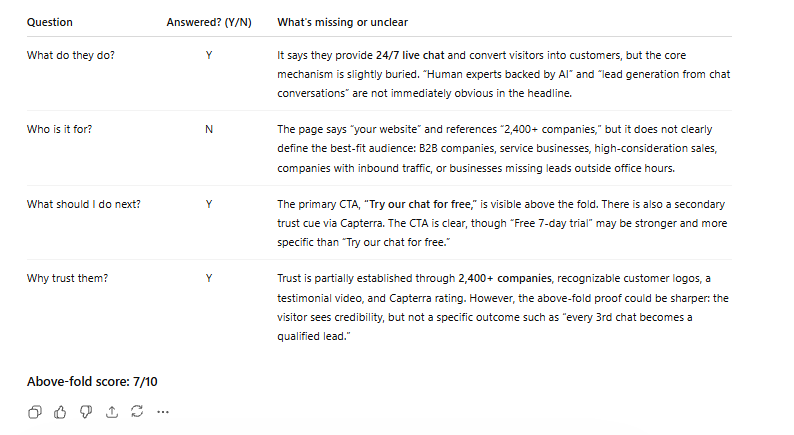
Prompt 1: The First-Impression Test (copy this exact prompt) # First-Impression Audit ## Context Visitors decide within 5 to 10 seconds whether to stay or leave. This audit evaluates what's communicated before any scrolling. ## Your task Look at the first screenshot only (homepage or landing page). Based exclusively on what's visible above the fold, answer:
1. Clarity — What does this company do? 2. Audience — Who is it for? 3. Action — What should I do next? 4. Trust — Why should I believe them?
## Output format | Question | Answered? (Y/N) | What's missing or unclear | |----------|:---:|---------------------------| | What do they do? | | | | Who is it for? | | | | What should I do next? | | | | Why trust them? | | | Above-fold score: X/10
What this reveals: The failure we see most often across service websites is in row three of that table: "What should I do next?" Businesses build strong hero sections explaining what they do, then offer no visible next step. No CTA above the fold. No invitation to start a conversation. The visitor who wants to engage has to scroll, navigate, and figure the path out alone. Every step of effort they have to put in is a point where you can lose them. The good news is this is the quickest fix in the whole audit. A clear, visible CTA above the fold costs nothing to add and almost always moves conversion numbers.
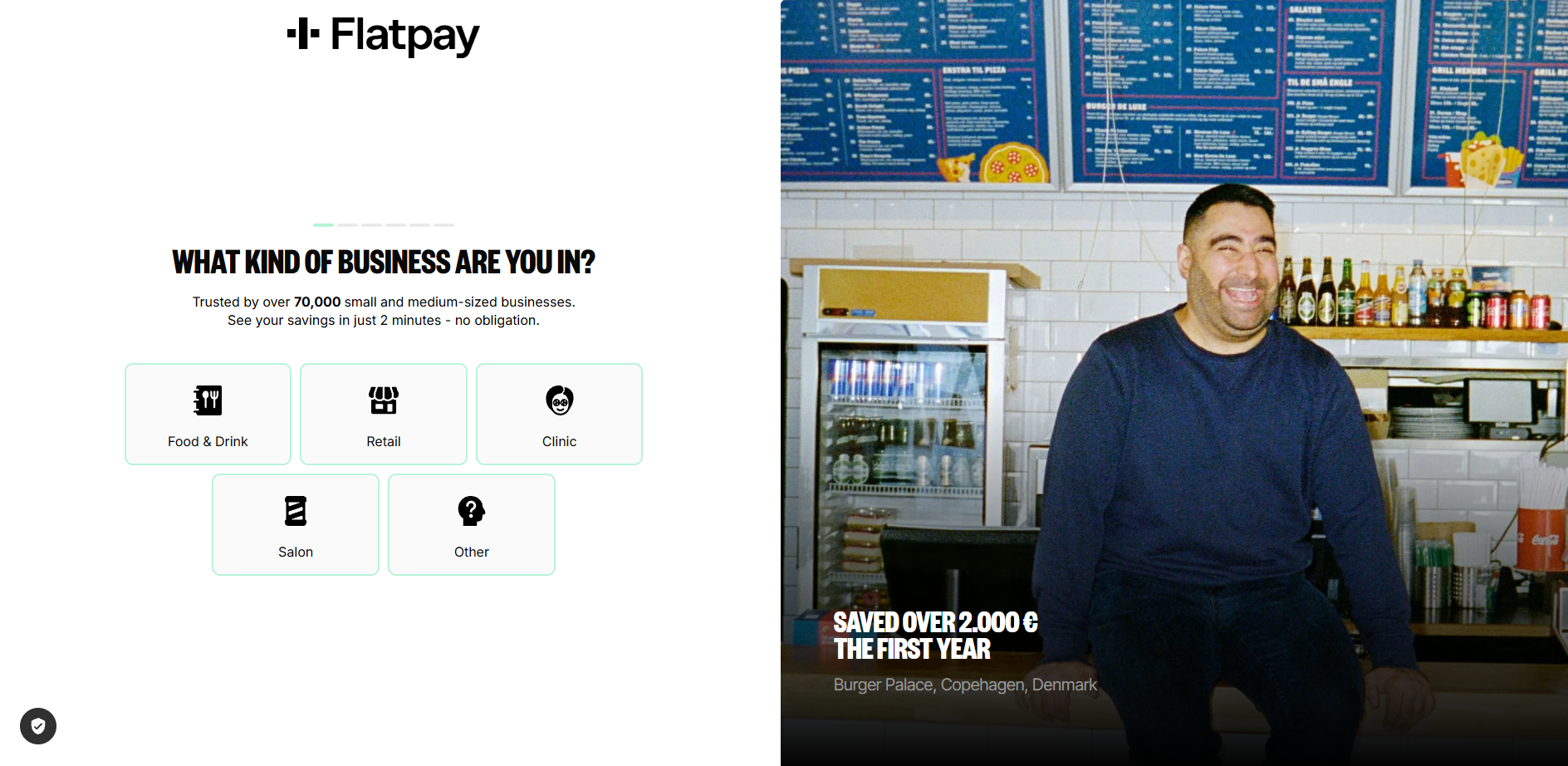
Example from running the prompt on Weply's homepage
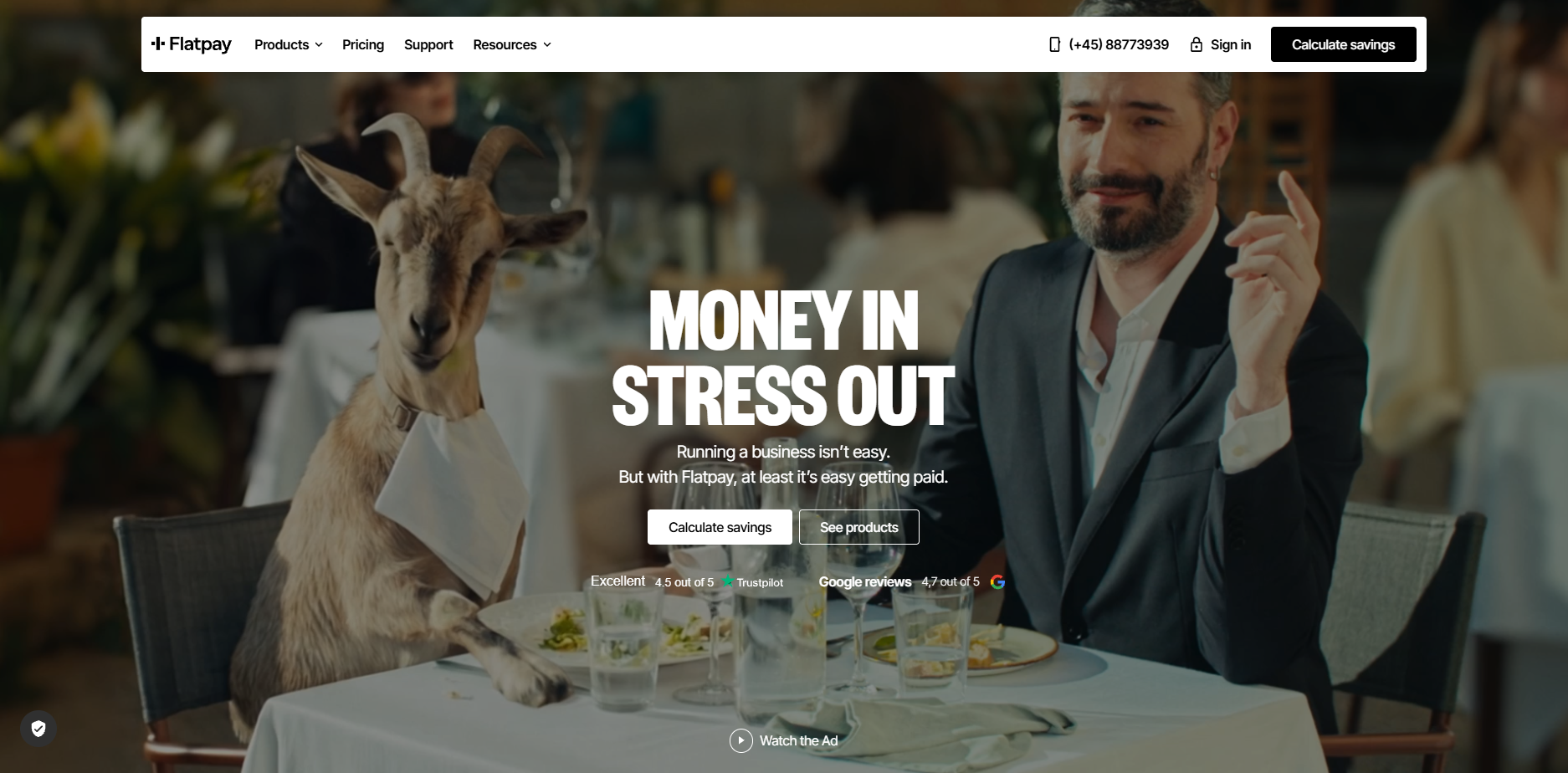
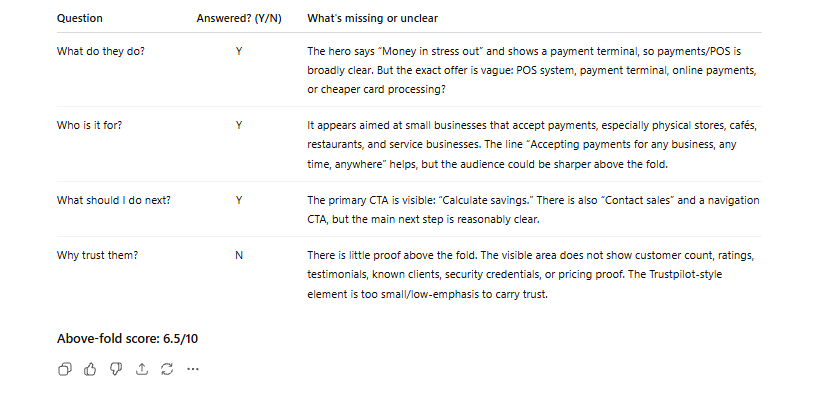
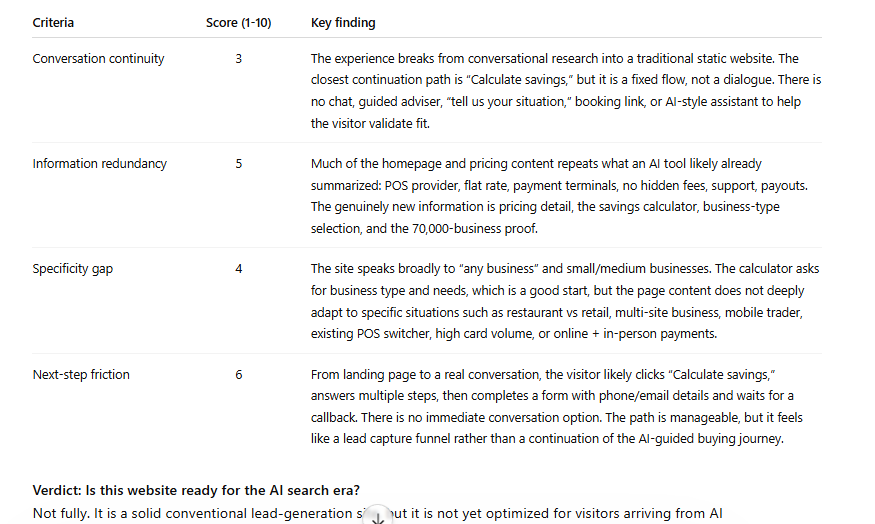
Now what we did was to run the full series of prompts on one of the most succesful current scaleups in Europe and one of the best at digital marketing, Flatpay.
This is the result from the first prompt:
Prompt 2: The Conversion Path Coherence Audit # Conversion Path Coherence Audit ## Context These pages form a sequence that visitors move through. The biggest conversion leaks often live between pages, not on them. ## Your task Evaluate all screenshots as a connected journey:
1. Message consistency — Do promises made on one page carry through to the next, or do they shift? 2. CTA consistency — Is the call-to-action language stable across pages, or does it change confusingly? 3. Orientation — Are there pages where a visitor might feel lost or unsure what to do next? 4. Distractions — What elements pull visitors away from the conversion goal (unrelated links, social buttons, irrelevant navigation)?
## Output format Score each transition between pages: | Transition | Coherence (1-10) | Key issue | |-----------|:---:|-----------| | Page 1 to Page 2 | | | | Page 2 to Page 3 | | | | (continue as needed) | | |
Overall path score: X/10
What this reveals: Messaging fragmentation is the most common path-level problem, and it's also the least visible to the people who built the site. The homepage says "Get a free consultation." The service page says "Contact us for pricing." The contact page says "Send us a message." Three different implied offers. Three moments of micro-doubt. Each transition chips away at the visitor's confidence that they're in the right place. The path should feel like one continuous conversation.
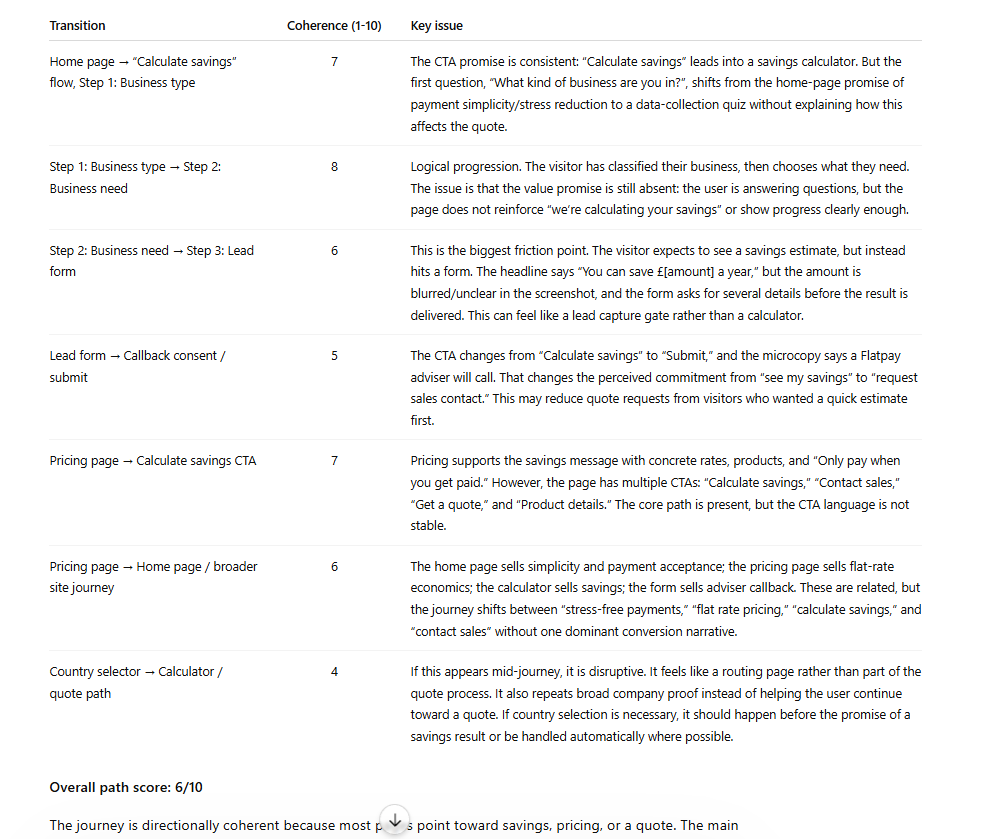
Flatpay uses a multi-step CTA journey for "calculate savings" or "get a quote", which most serves as a teaser as well as pre-qualifier for leads and Flatpay.
Flatpay results from prompt 2:
Prompt 3: The Trust Signal Inventory # Trust Signal Inventory ## Your task Across all pages, catalogue every trust signal present: customer logos, testimonials, reviews, case studies, certifications, team photos, years in business, guarantees, privacy assurances, awards, association memberships. Then evaluate:
1. Which pages have strong trust signals? 2. Which pages have weak or no trust signals? 3. Is there a trust gap specifically on the conversion page (contact or pricing page)? 4. What trust signals would you add, and where?
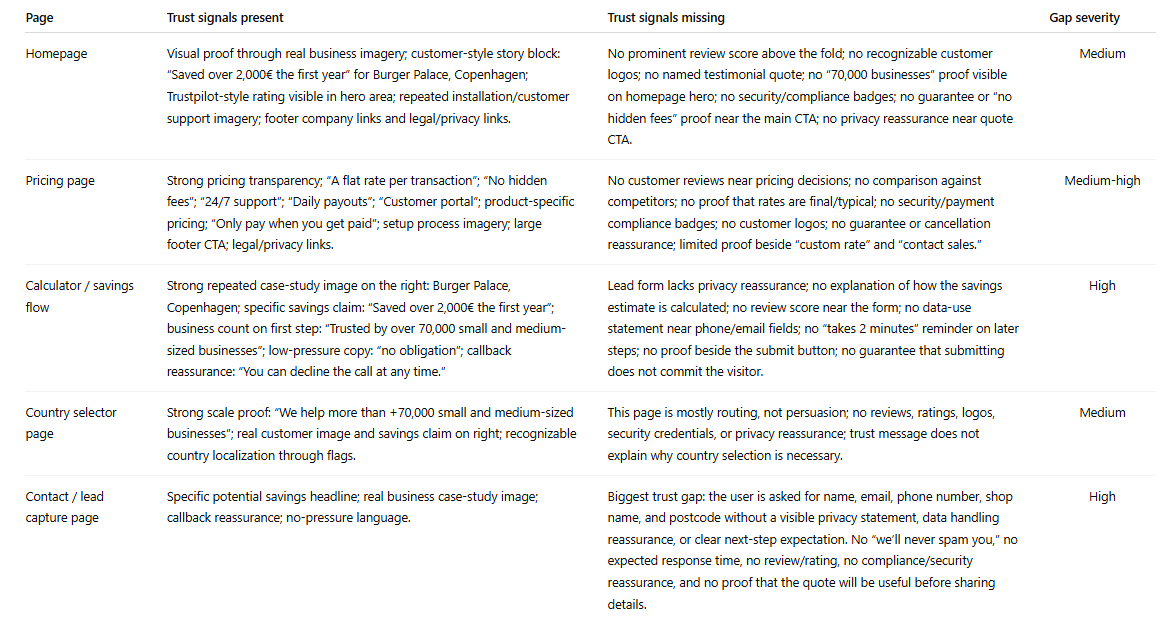
What this reveals: Trust signals cluster on homepages, where they're least needed, and disappear on contact pages, where they matter most. The moment a visitor is about to hand over their phone number is precisely when they need reassurance. They're asking: will someone actually reply to this? Have you done this for businesses like mine? Our chat data shows the most common questions visitors ask right before converting are trust questions: "How quickly will someone respond?" "Do you work with companies in my industry?" A single line on the contact page, "We typically respond within two hours," does more conversion work than most hero sections. Adding it takes five minutes. Flatpay results from prompt 3:
Prompt 4: The Dead Form Diagnosis # Lead Capture Form Diagnosis ## Context This is your final conversion point. A motivated visitor is about to become a lead, or quietly close the tab. ## Your task Evaluate the contact or lead form as a slightly hesitant potential customer who is ready to enquire:
1. Field count: How many fields? Which feel unnecessary for a first interaction? 2. Expectation setting: Does the page explain what happens after submission? Who responds? How soon? 3. Alternatives: Is there any option besides this form (phone, chat, booking link, WhatsApp)? 4. Urgency: Is there a reason to submit now, or could I come back to it later with no consequence? 5. Friction score: Rate 1 (effortless) to 10 (not worth the effort).
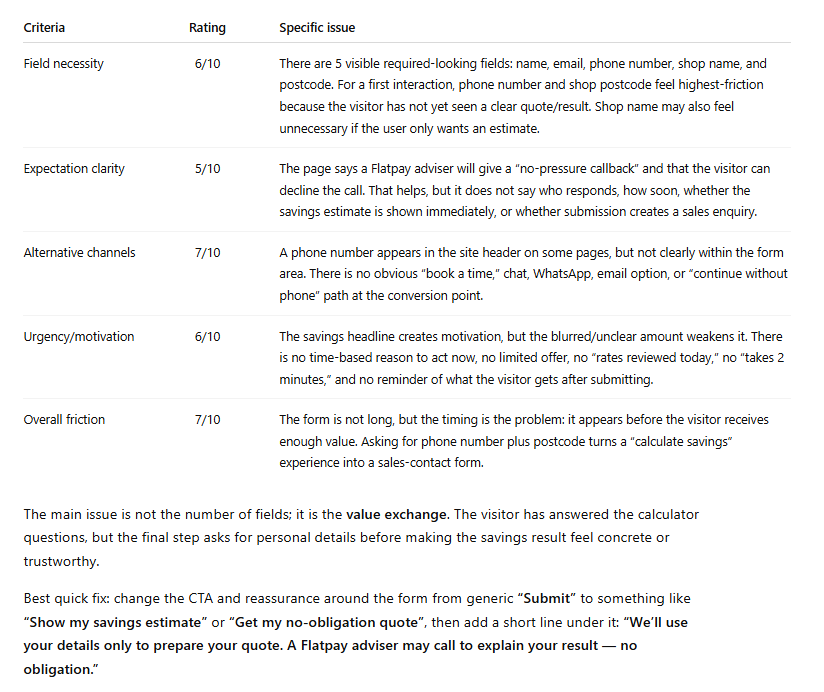
What this reveals: Forms are where conversions go to die, and the problem usually isn't the fields themselves. It's the silence around them. No indication of what happens after you submit. No alternative for the person who has a quick question but isn't ready to commit to a form submission. No urgency. Just a form floating on a page, asking for information and offering nothing in return. Our data shows that between 35 and 50 percent of chat conversations start because a visitor saw the form and decided they wanted to talk to a person instead. The form didn't convert them. A conversation did. Flatpay Results:
Prompt 5: The AI Search Visitor Test # AI Search Visitor Experience Audit ## Context A growing share of visitors now arrive from AI search tools (ChatGPT, Perplexity, Google AI Overviews, Claude). These visitors have been in a conversational research flow: asking questions, refining needs, receiving personalised guidance. They land here mid-dialogue, having just been told this website looks like a good match for their needs. ## Your task Evaluate these pages as an AI-referred visitor who was just told: "[Company] looks like a good option for your needs."
1. Conversation continuity. Can this visitor continue their dialogue, or does the experience break from conversation to static content? What engagement options exist? 2. Information redundancy. How much of this repeats what the AI tool likely already told them? What is genuinely new here? 3. Specificity gap. The visitor has a refined need. Does the site address specific use cases, or only general claims? 4. Next-step friction How many clicks stand between landing here and having a real conversation about their specific situation?
## Output format | Criteria | Score (1-10) | Key finding | |----------|:---:|-------------| | Conversation continuity | | | | Information redundancy | | | | Specificity gap | | | | Next-step friction | | | Verdict: Is this website ready for the AI search era? Single most impactful change:
What this reveals: An AI-referred visitor has been in an active dialogue. They arrive expecting to continue it. Instead they hit a static page and a form. It's like being mid-conversation with someone, then being walked to a colleague's office where that colleague hands you a clipboard. The AI will almost always point to real-time conversational engagement as the single most impactful change. Results from Flatpay analysis:
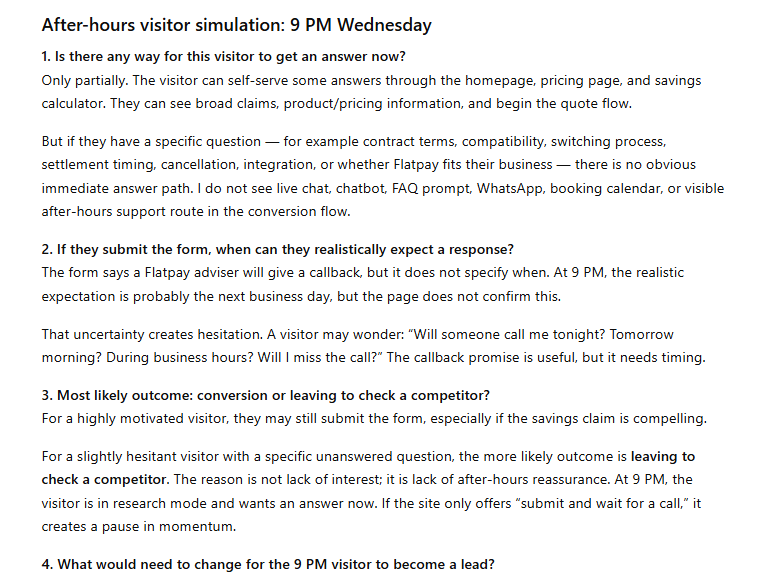
Prompt 6: The After-Hours Visitor Test # After-Hours Visitor Simulation ## Scenario It is 9 PM on a Wednesday. A potential customer lands on this website from a search. They're interested but have a specific question about the service. ## Your task
1. Is there any way for this visitor to get an answer now? 2. If they submit the form, when can they realistically expect a response? 3. What is the most likely outcome: conversion, or leaing to check a competitor? 4. What would need to change for the 9 PM visitor to become a lead?
What this reveals: Between 35 and 50 percent of high-intent traffic arrives outside business hours. The visitor at 9 PM with an urgent question, a pest control problem, an insurance query, a question about a dental procedure, is often your most motivated visitor. They're ready to act. Your website offers them a form that won't be read until tomorrow morning. By then, they've found a competitor who responded immediately. The after-hours visitor rarely shows up in your analytics as a lost lead. They show up as a lead that was never there.
Example from Flatpay conversion analysis. Prompt 6 answer form.
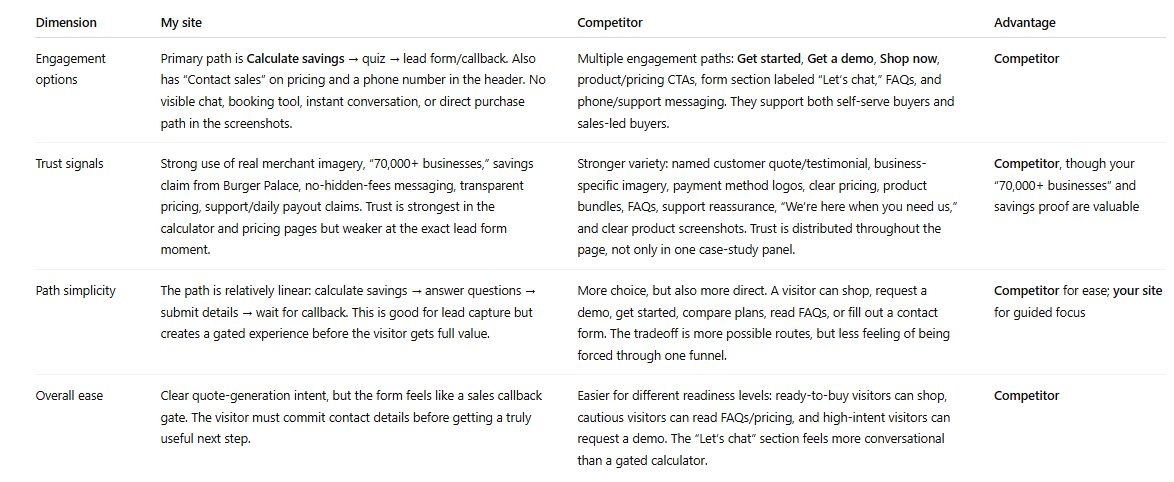
Prompt 7: The Competitor Comparison # Competitive Conversion Comparison ## Context I'm now uploading screenshots from a competitor's website. ## Your task Compare their conversion path to mine across four dimensions:
1. Engagement methods — Do they offer anything we don't? (chat, callback, WhatsApp, instant quote, booking tool) 2. Trust signals — Stronger, weaker, or different in type? 3. Path simplicity — Fewer or more steps to conversion? 4. If you were a potential customer comparing both, which makes it easier to take the next step? Why?
What this reveals: This is the prompt that makes abstract findings feel urgent. When the AI tells you "your competitor has live chat and a 60-second quote promise, you have a contact form," the gap stops being theory. It's a specific competitive disadvantage, described in plain language, sitting in a table. Running this against one or two competitors takes ten minutes. The output is more persuasive than any conversion audit report, because it shows exactly what a visitor experiences when they compare options, and most of the time, they are comparing options.
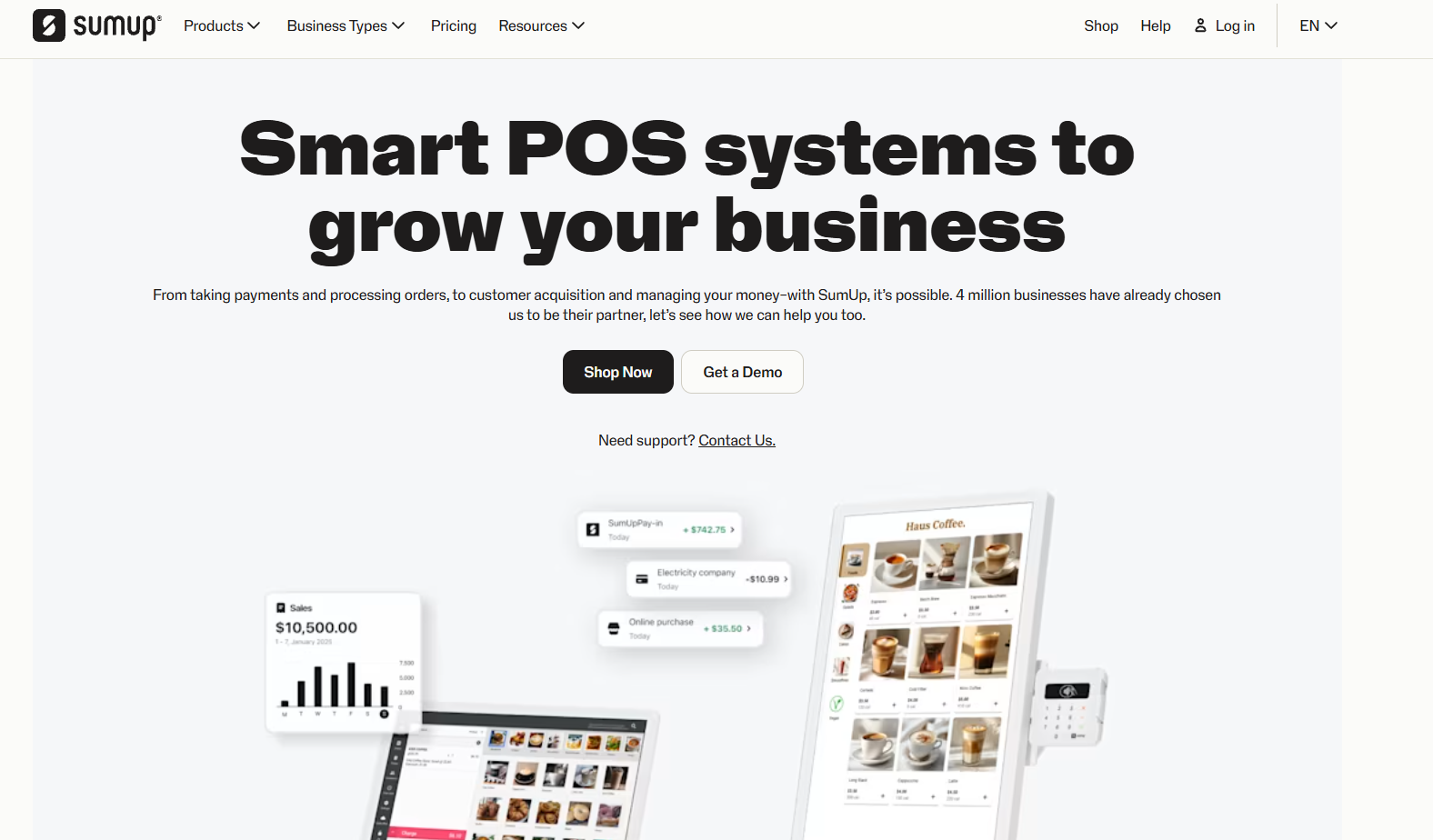
For this competitor comparison we used SumUp.
Response from ChatGPT on this prompt for comparison:
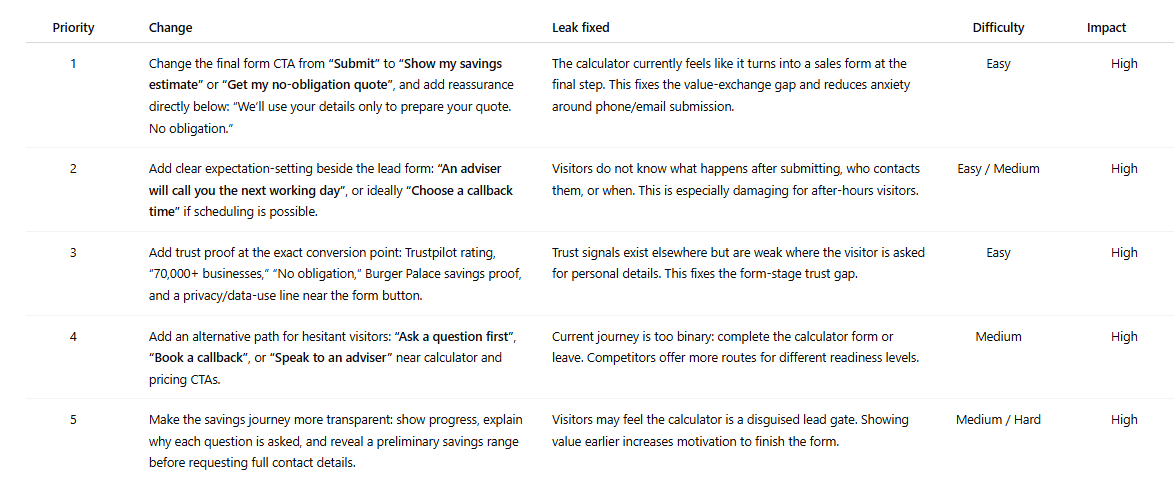
Prompt 8: The Priority Fix List # Prioritised Conversion Fix List ## Your task Based on everything analysed across all pages, give me the 5 most impactful changes to increase leads from this website.
For each recommendation:
1. The specific change 2. Which leak it fixes 3. Difficulty (easy / medium / hard) 4. Potential impact (low / medium / high)
What this reveals: This is the prompt that turns the audit into a to-do list. Flatpay priority fix list:
What to Do With Your Results
Most audits produce one of three finding patterns. Here's how to act on each.
Messaging and CTA inconsistencies. These are quick wins. Align the headline, the button text, and the implied offer across every page in the path so the visitor feels like they're moving through one coherent conversation. This costs nothing and can be done in an afternoon. It's also the change most businesses deprioritise because it doesn't feel significant enough. It is. Trust gaps on conversion pages. Add one or two trust signals directly to your contact page this week. A response-time commitment. A relevant testimonial. A count of businesses you've helped. Visitors about to submit a form need reassurance at that precise moment. Putting it on the homepage instead is like putting the "safe to drink" sign on the bottle rather than the glass. No real-time engagement option. This is the structural finding that shows up in almost every audit and sits at the top of almost every priority list. You have a few honest options: Managing chat yourself during business hours works for some businesses and isn't sustainable for most. An AI chatbot handles FAQ deflection and support reasonably well. It struggles with the nuanced, pre-purchase questions that are actually standing between a visitor and a conversion. It fails at custom lead qualification questions and collecting customer lead information. Managed live chat with human agents available around the clock, including evenings and weekends, is what Weply provides. It's the approach behind more than 250,000 qualified leads generated across our customer base in 2025. If the after-hours prompt produced an uncomfortable answer, it's worth a look.
The standard alternative is hiring a CRO agency. Budget: EUR 3,000 to 8,000. Timeline: four to six weeks. Deliverable: a PDF. The report is usually good. The process is slow, expensive, and produces findings that are already weeks old when they reach you. The process in this guide takes 30 minutes and produces an action plan from your own pages, in your own conversation thread, reviewable immediately. Run it quarterly. Run it after every redesign. Run it whenever traffic goes up and leads don't.
Try Weply for free for 7 days. Get qualifed leads, customer support and insights into the conversations that your webiste visitors have.
Read more
Articles
Blogs
|
October 11, 2026
|
9
min
7 Best Intercom Fin AI Alternatives in 2026
Quick Summary
Intercom's Fin AIis a capable AI support agent, but its $0.99-per-resolution pricing becomes expensive fast, and it only handles support well. This guide covers the 7 best alternatives across the full range, from free SMB tools to enterprise platforms, including one that generates leads instead of just deflecting tickets. Fin AI sounds cheap, but pricing scales extremely fast. Even for SMB's. Which is why "Intercom Fin alternatives" has been one of the fastest-growing support software queries of 2026.
Here are our top three picks:
Why trust us?
We built Weply because we saw how businesses loose potential customers on their webiste, by either having no chat as a communication channel, having a live chat but only manned during opening hours, or chossing an AI chatbot - made and trained for support - not suited for converting high-intent traffic to qualified leads. In 2025 alone, Weply generated over 250.000 qualified leads for 2.400+ customers across the Nordics and Europe. We have operated since 2013 and seen it all. This gives us a clear-eyed view of where Intercom Fin fits, where it doesn't, and which alternatives actually deliver at different budgets and use cases.
What Fin actually costs
The $0.99 number looks reasonable in a sales deck. It stops looking reasonable around month three. Here's the math Intercom doesn't tell: If you have 10 agents on the Advanced plan ($85/seat/month), your baseline Intercom bill is $850 a month before Fin touches a single ticket. Add 1,000 Fin resolutions, not a particularly high volume for a team that size, and you're at $1,840 a month. Push to 3,000 resolutions and you're past $3,800. Add Copilot ($35/agent/month) for the agents who handle what Fin can't, and the number climbs again. None of this is hidden. Intercom publishes it. But the compounding effect surprises a lot of finance teams when the first big invoice lands.
Why teams look for alternatives
1. The billing model punishes success. The more effectively Fin works, the more it costs. For teams with high support volume, per-resolution pricing isn't outcome-based. It's a variable tax on your growth. A team handling 10,000 resolutions a month is paying $10,000 in Fin fees before any other costs. At that scale, per-seat alternatives with flat monthly fees often work out significantly cheaper.
2. Fin is tied to the Intercom ecosystem. Fin works cleanest inside Intercom. You can deploy it as a standalone agent in front of Zendesk or Salesforce, but that adds integration complexity and you still pay the $0.99 per resolution either way. Teams that aren't already committed to Intercom end up buying the AI agent and effectively inheriting pressure to adopt the rest of the platform.
3. Fin handles support. It doesn't generate pipeline. This is the constraint that rarely appears in Fin reviews. Fin deflects tickets. It answers product questions, looks up order status, handles returns. What it doesn't do is convert an undecided website visitor into a lead, qualify sales intent, or push warm prospects into your CRM. If your chat function is supposed to do anything other than reduce support volume, Fin isn't built for it.
Before you choose: one question worth asking
Most alternatives articles give you a ranked list and call it a day. That's not useful, because the right answer depends on what you actually want to change. Do you want to swap the AI layer only, or replace the whole platform? If you want to keep Intercom and just reduce Fin's costs or add capabilities it lacks, your shortlist is different from someone who wants to walk away from Intercom entirely. → Keep Intercom, replace or supplement Fin: Look at Chatbase or Freshdesk's Freddy AI, which can run as a standalone agent in front of your existing helpdesk. HubSpot's Breeze Customer Agent is also worth considering if your CRM is already HubSpot. If you want to do customer support and lead generation while integrating to Intercom, consider Weply. → Replace the whole platform: Look at Zendesk AI. → You want chat to generate revenue, not just sav cost:Weply is the only option in this list built specifically for that outcome. With that framing established, here are the eight alternatives worth evaluating.
1. Weply
Weply is the only tool on this list that isn't primarily a support platform. That distinction matters if you've been thinking of chat as a cost centre when it could be doing more. Every other alternative here deflects tickets, reduces support volume, and helps your team handle more with less. Weply does that too, but it also actively works the other side of the funnel. Trained human chat consultants, available 24/7, qualify leads from website visitors and push them into your CRM with context. The AI layer (WeAssist) handles support queries, and is included in the base subscription. Humans are always in the loop, which eliminates hallucination risk on support conversations and means your leads are pre-qualified by a person, not a bot pattern-matching on keywords. The lead qualification demands are set by you, and thereby custom for each company. The result: Normally 2x more leads. And contrary to AI chatbot, the leads have been qualified to meet your lead crieteria.
Key Features
24/7 human + AI hybrid: Chat consultants run every conversation, with WeAssist handling standard support queries. Customers always interact with a human, which consistently produces higher conversion rates than automated-only chat.
Lead qualification direct to CRM: Weply pre-qualifies visitors against your criteria and delivers named, warm leads, with the contact information you want, to your inbox or CRM.
WeSights analytics: Dashboard covering chat volume, campaign attribution, lead quality, and conversion patterns. Helps connect chat activity to marketing spend.
Dedicated Customer Success Manager: Included on all plans. An actual person responsible for your results.
Pricing
Monthly subscription from $69, covering up to 100 support chats with WeAssist included. Lead fees are charged per qualified lead, based on your defined qualification criteria. 7-day free trial, no credit card required.
Pros
The only alternative here with active lead generation built in. Not a support tool with a lead capture form bolted on.
Human-verified responses mean much less hallucination risk on live support conversations.
Converts 2x more chat visitors into qualified leads than pure AI chatbots, based on internal customer data.
Transparent, predictable pricing with a per-lead model.
Validated by more than 2.400 customers live.
Cons
Chat only. No voice, email, or social channels yet.
WeSights is an add-on, not included by default.
Not the right fit if all your chat traffic is only support-related with no commercial intent.
Rating
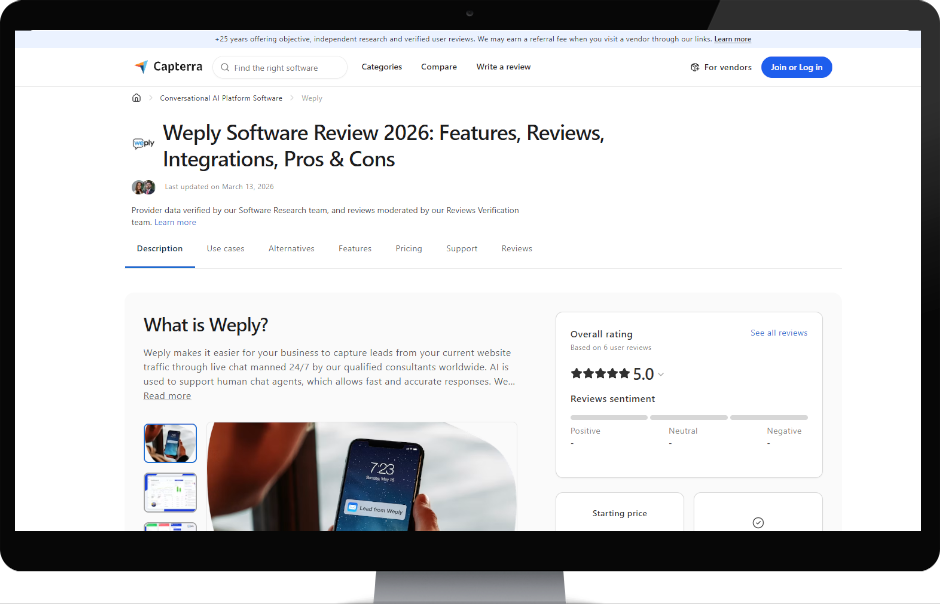
Capterra: 5/5. Customers consistently cite lead quality and volume improvements over their previous AI-only chat setup.
2. Zendesk AI
Zendesk is the default choice for support teams that need a mature, full-featured helpdesk and are willing to pay for it. With 22,000+ customers globally, its routing, SLA management, and omnichannel capabilities are genuinely enterprise-grade once configured. It makes the most sense for teams of 15+ internal support agents where organisational structure and ticket workflow start to matter as much as raw AI performance. The catch with Zendesk's AI story is the pricing structure. The headline per-agent price is real, but it's not the whole story. To get AI features worth comparing against Fin, you need the Advanced AI add-on at roughly $50/agent/month on top of your Suite plan. AI-automated resolutions are billed separately at $1.50 per committed resolution or $2.00 pay-as-you-go. A 20-agent team on Suite Professional with Advanced AI is therefore looking at close to $40,000 a year before implementation.
Key Features
Omnichannel unified workspace: Email, live chat, phone, WhatsApp, social media and web forms in one agent view.
AI Triage and routing: Classifies tickets by intent, language and sentiment before a human sees them. Sends conversations to the right agent tier based on skills and current load.
Zendesk Copilot: Suggests replies, surfaces knowledge articles, and summarises long threads for agents in real time. Available as the ~$50/agent/month add-on.
AI-automated resolutions: The AI agent handles queries it can resolve fully, charged at $1.50–$2.00 per completed resolution.
Reporting via Explore: Customisable dashboards at Professional and above, tracking CSAT, response time, resolution rates, and agent performance.
Pricing
From $55/agent/month. AI resolutions: $1.50-2 per committed resolution.
Pros
The most proven full customer support platform at enterprise scale in the market.
Comprehensive integration ecosystem .
Skills-based routing and SLA management work well for large teams.
Cons
The AI features that actually compete with Fin require the Advanced AI add-on that many teams don't budget for during the buying process.
Zendesk's own support quality is a consistent complaint on G2: slow responses, link-heavy replies.
Per-agent pricing scales directly with headcount with no outcome-based option on core plans.
Rating
G2: 4.3/5 across 6,800+ reviews. Satisfaction correlates strongly with team size. Small teams often find they're paying for features they haven't configured yet.
3. Tidio
Tidio is the clearest SMB alternative to Fin, and probably the fastest to deploy of anything on this list. The platform combines live chat, a no-code chatbot builder, and Lyro, its conversational AI agent, in a single product. It's particularly strong for Shopify merchants and e-commerce teams that want to handle chat, email, and social from one place without committing to an enterprise contract.
Key Features
Lyro AI agent: Answers questions based on your support content, handles hand-off to human agents when needed, and runs 24/7.
Flows builder: No-code drag-and-drop chatbot for creating automated conversation paths.
Multichannel inbox: Website chat, email, Instagram, Messenger, and WhatsApp managed from one view.
Live typing preview: Agents see what the customer is typing before they send it.
Shopify-native: Order lookup, product data, and customer details visible to agents within the chat window.
Pricing
Starter from $29/month. Growth from $59/month. Advanced $749/month. Lyro AI available as a standalone add-on from $39/month for additional conversation quota. Known for heavy price increases to existing customers.
Pros
G2 4.7/5, one of the highest-rated tools in this category.
Conversation-based pricing is more predictable than per-seat for smaller teams.
Live in minutes. Shopify integration is genuinely seamless.
Cons
Data processing happens primarily in the EU, but some data is also transferred to the US.
Best for e-commerce. Only to be used for customer support.
Not suited to complex enterprise workflows, multi-team SLA management, or large agent pools.
Rating
G2: 4.7/5. Users consistently mention ease of setup and the Shopify integration. Most criticism centres on pricing changes.
4. HubSpot Breeze Customer Agent
If your CRM is HubSpot and your support team already lives in Service Hub, HubSpot's Breeze Customer Agent is probably the path of least resistance. It runs inside your existing HubSpot setup, draws on your CRM data and knowledge base without additional integration work, and as of April 2026, moved to outcome-based pricing at $0.50 per resolved conversation. That's half the cost of Fin per resolution. Combined with a reported 65% average resolution rate across 8,000 activated customers, the economics are notably better for teams with high volume.
The important constraint: Breeze Customer Agent requires Service Hub Professional at a minimum, which starts at $90/seat/month. If you're not already on Professional or Enterprise, you're looking at a meaningful plan upgrade as a prerequisite.
Key Features
CRM-grounded AI: The agent draws on your full HubSpot customer data, relationship history, and knowledge base.
Nine channels supported: Chat, email, WhatsApp, Facebook, Instagram, Telegram, LINE, and SMS.
28-day free trial: New as of April 2026 alongside the outcome-based pricing shift.
Outcome-based pricing: $0.50 per resolved conversation.
Pricing
Breeze Customer Agent: $0.50/resolved conversation (60 free/month on Pro, 100 on Enterprise). Requires Service Hub Professional at $90/seat/month or Enterprise at $130/seat/month. Mandatory onboarding service approximately $1,500 on Professional plans.
Pros
Half the per-resolution cost of Intercom Fin.
Best option if your stack is already HubSpot Service Hub. Minimal integration work.
65% average resolution rate with full CRM context.
Most competitive outcome-based customer support pricing of any tool on this list.
Cons
Only practical if you're already in HubSpot and has bought their service hub. Adopting it as a standalone requires committing to HubSpot's ecosystem.
Get expensive with the mandatory purchases of additional Hubspot products.
Mandatory onboarding fee adds to the initial cost.
Rating
G2: 4.4/5. Users value the CRM context and the unified view of customer history. Common criticism: the platform's breadth can create complexity for teams that only want the Hubspot support module.
5. Freshdesk + Freddy AI
Freshdesk is the most commonly cited alternative when teams leave Zendesk on cost grounds, and it handles a lot of the same use cases for less money. The Freddy AI suite, Freshworks' AI product line, is built into Freshdesk's higher plans and works across the Freshworks stack, which includes Freshchat for live chat.
Freshdesk uses a session-based model for its AI agent rather than per-resolution pricing. A session counts any unique user who engages with Freddy, resolved or not.
Key Features
Freddy AI Agent: Handles frontline queries via chat and email. Trained on your Freshdesk knowledge base. Performs actions like order lookups and ticket creation.
Freddy Copilot: Suggests replies, summarises tickets, and drafts knowledge base articles for human agents. Available as an add-on.
Freshchat integration: The live chat product that pairs with Freshdesk for omnichannel support. Add-on.
Skills-based routing and SLA management: Available from higher tiers.
Pricing
Freshdesk Growth: $15/agent/month (email and ticketing). Pro: $49/agent/month (includes Freddy AI agent, 500 sessions/month included). Enterprise: $79/agent/month. Additional Freddy AI sessions: $49/100. Freddy Copilot: ~$29/agent/month add-on.
Pros
Significantly cheaper than Zendesk at comparable tiers, especially for teams primarily managing email.
G2 4.4/5. Well-established with a large user base.
Per-session model is easier to forecast than Fin's per-resolution model for teams with consistent traffic.
Cons
Freddy AI only responds to the first email in a thread. Follow-up messages require human handling.
G2-reported resolution rates from case studies: 23–30%, notably lower than Fin's 60% average or HubSpot's 65%.
Session billing counts engagements, not resolutions. You pay for conversations Freddy doesn't resolve.
Need to use the Freshdesk suite of products to gain real value.
Rating
G2: 4.4/5. The Freshwork platform itself is well-regarded. Freddy AI specifically receives more mixed feedback, with common criticism around setup complexity and the session cost ceiling.
6. Chatbase
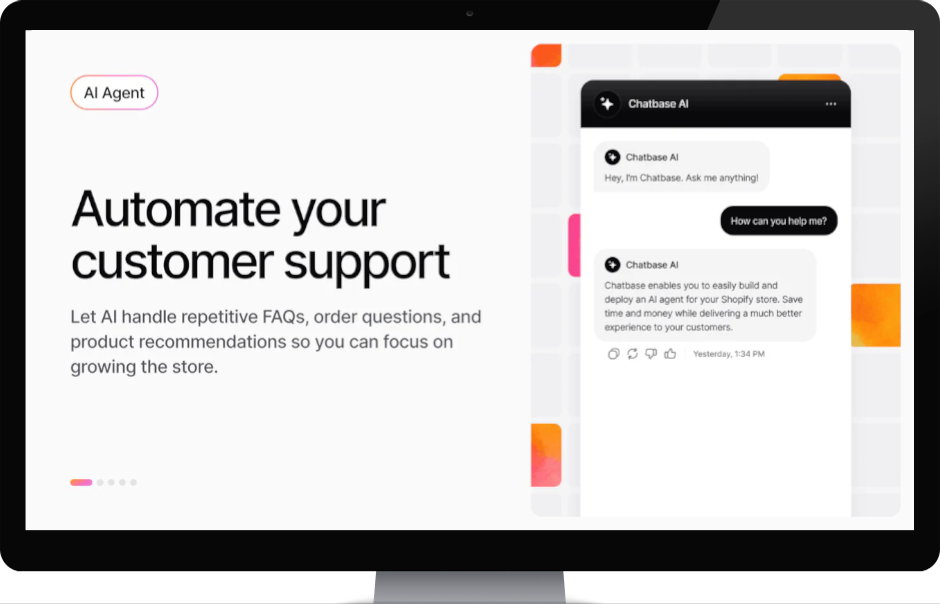
Chatbase is the fastest path from zero to a deployed AI chatbot. Upload your documentation, link to your knowledge base or Notion, and you have a functioning AI agent on your website in under an hour. No developer required. Used by 10,000+ businesses. It's worth being clear about what Chatbase is and isn't. It's a no-code chatbot builder, excellent for handling frequently asked questions and reducing inbound support volume for businesses that don't have a helpdesk team or need something running quickly. It's not a replacement for a full support platform, and its workflow automation capabilities are limited compared to Zendesk or Intercom.
One pricing note: Chatbase charges per message, not per conversation. A single back-and-forth exchange can consume multiple credits depending on the AI model you've selected.
Key Features
RAG-based training: Train on URLs, PDFs, Notion pages, or uploaded documents. The chatbot answers from your content and cites sources.
Multichannel deployment: Website widget, Shopify, WhatsApp, Instagram, Facebook Messenger, and Slack via native integrations.
AI Actions: Update Stripe subscriptions, create Zendesk tickets, fetch Salesforce order data. .
Model flexibility: Choose between economy models (GPT-4o Mini, Claude Haiku) and premium models (Claude Sonnet) based on cost and quality needs.
Pricing
From $40/month + credit usage.
Pros
Fastest time-to-live of any tool on this list.
No coding required. Accessible to non-technical teams.
Model selection gives you control over cost vs quality.
Cons
Metered by message, not conversation . Costs can be harder to predict than they look and it can become fast very quick. Credit costs makes it hard to use newer LLM models.
Limited workflow logic. Not suited for complex escalation flows or multi-step automation.
Output quality is directly tied to the quality of your documentation. Poor knowledge base, poor results.
Can only be used for customer support chats. Do not do a good job in lead conversion.
Data processed in the US. Not an option for most European businesses.
Rating
Capterra: 4.3/5. Easy setup and quick deployment are consistently praised. Pricing on higher plans and limited workflow capability are the most common criticisms.
7. Sierra.ai
Sierra.ai is the highest-profile name in enterprise AI customer service right now, founded in 2023 by Bret Taylor (former Salesforce co-CEO, current OpenAI board chair) and Clay Bavor. It's raised $950 million and counts Sonos, SiriusXM, Weight Watchers, and Casper among its customers. The platform handles voice and chat at scale, and its Ghostwriter feature generates production-ready AI agents from existing SOPs and call transcripts, reducing the time from contract to deployment significantly. Sierra is relevant to this list for completeness, not because it's a realistic alternative for most teams reading this article. The effective minimum to work with Sierra is ~$150-200,000 in year one when you factor in platform fees and implementation. If that's your budget range, Sierra is worth a serious evaluation. If it isn't, choose another tool.
Key Features
Empathetic AI agents: Built to mirror brand voice precisely across complex interactions such as returns, subscription management, account changes handled autonomously.
Ghostwriter: Generates deployable AI agents from SOPs, call recordings, and support transcripts. Also runs automated improvement cycles on live interactions.
Decagon Voice 2.0-comparable voice: Sub-second latency on voice interactions, branded caller IDs, interruption handling.
Multi-model architecture: Runs multiple AI models in parallel for accuracy checking, which reduces hallucination but can introduce latency on voice.
Pricing
No public pricing page. Third-party estimates: annual contracts from $150,000+. Implementation and onboarding: $50,000–$200,000. Outcome-based pricing per resolved conversation at undisclosed rates with minimum volume commitments.
Pros
One of the strongest voice + chat combinations in the market.
Ghostwriter materially reduces deployment time compared to traditional enterprise AI implementations.
Proven results at global consumer brands with high support volume.
Cons
Pricing puts it out of reach for any team without a substantial CX budget.
Support only. No lead generation capability.
No self-serve access or free trial.
Rating
G2: 4.4/5. Positive sentiment around empathetic AI quality and deployment support. Most criticism concerns pricing opacity and onboarding complexity.
How to choose
The right choice depends less on feature comparisons and more on what you actually need from chat. Or if you need a complete support platform.
If you need to generate revenue from chat, not just manage support volume then Weply is the only tool here built for that. The others are support platforms or support chats. If you're already deep in HubSpot and want the cheapest per-resolution pricing then Breeze Customer Agent at $0.50/resolution is the most cost-effective AI-only option right now. It require you have bought Hubspot Service Hub as a minimum. If you're a team of 15+ agents needing proper enterprise helpdesk infrastructure you will not go wrong with picking Zendesk, as it is still the most mature platform. If you're SMB and need something affordable and live quickly for customer support only then consider Tidio from $29/month. If you're an enterprise in a regulated industry with complex compliance requirements you should choose Ada or Sierra. If you just need an AI customer support chatbot running on your site within the hour and can live with data hosted in US then Chatbase.
Try Weply free for 7 days, no credit card, no commitment, and see what it adds to your pipeline this week (all qualified leads free of charge)
Can I use Intercom Fin without the rest of Intercom?
Yes. Fin can be deployed as a standalone AI agent in front of Zendesk, Salesforce, HubSpot, or most other helpdesks. You still pay $0.99 per resolution, and the is a minimum commit of $49 per month.
What does Fin AI count as a resolution?
A resolution is a conversation where the customer confirmed their issue was solved, or where they didn't respond after Fin's answer within a set time window (implying the answer was sufficient). The second part, the non-response trigger, is the one teams debate most. A customer who got a partial answer and gave up, or who simply got distracted, can still generate a billable resolution. Fin AI isn't unique in this ambiguity, but it's worth understanding before you project your monthly costs.
What is the cheapest Intercom Fin alternative?
For teams already in HubSpot Service Hub, Breeze Customer Agent at $0.50/resolution is the cheapest outcome-based AI alternative on this list. For teams without an existing platform, Tidio starts at $29/month, Chatbase starts at $40/month with a basic AI chatbot and Weply starts at $69 for a hybrid solution with human chat experts and AI, and doing both customer support and lead egenration.
Is Intercom Fin good?
Fin is a well-built product with a 60% average resolution rate across its customer base and clean integration within the Intercom platform. The criticism it gets is rarely about quality, it's about pricing structure and fit. If your support volume is moderate and you're already committed to Intercom, Fin works fine. The alternatives in this list are for teams where the per-resolution billing is creating budget problems, or where chat needs to do more than deflect support tickets.
Which Fin alternative is best for lead generation?
None of them, with one exception. The tools on this list, Zendesk, Tidio, Freshdesk, Ada, HubSpot, Chatbase, Sierra, are support platforms. They handle incoming queries and reduce ticket volume. Weply is the only alternative that actively generates and qualifies leads from website visitors. If your chat function is supposed to fill pipeline as well as handle support, Weply is the only tool in this category built for that outcome.
Articles
Blogs
|
October 3, 2026
|
9
min
10 Best Chat Solutions for Customer Support and Lead Generation in 2026
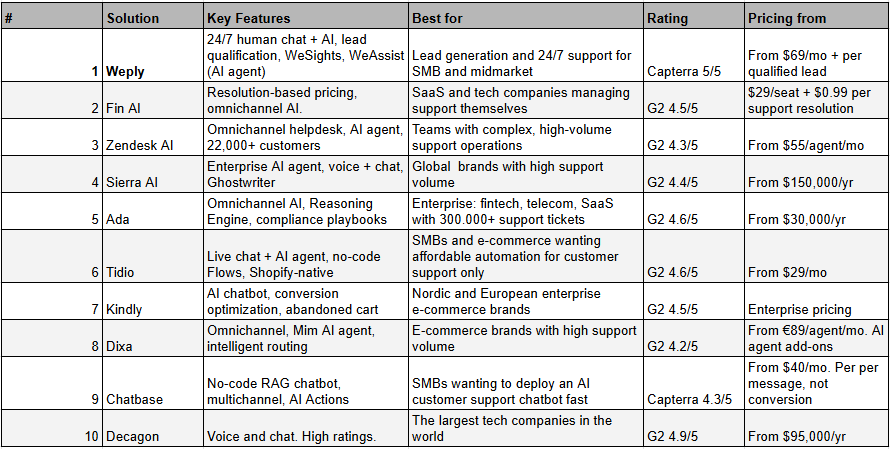
The right chat solution can turn your website traffic into paying customers and lift your customer support from reactive to proactive, or strengthen your lead generation and help grow your business. In the age of AI search having a chat solutions has become even more important. In this guide, we've reviewed the 10 best chat solutions available in 2026, including Weply, Intercom Fin, and Zendesk AI. We've looked at features, pricing, reviewsite ratings, and customer cases, so you don't have to. Here are our three top picks:
Looking for the best chat solution for your business?
Customers expect answers now. 63% of consumers prefer live chat over email or phone, and 46% of all leads are generated outside of normal business hours. With an ever-growing selection of solutions and increasing demands around GDPR compliance, data residency, and 24/7 availability, choosing the right chat solution has never been more important. The right solution helps you:
Convert anonymous visitors into named and qualified leads.
Give customers immediate help, 24/7.
Free up tiem for your team for other, more high-value interactions.
Comply with GDPR and data handling requirements within the EU.
Integrate with your existing CRM, helpdesk or e-com platform.
Why trust Weply?
We built Weply because we saw how businesses across Europe were losing potential customers on their websites, either because they had no chat at all, it was only availbale during operating hours, or because they put an AI support chat in front of high intent traffic and think it can convert it to qualified leads. Our platform combines trained chat consultants with AI and we generated over 250,000 qualified leads for more than 2,400 customers in 2025. We know this market inside out, from SMBs to enterprise. That gives us a unique position to evaluate which chat solutions actually deliver on the European and US markets. Finding the right solution is always about understanding your own needs first. Here's how some of our customers rate us:
Now, let's take a look at the 10 best chat solutions for 2026.
Now let's dive into each solution.
1. Weply
Weply is a Nordic 24/7 live chat solution that combines trained human chat consultants, lead conversion experts, with AI technology to generate and pre-qualify leads directly on your website. Founded in 2013 and headquartered in Copenhagen, Denmark, Weply has generated over 250,000 qualified leads for more than 2,400 customers in 2025, making it the largest Nordic operator in hybrid human-AI chat. Weply recently launched WeAssist, a support AI agent that chat consultants can activate for incoming support queries. What sets Weply apart from pure AI solutions is that your customers always interact with a real human being, backed by AI. That means meaningfully higher conversion rates and fewer missed interactions compared to fully automated chatbots. All support responses are also quality-checked by a human in real time, minimising the risk of AI hallucinations and ensuring answers are delivered with human empathy and nuance.
Key Features
24/7 Human Live Chat + AI (WeAssist): Trained chat consultants are available around the clock, complemented by WeAssist AI for standard support queries. You never miss a relevant customer interaction.
Sales-qualified leads delivered to your inbox or CRM: Weply pre-qualifies visitors based on your criteria and delivers warm leads, with name, phone number, and relevant context, directly to your CRM or inbox.
AI Co-pilot for internal chat agents: some customer run internal customer support agents using Weply outside normal opening hours or if overloaded, and those agents have access to AI WeAsssist co-pilot.
WeSights our analytics platform: Gives you insight into chat volume, chat context, campaign data, and conversion patterns, so you can continuously optimise your digital marketing, web, and lead strategy.
Dedicated Customer Success Manager: Every customer gets a dedicated CSM who helps with setup, optimisation, and ongoing strategy.
GDPR-compliant and EU-hosted: Data is processed in accordance with GDPR, with servers in the EU and full compliance with the ISO and EU AI Act.
Pricing
Pricing consists of a small monthly subscription starting from €53/mo, covering up to 100 monthly support chats with the WeAssist AI agent included. Beyond that, you pay only for success, a fixed price per qualified lead Weply generates, based on your unique lead qualification criteria. Weply offers a fully free 7-day trial, where all generated leads and answered support queries are free.
Pros
Human touch for your potential and existing customers 24/7, 365 days a year. Customers always talk to a real person, not just a bot.
Experts in lead conversion. If you're already spending money and time driving potential customers to your website, Weply is the only specialist. Typically converts minimum 50–80% more chat visitors into qualified leads than AI chatbots.
WeAssist is included in the subscription price, meaning you get an AI support chatbot verified in real time by humans. At a significantly lower cost than the alternatives.
Plug-and-play setup with CRM integrations, live quickly.
GDPR, AI Act, ISO. Verified with over 2,400 paying customers across the Nordics and Europe.
You get AI where AI is strong (support, but verified by humans) and humans where they're best (qualified lead generation).
Free 7-day trial, no credit card required, no commitment.
Cons
WeSights, the unique chat analytics tool, is an add-on.
Available as chat only, not yet on voice, email, or social channels.
Not ideal for public institutions where all traffic is support-related, or for chat behind a login wall as inside a SaaS support tool.
Rating
Capterra: 5/5. Trustpilot 4.4/5. Businesses consistently highlight that Weply delivers significantly more leads and better lead quality than AI chatbots, alongside 24/7 availability, easy setup, and a very high level of customer service.
2. Intercom Fin
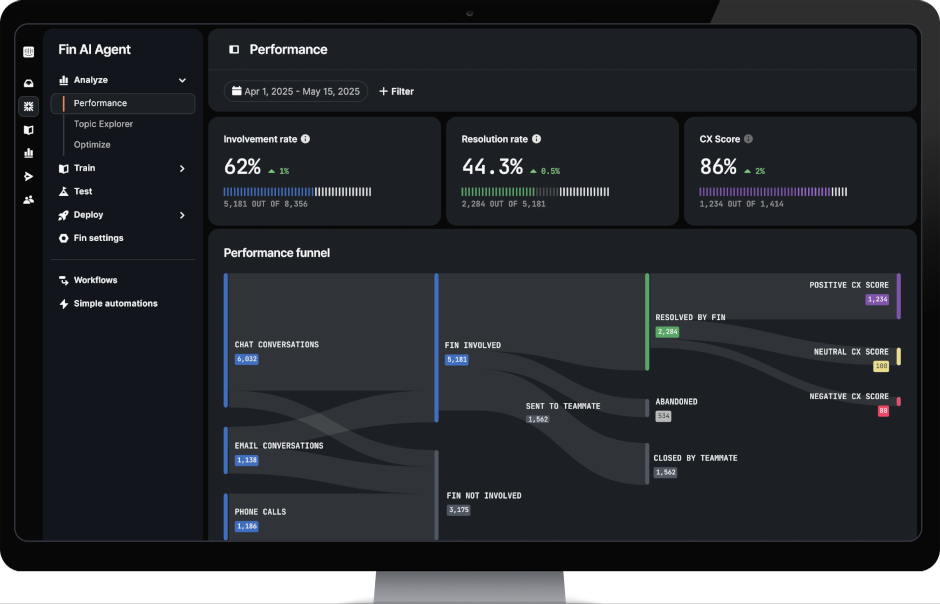
Intercom Fin is Intercom's AI agent, launched in 2023 and now one of the most widely deployed AI support platforms globally. Fin states it resolves an average of 60% of all queries automatically and supports all major channels: email, live chat, WhatsApp, Messenger, SMS, and voice.
Key Features
Outcome-based AI agent: Fin receives queries, responds using your knowledge base, and escalates to your support team when needed.
Omnichannel out-of-the-box: Fin works across email, live chat, WhatsApp, Messenger, SMS, and voice from a single platform.
Fin Copilot (agent assist): AI assistant for human agents in the inbox, generates reply suggestions, summarises case history, and retrieves knowledge in real time. $35/user/mo add-on.
AI-driven simulations and performance insights: Test Fin's performance against historical tickets before going live, and receive ongoing improvement recommendations.
Integrations: 450+ integrations including Shopify, Salesforce, Zendesk, and HubSpot.
Pricing
Fin AI Agent: $0.99 per resolution (min. 50 resolutions/mo = $49.50). Copilot is $35/user/mo as an add-on.
Example: 1,000 Fin resolutions/mo = $990 on top of seat costs. For 10 agents on the Advanced plan ($85/seat), the monthly total is approximately $1,840.
Pros
Outcome-based model is fair: you pay only for success.
Works standalone alongside Zendesk, Intercom and Salesforce.
Strong for SaaS and B2B support teams that manage their own helpdesk.
Cons
Pricing scales aggressively at high volumes: 1,000 resolutions/mo = $990 in AI costs alone.
Requires internal setup and optimisation. No dedicated CSM on lower plans.
Not suited for active lead generation, only customer support.
Fin Copilot is a paid add-on.
Some G2 reviewers report that what Intercom counts as a "resolution" doesn't always match real-world outcomes.
Rating
G2: 4.5/5. Users praise the modern interface and automation rate. Most criticism: pricing scales unpredictably, and advanced features require expensive plans.
3. Zendesk AI
Zendesk is still the world's most widely used customer service platform, with 22,000+ support teams globally and a well-established enterprise presence. Zendesk's AI capabilities including AI agents (chatbots), Copilot for human agents, and intelligent triage, are layered on top of its core omnichannel helpdesk and have been significantly expanded since 2024. Zendesk is used by teams ranging from fast-growing SaaS companies to large enterprise organisations across every industry. Zendesk's core strength is organisational scale: it handles email, live chat, voice, WhatsApp, Instagram, Facebook Messenger, X, and web forms in a single agent workspace, and routes tickets intelligently across large agent pools.
Key Features
AI agents and intelligent triage: Built-in AI agents handle common queries using your help centre content and can take basic actions.
Omnichannel unified workspace: Email, live chat, phone, WhatsApp, social media, and web forms in a single agent view. Routing ensures tickets reach the right agent based on skills, language, and current load.
Zendesk AI Copilot: Agent-side AI that suggests replies, surfaces relevant knowledge articles, and summarises long ticket threads in real time.
Knowledge base and help centre: AI-powered content suggestions for help centre articles, and a self-service portal that deflects tickets before they reach your support team.
Analytics and reporting: Pre-built dashboards and, on higher tiers, Explore for custom reports tracking response time, resolution rate, CSAT, and agent performance.
Pricing
Suite Team: $55/agent/mo (annual). Basic multichannel ticketing, help centre, AI agents with limited resolutions.
Suite Professional: $115/agent/mo (annual). Skills-based routing, community forums, HIPAA compliance, custom analytics.
Suite Enterprise: From $169/agent/mo (annual, negotiated). Custom agent roles, sandbox, advanced data protection.
Advanced AI add-on: ~$50/agent/mo extra. Required for Copilot, advanced triage, and generative AI features.
AI Agent resolutions: $1.50 per automated resolution (committed volume) or $2.00 pay-as-you-go.
For a 20-agent team on Suite Professional with Advanced AI, total annual cost approaches $40,000 before implementation.
Pros
The most established customer support platform globally. Deep integration ecosystem and proven enterprise track record.
Strong at scale: skills-based routing, SLAs, and omnichannel work well for 15+ agent teams.
Cons
Advanced AI features require a separate $50/agent/mo add-on.
Own support quality criticised consistently on G2: slow response times and link-heavy replies.
Some G2 reviewers describe being oversold during the buying process, real-world AI performance fell short of what was promised.
Per-agent pricing model means costs scale directly with headcount, with no outcome-based option on core plans. Expensive option.
Rating
G2: 4.3/5 (6,800+ reviews). Satisfaction correlates strongly with team size: large, multi-channel support teams tend to find the cost justified; smaller teams often feel they're paying for features they don't use.
4. Sierra.ai
Sierra.ai is an American enterprise AI company founded in 2023 by Bret Taylor (former co-CEO of Salesforce and current chairman of OpenAI's board) and Clay Bavor. Sierra has raised $950 million to date and is one of the most discussed AI companies globally. Sierra's customers include Sonos, SiriusXM, Weight Watchers, ADT, and Casper. The platform is built for large consumer brands with high inbound support volume across chat and voice.
Key Features
Empathetic AI agents: Sierra's agents are designed to mirror your brand's voice and tone precisely, handling complex interactions like returns, subscription changes, and account management autonomously.
Agent Studio + Agent SDK: No-code workflow builder for CX teams (Agent Studio) and a developer-focused SDK for custom integrations.
Ghostwriter: Automatically generates production-ready AI agents from SOPs, call transcripts, audio recordings, and whiteboard photos. Also runs an automatic improvement loop based on live interactions.
Multi-model "Constellation" architecture: Uses multiple AI models in parallel for accuracy-checking, reducing hallucination, but can introduce latency (700ms+) in voice environments.
Voice + chat across channels: Sierra's agents support web chat, mobile apps, and voice.
Pricing
Sierra publishes no pricing and has no pricing page. All contracts are enterprise agreements. Third-party estimates:
Annual contracts from $150,000+.
Implementation and onboarding fees: $50,000–$200,000.
Outcome-based model: payment per successful resolution (rate confidential, but with minimum commitment volumes).
Pros
One of the world's leading chat and voice agents for support.
Pricing makes it exclusive to the largest enterprises. SMBs and mid-market are entirely excluded.
Long and technically complex implementation.
Support only. No real lead generation capability.
Rating
G2: 4.4/5. Users praise the intuitive interface and empathetic AI interactions. Most common criticism: high price with unclear ROI, steep learning curve during onboarding.
5. Ada
Ada is an enterprise AI customer service platform founded in Toronto in 2016 by Mike Murchison and David Hariri. Ada has raised $200M+ and serves 350+ enterprise customers including Monday.com, Pinterest, Verizon, and YETI. The platform is built for high-volume, omnichannel AI deflection in industries including financial services, e-commerce, telecommunications, and SaaS. Ada's 2026 platform centres on its "Reasoning AI" which are agents that understand intent, follow compliance-sensitive playbooks, and execute multi-step workflows across chat, email, voice, SMS, and WhatsApp from a single platform.
Key Features
Reasoning AI engine: Ada's agents understand customer intent and follow structured playbooks, including compliance-sensitive flows for regulated industries, rather than simple script logic. Claims to resolve 80%+ of inquiries automatically.
Omnichannel coverage: Chat, email, voice, SMS, WhatsApp, and social messaging managed from a single platform. Handoff integrations with Zendesk, Salesforce, Freshworks, Genesys, Dixa, Gorgias, and more.
Coaching and feedback loops: Platform managers can provide precise, surgical guidance to the AI agent through a coaching interface, and verify outcomes through test scenarios before going live.
SOP-based playbooks: Ada can follow complex, multi-step workflows, including triggering refunds, extensions, or system updates, based on standard operating procedures. Well-suited to regulated industries.
Enterprise security: SOC 2 Type II, HIPAA, GDPR, and PCI compliant. Zero Data Retention option with all LLM providers.
Pricing
Ada does not publish pricing. Estimates from third-party sources:
Starting from ~$30,000/year.
Pricing model: typically $1–$3.50 per AI resolution, based on resolved conversations.
Pros
Strong omnichannel coverage across 10+ channels from a single platform.
Coaching interface gives platform managers strong control over AI behaviour.
Cons
Implementation timeline is measured in months.
Only for large global enterprises.
Pricing scales aggressively at high volume.
Rating
G2: 4.6/5. Platform administrators rate Ada highly for ease of use and coaching capability. Negative sentiment on Trustpilot: 1.8/5.
6. Tidio + Lyro
Tidio is a live chat and AI support platform primarily serving small businesses and e-commerce stores. Founded in Poland in 2013 and used by 300,000+ businesses globally, Tidio combines live chat, ticketing, a no-code chatbot builder and Lyro, its conversational AI agent, in a single platform. Tidio is particularly popular with Shopify merchants and SMBs that want to start with live chat and gradually layer in automation without switching tools.
Key Features
Lyro AI agent: Conversational AI that answers common customer questions based on your support content. Handles handoff to human agents when needed.
No-code Flows builder: Drag-and-drop chatbot builder for creating automated conversation paths: product recommendations, lead capture, FAQ automation, and more .
Live chat with live typing preview: Agents can see what customers are typing before they hit send, allowing faster, more prepared responses.
Multichannel inbox: Manages website chat, email, Instagram, Messenger, and WhatsApp in a single unified inbox.
Pricing
Starter: From $29/mo (annual). Includes live chat, ticketing, basic automation.
Growth: From $59/mo (annual). Includes Lyro AI conversations and advanced Flows.
Lyro AI add-on: Can be purchased separately from $39/mo for additional AI conversation quotas.
Pros
Among the most affordable live chat + AI combinations on the market for SMBs.
Conversation-based pricing is more predictable than per-seat models for smaller teams.
Very fast to set up. Live in minutes. Strong Shopify native integration.
Cons
Data processing: primarily EU-based, but some data is also transferred to the US.
Not well-suited for complex enterprise workflows, SLA management, or large multi-team operations.
Very limited lead generation capability. Can only be used for customer support.
Rating
G2: 4.6/5. Users consistently highlight ease of setup and Shopify integration. Most criticism relates to some agreesive prices increases.
7. Kindly
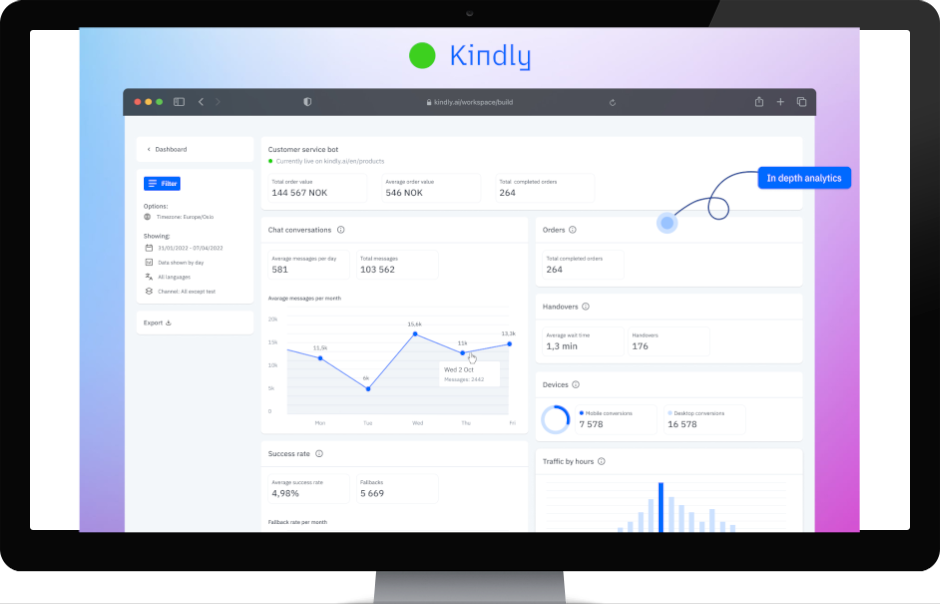
Kindly is a Nordic AI chatbot platform founded in Oslo in 2016 and one of Europe's leading conversational AI providers for enterprise e-commerce and customer service.
Key Features
Generative AI chatbot with multilingual training: Train the chatbot in one language and it understands queries in 100+ languages automatically. Nordic language expertise is a core competency.
Conversion optimisation and abandoned cart: Kindly's platform can increase conversion rates by up to 12% and automates abandoned cart messages.
Visual product carousel in chatbot: Enables product search and displays products directly within the chat interface based on selections made in the chatbot.
Simple customisation without coding: No code required to match the chatbot to your brand identity, tone, and layout.
Support automation: Automates up to 80% of customer inquiries according to themselves.
Pricing
Kindly does not publish pricing. All agreements are reached via direct contact. Enterprise prices.
Pros
Deep Nordic and European market presence with proven language expertise.
Unique combination of AI chatbot, conversion optimisation, and support automation in one platform.
No public pricing. Expensive and only for enterprises.
Primary focus on e-commerce. Not tailored for public sector or regulated industries.
Only for customer support. Not suited for active lead generation.
Rating
G2: 4.9/5. Users highlight easy implementation, Nordic language expertise, and high automation rates.
8. Dixa
Dixa is a Danish-founded customer experience platform aimed at e-commerce brands that want to consolidate all customer communication in one system. Dixa is used by 850–1,000+ brands across 42 countries, including Rapha, Hobbii, Mejuri, and Miinto. In 2025, Dixa launched Mim, an agentic AI agent.
Key Features
Mim AI Agent: Dixa's AI agent handles end-to-end customer interactions, including order lookup in Shopify and Magento, refunds, and self-service, with intelligent escalation to interrnal human agents.
E-commerce focused: Built exclusively for e-commerce companies, with features and integrations tailored to these specific workflows.
Omnichannel native: Phone, email, live chat, WhatsApp, Instagram, Facebook Messenger, and SMS in a single Team Hub.
Intelligent routing and Flow Builder: Drag-and-drop routing engine that assigns interactions to the right agent based on skills, language, and workload.
Shopify + Magento + WooCommerce integrations: Deep e-commerce integrations mean agents see order history directly within the conversation window.
Pricing
Growth: From €89/agent/mo. All channels included.
Ultimate: From €139/agent/mo. Adds various AI features.
Prime: From €179/agent/mo. Enterprise functionality including SSO.
Mim AI agent is an additional cost on all plans.
Pros
All channels included as standard.
Danish-founded with strong Nordic support and understanding of European data requirements.
Mim AI Agent is one of the market's most mature agentic AI solutions for e-commerce.
Cons
Built specifically for e-commerce brands. Limited or no relevance for other verticals.
Mim AI agent access costs extra on top of the base subscription.
AI copilot is also an add-on.
Rating
G2: 4.2/5. Users praise the user-friendly interface and customer support, but criticise long contracts and minimum seat requirements.
9. Chatbase
Chatbase is a no-code AI chatbot builder used by over 10,000 businesses globally. Chatbase lets you train an AI chatbot on your website, PDF documents, Notion pages, and internal knowledge sources, and deploy it on websites, Shopify, email, WhatsApp, Instagram, Facebook, and Slack. It is designed for SMBs and teams that want AI support without programming or developer resources.
Key Features
RAG-based knowledge training: Upload PDFs, link to URLs, or Notion pages. Chatbase automatically builds a knowledge foundation and uses it to answer queries accurately with source references.
Multichannel deployment: Deploy your chatbot on your website with a script tag, or connect to Shopify, WhatsApp, Instagram, Facebook Messenger, and Slack via native integrations.
AI Actions: The chatbot can take real actions via API as booking meetings in Calendly, updating subscriptions in Stripe, and so on.
Flexible AI model selection: Choose between economy LLM models (GPT-4o Mini, Claude Haiku) and premium models (Claude Sonnet) depending on quality and cost requirements.
Pricing
Prices start from $40/mo. You pay additional credits when your usage exceeds the amount included in your plan.
Note: Chatbase uses "messages" rather than "chat conversations" as its consumption metric. A single conversation can contain many messages, which can be difficult to control and therefore forecast costs. In theory one single chat can eat your entire budget.
Pros
Fastest time-to-live of any solution in this guide.
Multichannel deployment without any coding.
Flexible model selection (GPT-4o, Claude Haiku/Sonnet/Opus).
Cons
The free plan deletes the chatbot after 14 days of inactivity. Unreliable for production use.
Limited workflow logic. Not suited for complex escalation flows or multi-step automation.
Output quality depends heavily on which AI models you choose. The best models can make the solution expensive very quickly.
Priced per message, not per conversation. Many add-ons may be required.
Good for customer support. Not in the same league as Weply for active lead generation.
Data is processed in the US. Not EU compliant for most EU-based companies.
Rating
Capterra 4.3/5. Users praise easy setup and quick deployment. Most common criticism: pricing climbs quickly on higher plans and workflow capabilities are limited compared to alternatives.
10. Decagon
Decagon is an American enterprise AI customer service platform founded in 2023. Decagon has raised $481M across five rounds, reaching a $4.5B valuation in January 2026, and was named to the Forbes AI 50 list. Its customer list includes 100+ enterprise customers to date. Decagon's core concept is that AI agents should work like employees, not tools.
Key Features
Agent Operating Procedures (AOPs): Define agent workflows in natural language. A non-technical support manager can write instructions like "If a customer asks for a refund over $100, verify their purchase date and escalate to billing", and the AI follows that logic precisely, with full audit trails.
Decagon Voice 2.0: Inbound and outbound voice with sub-second latency, customisable tone and speed, interruption handling, and branded caller IDs.
Cross-channel memory: If a customer starts in chat and later calls, the voice agent already knows what was discussed. No information repeated, no disconnected experiences across channels.
Continuous self-learning: Decagon agents learn from new tickets and human replies, updating their own knowledge without manual retraining.
Enterprise security and version control: SOC 2 compliant, data residency options, strict guardrails for sensitive operations (identity verification, refunds).
Pricing
Esitamted annual platform fee: ~$50,000/year, regardless of usage volume.
Per-conversation fee: ~$0.99/conversation on top of the platform fee.
Effective starting cost: ~$95,000/year total. Median enterprise spend is estimated at ~$400,000/year at scale.
No public pricing page. All contracts are enterprise agreements with custom volume terms.
Pros
Voice 2.0 with sub-second latency and outbound capabilities is a genuine differentiator vs Sierra and Ada.
AOPs make complex workflow logic accessible to non-technical teams without sacrificing precision.
Very strong customer references for SaaS and tech enterprises globally.
Cons
Pricing makes it inaccessible for all but the largest tech enterprises.
Choosing the right chat solution for your business
The best chat solution depends on your company's size, industry, and primary purpose, whether that's lead generation, customer support, or both.
Do you need lead generation, because some of the traffic you drive to your website is genuinely purchase-ready? Then Weply is the only solution on this list that specialises in it, offering 24/7 human-led lead qualification backed by AI.
Are you a SaaS or tech company running your own helpdesk? Intercom Fin is a strong choice, with its outcome-based pricing and solid resolution rates.
Is your business an international enterprise with high support volume? Sierra.ai or Decagon are the natural candidates.
Are you an e-commerce brand wanting quick, affordable AI support? Tidio + Lyro is the best entry-level option.
Most visitors to a live chat prefer talking to a human. If you want to satisfy both potential and existing customers on that dimension, Weply is the only solution offering a hybrid between real human experts and a controlled AI agent, for both lead generation and support.
Whatever you choose, the most important thing is to start. Try Weply free for 7 days, no credit card, no commitment, and see what it means for your conversion rate and customer support this week.
FAQ: Chat Solutions for Support and Lead Generation
What is the best chat solution for lead generation?
Weply is the only chat solution in this guide specifically built for lead generation. The platform combines trained human chat consultants with AI agents and is available 24/7, including outside business hours, where 46% of all leads arise. With 2,400+ customers and 250,000+ leads generated in 2025, it's the most documented solution for active lead generation in Europe.
How much does a chat solution cost for a business in 2026?
Pricing varies significantly depending on solution type. Solutions are typically priced as a combination of a subscription and an outcome-based fee (per qualified lead or per resolved conversation). Enterprise platforms like Sierra.ai and Ada start from $30,000–$150,000+/year. SMB solutions like Weply start from $69/mo + per lead, while Tidio starts from $29/mo and Chatbase from $40/mo.
What's the difference between an AI chatbot and a live chat solution?
An AI chatbot answers questions automatically based on pre-programmed rules or AI training from your content. A live chat solution connects visitors to real team members in real time. Hybrid solutions like Weply combine both: AI handles standard queries with human experts in the loop and as the sender of every message, while human consultants take over complex conversations and real lead qualification and lead capture. The human layer ensures empathy, nuance, and accuracy in every response, as well as outperform AI on lead generation by 2x.
Which chat solution is best for e-commerce brands?
For e-commerce, Dixa and Kindly are strong choices depending on scale and geography. Dixa is built exclusively for e-commerce with all channels included as standard and a mature AI agent (Mim). Kindly offers deep European language expertise and strong conversion optimisation tools, with proven results at Elkjøp across the Nordics. For e-commerce companies selling high-value products, where lead qualification matters as much as support, Weply is commonly used as a complement.
Are AI chatbots GDPR-compliant?
Most professional chat solutions are GDPR-compliant, but data residency varies. Weply, Dixa, and Kindly store data on EU servers and are built with European data requirements in mind. Intercom, Zendesk, Chatbase, and Tidio are also GDPR-compliant, but may process data in the US under standard contractual clauses unless EU hosting is specifically selected on enterprise plans. Ada and Sierra offer EU hosting on enterprise agreements.
Can a chat solution replace my customer service team?
No, and it shouldn't. The best chat solutions free your team from repetitive, low-value queries so they can focus on complex cases and relationship-building. The hybrid model , AI for volume, humans for value, consistently produces the highest customer satisfaction scores. Weply's approach takes this further: humans remain in the loop on every AI-assisted support response, ensuring quality and empathy at every touchpoint.
Articles
Lead Gen Hub
|
September 28, 2026
|
9
min
The Real Cost of a Slow Lead Response
The Real Cost of a Slow Lead Response: What Happens Minute by Minute
Accoridng to a 2026 study the average B2B company takes 47 hours to respond to a new lead. The window where most buyers are still actively comparing options closes at five minutes. That gap is not a minor inefficiency. It is the single largest unmeasured revenue leak in European inbound lead generation, and it widens every quarter as buyer expectations harden. This article is the minute-by-minute account of what the gap costs you, and what to do about it.
What happens at each interval
The decay curve below is built from four sources: the original Oldroyd/MIT research published in Harvard Business Review 2011, Velocify's follow-up data, Optifai's 2026 benchmark study of 939 B2B SaaS companies, and Hennessey Digital's 2025 study of 1,333 law firm websites. The exact multipliers vary by source and sales motion. The shape of the curve does not.
1 minute. Peak intent. The visitor is still on the page with three competitor tabs open. Velocify's research found a 391% conversion uplift for one-minute responses compared with delays of two minutes or more.
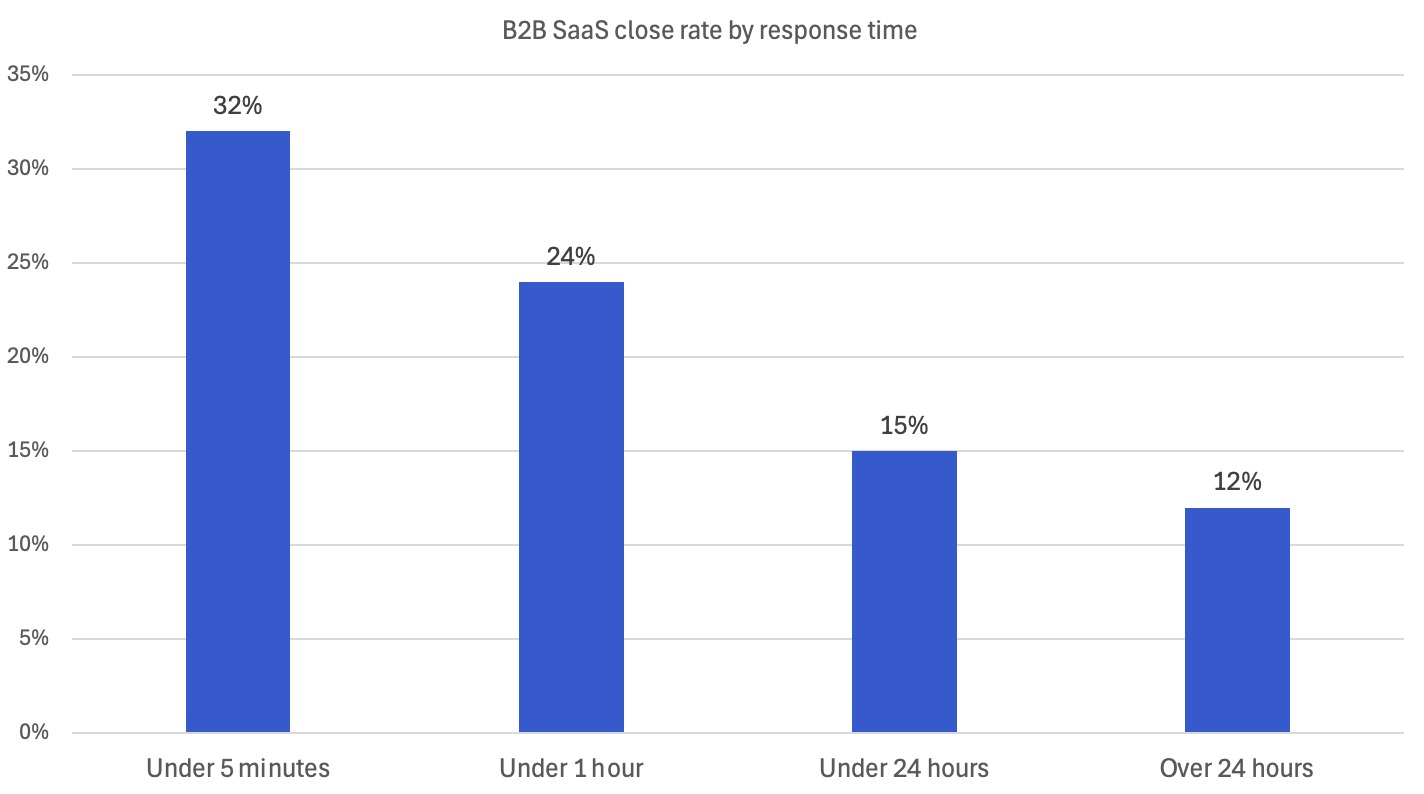
5 minutes. The benchmark every credible study converges on. Optifai's 2026 data, drawn from 939 B2B companies, shows a 32% close rate for leads contacted within 5 minutes, which is 2.6× higher than leads contacted after 24 hours. Looking at contact rates rather than close rates, the original Oldroyd research found firms 100× more likely to reach the lead at 5 minutes than at 30 minutes.
10 minutes. Engagement falls off a cliff. Strolid's analysis of 2.3 million automotive leads found that buyer engagement drops from roughly 80% at 5 minutes to 45% at 10 minutes (Strolid, 2024). Each additional minute of delay in the first five minutes reduces conversion probability by approximately 10%.
30 minutes. You are now 21× less likely to qualify the lead than a competitor who got there in 5. In Strolid's automotive data, just 15% of leads are still in active shopping mode at this point.
1 hour. The original Harvard Business Review finding still holds in the more recent data: firms contacting leads within an hour are 7× more likely to qualify them than those waiting one hour longer, and 60× more likely than those waiting 24+ hours.
4 hours. Most competitors have already had a conversation. The lead may still answer your call. But they are no longer comparing options. They are in a sales process you started too late.
24 hours. Optifai's data shows close rates settle around 12%. Less than half the rate of a 5-minute response. Drift's Lead Response Report found 55% of companies actually take five days or more to respond at all.
48+ hours. Salvage mode. Salesforce data shows that only 27% of leads ever get contacted at all. The remaining 73% are wasted marketing spend, sitting in a CRM that nobody takes action upon.
Why the problem is getting worse, not better
A decade of CRM tools, marketing automation, and AI-assisted sales should have closed the response gap. It hasn't. The B2B average is still 47 hours. Hatch's 2024 analysis of 132,188 home services campaigns found 88% of users take longer than 5 minutes to reply, and the most common response time was a full day.
Three things are pulling the average in the wrong direction.
Buyer expectations have flipped.80% of Millennials expect an immediate response from a company they contact. 64% of Gen Z want the same. The customer base is becoming less tolerant of delay every quarter. The infrastructure most businesses are still running was built for a tolerance window that no longer exists.
Lead volume is shifting outside business hours. AI-referred traffic, mobile inquiries, and after-hours research all push more inquiries into the 5 PM–9 AM window. A homeowner requesting three pest control quotes on a Sunday evening is not the exception. They are the median.
Multi-vendor shopping is the default. A buyer requesting a quote almost never requests just one. Insurance leads from some sources are often sold to between three and eight carriers simultaneously, with the first to respond winning the conversation. 78% of customers buy from the first business that responds. Not the best. Not the cheapest. The first.
The compound effect: rising expectations, more after-hours volume, and simultaneous-vendor shopping have created a window that closes faster than most internal processes can react. A 30-minute response in 2015 was acceptable. In 2026, it could have the same effect on your pipeline as no response at all.
The after-hours gap
This is where most of the leakage happens, and where most businesses haven't looked.
Across Weply's European chat operations, roughly half of all visitor conversations happen outside standard office hours: evenings, nights, and weekends. That is not surprising once you look at the calendar. 5 PM–9 AM weekdays plus weekends is around 64% of the week. What is surprising is how few businesses are set up to respond during that window.
The pattern is consistent across the public data. Housecall Pro found that 41% of home services jobs are booked after hours, when most teams are unavailable to respond. Neil Patel's analysis of LeadChat client data put after-hours leads at 50–60% of total volume. GreetNow's 2026 benchmark report found companies with 24/7 response capability convert at 2.5× the rate of 9-5 operations, and that after-hours leads receiving same-night response have an 85% contact rate, compared with 35% for next-morning response.
Translate the numbers into the buyer's actual experience. Someone fills in your form at 21:14 on a Tuesday. Your CRM stamps it and waits. At 09:00 Wednesday, your team sees it and responds. By then, the buyer has had twelve hours to receive replies from three competitors who do answer at night. The deal isn't lost because your product is worse. It's lost because the conversation happened without you.
The after-hours gap is the single largest unaddressed revenue leak in European inbound lead generation. It is also the easiest to measure. Pull the timestamps on every web form, chat, or call request from the last 90 days. Plot them by hour. The shape you'll see is not 9-5.
Industry response time dynamics are not the same
Not every industry decays at the same rate. The shape of the curve holds across all of them. The slope varies.
Insurance
Insurance leads are often sold to between three and eight carriers simultaneously. The first response wins the conversation. Yet only 37% of insurance reps reply within the first hour, and 24% take more than 24 hours. For an industry where the entire premium structure depends on capturing intent at the point of decision, that is a structural problem. SalesWings's analysis of insurance lead behaviour found that the golden window is the first five minutes, after which connect rates "decay as intent drops and competitors step in".
Automotive
Strolid analysed 2.3 million automotive leads across 847 dealerships between 2022 and 2024. Buyer engagement at five minutes was 80%. At ten, 45%. At thirty, 15%. Yet only 13% of dealership sales teams respond within five minutes to a web form or chat lead. Automotive is one of the clearest cases of an industry where the data is well-known and ignored.
Trades and home services
Hatch's 2024 study of 132,188 home services campaigns found 88% of responses take longer than five minutes; only 3% respond in under a minute. 41% of home services jobs are booked after hours. A homeowner whose drain backs up at 19:00 is contacting three plumbers. The one who answers first wins. This is the vertical where the decay curve is steepest and the after-hours skew is most pronounced.
Legal
Hennessey Digital's 2025 study of 1,333 US law firms found the median response time is 13 minutes, markedly faster than five years ago, but 26% of firms still don't respond at all, and only 25% respond within five minutes. Legal leads are higher-consideration than insurance or trades, but the window is still measured in minutes, not days.
A decay curve and a benchmark spreadsheet don't move budgets. Concrete numbers do. Two illustrative examples, with the maths visible below:
Example A: A Danish insurance brokerage
Inputs. 200 inbound leads per month from the website, hereof 50 pre-qualified by experts in the live chat. Average commission per converted policy: €350. Current response time: 45 minutes during business hours; next-morning for after-hours leads, which represent roughly half of total volume.
What the data says. At a sub-5-minute response, the close rate would land near 32% on the Optifai curve. At a 45-minute response, closer to 24%. That is an 8-percentage-point gap. On 200 leads per month, the brokerage is converting 48 policies instead of an achievable 64.
The maths. 16 lost policies × €350 = €5,600 per month, or €67,200 per year, on the response-time delta alone. That number ignores the 100 after-hours leads receiving no response until the next morning, where GreetNow's contact-rate gap of 85% vs 35% implies a further loss in the range of 30 to 50 policies per year.
Example B: A Dutch pest control company
Inputs. 50 leads per month, average job value €280. Current response: 4 hours during business hours, no response after-hours (roughly 45% of inbound).
What the data says. The 27 after-hours leads receiving no response have an 85% drop in contact rate by next morning. Of the 23 business-hours leads, the 4-hour response is converting roughly half what a 5-minute response would.
The maths. Best-case lost revenue across both buckets sits between €3,000 and €4,500 per month, or roughly €42,000 per year.
The exact numbers will vary by business. The shape of the loss does not.
What to do about it
Three tiers, in increasing investment. Pick the one your data justifies.
Free, this week
Audit your inbound timestamps. Pull every form submission, chat, and call request from the last 30 days. Plot them by hour and day of week. Mark the percentage that arrived outside your team's working hours. Until you have that number, every other decision is guesswork.
Set up an immediate auto-acknowledgement on every web form. A real, useful response within 60 seconds confirming receipt, setting expectations on when a human will reply, and offering an alternative channel like chat for urgent enquiries. This buys you goodwill and time.
Moderate investment
Live chat with human agents during business hours. The data on chat is consistent: one reply in a chat increases conversion probability by 50%, and a second reply doubles it. After-hours, a human agent also does the smart lead qualification; name, contact, intent, urgency, and captures the lead in the conversation rather than letting it sit in an inbox and informs the lead when they can expect to be contacted.
Full coverage
24/7 human-staffed chat with AI support. This is what Weply does for European businesses. Not an AI support bot answering alone. A human-supervised conversational layer with lead conversion experts that handles the conversions 24/7, 365 days a year. Why waste all those marketing initiatives and money in generating traffic with buying intent, when no expert is there to pick it up? Because that is what you do, when you neglect putting conversion experts on your website.
Frequently Asked Questions
What is a good lead response time?Under 5 minutes for any qualified inbound lead with active intent: quote requests, demo bookings, contact form submissions. Top-performing teams hit under 60 seconds. The industry average across B2B is 47 hours, which means even a 1-hour response puts you ahead of the field. The right target for your business depends on the competitive intensity of your vertical.
Is the 5-minute rule actually based on real data?Yes, with caveats. The original research is Dr. James Oldroyd's 2007 study using InsideSales.com data, published in Harvard Business Review in 2011. It analysed 2,241 US companies and roughly 100,000 leads, looking at phone-based outbound responses. The shape of the curve has been replicated in every subsequent study; the precise multipliers vary by motion (chat vs phone vs SMS) and industry. Modern benchmarks like Optifai 2026 and Hennessey 2025 confirm the directional finding.
What if my business doesn't operate after hours? Roughly half of European inbound lead volume arrives outside standard office hours. The question isn't whether your business operates at night. It's whether your competitor's response system does. The economics rarely justify staffing a full sales team after hours, but they almost always justify some form of automated qualification with human handoff and expectation setting in real-time with the high-intent visitor.
How quickly should I respond to after-hours leads? If you can respond same-night, within a few hours, even via outsourced qualification, your contact rate will be roughly 85%, compared with 35% if you wait until the next morning. The cost of a "respond in the morning" policy is roughly half of every after-hours lead lost to a faster competitor.
Does response time matter more for B2C or B2B? Both, differently. B2C buyers have higher decay velocity and shorter consideration cycles. B2B leads have more tolerance for delay measured in minutes, but the deal value is usually higher, so the cost per lost lead is greater. 72% of B2B buyers say a vendor's response time is the most important attribute of a winning vendor.
The bottom line
Two sales teams with identical leads, identical products, and identical prices will produce wildly different revenue results based solely on response speed. The data on this has been consistent for fifteen years and continues to consolidate as buyer expectations harden.
The businesses that win are the ones that first and foremost capture and qualify the leads as the enter the website and that measure the after-hours skew in their own inbound data, calculate the cost of the response delta honestly, and decide what level of coverage the maths supports.
The numbers have been here for a decade. The question is whether you act on them before the competitor next door does.
Thank you! Your submission has been received!
Oops! Something went wrong while submitting the form.
Blogs
|
September 28, 2026
|
9
min
Why You Should Create a Customer Journey Map
Today's consumers are increasingly discerning and selective, challenging even the most established brands.
But how can you keep customers on your side?
Through a deeper understanding of their needs and motivations, you can create a map of the customer journey tailored to your specific audience.
But that's not the only benefit.
Just when your marketing activities seem to hit the mark, new channels, trends and technologies emerge to take you back to square one. Understanding how customers think, feel and are motivated by can be a challenge.
One study shows that 70% fill their shopping baskets, but don't complete the purchase.
So potential buyers spend time finding the products but lack the motivation to buy them. Why does it take several steps and turns for prospects to become customers, when one step should be enough?
What is a customer journey?
The customer journey describes the process by which customers interact with a brand to fulfil a particular need.
From the moment the customer becomes aware of your brand on social media, for example, to the moment they start subscribing to your newsletter, to the moment they click through to your website.
The customer journey can seem very simple. Brands offer a product or service, which customers then buy.
But it's more complex than that.
A study has shown that 80% of today's consumers value their customer experience as highly as the products they buy.
This shows why it's important to understand the customer journey and tailor it to the target audience. From the moment customers pay attention to your brand to the moment they buy a product, their experience should live up to their expectations.
But it's not enough to just understand the customer journey. You need to visualize the whole process. You do this by making a map of the customer journey.
The map will help you pinpoint the most crucial steps and increase the chances of them making it all the way through the purchase.
Benefits of a customer journey map
Now you may be thinking that this isn't necessary for you and your business.
But when you map out the customer journey step by step with a concrete goal, you have the opportunity to improve both the customer experience and the bottom line. The aim is to solve your customers' problems and meet their needs.
1. Inbound is better than outbound
Instead of focusing on finding customers through outbound marketing, your customers can find your products through inbound marketing.
Outbound marketing requires a lot of resources. By mapping out the customer journey, you can gain a better understanding of both what piques consumers' interest and what causes them to become bored. This will give you clear guidelines for future production.
2. Relevant target audience
If you lack insights into the customer journey, you probably don't have enough information about your target audience. You risk wasting both time and money creating marketing activities that target the wrong audience.
By identifying your target audience's customer journey, motivations and needs, you have more opportunities to create activities that generate results.
3. Customer service that sells
A map of the customer journey says something about the customer experience. It shows you what they're happy with, but also where things can go wrong in the process.
It helps you prevent miscommunication or lack of information through accessible customer service.
Live chats, for example, can improve your customer service. Not least when it comes to accessibility and quick response. It will help you build trust and deepen your relationship with customers.
4. Improve the customer experience
When you have a clear insight into the customer journey, it's easier to identify areas that need improvement. This will lead to more customers staying with you and prevent them from taking an interest in competing businesses.
Research shows that as many as 33% of customers switch brands after a bad experience. That's why it's important to work as preventively as possible.
When you have a clear insight into the customer journey, it's easier to identify areas that need improvement. This will lead to more customers staying with you and prevent them from taking an interest in competing businesses.
A map of the customer journey can identify where things go wrong in the process, making it easier for you to prevent it happening again. In other words, you have the opportunity to stay one step ahead.
5. Create a customer-focused mentality
As your brand grows, it's important not to forget about the core of your success - your customers. It's important that all departments, whether it's marketing, sales or support, are customer-centric in their work.
Wrapping up
Share the customer journey with your employees. A map of the customer journey can usefully be shared with all departments. The advantage of the map is that it defines each step of the customer journey. From first contact to completed purchase. This means that everyone is involved in the process in one way or another and can relate.
A map of the customer journey can help you gain deeper insights into your customers' experiences, motivations and needs. It gives you deeper insights into behaviour and how you can work proactively to both convert them into customers and retain them.
Isn't that enough motivation to get started?
Read more
Blogs
|
November 11, 2026
|
9
min
Weply vs Imbox
Weply and Imbox are both live chat providers that develop chats for businesses that are staffed by real human beings. However, there is a big difference in the two providers' combined solution. Where Imbox mostly focuses on companies' ability to create personal relationships online themselves, Weply is an external partner that provides businesses with a 24/7 personally staffed live chat that converts website traffic into qualified leads.
Personal manned chat
Weply and Imbox are both live chat platforms, but they differ in one major way: Weply is a hosted solution, whereas Imbox is a self-hosted solution.
In other words, when you sign up for Imbox, you will have access to their platform-meaning that you and your employees can handle chats yourself.
This is great for businesses who want to handle their own live chats without having to pay a third party to do it. However, as an added benefit to signing up with Weply, we'll be providing professional chat consultants who will be available at all hours (24/7) to help you out with any questions or issues that arise during the course of your chat sessions.
Online 24/7
We're not just another chat platform. We're the first and only company that guarantees 24/7 365 online availability. That means there will always be a real human being ready to interact with your visitors on your site all day, every day.
Other platforms might promise 24/7 availability, but they don't deliver it like we do. With Imbox, your availability will depend on your own resources in terms of covering the chat either yourself, your employees, or paying extra for external chat agents.
We know for a fact how important businesses' online availability is. Our data show that +50% of all customers' chats come outside the period 8AM-4PM, and more than 23% of all chats are on weekends. Therefore, 24/7 availability is part of Weply's chat solution
Deep understanding of online dialogues
Weply's Chat Agents are trained in questioning techniques, mirroring, dialogue management, and meta communication. This means that every single chat dialogue is adjusted to the specific customer. You can be sure that your website visitors will have a great experience on your site, which leads to happier and more loyal customers.
Unlike Imbox, Weply has their own chat consultants that handle chats on behalf of businesses in both English, Swedish, Norwegian, and Danish. We know how important and convenient it is for customers to interact in their own native language.
Take your chat to another level with lead generation
Your customer inquiries are a dream come true.
But what happens when your customer inquiries become a nightmare? What if the majority of them are not relevant for you, and it ends up being a lot of wasted work hours?
You can avoid this with Weplys chat solution. We collect, sort, and forward leads on customers that meet your lead requirements. For instance, you could have the lead requirement that customers should give up a phone number, e-mail, and live in a specific area. You will not get the same opportunity with Imbox - in fact, Weply is the only one on the market that offer this kind of lead generation 24/7.
Easy and quick implementation
Like Weply, Imbox has a simple and fast click-copy-paste chat that takes no more than five minutes to get online. The difference, however, is that as soon as the chat is active, Weply's chat agents can answer chats on your website. If you choose to use Imbox as your live chat provider, you will have to train employees in how they answer customer inquiries and use the chat system. Minimize the time you use on implementing a new live chat with Weply as your provider.
Optimize more than conversion rates
If you're looking to improve your website's SEO rating, then you should choose Weply. We are the only chat provider that will not negatively impact your website's page speed. Other providers will slow down the site and make it less engaging, but Weply's lightweight widget actually improves a site's page authority by increasing engagement, which improves its rating in Google. This ultimately results in more traffic to your site and increased business value for you.
Read more
Blogs
|
September 28, 2026
|
9
min
Why live chat should be your next sales and marketing tool
Live chat has never been more relevant than right now. The digitalization is growing rapidly, and we are more online than ever before.
Purchases and customer experiences have moved to online platforms, which makes business websites the window to the world and the first impression.
Websites have become a crucial part of a business even though they are not e-commerce businesses. The outbreak of the global pandemic COVID-19 in 2020 has accelerated the digital development even more, which underlines the relevance of live chat.
A live chat is a versatile and efficient tool which can benefit businesses in multiple ways. We will use the sales funnel model to illustrate a funnel with and without a live chat implemented.
Here, we will explain specific how live chat can affect your funnel in every step. If you are still not sure whether you should implement live chat as your next tool in your stack of sales and marketing tools you have come to the right place.
Let’s get to it!
Live chat improves your sales funnel
Above are two examples of a company’s sales funnel. On the left is a traditional sales journey and on the left is a sales journey where live chat is integrated.
As you can see, the big difference is that the latter is significantly wider at the bottom. More specifically, this means that the company on the right converts more website traffic to buying customers.
But how exactly does a live chat transform more visitors to real sales? We will take a closer look at that now.
First step
The first step of the sales funnel is all about getting traffic to your website. To make potential customers aware of your business you probably already have some marketing activities focusing on generating traffic to your site.
It can be advertising, SEO or social media activities. We will get more into SEO activities later, as live chat (to many people’s surprise) can have a positive effect on that.
Second step
We will continue to the next step of the funnel, where the effect of a live chat is clear. In this phase you want to focus on keeping your website visitors interested in what you offer.
This is a job that live chat fulfills to perfection. By inviting visitors to interact with the sentences “We are online” and “Hi, can I help you with anything?” you indicate that you are online and ready to help.
In the chat it is possible to communicate with a real human being who can give your potential customers immediate answers to their inquiry.
As you can see in the traditional sales funnel, which by the way is the case in many businesses, many customers are on their own most of the time during the online customer journey.
Live chat can function as an online assistant who helps visitors on the site, just as an assistant would do in a physical store. We will get back to why availability is crucial and should be highly prioritized.
Third and last step
In the last part of the sales funnel, it all comes down to if you can get customers to choose you.
Even having a live chat that focus on customer service will leave the customer on their own the last part of the journey which can be risky.
Our live chat solution will cover this gap as our chat consultants will collect contact information on those customers who shows buying interest. The contact information will be forwarded to you so you can contact them and easily close the sale.
This is extremely valuable as many customers stop their research for alternatives as soon as they are waiting for an offer.
We hope that we have made it clear how live chat can have a positive effect and support all steps in your sales funnel and because of that increase your conversion rate.
We will now dive even more into the different steps and show specific how live chat improve every step in the funnel.
Higher ranking in search results
As mentioned earlier on live chatcan have a positive effect on your Search Engine Optimization. A higher ranking will naturally increase the amount of traffic you get on your site.
The term page authority covers multiple things and changes regularly, but we know for a fact that sites’ engagement is one of the factors Google measures.
Websites’ engagement is among other things measured based on its dwell time and bounce rate which live chat can have a positive impact on. The two terms are both concerned with how long visitors stays on the site.
If your dwell time is low, you probably have a high bounce rate. That means your visitors quickly decide to leave your site after entering. In purchase related situations it is often because your visitors have a hard time finding what they were looking for.
A live chat can make sure that visitors find what they are looking for. Through personal dialogues the chat consultant can help and interact with the potential customer which will increase the time the visitor spends on the site.
The visitors’ engagement on the site will also grow as the chat consultant will clarify some concerns, answer practical questions, or help them find what they were looking for on the site.
A higher dwell time and better engagement rate can lead to a higher ranking in the Google search results than your competitors, which is incredibly valuable.
Customers are expecting you to be available
Once a potential customer has landed on your site there is a lot that can determine whether or not it ends up in an actual sale. In a perfect situation the trust and chemistry arise immediately, and the customer chooses you right away.
Unfortunately, this rarely happen, and a lot can go wrong that causes the customers’ exit. Website visitors are hard to convince and therefore you must do everything you can to give the best first impression.
If your website has a live chat, you are signaling that you want to help which is the best you can do to attract and keep as many customers as possible.
If an interested customer opens the chat and start chatting, the chat consultant can maintain and even increase the interest in your company through personal interactions.
The digitalization has changed our behaviour and expectations for companies' availability. We have become more impatient and we are expecting immediate answers when we are interested in a company.
At the same time, the structure of the internet means that potential customers are always just one click away from competitors. In order to meet consumers' needs you have to give the same customer experience online as you would in a psychical shop.
Just as you would expect to be able to seek help in a psychical shop, a live chat will play the corresponding role on your website. Imagine that you are in a psychical store with no opportunity to get a quick answer on product related questions. Frustrating, right?
In that situation you would probably not be satisfied with filling a contact form or reaching the company by phone where there is a chance that you call outside opening hours. In the same way it is not good enough for your website visitors.
Availability is also about how customers can reach out to you. Being able to get in touch with you through chat is very attractive for both you and your customers.
A new market research done by Megafon shows that 45% prefer to contact businesses through chat. Even more importantly, the research show that every 2. chooses to deselect a business if they cannot get in touch with them through their preferred communication channel.
A global research done by J.D Power also shows that chats are the preferred way of communicating with companies.
It shows that 46% prefer live chat compared with 29% that prefers email and 16% for social media. Having a chat is not only convenient for your customers but is also the ideal tool for you to generate more sales as you will not get deselected based on a missing communication channel.
If the live chat you implement even handle customer inquiries 24/7 you have reached the top of availability. Our data particularly shows that many tend to chat with businesses outside normal office hours which underlines the importance of having a chat that is open 24 hours a day.
Are you looking for more interesting facts on digital communication? Click here and read 5 surprising findings about digital communication.
Interactions lead to conversions
We know for a fact that the availability and customer service you are signaling through livechat leads to increased conversions and more paying customers. Coverting traffic is specifically something that many businesses are struggling with.
The challenge is typically that most businesses prioritize sales and marketing activities in the top funnel. Many spend over 85% of their marketing budget on getting traffic to their website. Traffic is of course never a bad thing but the prioritizing of the funnel will show in the conversion rate.
In that case you might want to consider live chat, as you through chats can gather information about your visitors. Through chat dialogues you are able to see your customers signals, which can help you get more knowledge about why customer chooses you, why they are deselecting you or what information they are having a hard time finding on your site.
These are signals that would be easy to registre in a psychical shop but online it is much more difficult. Chat dialogues makes it possible for you to get to know your potential customers and optimize your site based on your findings which eventually will increase your conversion rate.
Besides getting a deep understanding of your customer base you can use live chat to generate leads.
As mentioned earlier on, it basically means that the chat consultant will collect contact information on people that are intersted in being, and will forward their information to you.
You will also get the entire chat dialogue so you can get a clear sense of what the customer wants to get an offer of or what question they want you to answer.
This is incredibly valuable as many actually stops looking for alternatives while they are waiting for an offer or an answer to their product related question.
While the potential customer's interest in you are on hold, you will receive the lead that easily can get you informed about what the needs are and how you should approach the customer when you contact them. In that way you have the best starting point for converting leads to buying customers.
As you might have realized, the sales funnel is not just four steps where you can work with each steps' separate tools. The most effective and optimal sales funnel is when there is an interplay between the various sales and marekting tools.
Therefore we also do not suggest that you only focus entirely on the bottom of the sales funnel, as well as you should not only focus on the top funnel. It is crucial that you focus on the sales funnel as a whole and you should not spend the majority of your budget on traffic generating activities.
Live chat should be your next sales and marketing tool due to the positive effect in all of the sales steps which in the ends leads to more sales. It is an efficient tool that neither exceeds your budget nor expecting much from you.
The effect of your live chat will show in several areas of your business, and the price you pay for your live chat solution will be nothing compared to the value it creates.
Are you driving a lot of traffic to your website, but missing conversions? There could be several reasons why your users aren't getting all the way to their final destination.
In this article, we'll go over what conversion optimization means and how you can work with the strategy on your website.
What does CRO mean?
CRO is an abbreviation for Conversion Rate Optimization. Conversion rate optimization aims to increase the number of conversions on your website, which means that a greater number of visitors meet your specific goals. This could be a purchase, membership, contact, or newsletter sign-up.
You can calculate the conversion rate by dividing the number of goals achieved by the number of visitors. Let's give an easy example.
You have sold 100 items and had 1000 visitors in the given period, this means you have a conversion rate of 10%.
By optimising the conversion rate of your website, you have the opportunity to increase your sales, reach your goals, and produce more value from of your visitors.
What is a conversion?
Depending on your industry and business, conversions can look different. Here are some examples of conversion points:
Buy
Downloadable whitepaper or guide
Contact form
Register for webinars
Gives contact information
A conversion means that the visitor actively chooses to receive information from your brand, complete a purchase or contact you. Depending on whether you sell products or services, there are several conversion options to choose from.
A common conversion point for almost all industries is the collection of contact details, which can be used by the sales department or for newsletters, for example.
Why work with conversion optimization?
Today, marketers spend 85% of their budget on driving traffic to their website, with no plan on how to convert that traffic from visitors to actual customers.
Statistics also show that 27% have a purchase intent when they visit a website, yet only 1-4% of visitors act. Now that's a problem. To raise the numbers, conversion optimization plays a key role.
Conversion optimization increases the number of quality leads
There are several strategies to optimize the conversion rate of your website. Now it's time to figure out what works for your business.
1. Optimize the structure
Look at the structure of your website and see if there is anything you can improve in the menu, the choice of headings or CTAs, for example. Base your website on your visitors' intentions. Is it easy for them to navigate, find information and take advantage of your offers?
If not, make the process easier for them by ensuring that the menu highlights the most important elements of your business. Examples include product categories, services, news, and contact. You should highlight at least one conversion point in the menu, which could be purchase, downloadable content, or contact for example.
The same strategy applies to the landing page, which visitors are sent in the first place. Include the most important parts of your business through concise descriptions and interesting headlines. Work actively with CTAs and internal links that easily take visitors to the next step, with a focus on conversion.
You can also review your design. You can highlight key elements by using more prominent colors, fonts, and shapes.
Do your CTAs stand out from the crowd?
Are your conversion points clear and easy enough to find, compared to the rest of your content?
2. Optimize downloadable content
What kind of downloadable content are you using today? Are there PDFs or forms exposed on your website? Analyze how the content is presented and whether there are opportunities to improve the download process.
If the content takes a long time to download or is of poor quality, you risk losing potential customers before they have even had a chance to read it.
The same applies if you do not present the content in a sufficiently interesting way. Be clear about why recipients should engage with the content, what they can expect and how it will benefit them.
3. Increase trust
Trust is one of the most important factors influencing visitors' purchase intentions, according to most studies.
The visual impression, quality of content, certifications, credentials, knowledge, and navigation all influence how visitors will perceive your brand and company.
Here it is important to create an overall impression that is professional, informative, and in line with your brand profile. Is there any element you have neglected or neglected to date?
For example, are you missing references, customer cases, or proof of your expertise in the form of certifications and awards? Or could you create more articles, interviews, or press releases that demonstrate your knowledge in the industry?
There's plenty of content to work with that will help you build deeper trust with your visitors.
4. Live chat
Live chat allows you to engage with users at any time of day. At Weply, we offer a service in the form of lead-generating chat consultants 24/7. It's a way for you to improve customer service, build deeper relationships, and collect data from potential customers in a natural context.
No matter what question the customer has, the consultants can guide them right. Right in the chat. Livechat can generate more leads and build customer relationships over time.
5. Listen to users
One of the most important parts of conversion optimization is listening to users. Collect feedback through forms, chat features, or newsletters.
Do they think something is missing from your website?
Is the information they want available?
Or could you improve your offerings?
Consumers appreciate feeling important. Show that their opinions matter to you and your brand moving forward.
It's important to A/B test
It's easy to fall into old ways of doing things and to fall behind the competition. Instead, we recommend finding out what actually works on your site. Develop data-driven hypotheses, run A/B tests and analyze your stats after the fact.
A/B tests show specifically what generates results and what doesn't, as different versions are tested over the same period of time. This can include headlines, formats, color choices, and placements. But also alternative opening phrases in a live chat. The possibilities are many and data-driven optimization will play a big part in your conversion optimization.
Conversion optimization allows you to guide your visitors the right way on the website. Depending on your needs and circumstances, there are different strategies you can apply to achieve your goals. Dare to test yourself and evaluate afterwards.
If you are curious about implementing lead generation and personalized interactions in your strategy, contact us for more information!
Read more
Blogs
Lead Gen Hub
|
November 2, 2026
|
9
min
What is lead generation? And how does it work?
Many salespeople and marketers daily talk about leads. But what exactly is a lead?
The short version: a lead is when you collect customer information.
At Weply, a lead is based on our customers' requirements and wishes, which is then passed on to the sales manager or an employee at the respective company.
With this blog post, we want to explain what a lead is, how you can generate them and what strategies actually work in practice.
Before we delve into strategies and channel selection, we'll clarify what the term means and how you can identify your current and future leads.
The sacred question - what is a lead?
A lead is the definition of a new potential customer, who has shown an interest in your services or products. This can be a contact from a company (B2B) or individual (B2C), depending on the market your company is positioned in.
The advantage of lead generation is that as a business owner you avoid making cold calls to people who don't know who you are or why you are calling them. We all know how that usually ends - in annoyance.
Instead, you work with those contacts who have found your brand on their own and are aware of what you have to offer.
There are several variations of leads, we will now go through the most common ones:
Marketing Qualified Leads
Marketing Qualified Leads refer to people who have engaged with your marketing activities. For example, they have downloaded a whitepaper and in exchange entered their email, or signed up for a newsletter.
This does not mean that the customer is ready to make a purchase. However, they are interested in more information about your brand, in order to make a purchase decision.
Sales Qualified Leads
Sales qualified leads are contacts who have shown a strong interest in becoming a customer of yours. For example, by downloading a price list from your website or filling in a contact form.
Service Qualified Leads
Service qualified leads refer to your current customers. This is about building a deeper relationship and converting them into loyal and returning customers.
Why lead generation?
Lead generation allows you to nurture your potential customers at an early stage. When a person shows an interest in your brand, you have the opportunity to capture them immediately, as the contact information becomes the basis for your sales department.
Lead generation saves time for sales people who don't have to look for cold prospects, and shortens the buying journey for the customer who is directly noticed.
How do you generate leads?
There are several strategies you can use to generate leads, but the process is the same regardless of channel choice or format.
Attract: drive traffic to your website through social media, for example
Engage: lift content that sparks an interest to learn more information on your website
Convert: turn your visitors into leads by motivating them to give up their contact details - preferably in exchange for a service.
So the first step is to create interest-generating content that leads recipients to the next step. Content production is the foundation of lead generation. We'll look at the strategies you can use to both attract and engage your recipients to go all the way to conversion.
Lead generation strategies
Social Media
Social media marketing is an effective way to attract new contacts. Through your channels, you have the opportunity to highlight products, services, offerings, quality work or the team behind the brand.
Encourage your recipients to click through to find out more through a clear Call-To-Action. The more relevant your content is to the recipients, the more likely they are to click through to your website.
E-mail Marketing
Email marketing is an effective strategy for engaging with contacts who are already aware of your brand. Tailor your messages, campaigns and offers to the recipients.
What do they want to learn more about and what have they shown interest in before?
Blog posts allow you to promote your offers in a genuine and informative way.
For example, if you offer SEO services, you can justify all the benefits the method generates in the blog post. This will motivate recipients to want to read more and to learn about your expertise.
Through the blog, you have the opportunity to demonstrate your knowledge which will also build trust with the potential clients.
Advertising
The purpose of advertising can look different, some use it to increase brand awareness, others to drive traffic to their website or to collect contact details.
Here you have a great opportunity to generate new leads. Be clear in the ad about what your brand can offer recipients and include a clear CTA that leads them on through a simple click. Don't forget to target your ads to your specific audience.
Livechat
The purpose of advertising can look different, some use it to increase brand awareness, others to drive traffic to their website or to collect contact details.
Here you have a great opportunity to generate new leads.
Be clear in the ad about what your brand can offer and include a clear CTA that leads them on through a simple click. Don't forget to target your ads to your specific audience.
Your website can be a goldmine for lead generation, if you set the stage for it.
The most effective strategy for optimizing your website for lead generation is through a live chat. Here you have the opportunity to specify what a relevant lead is for you, so chat consultants know what to base their conversation with visitors on.
If the consultants have the feeling that the leads are potential customers for your company, they compile the relevant information which is then attached to you:
Contact
Company
Telephone number
E-mail
Which page they last visited while navigating your website
The contacts referred to your business are potential leads who have shown a strong interest in your business. They have also provided their personal details, indicating that they are quite far in their buying journey.
As a business owner, you have the opportunity to save both time and money by implementing livechats into your lead generation strategy, as marketing activities are optimized and the sales process is shortened.
Want to increase your sales while optimizing the sales process?
Then lead generation is the right approach for you. There are many ways to process leads and you need to find the strategy that works for you and your business.
We hope this article has clarified what leads mean and how you can process them.
Don't hesitate to contact us if you want to know more about how Weply's live chat is the ultimate conversion tool!
Read more
Blogs
Resources
|
September 28, 2026
|
9
min
The Essential Chat Glossary
This glossary contains explanations of all the abbreviations and terms that we use daily in the chat world, but which for some may be unfamiliar. If you are completely new to the field, you can start from the beginning, but if you are partially familiar with the universe, you can simply click directly to the ones you want to learn more about or brush up on.
A/B testing, which is also called split testing, is when you test the exact same thing several times with different variabels in order to find the perfect recipe. In chat context we use A/B testing to test which elements in a chat that work best for a specific customer segment.
Adwords
Adwords is Google's online advertising platform. The platform allows businesses to pay to get their advertisements displayed in Google's search engine or in other of Google's affiliate sites. Businesses pay-per-click which means that when users click on the advertisement, Google will each time get a certain amount of money.
Agent picture
An agent picture is the small round picture that appear in a chat when it opens. It can be a picture of the actual person you are chatting with, a fixed picture of some employees from customer service or it can the a company logo. When Weply develops a chat for at customer, the company can decide which picture they want to show in their chat.
Application programming interface (API)
An application programming interface is a program that gets several programs or apps intertwined. You can say that an API is an interpreter who makes two different types of software able to communicate. At Weply we use an API to deliver leads into our customers' CRM systems so they do not need to type something twice manually.
Artificial intelligence (AI)
Artificial intelligence is the term for the field working with simulating human intelligence in machines. Artificial intelligence only works based on huge amount of datasets. Once you have collected a fair amount of data you can feet an algorithm with information that allows the machine to act more like a real human being.
B
Backlink
Backlinks are links to external websites on your own website. You can for example create a blog post where you link to other businesses or articles which will improve you SEO.
Best practice
Something being best practice basically means that you see a way of doing things as the most efficient and succesful.
Bounce rate
A bounce rate is a measurement for how many enters a website and leaves it right away without clicking into a subpage.
Buyer persona
Creating a buyer persona is when you make a representation of a potential customer based on market research or your own collected data. Based on buyer personas you can easier build your strategi on how you will approach and attract future customers.
C
Call to action (CTA)
The term call to action is when you want to get someone to click on something. This can e.g be pictures, buttons, or links, that has a specific message that encourage the visitor to make an action. This could be a button saying "Get your free e-book here" or "Get 7 days free" which temp the visitor to click on it.
Content management system (CMS)
A content management system is a software that makes it easier to put content online and organize your entire website. The most common CMS is WordPress which is used for around 1/3 of all websites in the entire world.
Conversion Rate Optimization (CRO)
Optimizing a conversion rate is when you work with increasing the number of conversions made by a website visitors. This is often a longer process and usually takes a lot of time and different tests.
Cost per lead (CPL)
You measure a cost per lead in marketing and sales campaigns. You calculate the CPL to measure campaigns' efficiency typically in terms of how many leads you generate based on a specific campaign or ad.
Customer acquisition cost (CAC)
Customer acquisition costs are the cost of getting a customer to choose your product or service. This usually includes costs related to marketing and sales activities in a given time period. All the costs that you have spend must be divided by how many customers acquired to get your CAC.
Customer lifetime value (CLV)
A customer's lifetime value is the predicted value of what the customer will bring to the company over the course of the relationship. In order to calculate a customer groups' CLV you have to know what it costs to acquire a new customer, how much profit you make on a customer per year, and how many customers that are leaving you yearly.
Customer relation management (CRM)
Customer relation management is all about how you increase the customer loyalty. If a business optimizes customers' loyalty the costs will decrease and the rentability will increase. Businesses typically use a CRM system in order to gather all customer data in one place which will make it easier to keep track on customers.
D
Dialogue
A dialogue can be many things. In our chat world a dialogue is the conversation between one of our chat consultants and a website visitor. Through personal dialogues Weply helps businesses handle their chat inquiries.
Direct traffic
Traffic entering a website without a referral URL from an external source (e.g Twitter or Facebook) is called direct traffic.
Dwell time
A website's dwell time is an expression of how long visitors stay on the site. Having a low dwell time is typically a sign that you also have a high bounce rate which means that visitors exit the site quickly. The other way around, a high dwell time typically goes hand in hand with a lower bounce rate. The latter is a sign to search engines that your website is relevant which will improve your ranking.
E
Engagement rate
The rate of engagement is an expression of how many interactions people have with your content. Engagement rate is typically measured from the number of views, impressions, likes, comments, shares, saves or mentions.
F
FAQ chat
A chat that only answers Frequently Asked Questions is typically a chat where visitors can get answers on the most common things customers are considering when buying. This could e.g be questions like "How do I return?" or "How long is delivery time?" but of course depend on the business. In some chat solutions it starts by asking FAQ questions and if the customer cannot get the right answer he/she will get the opportunity of being forwarded to a real person.
H
Heat map
A heat map is a visually way of getting to know where your customers are looking, scrolling, and clicking on your site. Based on a heat map you can decide where to place CTA's based on the color of the heat in specific areas which usually ranges from red to green.
I
Inbound marketing
Inbound marketing covers for the activities that focuses on attracting new organic traffic through existing channels. This kind of marketing heavily relies on creating creative and relevant content that will have an effect on you ranking in search engines.
Interactions
Interactions covers for all the ways customers can engage with you. On social media it is typically through likes, comments, sharing or writing a review. At Weply we naturally focus on the engagement that happens related to the chat. Here we mostly look at if visitors first of all open the chat and afterwards if they start chatting.
J
JavaScript
A javascript is a dynamic coding language executed in a browser. In our case, our customers receive a custom javascript that allows us to get their personal chat online.
L
Lead generation
A lead is when you get information about a specific person who has shown interest in your business. In our case, a lead is when our chat consultants collect a potentiel customer's name, e-mail address and phone number after a chat.
Lead magnet
A lead magnet is a term that covers for the way you generate leads. When you offer something valuable in return of customers contact information, this is a lead magnet. An example that we see a lot is when you can get access to specific content, guides or insights if you in return give your e-mail address.
Live chat
A live chat is a chat where two human beings communicate in real time online. Having a live chat on your website makes it possible for website visitors to ask their questions.
M
Marketing funnel
The marketing funnel is a model used to understand customers' engagement with a business during the entire sales process. The funnel can be used to evaluate individual activities and based on that optimize the entire flow. Traditionally, the funnel is divided into Awareness, Interest, Consideration, Intent, Evaluation and Purchase.
N
Nurturing
In relation to the marketing funnel you naturally talk about nurturing. Nurturing is when you try to keep the customer's attention and interest in your brand. In order to do so, it is important to work with each step of the funnel. A live chat is e.g a tool for nurturing website visitors but it can also be CTA elements.
O
Opt-in form
An opt-in form is a site where businesses in return of valuable content collect customer information. This is done by offering for example industry reports, statistics or white papers. The customers will have acces to it once they give up their information.
Organic lead
An organic lead is when a lead is generated that the business did not pay for. For example when you hear recommendations for certain products or services through friends and you decide to try it, this is an organic lead.
Organic traffic
All traffic that comes to your website that you have not payed for for example though marketing activities is organic traffic.
Outbound marketing
Outbound marketing is the marketing activities that focus on pushing the brand to the end customer on external platforms through payed ads.
P
Page speed
A website's page speed is simply how fast a site is being downloaded. The bigger elements a site has (javascripts, widgets, etc.) the slower the page speed will be.
Pain points
In a customer journey there can be certain customer paint points. A pain point happens when the customers expectation did not match the experience. It is obviously important to know these pain points so you can optimize the customer journey. A live chat can be useful as paint points usually show in a chat conversation.
Pick up line
In chat context you often invite the visitor to chat with a pick up line. This line should indicate that you are online and ready to help. In our case we ask "Hi, can I help you with anything".
Plugin
A plugin is a piece of software that is being added to a program which will increase the program's qualities.
R
Referral marketing
Referral marketing is word-of-mouth recommendations. The recommendations you give to your friends and family based on your own experience with the product or service.
Retargeting
Retargeting is a strategy where businesses want to advertise to persons that already showed interest in the brand. These ads trigs when somebody for example has left a site without buying anything. You can use tools such as Google Ads, LinkedIn Ads and Facebook retargeting.
Return On Investment (ROI)
The ROI is a measurement for how much you will get in return for an investment. A positive ROI is a sign that you have earned money and oppesite, a negative ROI is a sign that you will loose money and the investment is not profitabel for you.
S
Search engine marketing (SEM)
A SEM strategy is a way of doing marketing. Search engine marketing means that you pay for ads that will appear in the search engine result pages (SERP). Basically companies will bid on keywords that you usually would type in when searching for that specific product or service.
Search Engine Optimization (SEO)
Search engine optimization is a marketing strategy where the main goal is to gain a higher ranking in the search results. Working with SEO is quite broad and include things such as building a user-friendly website and creating relevant content.
Segmentation
Segmentation is when you divide customers into groups based on different criteria. These groups are often divided based on industry, age, geographic, demographic etc.
Striking point
In our world a striking point is the moment in a chat dialogue where the potential customer is most likely to give their information. Based on our own chat data we know when the chance of generating a lead is biggest. Generally, this happens after 4-6 interactions but of course it will depend on the context, industry and buying situation.
T
Thought leadership
Thought leadership is a way of branding your business, not through your product or service, but by communicating that you are the expert within your field. You usually share your knowledge and expertise through social media, blogs, articles or white papers.
U
Unique selling proposition (USP)
A unique selling proposition is a business' competitive advantage and how you differentiate from competitors.
w
Web hosting
Web hosting is an online service that basically rent out storage place on a server. A web host storage all stort of files and data for a website which allows the site to function as it should.
Widget
A widget is a block with content you put on your website which adds a new function to your site.