Strategy, data and guidance on driving the right traffic, converting it, and making the most of every lead. From a team doing it every day across 2500+ BtB and BtC companies.
August 26, 2026
|
9
min
How to Find Your Website's Lead Conversion Leaks with ChatGPT [including 8 prompts to use]
Quick Summary
Most businesses spend serious money driving traffic to their website and almost nothing auditing whether that website actually converts visitors into leads. This guide gives you 8 copy-paste prompts and a clear process. Run them against your own webpages using ChatGPT or Claude. No tools to buy, no agency to hire. By the end, you'll have a prioritised list of exactly where your website is losing leads and what to fix first.
The Problem Most Businesses Never Audit
Traffic goes up. Leads stay flat. You've tried new headlines, changed the button colour, maybe swapped the hero image. Nothing moves the needle. Here's what usually isn't happening: a proper audit of the full path a visitor takes from landing on your homepage to becoming a lead.
The average website converts 2 to 3 percent of its visitors. The top performers convert 8 to 15 percent. The gap between those two numbers is often not better traffic or smarter ads. It's fewer leaks in the conversion path. A leak is any point where a motivated visitor quietly exits without taking the action you need them to take.
Leaks hide in obvious places: a form with no clear next step, a contact page stripped of any reason to trust you, a service page that doesn't match what the homepage promised. They also hide in less obvious ones: a visitor arriving at 9 PM with a genuine need and nowhere to turn, or a buyer who just came from an AI search tool mid-conversation and landed on a static brochure page with a contact form at the bottom and a phonenumber in the menu bar.
Most businesses have never audited for these problems systematically. They've looked at individual pages. They haven't looked at the path. This guide changes that. Eight prompts, one conversation thread with an AI, your own screenshots.
Why Listen to Us?
Weply has in 2025 alone generated over 250,000 qualified leads on behalf of 2,400+ customers across the Nordics and Europe. We've been doing this since 2013, across industries ranging from dental chains to insurance companies to fast-growing scaleups, to telco enterprises and so on.
We know what breaks conversion paths because we watch them break in real time.
Our chat consultants, backed by AI, handle the questions visitors can't get answered on a website. They capture the leads that forms lose. Across our customer base, adding managed chat produces an average 12% lift in lead conversion, and one in three chat conversations becomes a qualified lead. That data is the foundation for everything you're about to audit.
Why Use AI for This, and What You'll Need
A conversion specialist can audit your website for between EUR 3,000 and 8,000. They'll spend four to six weeks on it and deliver a PDF. The audit will be thorough, and for complex e-commerce operations, it's probably worth every cent. For most service businesses, you can surface minimum 80% of the same findings in 30 minutes using an AI. Here's why it works: AI evaluates your pages the way a first-time visitor does, without the curse of knowledge. You've looked at your homepage so many times you no longer see it. AI reads it cold. It also audits paths as sequences, which means it catches the friction that lives between pages, not just on them.
One honest caveat: this works well for service and product businesses with a clear conversion path. If you're running a complex multi-product e-commerce operation, a full specialist audit will find things this process won't. For everyone else, 30 minutes is enough to find what's bleeding leads.
What you'll need:
ChatGPT Plus, Team, or Claude Pro (the free tier works, with limitations on image uploads)
A browser
A full-page screenshot tool (GoFullPage for Chrome, Firefox's built-in screenshot function, or use mulitple screenshot directly from Claude)
30 minutes
Optional: GA4 access for one advanced prompt
Before You Start: Four Preparation Steps
Step 1: Map your conversion path. For most businesses this is Homepage, Service/Product Page, Pricing Page, Contact Page. If you're unsure which pages matter most, open GA4, go to Explore, and check the path exploration report. Three to five pages is enough to work with. Step 2: Take full-page screenshots of each page in sequence. Full-page, not just the top fold. You need the AI to see the whole page. Step 3: Screenshot your lead form and your confirmation page. The confirmation page matters because it tells you, and the AI, what promise you make to someone after they submit. Step 4: Open a new conversation in ChatGPT or Claude, upload all screenshots together, and add this context: You are a senior conversion rate optimisation specialist with experience auditing business websites. These are screenshots of my website pages in the order a visitor would see them. My business is [type of business]. My goal is to generate [desired action: enquiries / consultations / quote requests]. I'll be asking you to audit specific aspects of these pages.
Set this context once at the start. Every prompt that follows builds on it.
The Prompt Library
Eight prompts. Run them in sequence in the same conversation thread. Each builds on what came before.
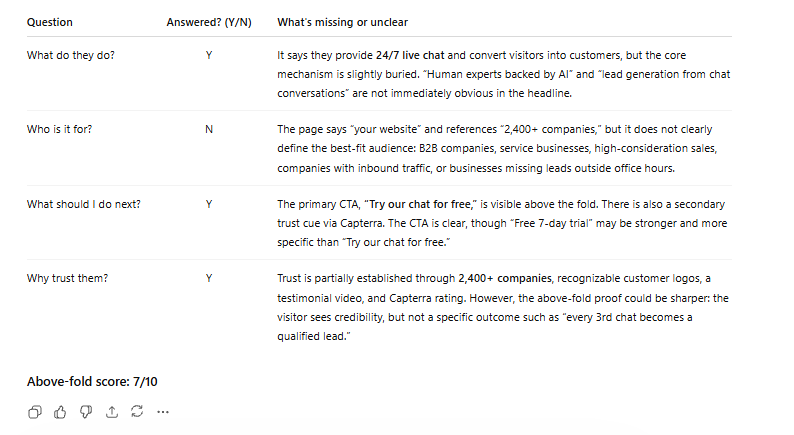
Prompt 1: The First-Impression Test (copy this exact prompt) # First-Impression Audit ## Context Visitors decide within 5 to 10 seconds whether to stay or leave. This audit evaluates what's communicated before any scrolling. ## Your task Look at the first screenshot only (homepage or landing page). Based exclusively on what's visible above the fold, answer:
1. Clarity — What does this company do? 2. Audience — Who is it for? 3. Action — What should I do next? 4. Trust — Why should I believe them?
## Output format | Question | Answered? (Y/N) | What's missing or unclear | |----------|:---:|---------------------------| | What do they do? | | | | Who is it for? | | | | What should I do next? | | | | Why trust them? | | | Above-fold score: X/10
What this reveals: The failure we see most often across service websites is in row three of that table: "What should I do next?" Businesses build strong hero sections explaining what they do, then offer no visible next step. No CTA above the fold. No invitation to start a conversation. The visitor who wants to engage has to scroll, navigate, and figure the path out alone. Every step of effort they have to put in is a point where you can lose them. The good news is this is the quickest fix in the whole audit. A clear, visible CTA above the fold costs nothing to add and almost always moves conversion numbers.
Example from running the prompt on Weply's homepage
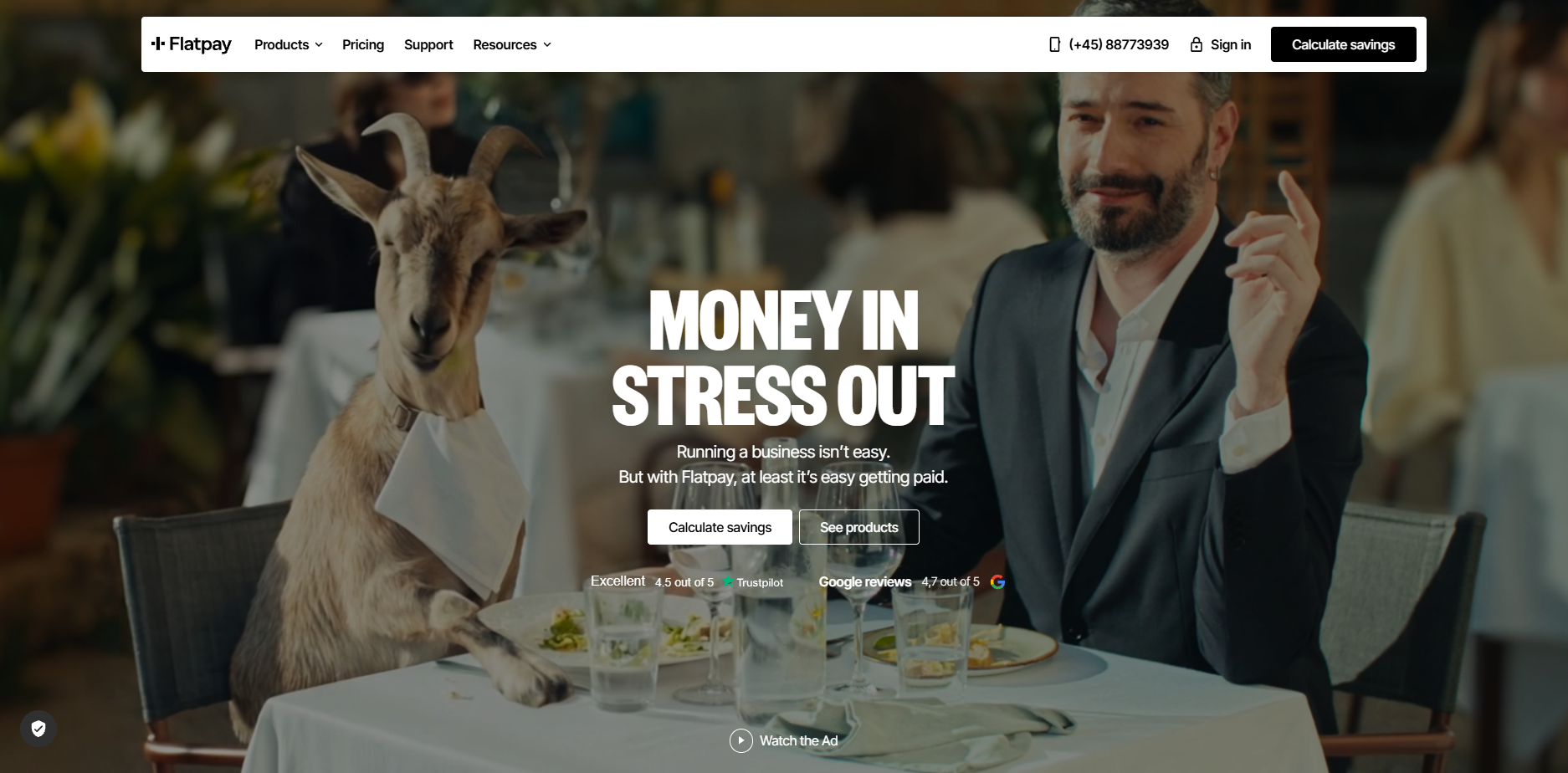
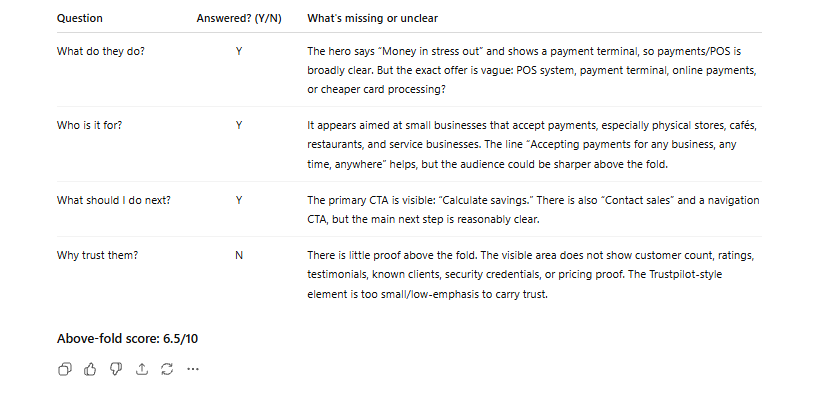
Now what we did was to run the full series of prompts on one of the most succesful current scaleups in Europe and one of the best at digital marketing, Flatpay.
This is the result from the first prompt:
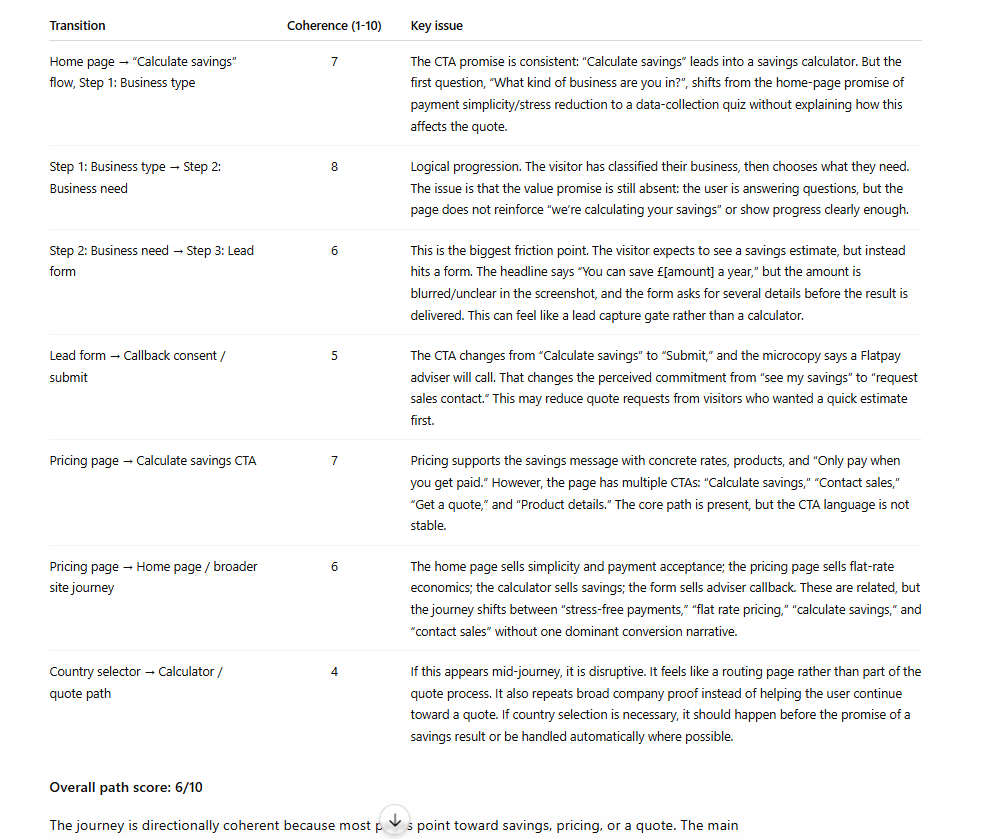
Prompt 2: The Conversion Path Coherence Audit # Conversion Path Coherence Audit ## Context These pages form a sequence that visitors move through. The biggest conversion leaks often live between pages, not on them. ## Your task Evaluate all screenshots as a connected journey:
1. Message consistency — Do promises made on one page carry through to the next, or do they shift? 2. CTA consistency — Is the call-to-action language stable across pages, or does it change confusingly? 3. Orientation — Are there pages where a visitor might feel lost or unsure what to do next? 4. Distractions — What elements pull visitors away from the conversion goal (unrelated links, social buttons, irrelevant navigation)?
## Output format Score each transition between pages: | Transition | Coherence (1-10) | Key issue | |-----------|:---:|-----------| | Page 1 to Page 2 | | | | Page 2 to Page 3 | | | | (continue as needed) | | |
Overall path score: X/10
What this reveals: Messaging fragmentation is the most common path-level problem, and it's also the least visible to the people who built the site. The homepage says "Get a free consultation." The service page says "Contact us for pricing." The contact page says "Send us a message." Three different implied offers. Three moments of micro-doubt. Each transition chips away at the visitor's confidence that they're in the right place. The path should feel like one continuous conversation.
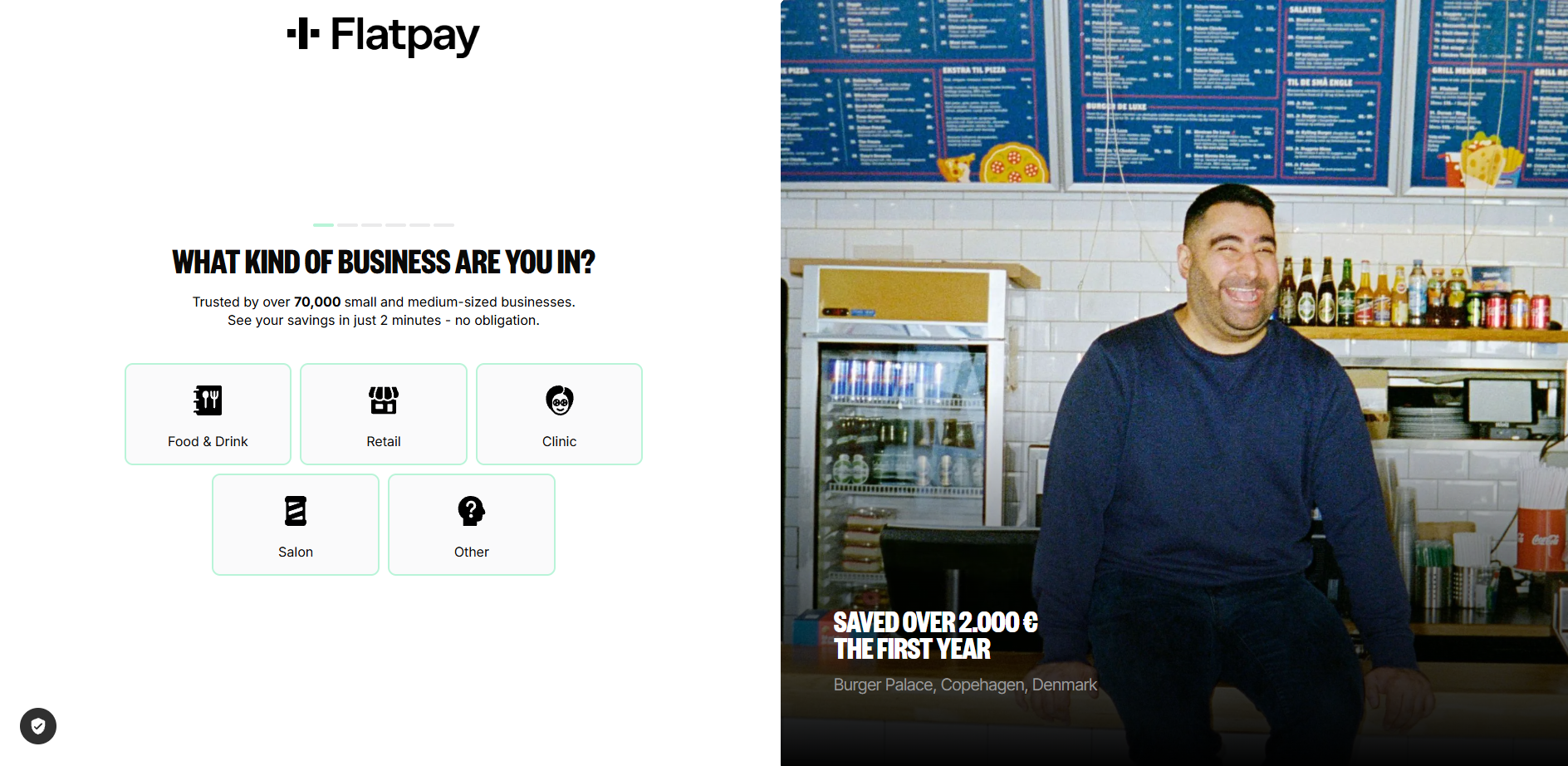
Flatpay uses a multi-step CTA journey for "calculate savings" or "get a quote", which most serves as a teaser as well as pre-qualifier for leads and Flatpay.
Flatpay results from prompt 2:
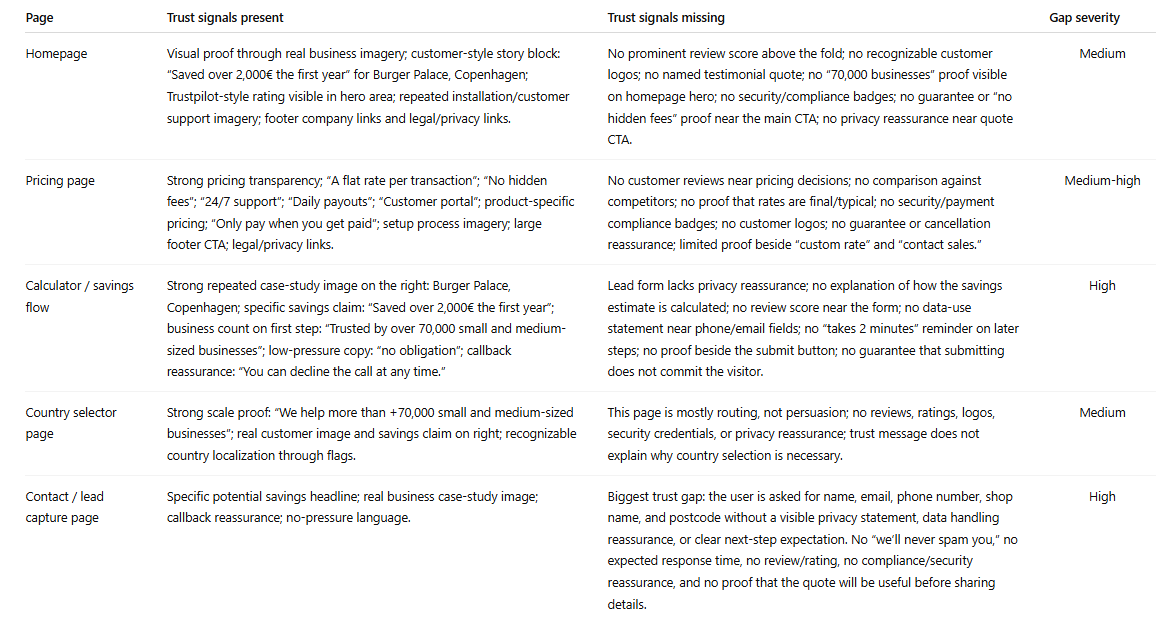
Prompt 3: The Trust Signal Inventory # Trust Signal Inventory ## Your task Across all pages, catalogue every trust signal present: customer logos, testimonials, reviews, case studies, certifications, team photos, years in business, guarantees, privacy assurances, awards, association memberships. Then evaluate:
1. Which pages have strong trust signals? 2. Which pages have weak or no trust signals? 3. Is there a trust gap specifically on the conversion page (contact or pricing page)? 4. What trust signals would you add, and where?
What this reveals: Trust signals cluster on homepages, where they're least needed, and disappear on contact pages, where they matter most. The moment a visitor is about to hand over their phone number is precisely when they need reassurance. They're asking: will someone actually reply to this? Have you done this for businesses like mine? Our chat data shows the most common questions visitors ask right before converting are trust questions: "How quickly will someone respond?" "Do you work with companies in my industry?" A single line on the contact page, "We typically respond within two hours," does more conversion work than most hero sections. Adding it takes five minutes. Flatpay results from prompt 3:
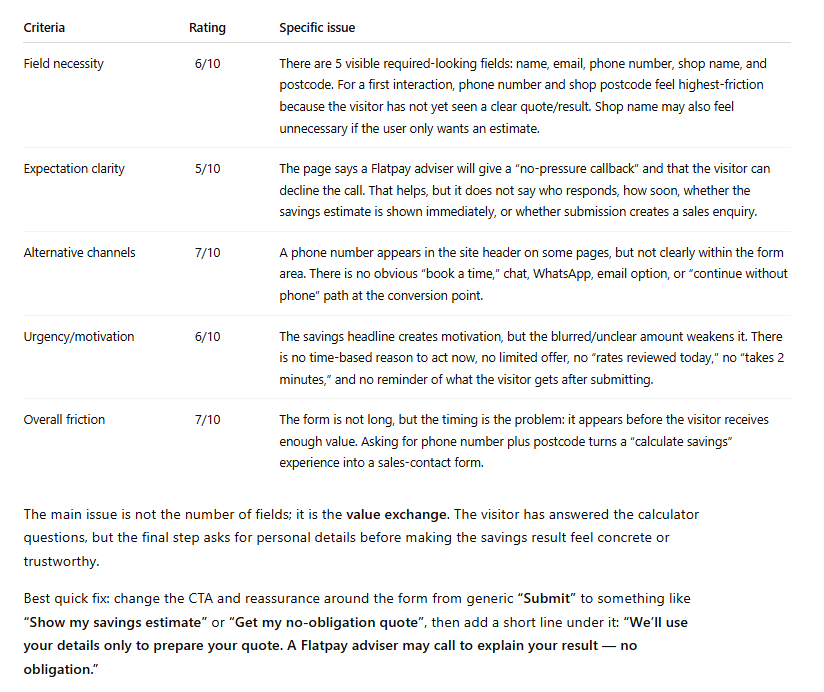
Prompt 4: The Dead Form Diagnosis # Lead Capture Form Diagnosis ## Context This is your final conversion point. A motivated visitor is about to become a lead, or quietly close the tab. ## Your task Evaluate the contact or lead form as a slightly hesitant potential customer who is ready to enquire:
1. Field count: How many fields? Which feel unnecessary for a first interaction? 2. Expectation setting: Does the page explain what happens after submission? Who responds? How soon? 3. Alternatives: Is there any option besides this form (phone, chat, booking link, WhatsApp)? 4. Urgency: Is there a reason to submit now, or could I come back to it later with no consequence? 5. Friction score: Rate 1 (effortless) to 10 (not worth the effort).
What this reveals: Forms are where conversions go to die, and the problem usually isn't the fields themselves. It's the silence around them. No indication of what happens after you submit. No alternative for the person who has a quick question but isn't ready to commit to a form submission. No urgency. Just a form floating on a page, asking for information and offering nothing in return. Our data shows that between 35 and 50 percent of chat conversations start because a visitor saw the form and decided they wanted to talk to a person instead. The form didn't convert them. A conversation did. Flatpay Results:
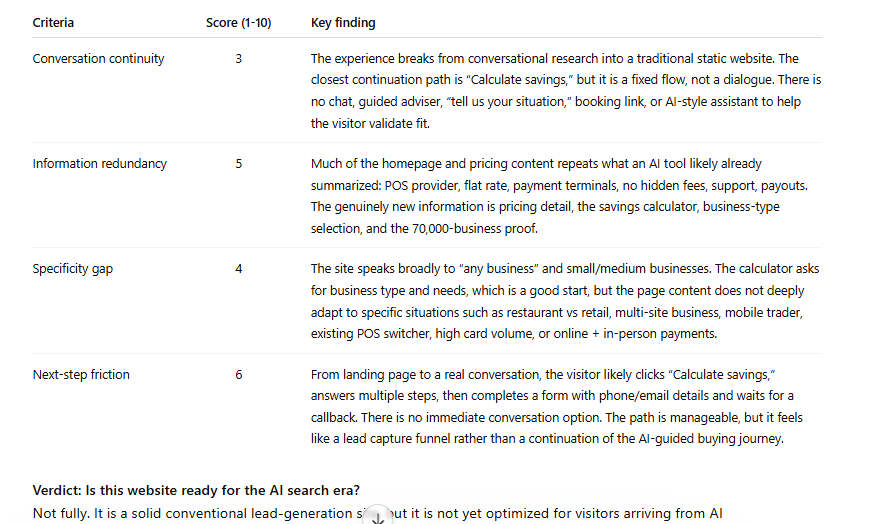
Prompt 5: The AI Search Visitor Test # AI Search Visitor Experience Audit ## Context A growing share of visitors now arrive from AI search tools (ChatGPT, Perplexity, Google AI Overviews, Claude). These visitors have been in a conversational research flow: asking questions, refining needs, receiving personalised guidance. They land here mid-dialogue, having just been told this website looks like a good match for their needs. ## Your task Evaluate these pages as an AI-referred visitor who was just told: "[Company] looks like a good option for your needs."
1. Conversation continuity. Can this visitor continue their dialogue, or does the experience break from conversation to static content? What engagement options exist? 2. Information redundancy. How much of this repeats what the AI tool likely already told them? What is genuinely new here? 3. Specificity gap. The visitor has a refined need. Does the site address specific use cases, or only general claims? 4. Next-step friction How many clicks stand between landing here and having a real conversation about their specific situation?
## Output format | Criteria | Score (1-10) | Key finding | |----------|:---:|-------------| | Conversation continuity | | | | Information redundancy | | | | Specificity gap | | | | Next-step friction | | | Verdict: Is this website ready for the AI search era? Single most impactful change:
What this reveals: An AI-referred visitor has been in an active dialogue. They arrive expecting to continue it. Instead they hit a static page and a form. It's like being mid-conversation with someone, then being walked to a colleague's office where that colleague hands you a clipboard. The AI will almost always point to real-time conversational engagement as the single most impactful change. Results from Flatpay analysis:
Prompt 6: The After-Hours Visitor Test # After-Hours Visitor Simulation ## Scenario It is 9 PM on a Wednesday. A potential customer lands on this website from a search. They're interested but have a specific question about the service. ## Your task
1. Is there any way for this visitor to get an answer now? 2. If they submit the form, when can they realistically expect a response? 3. What is the most likely outcome: conversion, or leaing to check a competitor? 4. What would need to change for the 9 PM visitor to become a lead?
What this reveals: Between 35 and 50 percent of high-intent traffic arrives outside business hours. The visitor at 9 PM with an urgent question, a pest control problem, an insurance query, a question about a dental procedure, is often your most motivated visitor. They're ready to act. Your website offers them a form that won't be read until tomorrow morning. By then, they've found a competitor who responded immediately. The after-hours visitor rarely shows up in your analytics as a lost lead. They show up as a lead that was never there.
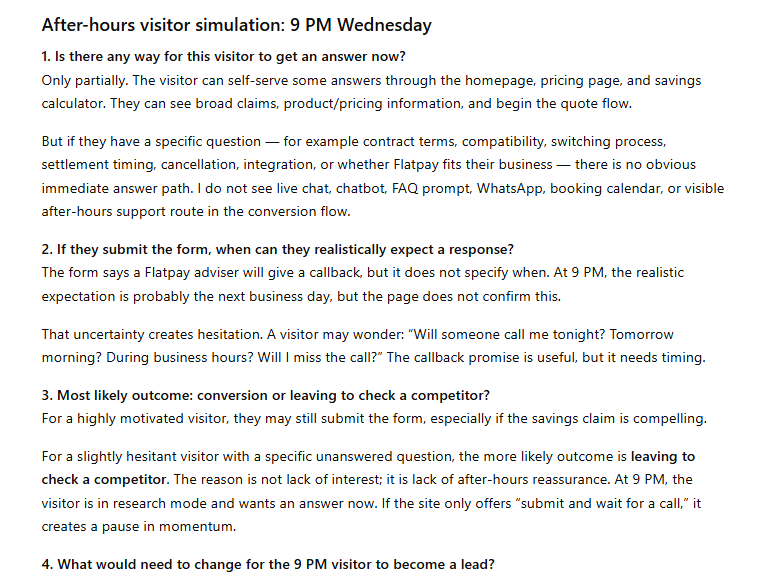
Example from Flatpay conversion analysis. Prompt 6 answer form.
Prompt 7: The Competitor Comparison # Competitive Conversion Comparison ## Context I'm now uploading screenshots from a competitor's website. ## Your task Compare their conversion path to mine across four dimensions:
1. Engagement methods — Do they offer anything we don't? (chat, callback, WhatsApp, instant quote, booking tool) 2. Trust signals — Stronger, weaker, or different in type? 3. Path simplicity — Fewer or more steps to conversion? 4. If you were a potential customer comparing both, which makes it easier to take the next step? Why?
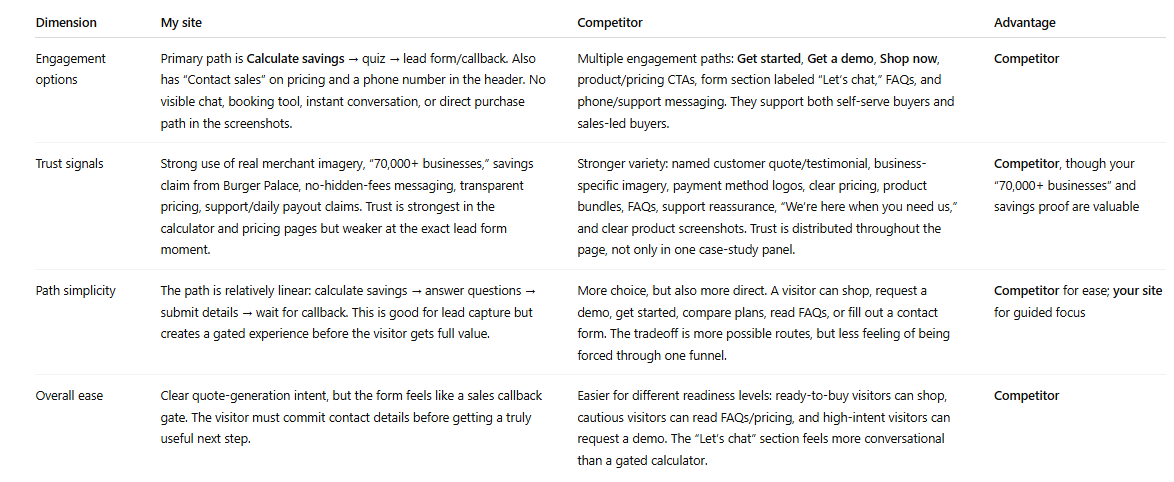
What this reveals: This is the prompt that makes abstract findings feel urgent. When the AI tells you "your competitor has live chat and a 60-second quote promise, you have a contact form," the gap stops being theory. It's a specific competitive disadvantage, described in plain language, sitting in a table. Running this against one or two competitors takes ten minutes. The output is more persuasive than any conversion audit report, because it shows exactly what a visitor experiences when they compare options, and most of the time, they are comparing options.
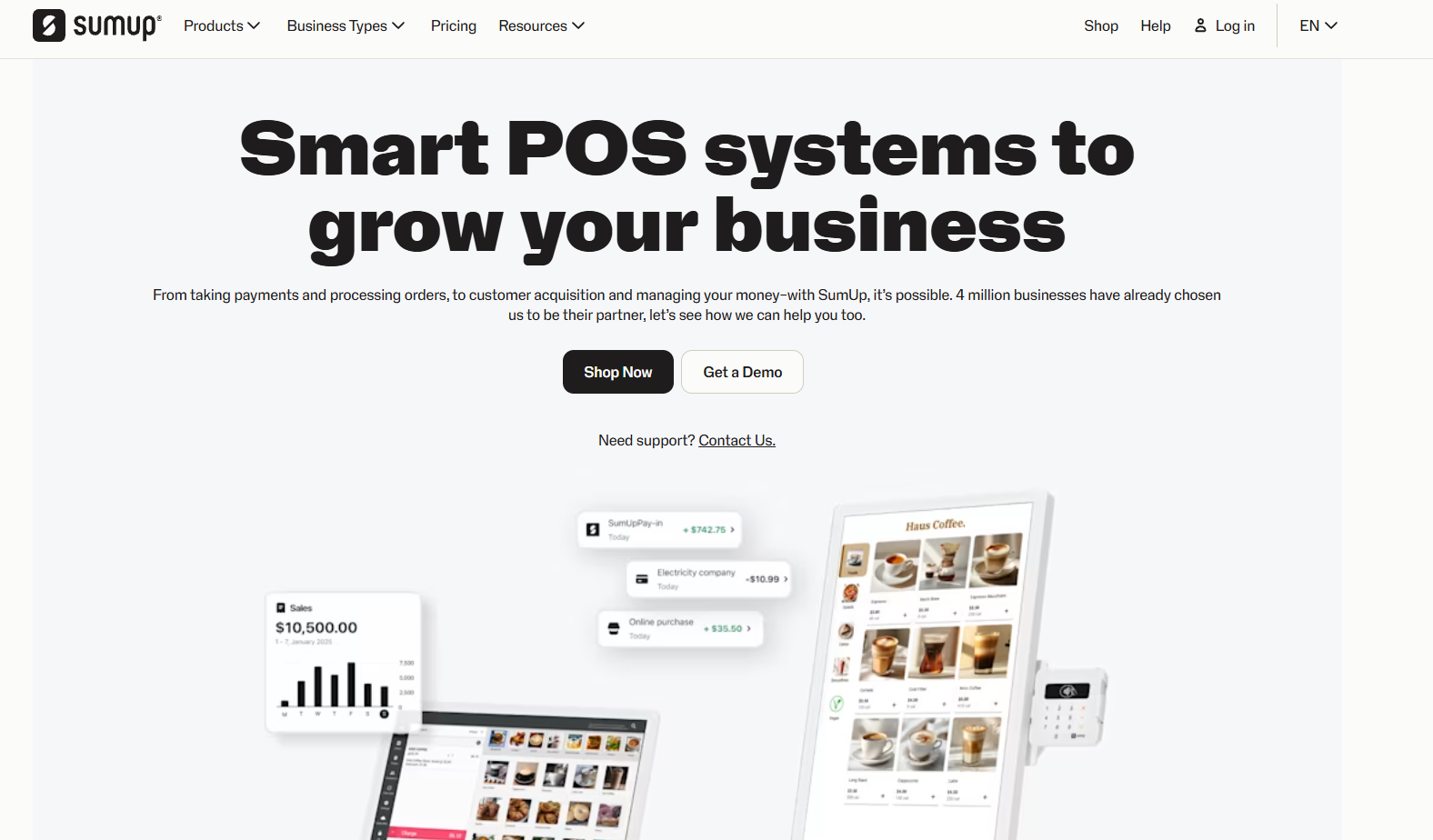
For this competitor comparison we used SumUp.
Response from ChatGPT on this prompt for comparison:
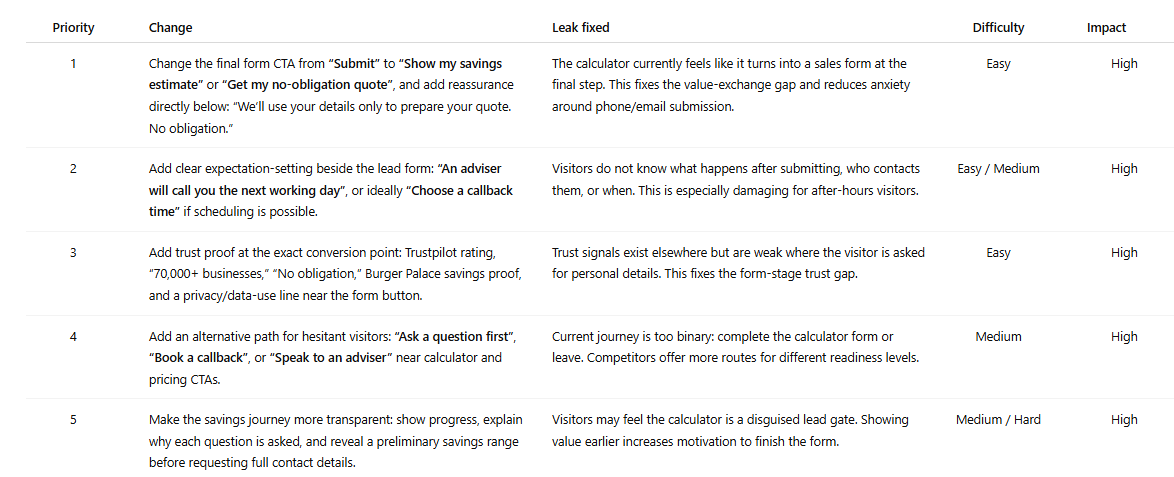
Prompt 8: The Priority Fix List # Prioritised Conversion Fix List ## Your task Based on everything analysed across all pages, give me the 5 most impactful changes to increase leads from this website.
For each recommendation:
1. The specific change 2. Which leak it fixes 3. Difficulty (easy / medium / hard) 4. Potential impact (low / medium / high)
What this reveals: This is the prompt that turns the audit into a to-do list. Flatpay priority fix list:
What to Do With Your Results
Most audits produce one of three finding patterns. Here's how to act on each.
Messaging and CTA inconsistencies. These are quick wins. Align the headline, the button text, and the implied offer across every page in the path so the visitor feels like they're moving through one coherent conversation. This costs nothing and can be done in an afternoon. It's also the change most businesses deprioritise because it doesn't feel significant enough. It is. Trust gaps on conversion pages. Add one or two trust signals directly to your contact page this week. A response-time commitment. A relevant testimonial. A count of businesses you've helped. Visitors about to submit a form need reassurance at that precise moment. Putting it on the homepage instead is like putting the "safe to drink" sign on the bottle rather than the glass. No real-time engagement option. This is the structural finding that shows up in almost every audit and sits at the top of almost every priority list. You have a few honest options: Managing chat yourself during business hours works for some businesses and isn't sustainable for most. An AI chatbot handles FAQ deflection and support reasonably well. It struggles with the nuanced, pre-purchase questions that are actually standing between a visitor and a conversion. It fails at custom lead qualification questions and collecting customer lead information. Managed live chat with human agents available around the clock, including evenings and weekends, is what Weply provides. It's the approach behind more than 250,000 qualified leads generated across our customer base in 2025. If the after-hours prompt produced an uncomfortable answer, it's worth a look.
The standard alternative is hiring a CRO agency. Budget: EUR 3,000 to 8,000. Timeline: four to six weeks. Deliverable: a PDF. The report is usually good. The process is slow, expensive, and produces findings that are already weeks old when they reach you. The process in this guide takes 30 minutes and produces an action plan from your own pages, in your own conversation thread, reviewable immediately. Run it quarterly. Run it after every redesign. Run it whenever traffic goes up and leads don't.
Try Weply for free for 7 days. Get qualifed leads, customer support and insights into the conversations that your webiste visitors have.
Read more
Articles
AI Hub
|
August 26, 2026
|
9
min
10 Best Chat Solutions for Customer Support and Lead Generation in 2026
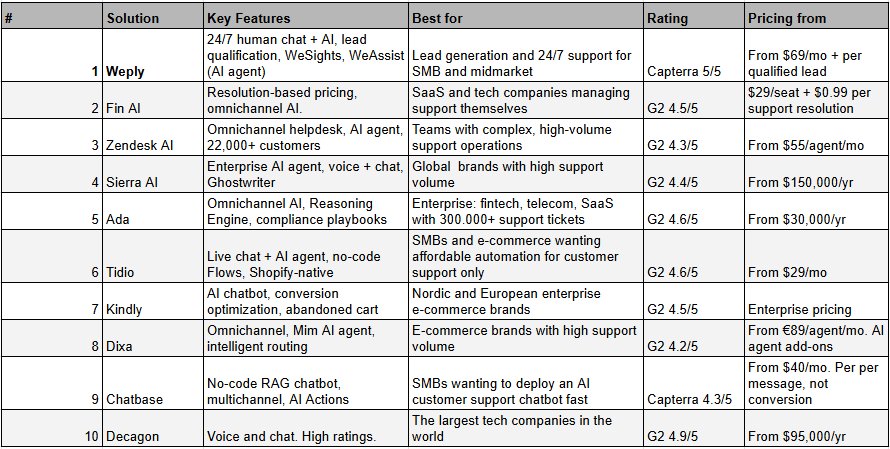
The right chat solution can turn your website traffic into paying customers and lift your customer support from reactive to proactive, or strengthen your lead generation and help grow your business. In the age of AI search having a chat solutions has become even more important. In this guide, we've reviewed the 10 best chat solutions available in 2026, including Weply, Intercom Fin, and Zendesk AI. We've looked at features, pricing, reviewsite ratings, and customer cases, so you don't have to. Here are our three top picks:
Looking for the best chat solution for your business?
Customers expect answers now. 63% of consumers prefer live chat over email or phone, and 46% of all leads are generated outside of normal business hours. With an ever-growing selection of solutions and increasing demands around GDPR compliance, data residency, and 24/7 availability, choosing the right chat solution has never been more important. The right solution helps you:
Convert anonymous visitors into named and qualified leads.
Give customers immediate help, 24/7.
Free up tiem for your team for other, more high-value interactions.
Comply with GDPR and data handling requirements within the EU.
Integrate with your existing CRM, helpdesk or e-com platform.
Why trust Weply?
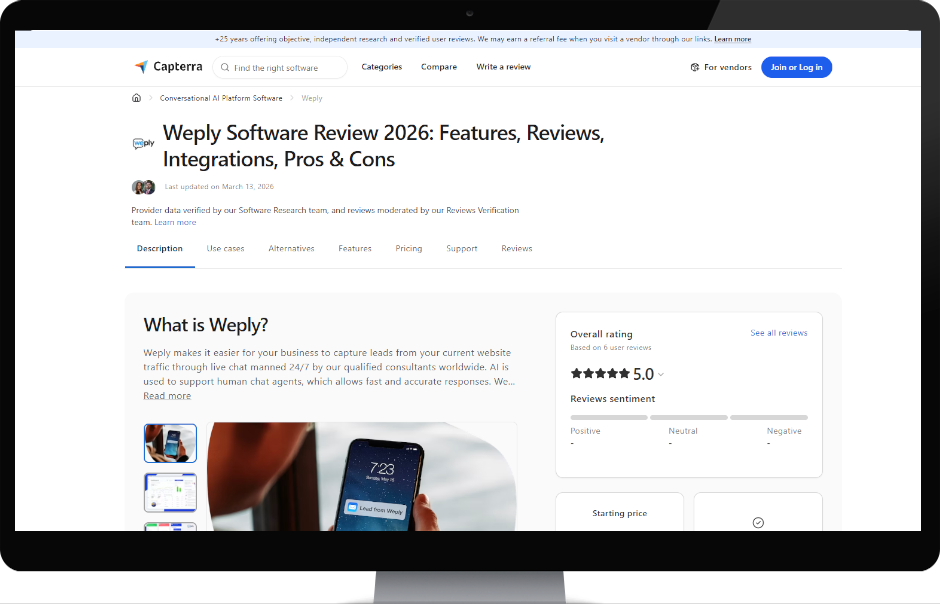
We built Weply because we saw how businesses across Europe were losing potential customers on their websites, either because they had no chat at all, it was only availbale during operating hours, or because they put an AI support chat in front of high intent traffic and think it can convert it to qualified leads. Our platform combines trained chat consultants with AI and we generated over 250,000 qualified leads for more than 2,400 customers in 2025. We know this market inside out, from SMBs to enterprise. That gives us a unique position to evaluate which chat solutions actually deliver on the European and US markets. Finding the right solution is always about understanding your own needs first. Here's how some of our customers rate us:
Now, let's take a look at the 10 best chat solutions for 2026.
Now let's dive into each solution.
1. Weply
Weply is a Nordic 24/7 live chat solution that combines trained human chat consultants, lead conversion experts, with AI technology to generate and pre-qualify leads directly on your website. Founded in 2013 and headquartered in Copenhagen, Denmark, Weply has generated over 250,000 qualified leads for more than 2,400 customers in 2025, making it the largest Nordic operator in hybrid human-AI chat. Weply recently launched WeAssist, a support AI agent that chat consultants can activate for incoming support queries. What sets Weply apart from pure AI solutions is that your customers always interact with a real human being, backed by AI. That means meaningfully higher conversion rates and fewer missed interactions compared to fully automated chatbots. All support responses are also quality-checked by a human in real time, minimising the risk of AI hallucinations and ensuring answers are delivered with human empathy and nuance.
Key Features
24/7 Human Live Chat + AI (WeAssist): Trained chat consultants are available around the clock, complemented by WeAssist AI for standard support queries. You never miss a relevant customer interaction.
Sales-qualified leads delivered to your inbox: Weply pre-qualifies visitors based on your criteria and delivers warm leads, with name, phone number, and relevant context, directly to your CRM or inbox.
AI Co-pilot for internal chat agents: some customer run internal customer support agents using Weply outside normal opening hours or if overloaded, and those agents have access to AI WeAsssist co-pilot.
WeSights our analytics platform: Gives you insight into chat volume, chat context, campaign data, and conversion patterns, so you can continuously optimise your digital marketing, web, and lead strategy.
Dedicated Customer Success Manager: Every customer gets a dedicated CSM who helps with setup, optimisation, and ongoing strategy.
GDPR-compliant and EU-hosted: Data is processed in accordance with GDPR, with servers in the EU and full compliance with the ISO and EU AI Act.
Pricing
Pricing consists of a small monthly subscription starting from $69/mo, covering up to 100 monthly support chats with the WeAssist AI agent included. Beyond that, you pay only for success, a fixed price per qualified lead Weply generates, based on your unique lead qualification criteria. Weply offers a fully free 7-day trial, where all generated leads and answered support queries are free.
Pros
Human touch for your potential and existing customers 24/7, 365 days a year. Customers always talk to a real person, not just a bot.
Experts in lead conversion. If you're already spending money and time driving potential customers to your website, Weply is the only specialist. Typically converts minimum 50–80% more chat visitors into qualified leads than AI chatbots.
WeAssist is included in the subscription price, meaning you get an AI support chatbot verified in real time by humans. At a significantly lower cost than the alternatives.
Plug-and-play setup with CRM integrations, live quickly.
GDPR, AI Act, ISO. Verified with over 2,400 paying customers across the Nordics and Europe.
You get AI where AI is strong (support, but verified by humans) and humans where they're best (qualified lead generation).
Free 7-day trial, no credit card required, no commitment.
Cons
WeSights, the unique chat analytics tool, is an add-on.
Available as chat only, not yet on voice, email, or social channels.
Not ideal for public institutions where all traffic is support-related, or for chat behind a login wall as inside a SaaS support tool.
Rating
Capterra: 5/5. Trustpilot 4.4/5. Businesses consistently highlight that Weply delivers significantly more leads and better lead quality than AI chatbots, alongside 24/7 availability, easy setup, and a very high level of customer service.
2. Intercom Fin
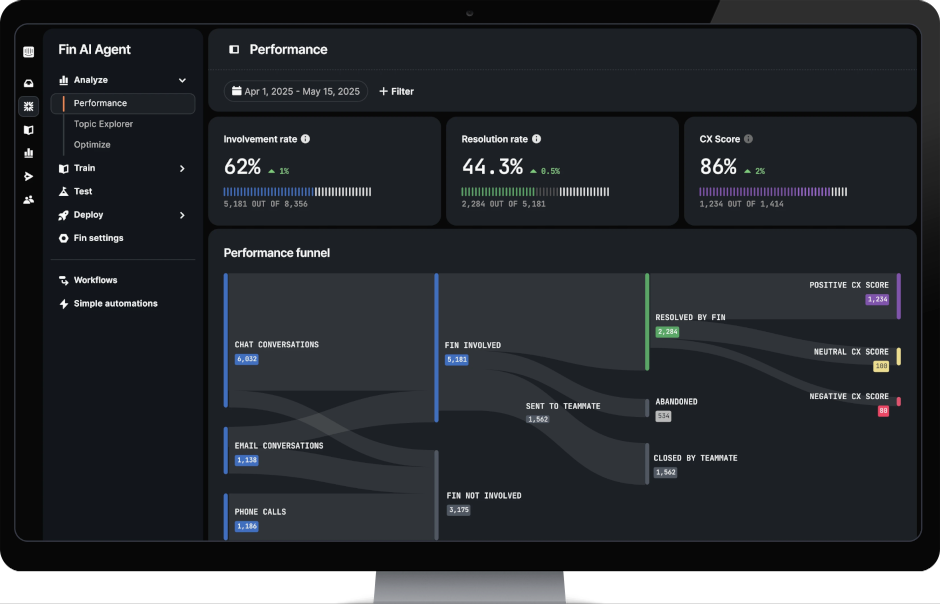
Intercom Fin is Intercom's AI agent, launched in 2023 and now one of the most widely deployed AI support platforms globally. Fin states it resolves an average of 60% of all queries automatically and supports all major channels: email, live chat, WhatsApp, Messenger, SMS, and voice.
Key Features
Outcome-based AI agent: Fin receives queries, responds using your knowledge base, and escalates to your support team when needed.
Omnichannel out-of-the-box: Fin works across email, live chat, WhatsApp, Messenger, SMS, and voice from a single platform.
Fin Copilot (agent assist): AI assistant for human agents in the inbox, generates reply suggestions, summarises case history, and retrieves knowledge in real time. $35/user/mo add-on.
AI-driven simulations and performance insights: Test Fin's performance against historical tickets before going live, and receive ongoing improvement recommendations.
Integrations: 450+ integrations including Shopify, Salesforce, Zendesk, and HubSpot.
Pricing
Fin AI Agent: $0.99 per resolution (min. 50 resolutions/mo = $49.50). Copilot is $35/user/mo as an add-on.
Example: 1,000 Fin resolutions/mo = $990 on top of seat costs. For 10 agents on the Advanced plan ($85/seat), the monthly total is approximately $1,840.
Pros
Outcome-based model is fair: you pay only for success.
Works standalone alongside Zendesk, Intercom and Salesforce.
Strong for SaaS and B2B support teams that manage their own helpdesk.
Cons
Pricing scales aggressively at high volumes: 1,000 resolutions/mo = $990 in AI costs alone.
Requires internal setup and optimisation. No dedicated CSM on lower plans.
Not suited for active lead generation, only customer support.
Fin Copilot is a paid add-on.
Some G2 reviewers report that what Intercom counts as a "resolution" doesn't always match real-world outcomes.
Rating
G2: 4.5/5. Users praise the modern interface and automation rate. Most criticism: pricing scales unpredictably, and advanced features require expensive plans.
3. Zendesk AI
Zendesk is still the world's most widely used customer service platform, with 22,000+ support teams globally and a well-established enterprise presence. Zendesk's AI capabilities including AI agents (chatbots), Copilot for human agents, and intelligent triage, are layered on top of its core omnichannel helpdesk and have been significantly expanded since 2024. Zendesk is used by teams ranging from fast-growing SaaS companies to large enterprise organisations across every industry. Zendesk's core strength is organisational scale: it handles email, live chat, voice, WhatsApp, Instagram, Facebook Messenger, X, and web forms in a single agent workspace, and routes tickets intelligently across large agent pools.
Key Features
AI agents and intelligent triage: Built-in AI agents handle common queries using your help centre content and can take basic actions.
Omnichannel unified workspace: Email, live chat, phone, WhatsApp, social media, and web forms in a single agent view. Routing ensures tickets reach the right agent based on skills, language, and current load.
Zendesk AI Copilot: Agent-side AI that suggests replies, surfaces relevant knowledge articles, and summarises long ticket threads in real time.
Knowledge base and help centre: AI-powered content suggestions for help centre articles, and a self-service portal that deflects tickets before they reach your support team.
Analytics and reporting: Pre-built dashboards and, on higher tiers, Explore for custom reports tracking response time, resolution rate, CSAT, and agent performance.
Pricing
Suite Team: $55/agent/mo (annual). Basic multichannel ticketing, help centre, AI agents with limited resolutions.
Suite Professional: $115/agent/mo (annual). Skills-based routing, community forums, HIPAA compliance, custom analytics.
Suite Enterprise: From $169/agent/mo (annual, negotiated). Custom agent roles, sandbox, advanced data protection.
Advanced AI add-on: ~$50/agent/mo extra. Required for Copilot, advanced triage, and generative AI features.
AI Agent resolutions: $1.50 per automated resolution (committed volume) or $2.00 pay-as-you-go.
For a 20-agent team on Suite Professional with Advanced AI, total annual cost approaches $40,000 before implementation.
Pros
The most established customer support platform globally. Deep integration ecosystem and proven enterprise track record.
Strong at scale: skills-based routing, SLAs, and omnichannel work well for 15+ agent teams.
Cons
Advanced AI features require a separate $50/agent/mo add-on.
Own support quality criticised consistently on G2: slow response times and link-heavy replies.
Some G2 reviewers describe being oversold during the buying process, real-world AI performance fell short of what was promised.
Per-agent pricing model means costs scale directly with headcount, with no outcome-based option on core plans. Expensive option.
Rating
G2: 4.3/5 (6,800+ reviews). Satisfaction correlates strongly with team size: large, multi-channel support teams tend to find the cost justified; smaller teams often feel they're paying for features they don't use.
4. Sierra.ai
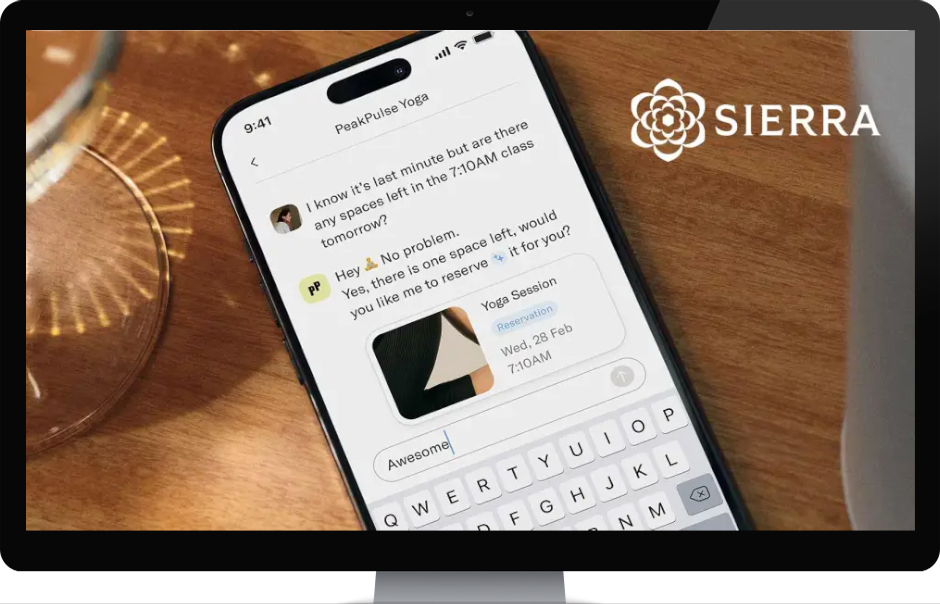
Sierra.ai is an American enterprise AI company founded in 2023 by Bret Taylor (former co-CEO of Salesforce and current chairman of OpenAI's board) and Clay Bavor. Sierra has raised $950 million to date and is one of the most discussed AI companies globally. Sierra's customers include Sonos, SiriusXM, Weight Watchers, ADT, and Casper. The platform is built for large consumer brands with high inbound support volume across chat and voice.
Key Features
Empathetic AI agents: Sierra's agents are designed to mirror your brand's voice and tone precisely, handling complex interactions like returns, subscription changes, and account management autonomously.
Agent Studio + Agent SDK: No-code workflow builder for CX teams (Agent Studio) and a developer-focused SDK for custom integrations.
Ghostwriter: Automatically generates production-ready AI agents from SOPs, call transcripts, audio recordings, and whiteboard photos. Also runs an automatic improvement loop based on live interactions.
Multi-model "Constellation" architecture: Uses multiple AI models in parallel for accuracy-checking, reducing hallucination, but can introduce latency (700ms+) in voice environments.
Voice + chat across channels: Sierra's agents support web chat, mobile apps, and voice.
Pricing
Sierra publishes no pricing and has no pricing page. All contracts are enterprise agreements. Third-party estimates:
Annual contracts from $150,000+.
Implementation and onboarding fees: $50,000–$200,000.
Outcome-based model: payment per successful resolution (rate confidential, but with minimum commitment volumes).
Pros
One of the world's leading chat and voice agents for support.
Pricing makes it exclusive to the largest enterprises. SMBs and mid-market are entirely excluded.
Long and technically complex implementation.
Support only. No real lead generation capability.
Rating
G2: 4.4/5. Users praise the intuitive interface and empathetic AI interactions. Most common criticism: high price with unclear ROI, steep learning curve during onboarding.
5. Ada
Ada is an enterprise AI customer service platform founded in Toronto in 2016 by Mike Murchison and David Hariri. Ada has raised $200M+ and serves 350+ enterprise customers including Monday.com, Pinterest, Verizon, and YETI. The platform is built for high-volume, omnichannel AI deflection in industries including financial services, e-commerce, telecommunications, and SaaS. Ada's 2026 platform centres on its "Reasoning AI" which are agents that understand intent, follow compliance-sensitive playbooks, and execute multi-step workflows across chat, email, voice, SMS, and WhatsApp from a single platform.
Key Features
Reasoning AI engine: Ada's agents understand customer intent and follow structured playbooks, including compliance-sensitive flows for regulated industries, rather than simple script logic. Claims to resolve 80%+ of inquiries automatically.
Omnichannel coverage: Chat, email, voice, SMS, WhatsApp, and social messaging managed from a single platform. Handoff integrations with Zendesk, Salesforce, Freshworks, Genesys, Dixa, Gorgias, and more.
Coaching and feedback loops: Platform managers can provide precise, surgical guidance to the AI agent through a coaching interface, and verify outcomes through test scenarios before going live.
SOP-based playbooks: Ada can follow complex, multi-step workflows, including triggering refunds, extensions, or system updates, based on standard operating procedures. Well-suited to regulated industries.
Enterprise security: SOC 2 Type II, HIPAA, GDPR, and PCI compliant. Zero Data Retention option with all LLM providers.
Pricing
Ada does not publish pricing. Estimates from third-party sources:
Starting from ~$30,000/year.
Pricing model: typically $1–$3.50 per AI resolution, based on resolved conversations.
Pros
Strong omnichannel coverage across 10+ channels from a single platform.
Coaching interface gives platform managers strong control over AI behaviour.
Cons
Implementation timeline is measured in months.
Only for large global enterprises.
Pricing scales aggressively at high volume.
Rating
G2: 4.6/5. Platform administrators rate Ada highly for ease of use and coaching capability. Negative sentiment on Trustpilot: 1.8/5.
6. Tidio + Lyro
Tidio is a live chat and AI support platform primarily serving small businesses and e-commerce stores. Founded in Poland in 2013 and used by 300,000+ businesses globally, Tidio combines live chat, ticketing, a no-code chatbot builder and Lyro, its conversational AI agent, in a single platform. Tidio is particularly popular with Shopify merchants and SMBs that want to start with live chat and gradually layer in automation without switching tools.
Key Features
Lyro AI agent: Conversational AI that answers common customer questions based on your support content. Handles handoff to human agents when needed.
No-code Flows builder: Drag-and-drop chatbot builder for creating automated conversation paths: product recommendations, lead capture, FAQ automation, and more .
Live chat with live typing preview: Agents can see what customers are typing before they hit send, allowing faster, more prepared responses.
Multichannel inbox: Manages website chat, email, Instagram, Messenger, and WhatsApp in a single unified inbox.
Pricing
Starter: From $29/mo (annual). Includes live chat, ticketing, basic automation.
Growth: From $59/mo (annual). Includes Lyro AI conversations and advanced Flows.
Lyro AI add-on: Can be purchased separately from $39/mo for additional AI conversation quotas.
Pros
Among the most affordable live chat + AI combinations on the market for SMBs.
Conversation-based pricing is more predictable than per-seat models for smaller teams.
Very fast to set up. Live in minutes. Strong Shopify native integration.
Cons
Data processing: primarily EU-based, but some data is also transferred to the US.
Not well-suited for complex enterprise workflows, SLA management, or large multi-team operations.
Very limited lead generation capability. Can only be used for customer support.
Rating
G2: 4.6/5. Users consistently highlight ease of setup and Shopify integration. Most criticism relates to some agreesive prices increases.
7. Kindly
Kindly is a Nordic AI chatbot platform founded in Oslo in 2016 and one of Europe's leading conversational AI providers for enterprise e-commerce and customer service.
Key Features
Generative AI chatbot with multilingual training: Train the chatbot in one language and it understands queries in 100+ languages automatically. Nordic language expertise is a core competency.
Conversion optimisation and abandoned cart: Kindly's platform can increase conversion rates by up to 12% and automates abandoned cart messages.
Visual product carousel in chatbot: Enables product search and displays products directly within the chat interface based on selections made in the chatbot.
Simple customisation without coding: No code required to match the chatbot to your brand identity, tone, and layout.
Support automation: Automates up to 80% of customer inquiries according to themselves.
Pricing
Kindly does not publish pricing. All agreements are reached via direct contact. Enterprise prices.
Pros
Deep Nordic and European market presence with proven language expertise.
Unique combination of AI chatbot, conversion optimisation, and support automation in one platform.
No public pricing. Expensive and only for enterprises.
Primary focus on e-commerce. Not tailored for public sector or regulated industries.
Only for customer support. Not suited for active lead generation.
Rating
G2: 4.9/5. Users highlight easy implementation, Nordic language expertise, and high automation rates.
8. Dixa
Dixa is a Danish-founded customer experience platform aimed at e-commerce brands that want to consolidate all customer communication in one system. Dixa is used by 850–1,000+ brands across 42 countries, including Rapha, Hobbii, Mejuri, and Miinto. In 2025, Dixa launched Mim, an agentic AI agent.
Key Features
Mim AI Agent: Dixa's AI agent handles end-to-end customer interactions, including order lookup in Shopify and Magento, refunds, and self-service, with intelligent escalation to interrnal human agents.
E-commerce focused: Built exclusively for e-commerce companies, with features and integrations tailored to these specific workflows.
Omnichannel native: Phone, email, live chat, WhatsApp, Instagram, Facebook Messenger, and SMS in a single Team Hub.
Intelligent routing and Flow Builder: Drag-and-drop routing engine that assigns interactions to the right agent based on skills, language, and workload.
Shopify + Magento + WooCommerce integrations: Deep e-commerce integrations mean agents see order history directly within the conversation window.
Pricing
Growth: From €89/agent/mo. All channels included.
Ultimate: From €139/agent/mo. Adds various AI features.
Prime: From €179/agent/mo. Enterprise functionality including SSO.
Mim AI agent is an additional cost on all plans.
Pros
All channels included as standard.
Danish-founded with strong Nordic support and understanding of European data requirements.
Mim AI Agent is one of the market's most mature agentic AI solutions for e-commerce.
Cons
Built specifically for e-commerce brands. Limited or no relevance for other verticals.
Mim AI agent access costs extra on top of the base subscription.
AI copilot is also an add-on.
Rating
G2: 4.2/5. Users praise the user-friendly interface and customer support, but criticise long contracts and minimum seat requirements.
9. Chatbase
Chatbase is a no-code AI chatbot builder used by over 10,000 businesses globally. Chatbase lets you train an AI chatbot on your website, PDF documents, Notion pages, and internal knowledge sources, and deploy it on websites, Shopify, email, WhatsApp, Instagram, Facebook, and Slack. It is designed for SMBs and teams that want AI support without programming or developer resources.
Key Features
RAG-based knowledge training: Upload PDFs, link to URLs, or Notion pages. Chatbase automatically builds a knowledge foundation and uses it to answer queries accurately with source references.
Multichannel deployment: Deploy your chatbot on your website with a script tag, or connect to Shopify, WhatsApp, Instagram, Facebook Messenger, and Slack via native integrations.
AI Actions: The chatbot can take real actions via API as booking meetings in Calendly, updating subscriptions in Stripe, and so on.
Flexible AI model selection: Choose between economy LLM models (GPT-4o Mini, Claude Haiku) and premium models (Claude Sonnet) depending on quality and cost requirements.
Pricing
Prices start from $40/mo. You pay additional credits when your usage exceeds the amount included in your plan.
Note: Chatbase uses "messages" rather than "chat conversations" as its consumption metric. A single conversation can contain many messages, which can be difficult to control and therefore forecast costs. In theory one single chat can eat your entire budget.
Pros
Fastest time-to-live of any solution in this guide.
Multichannel deployment without any coding.
Flexible model selection (GPT-4o, Claude Haiku/Sonnet/Opus).
Cons
The free plan deletes the chatbot after 14 days of inactivity. Unreliable for production use.
Limited workflow logic. Not suited for complex escalation flows or multi-step automation.
Output quality depends heavily on which AI models you choose. The best models can make the solution expensive very quickly.
Priced per message, not per conversation. Many add-ons may be required.
Good for customer support. Not in the same league as Weply for active lead generation.
Data is processed in the US. Not EU compliant for most EU-based companies.
Rating
Capterra 4.3/5. Users praise easy setup and quick deployment. Most common criticism: pricing climbs quickly on higher plans and workflow capabilities are limited compared to alternatives.
10. Decagon
Decagon is an American enterprise AI customer service platform founded in 2023. Decagon has raised $481M across five rounds, reaching a $4.5B valuation in January 2026, and was named to the Forbes AI 50 list. Its customer list includes 100+ enterprise customers to date. Decagon's core concept is that AI agents should work like employees, not tools.
Key Features
Agent Operating Procedures (AOPs): Define agent workflows in natural language. A non-technical support manager can write instructions like "If a customer asks for a refund over $100, verify their purchase date and escalate to billing", and the AI follows that logic precisely, with full audit trails.
Decagon Voice 2.0: Inbound and outbound voice with sub-second latency, customisable tone and speed, interruption handling, and branded caller IDs.
Cross-channel memory: If a customer starts in chat and later calls, the voice agent already knows what was discussed. No information repeated, no disconnected experiences across channels.
Continuous self-learning: Decagon agents learn from new tickets and human replies, updating their own knowledge without manual retraining.
Enterprise security and version control: SOC 2 compliant, data residency options, strict guardrails for sensitive operations (identity verification, refunds).
Pricing
Esitamted annual platform fee: ~$50,000/year, regardless of usage volume.
Per-conversation fee: ~$0.99/conversation on top of the platform fee.
Effective starting cost: ~$95,000/year total. Median enterprise spend is estimated at ~$400,000/year at scale.
No public pricing page. All contracts are enterprise agreements with custom volume terms.
Pros
Voice 2.0 with sub-second latency and outbound capabilities is a genuine differentiator vs Sierra and Ada.
AOPs make complex workflow logic accessible to non-technical teams without sacrificing precision.
Very strong customer references for SaaS and tech enterprises globally.
Cons
Pricing makes it inaccessible for all but the largest tech enterprises.
Choosing the right chat solution for your business
The best chat solution depends on your company's size, industry, and primary purpose, whether that's lead generation, customer support, or both.
Do you need lead generation, because some of the traffic you drive to your website is genuinely purchase-ready? Then Weply is the only solution on this list that specialises in it, offering 24/7 human-led lead qualification backed by AI.
Are you a SaaS or tech company running your own helpdesk? Intercom Fin is a strong choice, with its outcome-based pricing and solid resolution rates.
Is your business an international enterprise with high support volume? Sierra.ai or Decagon are the natural candidates.
Are you an e-commerce brand wanting quick, affordable AI support? Tidio + Lyro is the best entry-level option.
Most visitors to a live chat prefer talking to a human. If you want to satisfy both potential and existing customers on that dimension, Weply is the only solution offering a hybrid between real human experts and a controlled AI agent, for both lead generation and support.
Whatever you choose, the most important thing is to start. Try Weply free for 7 days, no credit card, no commitment, and see what it means for your conversion rate and customer support this week.
FAQ: Chat Solutions for Support and Lead Generation
What is the best chat solution for lead generation?
Weply is the only chat solution in this guide specifically built for lead generation. The platform combines trained human chat consultants with AI agents and is available 24/7, including outside business hours, where 46% of all leads arise. With 2,400+ customers and 250,000+ leads generated in 2025, it's the most documented solution for active lead generation in Europe.
How much does a chat solution cost for a business in 2026?
Pricing varies significantly depending on solution type. Solutions are typically priced as a combination of a subscription and an outcome-based fee (per qualified lead or per resolved conversation). Enterprise platforms like Sierra.ai and Ada start from $30,000–$150,000+/year. SMB solutions like Weply start from $69/mo + per lead, while Tidio starts from $29/mo and Chatbase from $40/mo.
What's the difference between an AI chatbot and a live chat solution?
An AI chatbot answers questions automatically based on pre-programmed rules or AI training from your content. A live chat solution connects visitors to real team members in real time. Hybrid solutions like Weply combine both: AI handles standard queries with human experts in the loop and as the sender of every message, while human consultants take over complex conversations and real lead qualification and lead capture. The human layer ensures empathy, nuance, and accuracy in every response, as well as outperform AI on lead generation by 2x.
Which chat solution is best for e-commerce brands?
For e-commerce, Dixa and Kindly are strong choices depending on scale and geography. Dixa is built exclusively for e-commerce with all channels included as standard and a mature AI agent (Mim). Kindly offers deep European language expertise and strong conversion optimisation tools, with proven results at Elkjøp across the Nordics. For e-commerce companies selling high-value products, where lead qualification matters as much as support, Weply is commonly used as a complement.
Are AI chatbots GDPR-compliant?
Most professional chat solutions are GDPR-compliant, but data residency varies. Weply, Dixa, and Kindly store data on EU servers and are built with European data requirements in mind. Intercom, Zendesk, Chatbase, and Tidio are also GDPR-compliant, but may process data in the US under standard contractual clauses unless EU hosting is specifically selected on enterprise plans. Ada and Sierra offer EU hosting on enterprise agreements.
Can a chat solution replace my customer service team?
No, and it shouldn't. The best chat solutions free your team from repetitive, low-value queries so they can focus on complex cases and relationship-building. The hybrid model , AI for volume, humans for value, consistently produces the highest customer satisfaction scores. Weply's approach takes this further: humans remain in the loop on every AI-assisted support response, ensuring quality and empathy at every touchpoint.
Articles
AI Hub
|
September 15, 2026
|
9
min
The Real Cost of a Slow Lead Response
The Real Cost of a Slow Lead Response: What Happens Minute by Minute
Accoridng to a 2026 study the average B2B company takes 47 hours to respond to a new lead. The window where most buyers are still actively comparing options closes at five minutes. That gap is not a minor inefficiency. It is the single largest unmeasured revenue leak in European inbound lead generation, and it widens every quarter as buyer expectations harden. This article is the minute-by-minute account of what the gap costs you, and what to do about it.
What happens at each interval
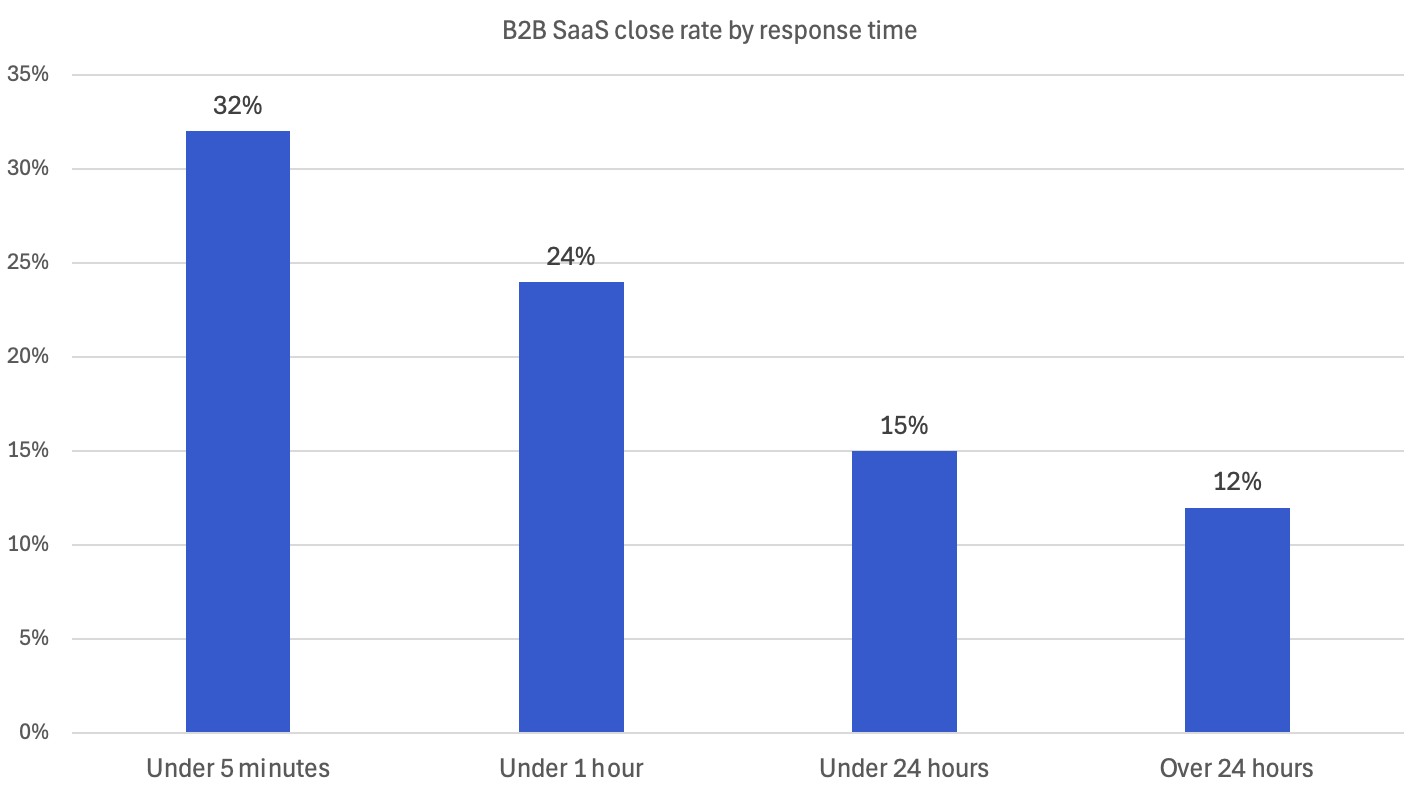
The decay curve below is built from four sources: the original Oldroyd/MIT research published in Harvard Business Review 2011, Velocify's follow-up data, Optifai's 2026 benchmark study of 939 B2B SaaS companies, and Hennessey Digital's 2025 study of 1,333 law firm websites. The exact multipliers vary by source and sales motion. The shape of the curve does not.
1 minute. Peak intent. The visitor is still on the page with three competitor tabs open. Velocify's research found a 391% conversion uplift for one-minute responses compared with delays of two minutes or more.
5 minutes. The benchmark every credible study converges on. Optifai's 2026 data, drawn from 939 B2B companies, shows a 32% close rate for leads contacted within 5 minutes, which is 2.6× higher than leads contacted after 24 hours. Looking at contact rates rather than close rates, the original Oldroyd research found firms 100× more likely to reach the lead at 5 minutes than at 30 minutes.
10 minutes. Engagement falls off a cliff. Strolid's analysis of 2.3 million automotive leads found that buyer engagement drops from roughly 80% at 5 minutes to 45% at 10 minutes (Strolid, 2024). Each additional minute of delay in the first five minutes reduces conversion probability by approximately 10%.
30 minutes. You are now 21× less likely to qualify the lead than a competitor who got there in 5. In Strolid's automotive data, just 15% of leads are still in active shopping mode at this point.
1 hour. The original Harvard Business Review finding still holds in the more recent data: firms contacting leads within an hour are 7× more likely to qualify them than those waiting one hour longer, and 60× more likely than those waiting 24+ hours.
4 hours. Most competitors have already had a conversation. The lead may still answer your call. But they are no longer comparing options. They are in a sales process you started too late.
24 hours. Optifai's data shows close rates settle around 12%. Less than half the rate of a 5-minute response. Drift's Lead Response Report found 55% of companies actually take five days or more to respond at all.
48+ hours. Salvage mode. Salesforce data shows that only 27% of leads ever get contacted at all. The remaining 73% are wasted marketing spend, sitting in a CRM that nobody takes action upon.
Why the problem is getting worse, not better
A decade of CRM tools, marketing automation, and AI-assisted sales should have closed the response gap. It hasn't. The B2B average is still 47 hours. Hatch's 2024 analysis of 132,188 home services campaigns found 88% of users take longer than 5 minutes to reply, and the most common response time was a full day.
Three things are pulling the average in the wrong direction.
Buyer expectations have flipped.80% of Millennials expect an immediate response from a company they contact. 64% of Gen Z want the same. The customer base is becoming less tolerant of delay every quarter. The infrastructure most businesses are still running was built for a tolerance window that no longer exists.
Lead volume is shifting outside business hours. AI-referred traffic, mobile inquiries, and after-hours research all push more inquiries into the 5 PM–9 AM window. A homeowner requesting three pest control quotes on a Sunday evening is not the exception. They are the median.
Multi-vendor shopping is the default. A buyer requesting a quote almost never requests just one. Insurance leads from some sources are often sold to between three and eight carriers simultaneously, with the first to respond winning the conversation. 78% of customers buy from the first business that responds. Not the best. Not the cheapest. The first.
The compound effect: rising expectations, more after-hours volume, and simultaneous-vendor shopping have created a window that closes faster than most internal processes can react. A 30-minute response in 2015 was acceptable. In 2026, it could have the same effect on your pipeline as no response at all.
The after-hours gap
This is where most of the leakage happens, and where most businesses haven't looked.
Across Weply's European chat operations, roughly half of all visitor conversations happen outside standard office hours: evenings, nights, and weekends. That is not surprising once you look at the calendar. 5 PM–9 AM weekdays plus weekends is around 64% of the week. What is surprising is how few businesses are set up to respond during that window.
The pattern is consistent across the public data. Housecall Pro found that 41% of home services jobs are booked after hours, when most teams are unavailable to respond. Neil Patel's analysis of LeadChat client data put after-hours leads at 50–60% of total volume. GreetNow's 2026 benchmark report found companies with 24/7 response capability convert at 2.5× the rate of 9-5 operations, and that after-hours leads receiving same-night response have an 85% contact rate, compared with 35% for next-morning response.
Translate the numbers into the buyer's actual experience. Someone fills in your form at 21:14 on a Tuesday. Your CRM stamps it and waits. At 09:00 Wednesday, your team sees it and responds. By then, the buyer has had twelve hours to receive replies from three competitors who do answer at night. The deal isn't lost because your product is worse. It's lost because the conversation happened without you.
The after-hours gap is the single largest unaddressed revenue leak in European inbound lead generation. It is also the easiest to measure. Pull the timestamps on every web form, chat, or call request from the last 90 days. Plot them by hour. The shape you'll see is not 9-5.
Industry response time dynamics are not the same
Not every industry decays at the same rate. The shape of the curve holds across all of them. The slope varies.
Insurance
Insurance leads are often sold to between three and eight carriers simultaneously. The first response wins the conversation. Yet only 37% of insurance reps reply within the first hour, and 24% take more than 24 hours. For an industry where the entire premium structure depends on capturing intent at the point of decision, that is a structural problem. SalesWings's analysis of insurance lead behaviour found that the golden window is the first five minutes, after which connect rates "decay as intent drops and competitors step in".
Automotive
Strolid analysed 2.3 million automotive leads across 847 dealerships between 2022 and 2024. Buyer engagement at five minutes was 80%. At ten, 45%. At thirty, 15%. Yet only 13% of dealership sales teams respond within five minutes to a web form or chat lead. Automotive is one of the clearest cases of an industry where the data is well-known and ignored.
Trades and home services
Hatch's 2024 study of 132,188 home services campaigns found 88% of responses take longer than five minutes; only 3% respond in under a minute. 41% of home services jobs are booked after hours. A homeowner whose drain backs up at 19:00 is contacting three plumbers. The one who answers first wins. This is the vertical where the decay curve is steepest and the after-hours skew is most pronounced.
Legal
Hennessey Digital's 2025 study of 1,333 US law firms found the median response time is 13 minutes, markedly faster than five years ago, but 26% of firms still don't respond at all, and only 25% respond within five minutes. Legal leads are higher-consideration than insurance or trades, but the window is still measured in minutes, not days.
A decay curve and a benchmark spreadsheet don't move budgets. Concrete numbers do. Two illustrative examples, with the maths visible below:
Example A: A Danish insurance brokerage
Inputs. 200 inbound leads per month from the website, hereof 50 pre-qualified by experts in the live chat. Average commission per converted policy: €350. Current response time: 45 minutes during business hours; next-morning for after-hours leads, which represent roughly half of total volume.
What the data says. At a sub-5-minute response, the close rate would land near 32% on the Optifai curve. At a 45-minute response, closer to 24%. That is an 8-percentage-point gap. On 200 leads per month, the brokerage is converting 48 policies instead of an achievable 64.
The maths. 16 lost policies × €350 = €5,600 per month, or €67,200 per year, on the response-time delta alone. That number ignores the 100 after-hours leads receiving no response until the next morning, where GreetNow's contact-rate gap of 85% vs 35% implies a further loss in the range of 30 to 50 policies per year.
Example B: A Dutch pest control company
Inputs. 50 leads per month, average job value €280. Current response: 4 hours during business hours, no response after-hours (roughly 45% of inbound).
What the data says. The 27 after-hours leads receiving no response have an 85% drop in contact rate by next morning. Of the 23 business-hours leads, the 4-hour response is converting roughly half what a 5-minute response would.
The maths. Best-case lost revenue across both buckets sits between €3,000 and €4,500 per month, or roughly €42,000 per year.
The exact numbers will vary by business. The shape of the loss does not.
What to do about it
Three tiers, in increasing investment. Pick the one your data justifies.
Free, this week
Audit your inbound timestamps. Pull every form submission, chat, and call request from the last 30 days. Plot them by hour and day of week. Mark the percentage that arrived outside your team's working hours. Until you have that number, every other decision is guesswork.
Set up an immediate auto-acknowledgement on every web form. A real, useful response within 60 seconds confirming receipt, setting expectations on when a human will reply, and offering an alternative channel like chat for urgent enquiries. This buys you goodwill and time.
Moderate investment
Live chat with human agents during business hours. The data on chat is consistent: one reply in a chat increases conversion probability by 50%, and a second reply doubles it. After-hours, a human agent also does the smart lead qualification; name, contact, intent, urgency, and captures the lead in the conversation rather than letting it sit in an inbox and informs the lead when they can expect to be contacted.
Full coverage
24/7 human-staffed chat with AI support. This is what Weply does for European businesses. Not an AI support bot answering alone. A human-supervised conversational layer with lead conversion experts that handles the conversions 24/7, 365 days a year. Why waste all those marketing initiatives and money in generating traffic with buying intent, when no expert is there to pick it up? Because that is what you do, when you neglect putting conversion experts on your website.
Frequently Asked Questions
What is a good lead response time?Under 5 minutes for any qualified inbound lead with active intent: quote requests, demo bookings, contact form submissions. Top-performing teams hit under 60 seconds. The industry average across B2B is 47 hours, which means even a 1-hour response puts you ahead of the field. The right target for your business depends on the competitive intensity of your vertical.
Is the 5-minute rule actually based on real data?Yes, with caveats. The original research is Dr. James Oldroyd's 2007 study using InsideSales.com data, published in Harvard Business Review in 2011. It analysed 2,241 US companies and roughly 100,000 leads, looking at phone-based outbound responses. The shape of the curve has been replicated in every subsequent study; the precise multipliers vary by motion (chat vs phone vs SMS) and industry. Modern benchmarks like Optifai 2026 and Hennessey 2025 confirm the directional finding.
What if my business doesn't operate after hours? Roughly half of European inbound lead volume arrives outside standard office hours. The question isn't whether your business operates at night. It's whether your competitor's response system does. The economics rarely justify staffing a full sales team after hours, but they almost always justify some form of automated qualification with human handoff and expectation setting in real-time with the high-intent visitor.
How quickly should I respond to after-hours leads? If you can respond same-night, within a few hours, even via outsourced qualification, your contact rate will be roughly 85%, compared with 35% if you wait until the next morning. The cost of a "respond in the morning" policy is roughly half of every after-hours lead lost to a faster competitor.
Does response time matter more for B2C or B2B? Both, differently. B2C buyers have higher decay velocity and shorter consideration cycles. B2B leads have more tolerance for delay measured in minutes, but the deal value is usually higher, so the cost per lost lead is greater. 72% of B2B buyers say a vendor's response time is the most important attribute of a winning vendor.
The bottom line
Two sales teams with identical leads, identical products, and identical prices will produce wildly different revenue results based solely on response speed. The data on this has been consistent for fifteen years and continues to consolidate as buyer expectations harden.
The businesses that win are the ones that first and foremost capture and qualify the leads as the enter the website and that measure the after-hours skew in their own inbound data, calculate the cost of the response delta honestly, and decide what level of coverage the maths supports.
The numbers have been here for a decade. The question is whether you act on them before the competitor next door does.
Articles
AI Hub
|
August 26, 2026
|
9
min
Your analytics data doesn’t lie, but it doesn’t tell the whole story
You know where your visitors come from. You know which pages they visit. But do you know what they actually want, and why they don’t convert? That’s the difference between traffic data and intent data. And that difference is decisive.
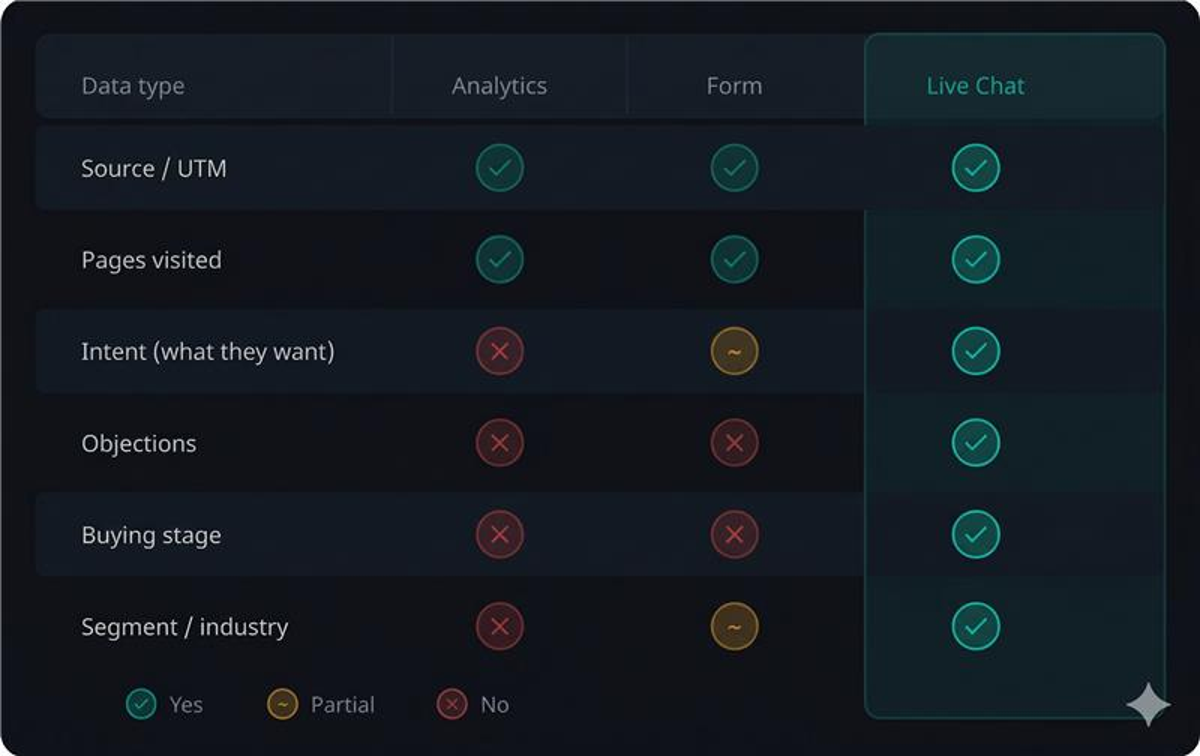
Analytics gives you behaviour, not motive
Google Analytics, GA4 and Hotjar are effective tools for measuring what happens on your website. A visitor arrived from a Google Ads campaign, landed on the product page, scrolled 60% and left after 45 seconds.
But why did they leave? Were they not ready to buy? Did they need a specific answer? Couldn’t they find the price? Was it simply the wrong product?
You don’t know, unless you asked them.
That’s exactly what a staffed live chat does. Not like a form that collects contact details, but as a conversation that reveals where in the buying process the visitor is, and what’s actually stopping them from taking the next step. As many as 44% of online customers say the most important thing a website can offer is the ability to get questions answered in real time by a real person.
Intent data: what it is and why it’s worth more than page views
Intent data is information about what a potential customer is actually trying to accomplish. It’s not just which keyword they used - it’s what they asked about, what concern they expressed, and which decision they’re trying to make.
97% of B2B marketers believe intent data gives their company a competitive position. 98% say it is crucial to their marketing and sales work. (Inbox Insight) Yet most SMEs still collect almost exclusively behavioural data, not intent data.
Concretely: a visitor who chats and asks “What does it cost to install solar panels on a 200 sqm house?” tells you three things immediately:
They are in an active buying process (not just researching)
Price is their primary decision parameter
They have a specific object in mind - not a general curiosity
No page view in GA4 can give you that information. It requires a conversation.
Even non-converting chats are business data
Here’s the underestimated insight: a visitor who chats without converting is not a failed visit - it’s a data collection opportunity.
Compare what you know about these two visitors:
Visitor A: Came from a Meta ad, visited three pages, left. You know source and behaviour.
Visitor B: Came from a Meta ad, chatted and asked about financing, did not convert. You know source, behaviour, intent, objection and buying stage.
Visitor B gives you the basis to:
Adjust the ad creative - if financing is a common question, it should be visible in the ad
Optimise the landing page - add a section on financing options
Train the sales team - financing is a recurring objection, not an exception
Companies using intent data report 82% faster lead conversion and 90% increased lead volume. Aggregated across hundreds of conversations per month, you get a qualitative market insight that no heatmap analysis or A/B test can match.
Combine intent with attribution and you have a competitive edge
UTM parameters and forms can tell you where a lead came from. But the combination of source + intent is what truly drives smart marketing decisions.
Imagine being able to answer:
Which channels drive visitors asking about price (high purchase intent) versus visitors asking how it works (early research stage)?
Which campaign drives the most qualified interest, not just clicks?
Which geographic market has the least friction in the buying process based on conversation content?
Companies with data-driven marketing are six times more likely to be profitable year over year compared to competitors who lack it. That’s information your competitor doesn’t have, unless they work the same way.
Why staffed live chat delivers better intent data than pureAI chat
A chatbot can answer common questions. But 70% of consumers prefer human agents over AI technology for complex queries. This matters especially in industries like solar panels, heat pumps, construction, or B2B services where the purchase decision is significant, the investment is high and the questions are complex.
A trained human chat operator does three things automatically:
Identifies buying stage based on how the question is asked, not just what is asked
Handles objections in real time and captures what is actually blocking conversion
Qualifies leads actively, not passively, and documents relevant information
The results show in the numbers: visitors who chat with a human agent are 2.8 times more likely to convert. Companies report an average 20% increase in conversion rate after introducing live chat on their websites. (Invesp) And every conversation, regardless of outcome, contributes to a deeper understanding of your market and your customers.
A concrete example: the heat pump company that optimised ads using chat data
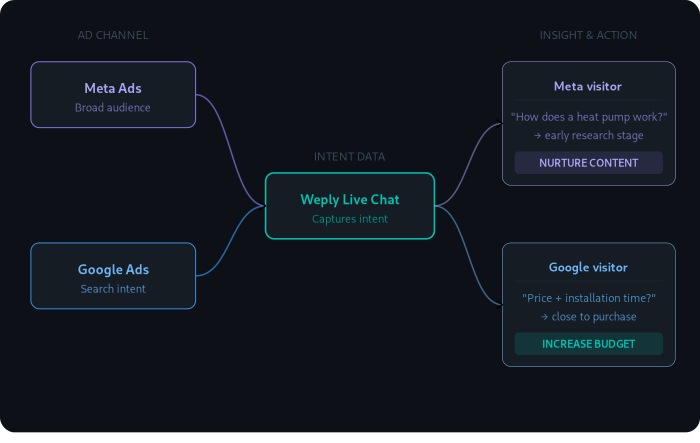
Imagine a company selling heat pumps running parallel campaigns on Google and Meta. GA4 shows that both channels deliver similar traffic volumes and roughly the same number of form submissions.
But the chat data tells a different story:
Google visitors frequently ask about specific models and installation timelines - they are close to a decision
Meta visitors ask how different types of heat pumps work and what they cost in general - they are in early research
With that insight, the marketer can allocate more budget to Google (high intent), adapt Meta ads towards informational content rather than sales messaging, and set up a nurture sequence for Meta leads. All based on data that would never have emerged from GA4 or forms alone.
Conclusion: don’t just measure traffic - understand it
Most marketing managers have a good grasp of where their traffic comes from. Fewer know why it doesn’t convert better.
Intent data fills that gap. It’s the difference between optimising on clicks and optimising on understanding, and that’s where the real conversion improvements are found. 55% of marketers who have started using intent data report increased lead conversion as a direct result.
A staffed live chat solution is not just a conversion tool. It is a marketing tool that gives you insights you cannot buy from anyone else’s platform.
Thank you! Your submission has been received!
Oops! Something went wrong while submitting the form.
|
February 6, 2026
|
9
min
How to analyze website traffic
If you have a website, it's important to have some form of analytics in place to track how your website is performing and how visitors are interacting with it.
So, whether you are just starting out with a new website or you are looking to upgrade your current analytics setup, this post will give you some valuable insights and help you make an informed decision.
Google Analytics helps you analyze website traffic
Google Analytics is one of the most common tools for analyzing website traffic.
Analytics gives you answers to where your visitors come from, how they navigate and what pages they are on when they leave your website.
Through Google Analytics you can produce reports focusing on the following:
Audience
Behaviour
Real-time
Acquisition
Conversions
Audience
In Google Analytics, you can find out detailed information about your users: statistics in terms of number of users per month, visit duration and how many pages they visit on average, to give a few examples.
Behaviour
Looking at behaviour in Google Analytics you can see how users navigate on your website, which pages they visit and which Call-To-Actions they follow.
Use the data when you plan to build more pages on your website. Then you'll gain insights into which structure works best for your users.
Acquisition
Here you have the opportunity to see how traffic is moving on your website in real time.
Like target audiences, you can see what pages they visit, where they are geographically and what device they use to visit.
If you drive a lot of traffic to your website, it can be beneficial to break down the information about your visitors in real time from time to time, so as not to miss out on valuable details or patterns.
Conversions
Acquisition gives you insights into which channels are generating the most traffic to your website.
Examples include social media, newsletters and podcasts.
The tool can give you many insights when it comes to optimizing your strategy to increase traffic.
Perhaps you should increase your advertising budget, post more newsletters or spend less resources on social media.
You can adjust your marketing activities according to what generates the most results based on your target audience.
Real-time
Conversions gives you insights into how your website is performing against your set goals.
This could be anything from sales to visitors, or the number of downloads of a whitepaper.
The tool is useful when you want to follow up on a campaign, post or CTA for example. The data can give you indications on how to improve.
Did a particular campaign generate a lot of sales? Then you should probably continue on that track.
Did your last guide not result in as many downloads as you predicted? Then you should revise the headline, the subject line or your CTA to increase the chances of conversion.
This feature is probably the most important, as the data can make a direct difference to the sales of your business.
Simple tracking through Tag Manager
Tag Manager is a complementary tool to Google Analytics that makes it easy for you to track specific goals and optimize as needed.
Tag Manager helps you track relevant activity on your website by configuring tags.
The aim is to easily track activity on your website, without the hassle of coding.
Tracking can be used in different ways, such as tracking the number of downloads of a document, the number of clicks on a CTA and purchases.
Understand website performance in Search Console
Search Console analyses how well your website is performing from an SEO perspective.
Unlike Analytics, which analyses what happens on your website, Search Console analyses how search engines perceive your website.
The tool reacts to different types of changes and alerts you through notifications.
Here are some examples:
The tool reacts to indexing problems
You receive updates on how well your website is performing in the search results
Information about external links
Technical aspects that should be addressed
Analyze organic performance through Google Business Profile
The Google Business Profile tool allows you to define your presence in Google search results and your visibility in Google maps.
Here it is important to update the information that the page displays. For example, if you change your address, phone number or opening hours.
Your information on the website should sync with what you communicate through your Google Business Profile account.
Analyze your users' needs through live chat
Using live chat for traffic analysis can be a useful way to understand the behavior and needs of visitors to your website.
Here are a few ways you can use live chat for traffic analysis:
Track the number of chat sessions initiated: This can give you an idea of the overall level of engagement on your website
Monitor the length of chat sessions: Longer chat sessions may indicate that visitors are seeking more in-depth information or assistance
Analyze the questions asked in chat sessions: This can give you insight into the topics that are of most interest to your visitors and help you identify areas where you may need to provide more information or resources
Monitor chat transcripts for common issues or problems: This can help you identify any problems or challenges that your visitors are facing, and allow you to address them in a timely manner.
Overall, using live chat for traffic analysis can provide valuable insights into the needs and behavior of your website visitors, helping you improve the user experience and drive more traffic to your site.
So, why use these tools?
Analytics tools like those we've mentioned, help you better understand who your visitors are, how they navigate, and where they might go astray.
Whether you're a small business owner, a marketer, or a website owner, having access to this type of data can make a huge difference in your online success.
So if you're not already using an analytic tool for your website, now is the time to start.
Read more
|
August 20, 2026
|
9
min
Guide: How to grow your business using SEM
Want to increase brand awareness, reach out to potential customers and drive more traffic to your website?
Then SEM could be the marketing method for you. SEM helps you become visible to your target audience with tailored messages and clear CTAs.
In this guide, we'll look at the difference between SEM and SEO, how SEM works in practice and how you can set realistic goals for your campaigns.
What is SEM?
SEM (Search Engine Marketing) is a strategy to increase the number of visitors to your website. Through paid ads, you drive traffic from the search engines to your platform, without having to rank high organically.
When you create ads in Google Ads, for example, you have the opportunity to be visible at the top of the search results, when users type in keywords related to your business and content.
SEM and SEO can be combined for increased visibility, as you have the opportunity to reach out both organically and through paid marketing.
SEO helps you build long-term trust with the search engines, while SEM helps you gain traffic directly. Think of it as a long-term and a short-term strategy.
While SEM makes an immediate impact in search results, SEO can take longer to build but creates long-term value.
That's why many start-ups choose to focus on SEM first, while building up their site with SEO optimisation afterwards.
The one and only, Google Ads
The most common tool when it comes to search engine marketing is Google Ads, which is Google's advertising platform.
Google Ads allows you to buy advertising space on several different channels, including Google search results, but also, for example, on YouTube, Gmail or other websites participating in the Google AdSense advertising programme.
You, as the marketer, can choose whether to pay for clicks or views, depending on the purpose and objective of the ad.
When you buy ad space in Google search results, you will be competing with other operators who are willing to pay for visibility through similar keywords that you use.
Therefore, in some industries or niches, there may be a lot of competition for ad space, while for other industries there may be very few players advertising.
Compared to SEO, where the goal is to rank in the top five search results, you are competing against all the websites on the internet. Here too, of course, the level of competition will vary.
For some industries, the competition is very high, while in smaller, niche areas, it may be easier to reach the front page.
Now that we've been through the difference between SEM and SEO, let's move on to how SEM works in practice.
How much does SEM cost?
The advantage of applying SEM in your marketing strategy, is that you can get visibility in search results right away.
On the other hand, you need to pay for each visitor you generate through the ads. It is not possible to say an exact price as it is dynamic pricing, but you pay for each click.
A click through Google Ads can cost anything from 50 cents to hundreds of dollars, depending on how many competing operators are bidding on the same keyword.
Of course, you decide what budget you want to spend on each individual ad. In other words, you never have to worry about the money ticking away uncontrollably.
Depending on what you are willing to pay per ad, there will in most cases be a bidding process for the visibility of each relevant recipient. This happens automatically, and is ongoing for the duration of your ad's activity.
So it's not something you have to sit and actively control yourself. However, it is important that you monitor how well your ads are performing over time, so that you can make improvements.
Are your ads not performing?
If your ads are not getting any visibility or clicks, it could be due to several factors. We recommend A/B testing headlines to find out which message has the best impact.
A/B testing involves creating two different versions of ads, or using the same ad against different audiences, then analysing which one performed best and continuing on that track.
A/B testing involves creating two different versions of ads, or using the same ad against different audiences, then analysing which one performed best and continuing on that track.
You can also do this with keywords, images and CTAs (call to action). Dare to test. In many cases, small adjustments can have a big impact on results.
The important thing is that you get a good ROI (Return On Investment). Of course, you want your investment in both time and money to generate results.
How can I calculate the ROI of SEM?
ROI refers to the amount of money you generate in profit, from the investments you put into marketing activities, in this case SEM. ROI represents the profit you generated.
We provide an example of how you can calculate your ROI here:
If you pay 10,000 for an ad campaign and generate 30,000 in sales, then you calculate ROI like this: 30,000 (gross profit) - 10,000 (cost) = 20,000.
Then you take the net result/cost=ROI in %. In this case it is: 20.000/10.000=200%
ROI is used to evaluate the effectiveness of your marketing activities in the long term, but also gives you an indication of how well your ads are performing. Use ROI to monitor performance and continuously optimise your ads as needed. The ultimate goal is to make a profit.
To set a target for how high ROI you want to achieve, you can start from the customer journey. Answer the following questions:
What is the average profit per lead?
How do you create interest at an early stage of the customer journey, with a potential customer?
When does the user who clicked on the ad become a potential lead for the sales team?
Determining the ROI of your activities can be a challenge, but it is necessary to get a clearer picture of how your activities are performing.
We recommend tracking the customer journey, and seeing what percentage has moved from one step to another. This will give you insight into how well your ads are performing and whether you are reaching a relevant audience.
How do I get started with SEM?
There are a variety of tools you can use to develop, analyse and optimise your SEM. We list the most common tools available:
To reach the search engine, you create ads in Google Ads, with the aim of targeting traffic to your website or a specific product/service. Google Marketing Platform offers you several different tools and solutions for SEM.
Whether you run a start-up or own an established business, the tool can help your business grow through targeted advertising. In the platform you will find for example:
Analytics - Analytics is an advanced analytics program for your website, providing valuable insight into both traffic and behavior.
Data studio - Data Studio is a tool that helps you organize and analyze data.
Optimize 360 - Optimize 360 is a tool that allows you to test and evaluate different versions of campaigns on your website.
Search Ads 360 - Search Ads 360 is a tool that helps you analyse and improve search campaigns.
Bing Ads
Bing Ads is Microsoft's equivalent to Google Ads. Although Google is the most well-established and largest search engine, there are several other options that have many users, such as Bing.
The Bing Ads advertising service works in much the same way as Google Ads. The main difference is the users you reach through the different search engines. Thus, when choosing a tool, the target audience should play a major role.
Adobe offers a multi-tool platform, designed to provide visibility and to optimise digital marketing activities. In the platform you will find tools such as:
Demand-side Platform
Advertising Cloud Search
Advertising Cloud TV
Advertising Cloud Creative
When working with SEM, Cloud Search is the most relevant tool, as it uses artificial intelligence to optimise advertising campaigns based on the data collected. This can give you a better understanding of who and how to target your ads.
SEM is a method that increases the visibility of businesses in search engines, through paid campaigns and ads.
The method can be costly, but it can also be extremely effective and profitable for businesses that want to achieve quick results.
It is important to always monitor, analyse and calculate the ROI of your ads.
Dare to test, make small adjustments and A/B test to get one step closer to your business goals.
We hope this guide has equipped you to take your business to the next level with SEM!
Read more
|
October 27, 2025
|
9
min
Chatbot, internal live chat, or Weply?
Do you find it hard to get an overview of the different types of chats and figure out which chat service would be the best solution for you? We know this can be complicated since chat is still a very underexposed tool, which makes it hard for businesses to make the right decision. We're here to change that!
In this post we will focus on and compare three different types of chats: chatbots, internal live chats and Weply's live chat. Let's get started!
Chatbot
A chatbot is an efficient tool and is typically the solution with the lowest operating costs. A chatbot works well in situations where customers have specific and general questions. This is usually also questions that you see in a FAQ. This could be questions such as "What is the delivery time?" or "How do I return my package?". If the customer asks those types of questions the bot will usually answer within 0,1 seconds. Also, a chatbot is always available 24/7. If you are looking for a chat that can answer simple FAQ questions day and night and has the lowest operating costs, chatbot is the right type of chat for you.
In situations where potential customers want help understanding a specific context and get personal guidance, a chatbot will make the customer frustrated because of its lack of human skills. Besides that, a chat bot cannot answer questions with typos or questions that it does not know beforehand. To get correct answers from a chatbot you will need to feed the bot with huge number of datasets. This process is the reason why a chatbot is the most expensive solution when it comes to the initial investment.
Building a chatbot yourself is not easy. A recent example from Denmark showed the complexity of getting started with this. After a year of programming and two years after launching the chatbot, the chatbot is still in the test phase. In this case, it surprised them, how different people asks the same question and how sensitive the bot is.
A chatbot is the perfect match for you, if you want a chat service that can answer simple customer inquiries within 0,1 seconds. A chatbot is the solution with the lowest operating costs compared the two other chats. On other hand, this is the solution where you pay the highest start-up costs.
Internal live chat
An internal live chat is usually a solution we see in smaller businesses, where there's not enough resources to handle customer inquiries. The difference between an internal and external live chat is that the chat agents handling customer inquiries in the former are employees.
By handling chats internally you make sure that the potential customer interacts with a person who knows everything about the product or service. Chatting with an expert increases the customer experience as the chat consultant quickly understand the context and can evaluate what the customer need. As you would usually use an employee, the start-up costs are low. Despite the benefits of an internal live chat there are factors that you need to be aware of.
Even though the initial costs will not break the budget, the operating costs are high as you basically pay with your employees' salary that could have been used on their normal tasks.
An example could be a self-employed accountant who answers his inquiries himself. The accountant will probably have to interrupt his work several times a day, which quickly runs up in terms of lost working hours. This interruption is the biggest disadvantage that an internal live chat has. Although you can be guaranteed that potential customers will get great customer service by internal employees, you can risk that other business critical areas are downgraded. At the same time, inquiries in the chat may risk being left unanswered for several hours if the employee is engaged in another work task.
It can be difficult for the employee to find the right balance between handling chats and their usual working tasks. In addition, very few internal live chats are open outside of normal office hours, which means that the chat's potential is not being used properly. Our chat data shows that a chat that is online from 9 am. to 4 pm. on weekdays only receives 48% of possible customer inquiries.
An internal live chat can be a good start-up chat for smaller businesses, as the chat does not require high start-up costs or major changes in your business. It is easy to get a current employee to answer chats, and you can be sure that your potential customers can chat with someone who knows a lot about the product or service you sell. What speaks against an internal live chat is that your employee is not only a chat consultant and will therefore have to interrupt normal work tasks. This might very well lead to less efficiency. In addition, it can be difficult to get the full effect of your internal live chat if you are not able to answer chats 24/7.
Weply's live chat
Weply's live chat solution is an external manned chat. Just like an internal live chat, one of the strengths of Weply's chat is that it is manned by real human beings. Opposite of bots, real human beings has empathy which is the key for good customer service. Being able to understand a customer's needs and adjust the communication to the specific situation, will make the customer feel taken care of just as it would in a psychical store. Weply's chat consultants will basically be an extra colleague that'll be your digital receptionist in a way.
The benefits of outsourcing your live chat are many. Weply's live chat focus on answer simple questions, guide the visitor on the website and collect leads. Generating leads means that the chat consultants will ask for contact information on those who show interest for buying. The leads, as well as the entire chat dialogue, will be forwarded directly to you, so you easily can give them a call and turn them into buying customers. Receiving these leads will decrease the time spend on handling customer inquiries and especially the time spend on the initial interactions which are typically very time consuming.
Humans will, just like chatbots, sometimes misunderstand customer's request. The difference is, however, that humans will observe the misunderstanding right away and will be able to turn the conversation back around. Weply's chat consultants is also trained in controlling a dialogue, how to ask questions, and meta-communication. Also, it's a big plus that Weply's chat consultants handle the chat around the clock. Our customers will be guaranteed that all customer inquiries coming in via their chat will get handled and they will not miss out on any potential customers.
Compared to an internal live chat where the employees usually leave the office around 5 PM, Weply's chat consultants are based around the world in different time zones which makes it possible for us to provide 24/7 service. Looking at the average response time, our chat consultants do answer a little bit slower than a chatbot, but it comes down to seconds. Weply's chat consultants answer chat within 4 seconds, which is much faster than an internal live chats' response time. In internal live chats you can wait up to several hours in worst case.
If we compare the costs related to Weply's live chat to the two other chats, this is the most favorable. The start-up costs are almost non existing as it doesn't require a bigger investment nor time spend on implementing the tool. In all cases new customers will get offered a free trial period on 7 days. The operating costs related to Weply's live chat is usually higher than a chatbots' but lower than an internal live chats' costs.
Choosing your chat solution is not an easy task. First things first, you need to figure ou what your exact needs are and think about what your customers would prefer you to have. We hope you've made up your mind, and are ready to find your actual chat provider. If you're interested in comparing Weply to some of the biggest providers on the market, you can find them here.
Read more
|
August 20, 2026
|
9
min
Guide: How to create a digital marketing strategy
Got your digital marketing up and running but not getting results?
Want to increase brand awareness, pull in more leads and build customer relationships, but don't know where to start?
In this guide, we'll walk you through how to create a digital marketing plan that will help you and your business get better results.
Why do you need a digital marketing strategy?
Digital marketing includes all communication of services and products that takes place through digital channels. Digital platforms such as search engines, email and social media can be effective channel choices for brands that want to reach out effectively and efficiently to existing and potential customers.
There are several advantages to investing in digital marketing, including:
Increased website traffic
More customers
Deeper relationships
Increased trust
Increased brand awareness
Analysis of results and optimisation
Does this sound interesting? Great.
We'll go through the most relevant marketing activities available in the market today and give you tips on how to implement them into your company's digital marketing strategy.
But before we jump into the fun, you should analyze how your digital activities are performing today.
Content Audit
Content Audit is an analysis of your existing content, which is published on your website today. The review will help you gather relevant data and metrics for each URL you include in your Content Audit, with the aim of gaining visibility and understanding of which content is most relevant for future production.
Which categories are performing best and actually contributing to your business goals?
In most cases, there are three main goals that underpin the production of your website:
Main goal: Lead generation or sales
Sub-goal: Improved Google ranking with SEO
Sub-goal: Engagement in external channels
In order to get data, you will need access to Google Analytics, Google Search Console and a system to analyse backlink data such as Ranktrail or Semrush. When collecting your data, we recommend using a spreadsheet program such as Google Sheets that is easy to share with your team.
The next step will be to collect all the URLs to be included in your Content Audit.
For example, do you want to analyse your products or your knowledge base?
Determine the scope according to your needs and collect the content in your spreadsheet.
You should also categorize the links by objective, what type of content it is, where in the customer journey the content is relevant, when it was produced, and who the primary audience is.
When compiling your data, you should focus on the following 10 key metrics:
Visitors: how many of your visitors are organic?
Visitor trends: what is the visitor trend this year compared to last?
Bounce rate: how many return to the search engine after clicking through to the page?
Pages: how many pages are displayed on average during a visit?
Session duration: how long do visitors stay on your site?
Conversions: how many leads/completed purchases?
Number of keywords: how many and which keywords does your website rank for?
Impressions: how many impressions did the URL generate?
Clicks: how many clicks has the website generated?
CTR: how many people have seen the URLs and chosen to click through to your website?
The results generated by the given metrics will give you valuable information about how well your website is performing and what content is driving traffic.
You will also be able to infer visitor behaviour, and gain an understanding of whether your content is leading them where you want them to go. Take these insights into the design of your future marketing activities.
Paid, owned and earned channels
Digital marketing includes paid, owned and earned channels. In many cases, brands apply all three in their strategy. So what's the difference?
Owned channels refer to the media over which you are the distributor, which you own and control on your own. For example, your website or your Instagram account. You create and control all the content, without paying for it.
In paid channels, on the other hand, you pay for your visibility, which can be through Google Ads, a banner or a partnership. Someone else owns the channel, and you need to pay for your visibility.
Earned channels refer to channels that you don't own, but that mention your brand or product for free. These are channels you can't directly influence, you are mentioned because your products or services are earned. This could be through a blog, digital magazine or Instagram stories.
Digital marketing activities
Blog
Actively working on a brand-building blog is an important part of many companies' digital marketing strategy. Blog posts keep your website alive and relevant, as visitors can expect new content on an ongoing basis.
It's also a great opportunity for you to sell products and services in a needs-based, genuine and creative way.
Don't forget to keep your readers in focus, they're the ones you should be creating value for whether you're reviewing a new product, sharing a new recipe or explaining a feature.
You can reinforce these through CTAs. If you want readers to click through to a product, contact you or register, you can easily lead them on with the click of a button.
Make sure your CTA is relevant and linked to the content, as you want to create a natural transition from one page to another.
We recommend creating a content plan for the coming months ahead as well as a publishing plan, including what to publish, when and by whom.
Without a clear schedule and continuity in your creation, it's easy for production to either get forgotten or get repetitive. You should also have a clear purpose and objective for your content.
Digital ads
Being able to analyse results and measure behaviour is one of the biggest benefits of digital marketing. It helps you understand if your activities are working or going in the wrong direction. There are countless options for digital advertising today.
For example, you can sponsor your posts on Instagram, create platform-specific ads on Facebook and LinkedIn, or increase your visibility in the search engines through Google Ads. All of these tools allow you to target your campaigns and see at the ad level what performs best.
In real time, you can analyse the results while your campaigns are running and optimise them if necessary. Digital advertising helps you reach your target audience accurately, in their everyday lives.
Gated content means you offer free content - in exchange for information. This could be a webinar, guide or whitepaper available on your website. Users are given the opportunity to download the content - in exchange for providing their contact details.
The purpose of gated content is to capture potential leads. If the user is interested in your content and is also willing to give up their details, they are likely to be a potential customer.
Once you have the data, you have every opportunity to send out tailored offers, promotions and newsletters via email.
Gated content also gives you valuable information about your visitors, which can help you shape your content going forward.
SEO
The aim of SEO, or search engine optimisation, is to increase your visibility in search results.
The more relevant keywords and headings you use, the higher and more frequently you will rank in search results - resulting in more users finding their way to your particular website.
But for this to happen, it's all about creating content the right way, which you can read more about here. SEO also includes features like load time, navigation and mobile responsiveness.
To make your website as relevant and attractive as possible to the search engines, it's important to create the best user experience possible. Want to know more about how you can work with SEO? Read our guide for more tips here.
Giveaways/Contests
Everyone appreciates getting something "for free". Whether it's a discount code, coupon or offer. By working with giveaways, you have the opportunity to engage your users.
We recommend performing the activities on the channels you want to grow or drive traffic to, your social media platforms or website.
The most important thing is that you have a clear purpose for your contest - besides delighting the lucky winner, of course. Participants have nothing to lose, except a few minutes of their time. But what's in it for your brand?
As well as engagement and improved relationships, you have the opportunity to increase your number of followers, increase your brand awareness and pull in more potential leads.
Taking Instagram as an example, a contest there can generate more followers, more likes, more shares, more tags - you set the rules.
For example, you could raffle off a gift card on the channel, which you promote in a post. To participate, you set a few rules, which advantageously revolve around activities around the post and your account.
It's very simple, but in many cases effective.
Webinars
Webinars allow you to create digital events that engage recipients during live webinars. Tools such as polls and chats motivate recipients to engage in dialogue, anonymously if they wish.
Recipients have the chance to ask questions and make their voices heard, while you have the opportunity to sell your brand and lead them to the next step.
You also get valuable information even before the event starts, as users need to register with their contact details. Webinars are a strategy that both builds relationships, increases brand awareness and converts leads. Depending on your industry, the method can be used in different ways.
If you're in the pharmaceutical industry, you can convey information about medications and new research to potential prospects.
If you work in beauty, you can create a light-hearted event where you demonstrate your products on each other and let the recipients decide which products they want to see and get tips on.
You also have the option to save your webinars as gated content on the website. So if someone misses out, they can register their details to be able to watch it at a later date. Read more about how to set up an account here.
Podcasts
Podcasts have become one of the most widely used formats in a short space of time, with 51% of all internet users listening to podcast radio, so it's no wonder that more and more brands are seeing the potential of the medium.
Podcasts give you the opportunity to reach a new audience, strengthen ties with your current customers and build the foundation for your editorial marketing.
Audio clips can be posted on social media and content can be rewritten as articles or interviews. It's a small investment that can have a big impact.
The advantage of the format is that it's so easy to absorb and use no matter where you are or what time of day it is. Podcasts that are catching on today focus on clear formats and well-produced content.
So before you start, you need a clear plan of what your podcast will be about, who will be on it and how you will break down the topics of conversation, week by week.
E-mail marketing
Email marketing is about communicating with leads who have shown interest in a product or service your brand offers. The aim is to create trust, loyalty and build your brand. Email marketing can include promotions, offers, news and information about your business.
The aim is to create value for the customer and that the content is relevant to the recipient. The advantage of email marketing is that you can personalise the content of your mailings, capturing the customer in the buying journey and thus increasing sales.
Read more about the creating an e-mail strategy here.
So, are you ready to get started?
To succeed in your marketing today, you need to have a clear strategy and be active on the channels your target audience is on.
Digital marketing not only helps you increase brand awareness, create engagement and build relationships, it also increases your sales.
We hope our guide has given you a clearer insight into some of the activities that are relevant today and how you can use them in your strategy.
Read more
|
August 20, 2026
|
9
min
Contact Forms: 7 Pitfalls To Avoid
Forms are everywhere. You probably got a few on your site right now: A subscription form, contact form, login form, or a signup form.
Contact forms are a huge part of the web and are a great tool for increasing conversions. However, there is one big problem with a contact form.
More often than not, there’s just too much friction and it’ll scare visitors away.
You want to make your contact form as frictionless as possible. So, on that note, we’ve assembled 7 pitfalls to avoid when creating a contact form that’ll increase the contact form conversion rate.
Pitfall #1. Asking for Too Much
A common mistake is to ask for too much information in your contact form.
Research shows that the number of fields matter when looking at conversion rate. A company reduced their contact form from 11 to 4 fields, gaining a 120% conversion increase from 5.4% to 11.9%.
Another study done by HubSpot analyzing 40,000 contact forms found that reducing a form from four fields to three nearly doubled the conversion rate!
So, think about what are the most important pieces of information you need to know about your potential customers? And don't ask more than necessary. You'll scare them away.
Some websites make certain fields optional, giving visitors the choice whether to fill them in or not. This is not a good idea, though.
Many will not even notice it’s optional, so they’ll abandon your site because they think they need to fill out all of them.
The key to gathering leads is not to collect as much information about them as possible. It’s about making the contact process as simple as possible. So, make your form short and to the point.
Give your form a conversational tone to make it clear that there’s a human on the other side. Write the form's copy as if you were having a conversation with the visitor. Use simple, everyday language.
Let’s take an example:
“The field is required”
or
“Oops, you’re missing this field”
See the difference?
You can also make your form human by placing an image of the people they are submitting their request to. Maybe it’s a specific sales representative or your customer service team?
The more human you make your contact form, the more likely you are to increase your engagement rate.
Pitfall #3. Response Time Not Clearly Defined
Waiting for something while not knowing how long you will wait can be an extremely frustrating experience. So, make it clear when you get back to the visitor.
Including a response time in a contact form shows that you respect and value the time of your visitors. A few hours? 24 hours?
It demonstrates that you are committed to providing a good customer experience and it helps to build trust with users. Remember to include other ways to contact you, especially if your response time is long.
Tip!
To provide the fastest response time possible you may want to consider which e-mail your contact form inquiries are sent to. People who’ve just submitted your contact form are in a decision-making mindset, so maybe send them straight to a sales representative?
Pitfall #4. Unfit for Mobile Devices
It should be standard procedure today, but sometimes it gets overlooked.
We also see the increasing usage of mobile devices vs desktop in our own data. In 2022, 61% of all chat inquiries are sent from a mobile, compared to only 25% in 2017.
If your contact form is not responsive, it will ruin the mobile experience and labels, or fields might get lost. Look at the example below. Not good, right?
Pitfall #5. Poor Design and Layout
If your contact form looks like it’s straight out of the 90s, it’s time to get creative!
Design plays a crucial role in the functionality and user experience of a contact form.
You want your contact form to be visually appealing and match your overall brand guidelines. You can make your form blend in by adjusting colors and fonts to match your brand.
A well-designed contact form is easy to understand and navigate, with clear labels and instructions for each field. You can even provide examples in each form field.
Where should your contact form be placed on the page? Left, or right?
A company changed location from left to right side and increased their conversion with 24.6%.
So, try to split test your design and layout and find what works best for you.
Pitfall #6. No Clear Call-to-Action
A user might fill out the contact form and not send it because they’re not encouraged to do so. Avoid this pitfall by making sure that your call-to-action is clear and prominent.
Visitors who fill out your contact form are ready to buy, so you must do anything you can to make them convert into leads.
Use action-oriented language to nudge the users to send the form. Research show that a CTA saying, “Click here” and “Go” convert 30% and 25% better than the default “Submit”.
However, “Download” and “Register” convert 15% and 10% worse.
Tip!
If you have any doubts about the effectiveness of your CTA, then A/B test it against another one. Set up a new version of your landing page with a different CTA and then send traffic to both versions.
Pitfall #7. Not Giving Confirmation
“Did it go through?”. Is not what you want your users to think! A big mistake to make is to not make it clear that the user’s message has been received.
A confirmation message acknowledges to the user that their message is being processed.
This can provide reassurance and a sense of comfort to the user that their message has not been lost or forgotten. Saying “Thank you” is a simple but effective way to provide a better user experience.
If a user is not sure if the form has been submitted successfully, they may try to submit it again, which can lead to multiple, duplicate submission. A confirmation message can eliminate this confusion and improve the overall user experience.
Also, take this opportunity to direct users to another relevant page on the website after the contact attempt was made successfully. This will increase engagement as you’re inviting them to continue to stay on your website.
Wrapping Up
The more friction you can eliminate from the user experience, the higher you’ll be able to push your conversion rate.
Creating a contact form for your website can seem like a simple task, but it's important to consider all the potential pitfalls to ensure that it is user-friendly and effective.
By avoiding these 7 mistakes outlined above, you can create a contact form that is easy to use and that effectively connects visitors with your business.
Read more
|
August 20, 2026
|
9
min
10 tips to creating e-mails that convert
Email marketing is known to be one of the most effective digital media channels - but what should you consider when producing your mailings? Here are 10 tips from Weply for creating emails that convert.
1. Headlines that capture interest
Say it early and clearly. It takes less than three seconds for your subscribers to decide whether or not they want to open your email.
Today's consumers are overwhelmed with information, making them more selective and discerning about which messages they want to spend their time and energy taking in. So make the decision easy for the recipient - right from the subject line.
Write a short, interesting and concise headline that gives a hint of what they will find in the email. Remember to prioritise the order of words, with the most important word coming first.
For example, if you want to promote a promotion, this should be the first word in the headline, "Offer exclusively for you". This is so that recipients will immediately get an idea of what the email contains.
Also consider the type of device the recipients open their email in. The available space offered by the apps or devices determines how much content the recipients will get already in the inbox.
Remember to prioritize the order of the words so that the most important word comes first!
For example, if you want to promote a campaign, it should be the first word in the headline: “Offer exclusively for you.” This instinctively gives the reader an idea of what the email contains.
Also, consider what type of device the recipients are using to open their email. The available space in apps or on devices determines how much content recipients will already see in their inbox.
2. Preview text matters
Using preview text in your email marketing campaigns gives subscribers greater clarity on what your email is about and about what it's aiming for.
The space gives you the opportunity to motivate and inspire readers to engage with more content (by clicking through to the email).
I think we're all convinced that the faster you can create engagement - the better!
Benefits of preview
Inbox exposure. Highlight your offer and increase open rates.
Complement your headline. As the headline should be interesting through a few words (maximum 150 characters), you have the opportunity to expand on the content through your preview, which is placed directly after the headline. For example, what is your campaign about, what products are new and what recommendations do you have?
CTA. To motivate action, you can tell readers what to do at an early stage. Use action verbs like read, buy and open already in the headline or preview.
3. Optimize for mobile
Let's face it, mobile adaptation matters in all aspects of digital communication. Which is because consumers spend all day on their phones.
If you haven't already adapted your layout for mobile emails, this should be at the top of your to-do list. Consumers read the majority of their emails on smartphones, which means your newsletters need to be designed to fit these devices.
Examples, headlines and previews need to be shortened. Any images, videos and CTA buttons should be adapted to smartphone formats. Being mobile-friendly will help you get your message across and improve your open rates, we promise.
4. A/B-testing
One way to find out what type of headline and preview text will work best for your target audience to click through is to conduct A/B tests.
Definition!
An A/B test also known as a split test, is a test of, for example, two variants of the same campaign to find out which one works best.
By splitting your list of email addresses into two or three equal parts - with each part having a variation of, for example, subject line, image selection and different order of content in the email, you can get a better insight into what motivates your particular target audience.
Should the campaign of the month be mentioned in the subject line or should it be presented later in the email?
Should there be a clear CTA in the subject line along the lines of "Limited time discount code!" or should it be sneaked into the section where you present products?
Dare to test yourself and analyse the outcome.
5. Frequency
Depending on your industry and recipients, the frequency of your mailings may vary. Once a month is suitable for some, while others do smaller mailings weekly or even daily.
The key is to create a sustainable strategy that can be sustained over time and that does not cause subscribers to unsubscribe.
Are you able to communicate several times a month, but unsure how your target audience will react to frequent mailings? Then you can try your hand at monitoring the response.
Review the open rate in the month you send out multiple emails, and compare it to a month where you only sent out one. Do the statistics differ?
The most important thing is that the mails generate
added value for the recipients
are well though out
tailored
and relevant.
6. Dare to be personal
Many people ask: how can email marketing be one of the most effective communication strategies today?
The great advantage of email marketing is that recipients subscribe to newsletters because they are genuinely interested in the content.
They want to get to know the brand better, learn about news, personal offers and get inspired.
It's important that you keep the recipient in focus when creating your e-mails, and that you actively try to create a deeper relationship with them.
Let them get to know you, and invite them to become part of your world. Language is incredibly important in relationship-building marketing.
Dare to be casual, personal and to address readers with personal pronouns. This will create a sense of community and recipients will feel that they are part of your brand.
7. Storytelling
Every brand needs its own story, and it needs to be a good one. Storytelling is about telling the story of your brand in an engaging and entertaining way.
This is an important part of your communication, in order to build long-term relationships.
Just as you work on storytelling on your website and social media, you need to get that part into your newsletter as well. Both to create consistent communication, but also to use the format for precisely relationship-building communication.
You can work with storytelling in different ways in your newsletters.
It could be as simple as having a box dedicated to sharing information about your particular company and what your service/products can do for customers.
You can also have headlines, where you share information about specific topics or products, which recipients can follow up on week after week.
Do you have a personal sender today, who writes the intro to each newsletter? Let that person create a dialogue with followers that they look forward to following up on week after week.
The most important thing about storytelling is that the focus is on the value you can add for customers, not on how good you are or how well you perform.
8. Compelling call-to-action
In order not to miss out on potential customers, you need to get the recipient to take action when they view your content. You can do this through clear CTAs (Call to Action).
An effective CTA could be offering the recipient a discount code when they visit your website, to attend an upcoming lecture for free or to read more about a topic on your blog page.
9. Pros and cons of images
Images and graphics can inspire, engage and evoke emotion in your email marketing. In fact, we're over six times more likely to remember information if we see images when we receive it.
That said, make sure images don't take up too much space and impact your load time. Images that are too large can make your email difficult to read and, in the worst case, can be marked as spam. So, be sure to adjust the size of the file to match the body text.
How to choose the right images:
Quality over quantity. Use high-quality images and avoid blurry or pixelated ones.
Invest in a photo shoot. Personal photos give a clearer picture of you and your brand. It gives you the opportunity to create credible, consistent and professional communications. Stock photos are all well and good, but most are already worn out by the competition, right?
Link. Increase click-through rates by linking in your images too. For example, if you want to motivate readers to click through to a specific product in your newsletter, make it easy for them by linking in your CTA in the text, as well as in the image.
Avoid large files. Just like with your web page. if you want to avoid long loading times, be careful with the image format.
10. Check links
It may sound obvious, but, it's so easy for an email to go off to thousands of recipients the second you realize that the product that the entire content is circulating around - is missing a link.
This small mistake can result in a huge loss of clicks and therefore sales. This basic element is built in to increase revenue and facilitate the buying journey for readers.
So, make sure it will!
So, why do email marketing?
Email marketing allows you to reach out to a relevant audience in a genuine way. The platform makes it easy for you to send out personalized messages, tailored to recipients, history and preferences.
If you want more information on how email marketing works in practice and how to get started with your account, read our guide here.

![How to Find Your Website's Lead Conversion Leaks with ChatGPT [including 8 prompts to use]](https://cdn.prod.website-files.com/687998866aa498f98160dbb6/6a86366654f54f6e36601151_your-website-leaking-leads.png)